


Everything You Need to Know About WhatsApp Calling in Zoko
Learn everything you need to know about WhatsApp Calling.
.png)
Share on WhatsApp
.png)


WhatsApp Calling enables your team to make and receive voice calls with customers directly from Zoko. Instead of switching between multiple apps, agents can handle calls and chats from one place, making it easier to provide faster support and deliver a better customer experience.
Whether you're resolving a complex support issue, following up with a lead, or assisting a customer in real time, WhatsApp Calling helps your team communicate more efficiently without leaving Zoko.
Key Features
WhatsApp Calling includes the following capabilities:
- Inbound and outbound calling: Receive incoming calls from customers and make business-initiated outbound calls directly from Zoko.
- Mid-call controls: Place customers on hold (with on-hold audio) or mute your microphone during a call.
- Chat while on a call: Continue messaging customers without ending the ongoing call.
- Multiple active calls: View and manage multiple ongoing calls from a single place.
- Automation support: Use Zoko Rules to automate actions based on incoming, outgoing, or missed calls.
Things to Know
Before using WhatsApp Calling, keep the following requirements and limitations in mind:
- Customer permission is required: Businesses can only make outbound calls to customers who have granted permission to receive business-initiated calls.
- Messaging limit requirement: Your WhatsApp Business Account must have a daily messaging limit of at least 2,000 to use WhatsApp Calling.
- One active call per customer: Only one live call can be active for a customer at a time. If another agent attempts to call the same customer while a call is already in progress, the second call will be rejected.
- Availability: WhatsApp Calling is only available in countries where Meta supports the feature.
Pricing
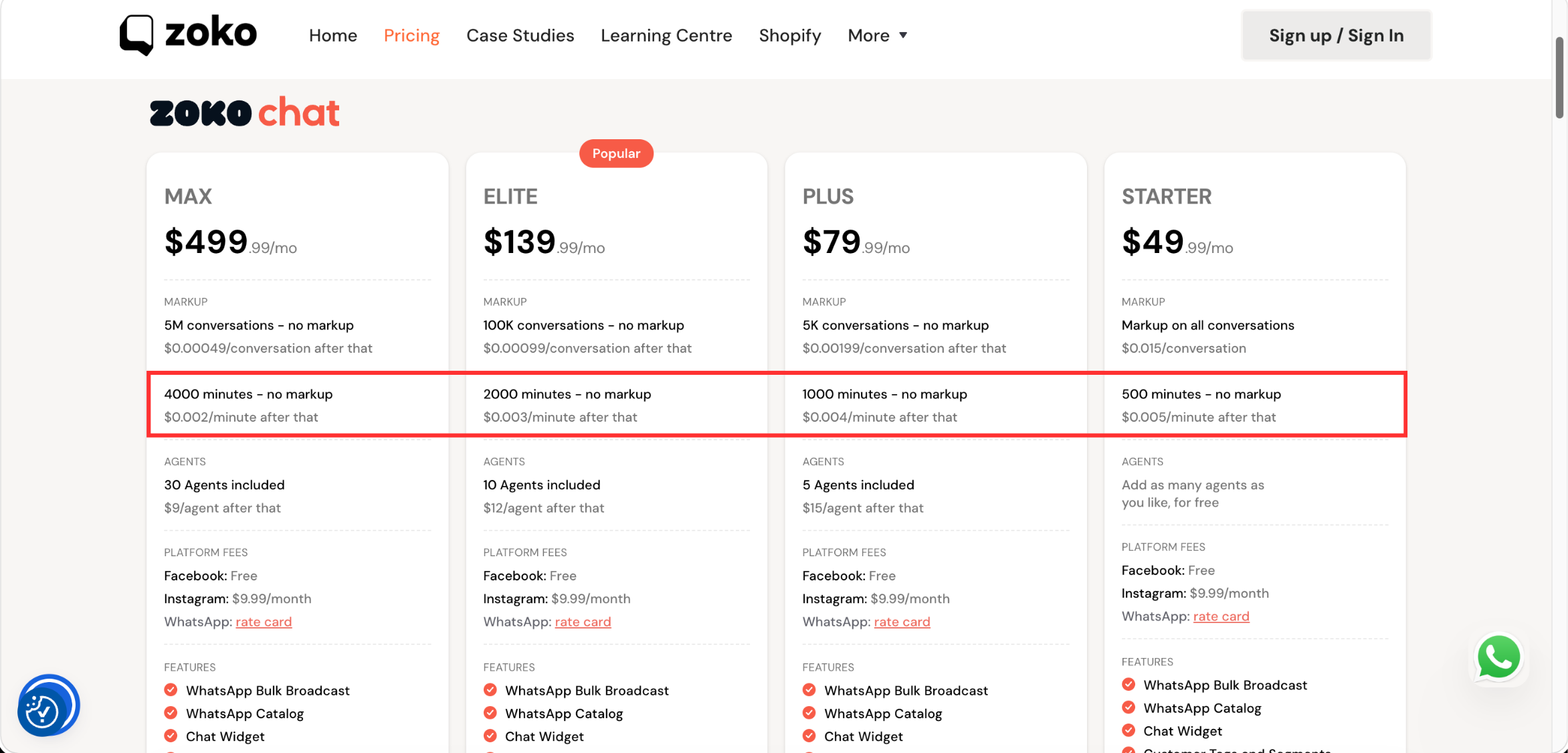
WhatsApp Calling is included with all Zoko subscription plans. Each plan comes with a monthly allocation of call minutes with no markup. Once you exceed the included minutes, a per-minute markup is charged based on your subscription plan. In addition, Meta's calling charges apply separately and are billed according to Meta's rate card.
For the latest USD calling rates, download the USD Rate Card. To view calling rates for other countries, refer to Meta's official rate card.
To learn more about WhatsApp Calling pricing, billing, and how charges are calculated, refer to the WhatsApp Calling Pricing.
Next Steps
To start using this feature, learn how to set up WhatsApp Calling and configure your calling preferences before making or receiving calls in Zoko.
Keywords: WhatsApp voice calls, Inbound WhatsApp calls, Outbound WhatsApp calls, WhatsApp Calling pricing, WhatsApp Calling requirements, WhatsApp Calling limits
