


What Is a BSUID? WhatsApp's New Privacy Setting Explained
.png)
Share on WhatsApp
.png)


As part of a new privacy initiative, WhatsApp has introduced the Business-Scoped User ID (BSUID) and will stop providing customer phone numbers to brands by default. Instead of seeing a phone number, your brand will see a BSUID, a unique identifier that WhatsApp assigns to that customer, just for your business. The customer's real phone number stays hidden until they explicitly choose to share it with you.
The good news up front: you can still message and broadcast to these customers exactly as before. The BSUID replaces the phone number as the address you send to. Nothing about your ability to reach customers changes, only what identifies them.
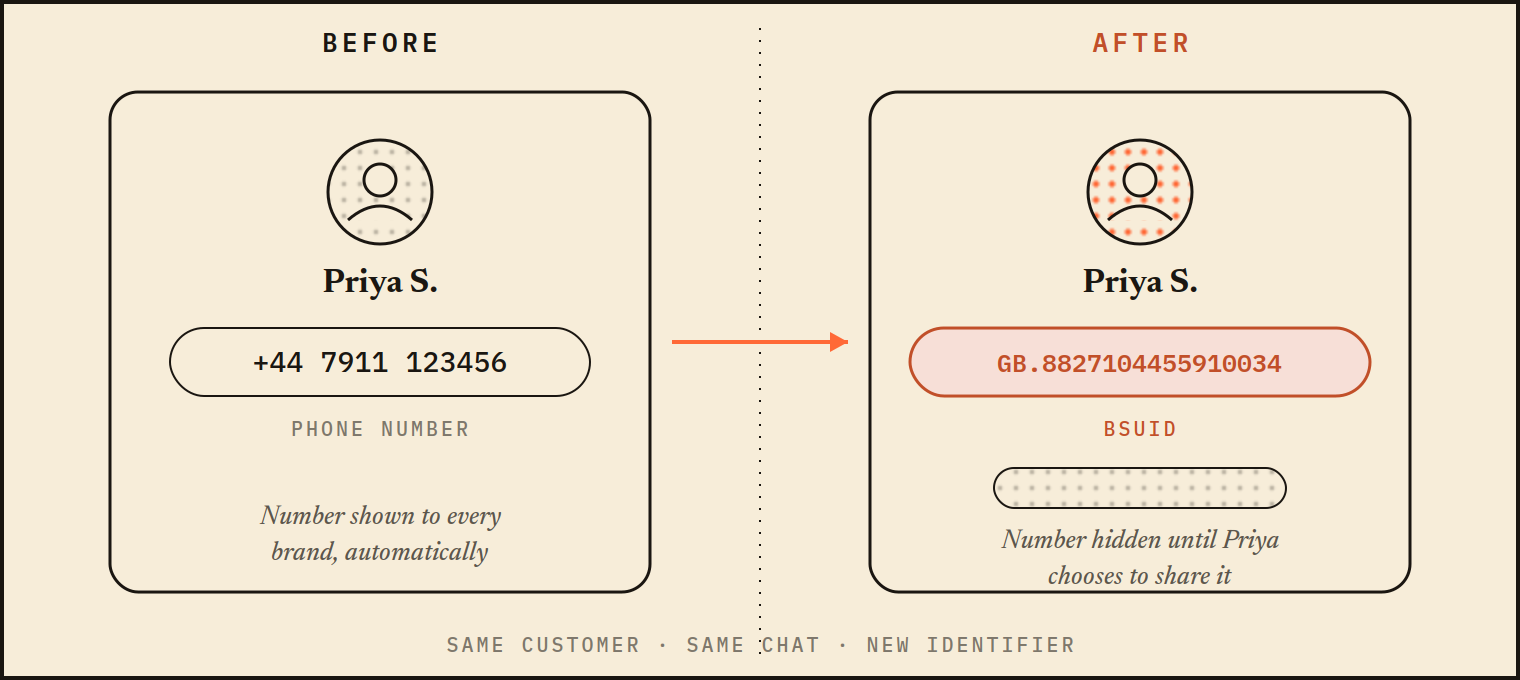
Fig. 1. What your team sees in the contact panel, before and after the change.
Why WhatsApp made this change
A phone number is deeply personal. It follows you across apps, accounts, and databases, and once a business has it, you can't take it back. With this change, WhatsApp is giving users control: they can chat with a business without revealing their number, and share it later only if they choose to.
Supporting BSUIDs is mandatory for every business on the WhatsApp Business Platform. You can't control which of your customers show up without a phone number, so your systems (and your messaging platform) need to handle BSUIDs.
What a BSUID is
A BSUID is a unique, stable identifier that Meta automatically generates for each customer and business pair. Think of it as WhatsApp's way of saying "this is the same person you've talked to before" without revealing who they are.
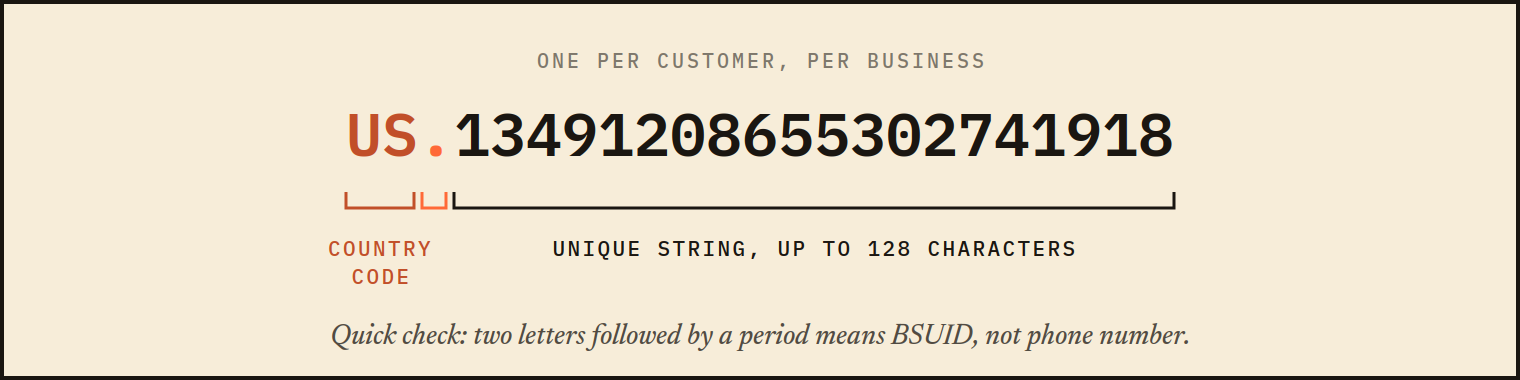
Fig. 2. Anatomy of a BSUID: country code, period, unique string. Store it exactly as received, in full.
Key properties:
- It's scoped to your business. The same customer has a different BSUID with every business they talk to. Your BSUID for a customer works only within your business portfolio, so it can't be used (or leaked) anywhere else. That's the privacy guarantee.
- It's stable. The BSUID stays the same across conversations, so you can recognise returning customers, keep chat history together, and run repeat campaigns. It only changes if the user changes their phone number, in which case WhatsApp notifies your platform with the old and new IDs so records stay linked.
What still works with just a BSUID
Almost everything:
- Two-way conversations. Customers message you, you reply, exactly as before.
- Outbound messages and broadcasts. You can send template messages and marketing broadcasts directly to a BSUID, the same way you'd send to a phone number.
- Customer recognition. Because the BSUID is persistent, your chat history, tags, and customer profile all stay attached to the same person.
The one exception: authentication templates (one-tap, zero-tap, and copy-code OTP messages) still require a real phone number. If you send login codes over WhatsApp, you'll need the customer's number for those flows.
Also worth knowing: if you already have a customer's phone number from checkout, a form, or past conversations, nothing changes. You can keep messaging that number as before. This change only affects customers whose number you don't yet have.
How to get a customer's phone number
Sometimes you genuinely need the number, whether for order verification, matching a customer to their account, or OTP flows. WhatsApp has built an official, consent-based way to ask for it, directly in the chat.
You simply send the customer a message with a Request contact info button. On their side, they see a prompt with a standard Share contact info button. One tap, and their phone number is shared with your business.
Once the customer taps the button, their phone number is delivered to your business and saved to their profile, so future messages, exports, and integrations all have the number attached.
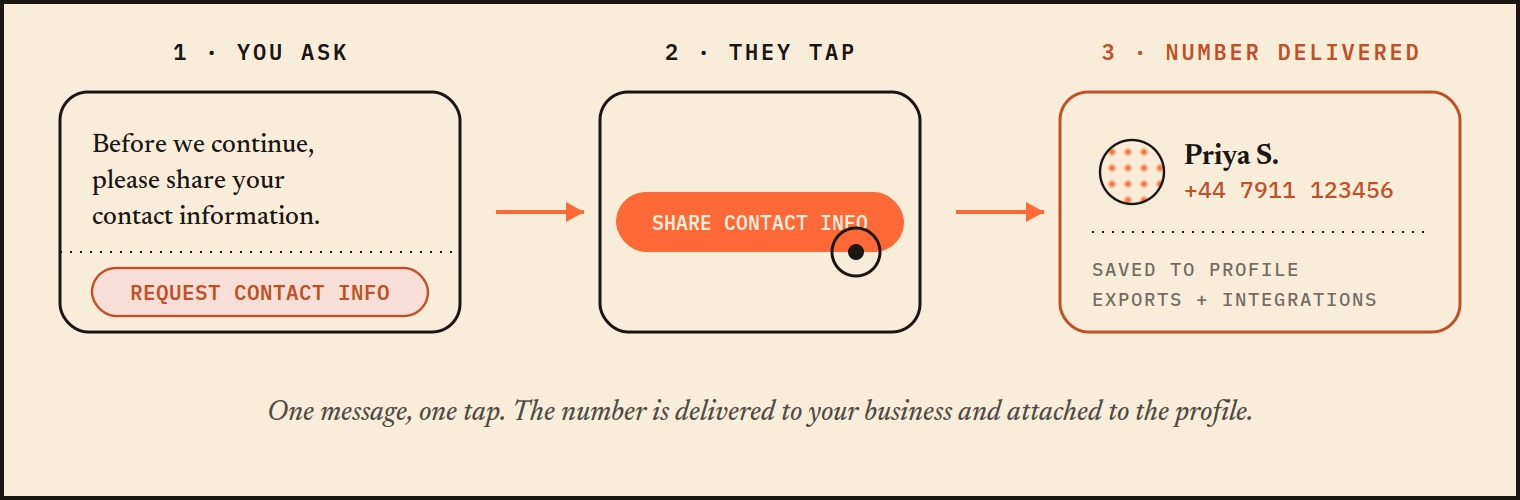
Fig. 3. The consent flow, in one tap. If the customer declines, the conversation simply continues on the BSUID.
A few best practices when asking:
- Ask only when you need it. If the conversation works fine on BSUID alone, let it. Customers chose privacy for a reason.
- Say why. "To verify your order" or "so our delivery partner can reach you" converts far better than a bare request.
- Ask once. If they decline, continue the conversation on BSUID. You lose nothing by respecting the choice.
What this means for your brand
In practice, very little changes day to day. Some chats will show a BSUID where a phone number used to be. You can still reply, broadcast, automate, and build relationships with those customers. And when you genuinely need the number, there's a clean, one-tap way to ask.
The brands that handle this well will treat it as what it is: WhatsApp raising the bar on customer trust. Respect the hidden number, ask for it only with a clear reason, and your WhatsApp channel keeps working, with customers who trust it more.
Keywords: BSUID, Message settings, Phone number, WhatsApp ID
