


The Messaging Funnel Explained
Understand how each flow performs by tracking message delivery, customer engagement, and the orders and revenue it generates.

Share on WhatsApp


Flow Message Analytics gives you a clear picture of how your WhatsApp messages perform. It helps you track delivery, understand how customers engage with your messages, and measure the orders and revenue generated by your flows.
You can access these insights from the Message Analytics tab within a published flow.
Understanding the Performance Overview
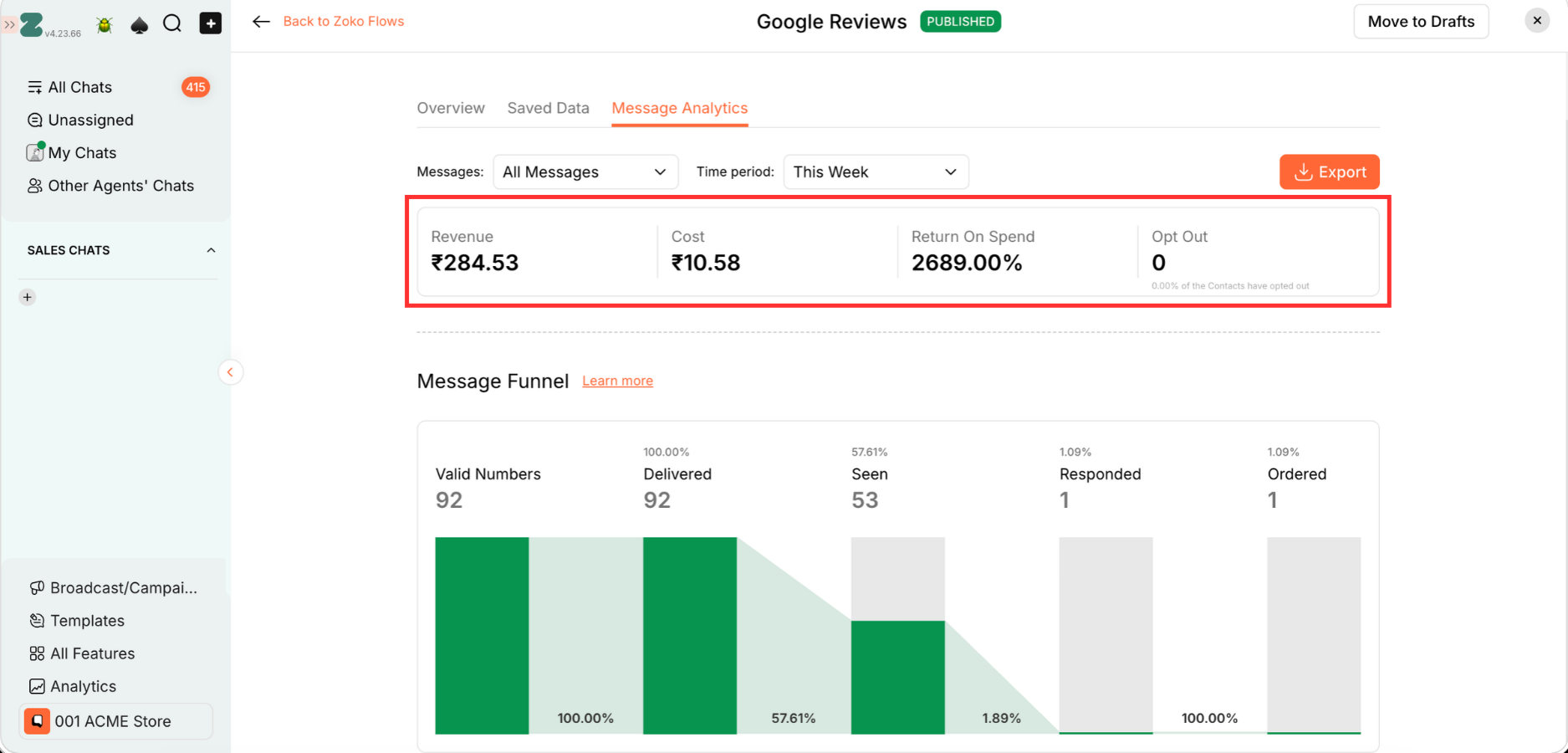
At the top of Message Analytics, you can see four summary cards that give you an overview of your messages' performance during the selected time period.
- Revenue: The total value of orders placed by customers within 72 hours of receiving a message. Cancelled orders are excluded. Revenue tracking is available for flows tagged as Marketing.
- Cost: The amount WhatsApp charged for sending these messages.
- Return on Spend: Shows how much revenue your messages generated compared to their cost. It's calculated by dividing Revenue by Cost and expressing the result as a percentage. For example, if your messages generated 5000 in revenue and cost 500, your Return on Spend is 1000%.
- Opt Out: Shows how many customers opted out after receiving your messages, along with the percentage of your contacts who opted out.
The Message Funnel
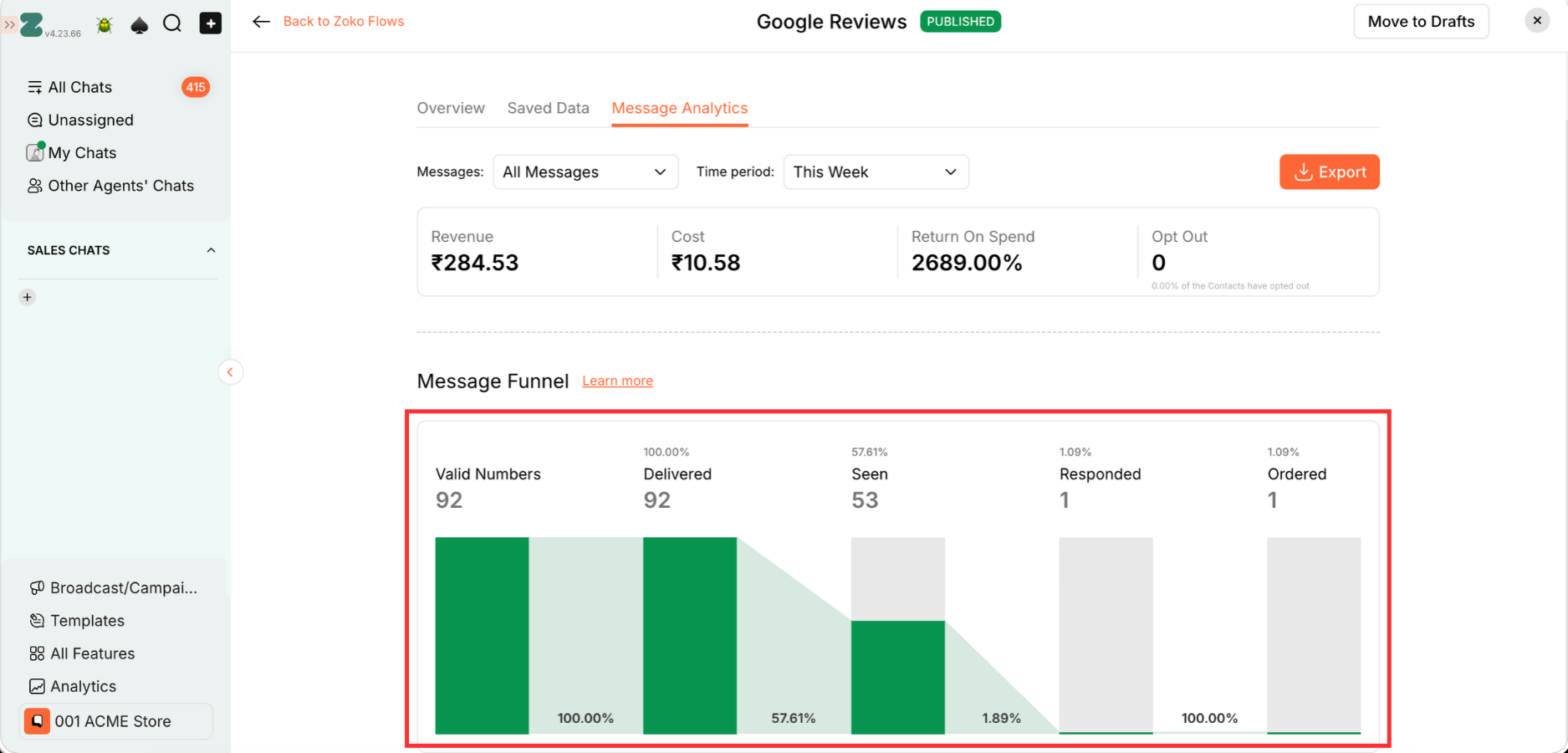
The Message Funnel shows how your WhatsApp messages progress through different stages, from delivery to customer engagement and orders.
Each stage displays the number of messages that reached it. The funnel also shows how many messages progressed from one stage to the next, helping you identify where customers stop engaging.
Let’s understand what each stage means:
- Valid Numbers: Shows the number of messages sent to valid WhatsApp numbers. Invalid numbers are excluded from the funnel, so they don't affect your delivery and engagement rates. This is the starting point for calculating the other funnel percentages.
- Delivered: Shows the number of messages successfully delivered to customers' phones. Messages that have been seen by customers are also included in this count.
- Seen: Shows the number of messages opened by customers. Customers who have turned off read receipts on WhatsApp won't be counted as seen, even if they've read the message. So, the actual number of messages viewed may be higher.
- Clicked: Shows the number of messages where customers clicked the link button. Click tracking is available only for template messages that use a dynamic (flexible) URL button, where the link is filled in for each customer. Clicks are not tracked for static URL buttons, links added directly to message text, carousel cards, or regular and list messages.
- Responded: Shows the number of messages that received a reply from customers. Only the first reply to a message is counted.
- Ordered: Shows the number of messages followed by an order from the customer within 72 hours of delivery. Cancelled orders are excluded. Customers don't need to reply to the message or click a link for their order to be counted.
Note: Stages with no activity are hidden. A flow may show only the stages where activity has been recorded.
Understanding Funnel Percentages
The Message Funnel displays two percentages for each stage. Understanding the difference helps you identify how well your messages are progressing.
- % of Valid: Shown above each stage. It compares the number of messages at that stage with the total number of valid numbers. It tells you how many messages made it to that stage out of the total valid numbers.
- % of Previous: Shown below the funnel, between two stages. It compares the number of messages at a stage with the number at the previous stage. It tells you how many progressed from the previous stage.
Let's understand this with an example:
Here's what these numbers tell you:
- Delivered: All 92 valid numbers received the messages.
- Seen: 53 out of 92 messages were seen, giving a 57.61% seen rate.
- Responded: One customer replied. That's 1.09% of valid numbers and 1.89% of customers who saw the message.
- Ordered: One order was recorded, representing 1.09% of valid numbers and 100% of the previous stage.
Important: Orders are tracked independently of customer replies. Customers can place an order without responding to a message. This means the number of orders can sometimes be higher than the number of responses, resulting in a conversion percentage above 100%.
For example, if 452 customers responded but 583 orders were placed within the attribution window, the conversion from Responded to Ordered would be 129%. This isn't an error; customers don't need to reply before placing an order.
Important to Know
- Data availability: Analytics include messages sent from 31 October 2026 onwards. Messages sent before this date won't appear.
- Playbooks: Message Analytics is not available for Playbooks.
- Data updates: Numbers are updated within a few minutes as WhatsApp sends delivery, read, and reply updates to Zoko.
Keywords: Flow Analytics, Message Analytics, Messaging Funnel, Delivered, Seen, Clicked, Responded, Orders, Revenue, Return on Spend, Opt Out
