


A Significantly Upgraded Product - 21 New Feature and 9 Improvements
.png)
Share on WhatsApp
.png)


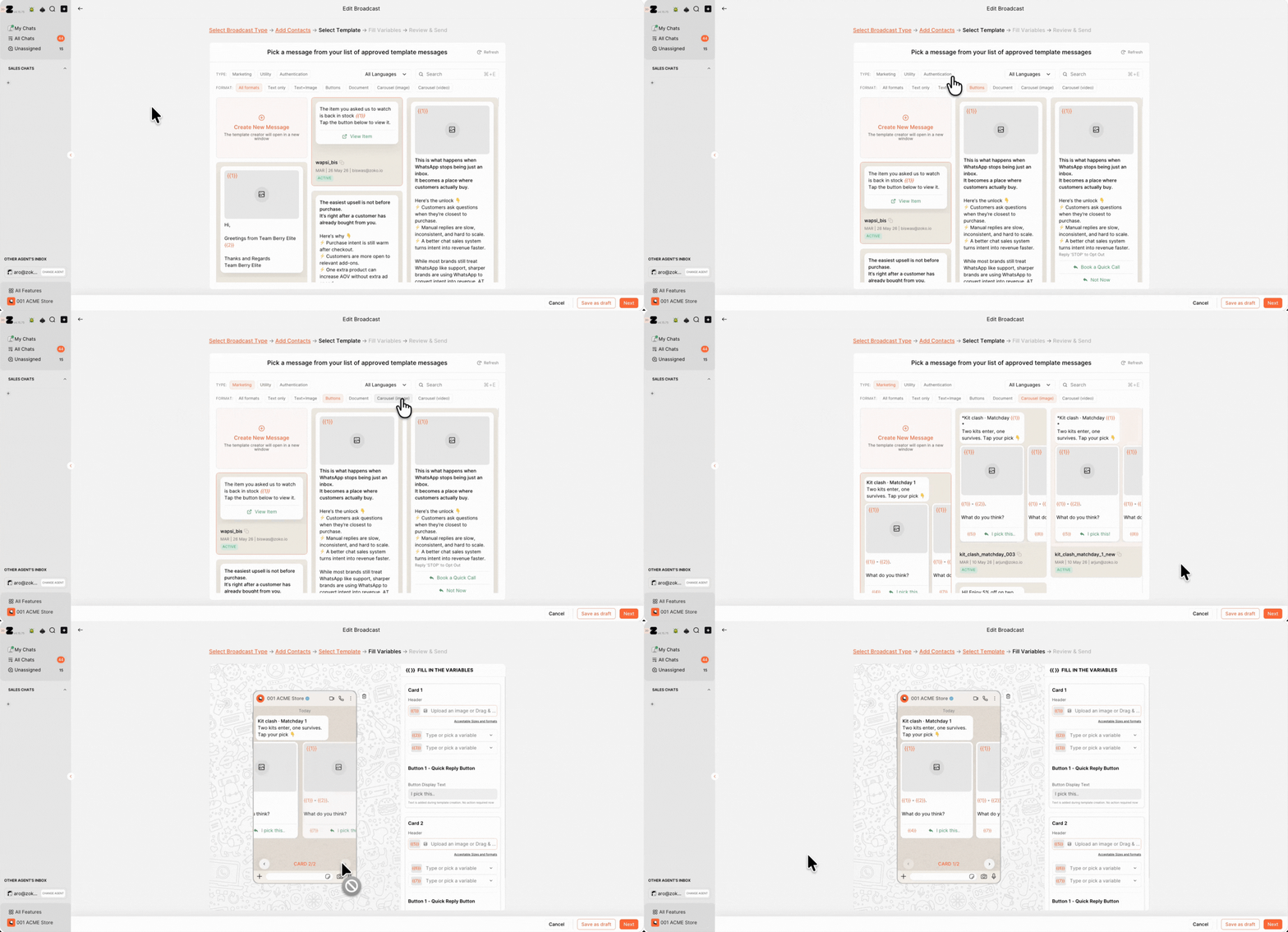
Broadcasts now fully support all newly introduced template formats; including carousels, copy code buttons, authentication templates, location messages, phone buttons, and more.
What can you do? ✨
- Send carousel templates
- Use phone & authentication buttons
- Send Copy Code campaigns
- Create richer broadcasts
Perfect for:
- Product launches
- Promotional campaigns
- Interactive customer journeys
- Rich commerce broadcasts

You can now schedule multiple follow-up broadcasts in a single setup instead of manually creating separate campaigns every time.
What can you do? ✨
- Schedule follow-up messages
- Create multi-step campaigns
- Automate customer follow-ups
- Re-engage customers effortlessly
Perfect for:
- Flash sales
- Launch campaigns
- Webinar reminders
- Win-back campaigns
Pro tip: Most WhatsApp conversions happen after the second or third customer touchpoint.
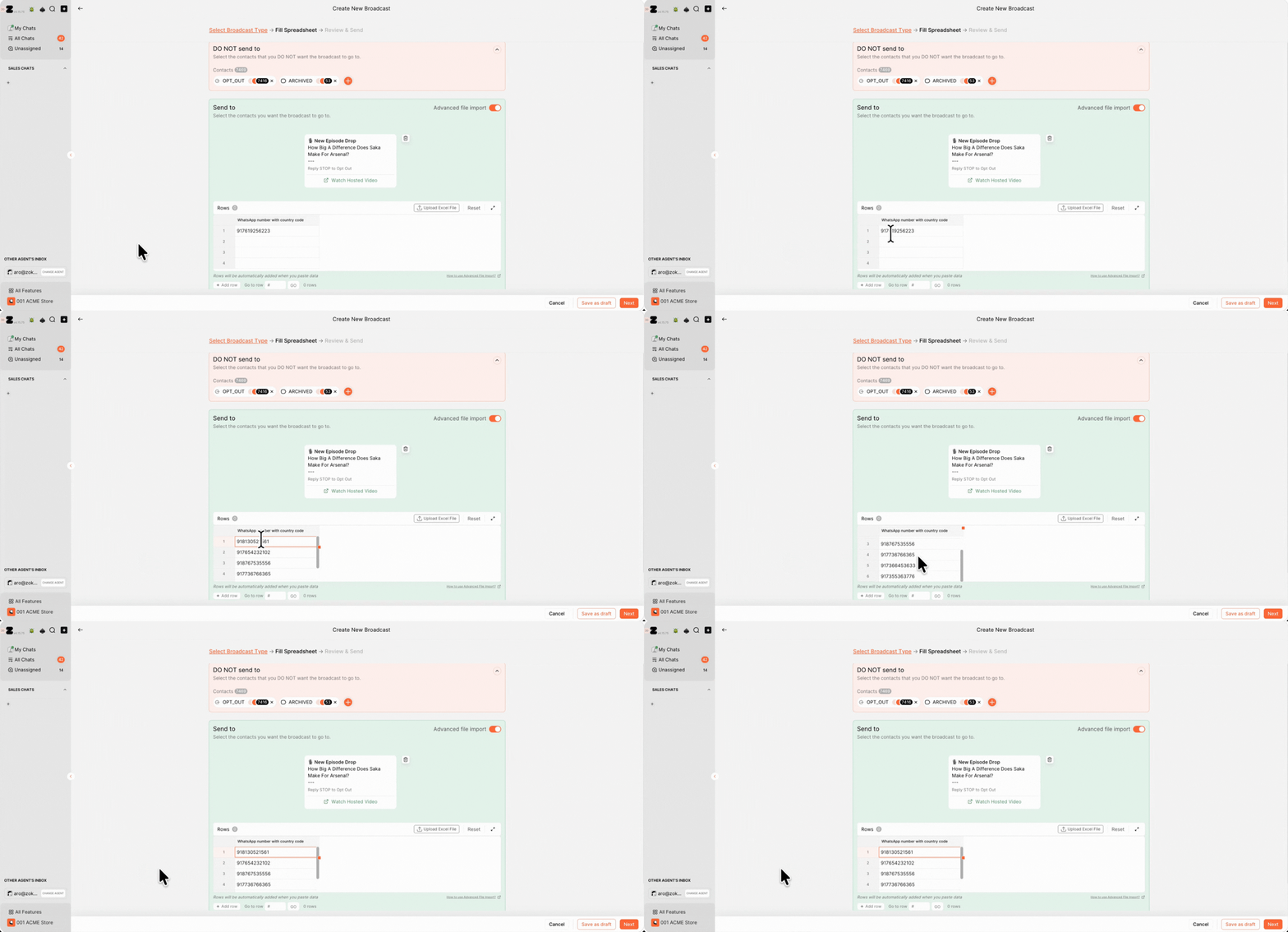
You no longer need to prepare and upload files for quick campaigns. Phone numbers can now be pasted directly into the Broadcast module.
What’s improved? 💡
- Faster campaign setup
- No file imports required
- Reduced formatting errors
- Easier quick sends
Perfect for:
- Reactive campaigns
- Event promotions
- Sales teams
- Quick outreach campaigns
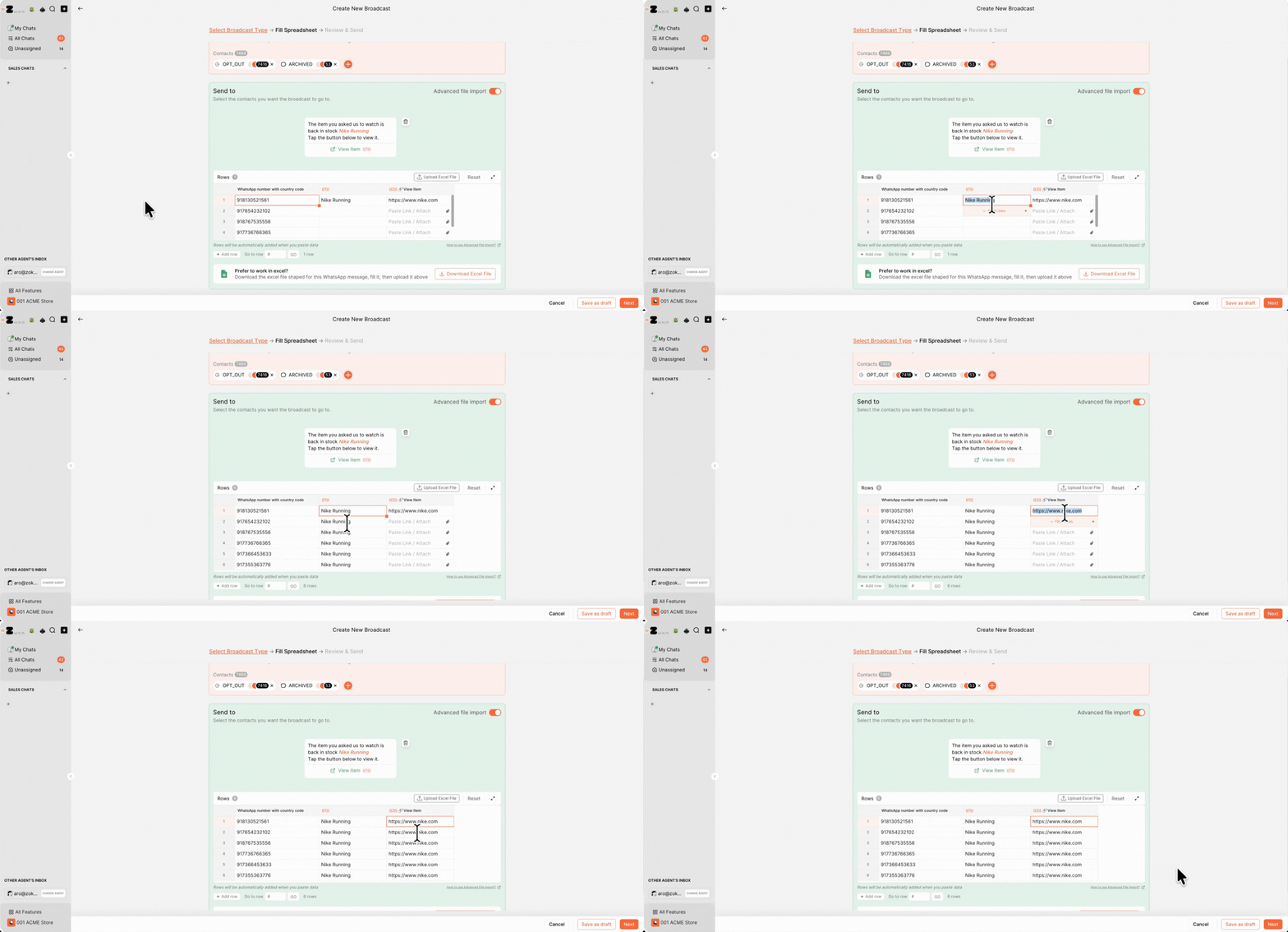
If the same value applies across multiple rows, Zoko can now automatically fill the remaining cells for you.
What can you do? ✨
- Auto-fill repeated values
- Speed up campaign setup
- Reduce manual data entry
- Prepare broadcasts faster
Perfect for:
- Personalized campaigns
- Bulk contact uploads
- Repetitive campaign fields
- High-volume broadcasts
Pro tip: Auto-fill significantly speeds up campaign preparation during large sales periods.
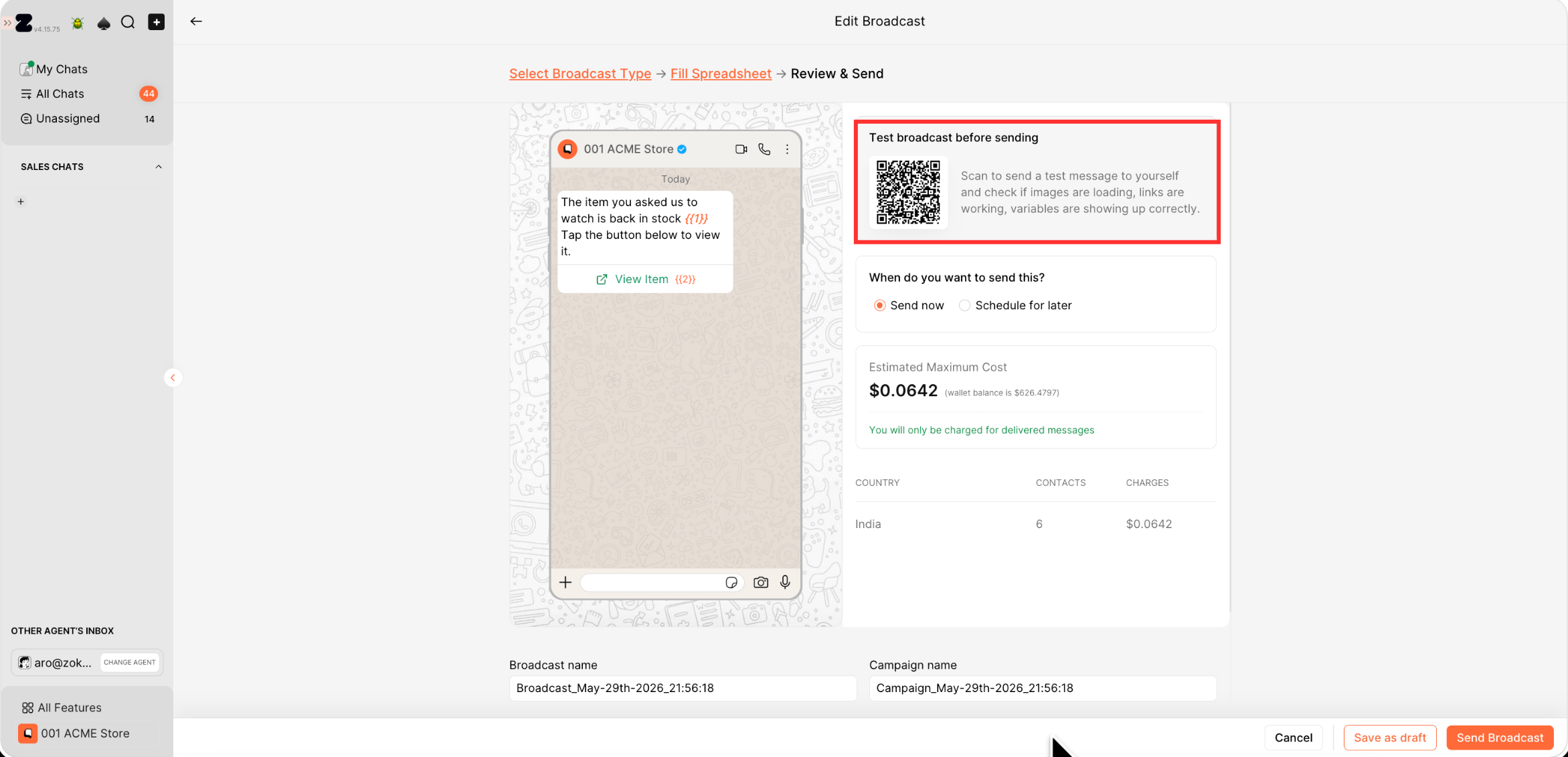
You can now test any broadcast or broadcast series on your own number before sending it to customers.
What can you do? ✨
- Preview broadcasts before sending
- Verify merge variables
- Catch formatting mistakes early
- Better campaign QA
Perfect for:
- Marketing approvals
- QA workflows
- Large-scale campaigns
- Team reviews
Pro tip: Always test carousel and variable-based broadcasts before sending them to large audiences
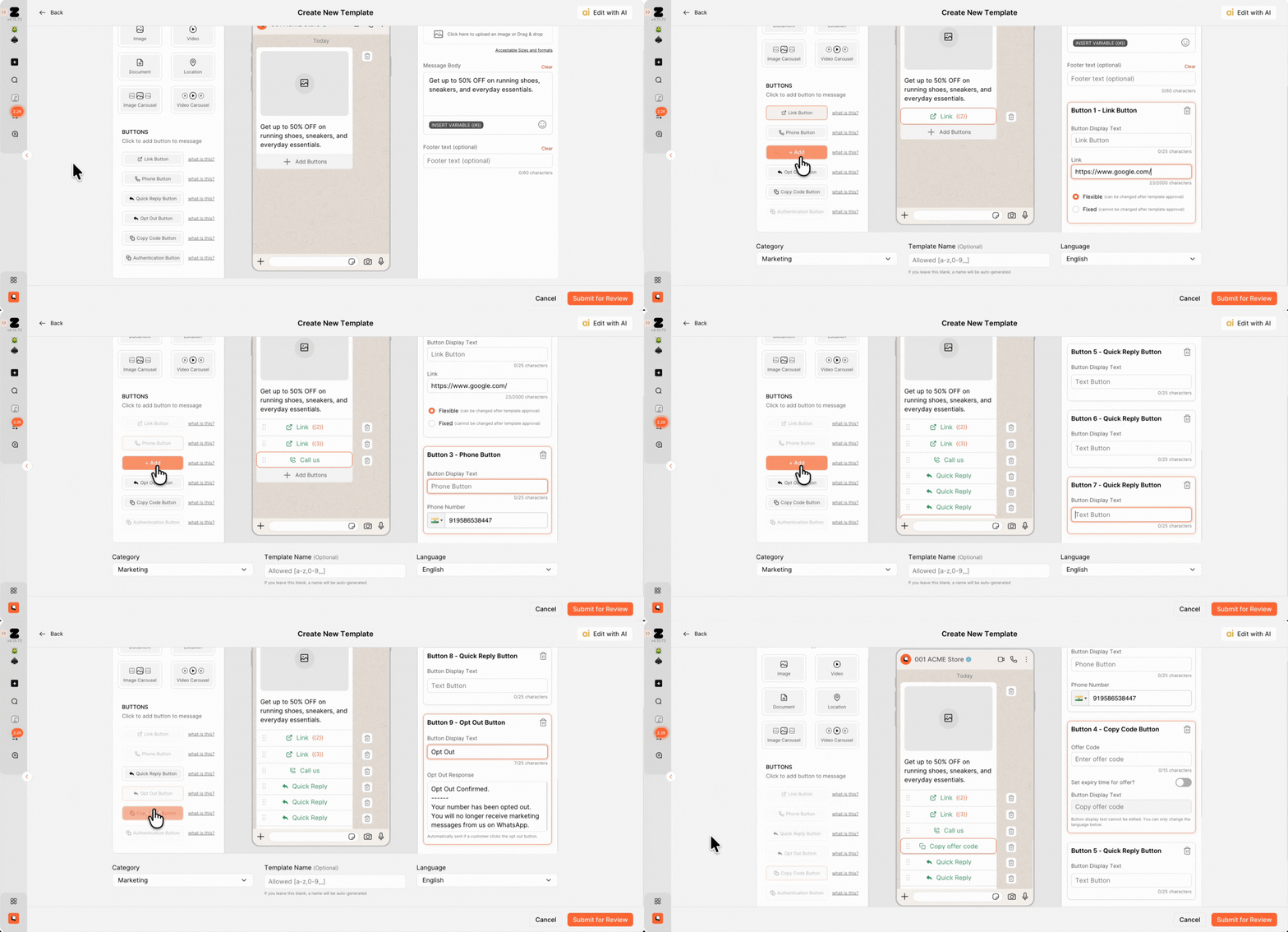
Templates now support up to 10 buttons instead of just 3 — giving brands significantly more flexibility inside a single WhatsApp message. Previously, businesses often had to split actions across multiple templates or chatbot flows. Now, customers can take multiple actions directly from one message itself.
What’s improved? 💡
- Support for up to 10 buttons
- Up to 10 quick reply buttons
- More customer actions in a single template
Perfect for:
- Product menus
- Customer support journeys
- Multi-category navigation
- Lead qualification flows
Pro tip: Use quick reply buttons to reduce customer typing and improve response rates.

Templates can now include two separate URL buttons instead of just one. This gives marketers the flexibility to drive customers toward different actions without forcing them into a single CTA path.
What’s improved? 💡
- Two clickable links in one template
- Better CTA flexibility
- More campaign routing options
Perfect for:
- “Shop Now” + “Learn More”
- Product page + Lookbook flows
- Checkout + Support combinations

Customers can now directly call your team from a WhatsApp template using a single tap. This creates a much faster path from customer intent to conversation.
What’s improved? 💡
- One-tap phone calling
- Faster customer connection
- Better high-intent conversion journeys
Perfect for:
- Luxury brands
- High-ticket sales
- Consultation-based businesses
- B2B teams
Pro tip: Phone buttons work especially well in abandoned cart and inquiry follow-up campaigns.
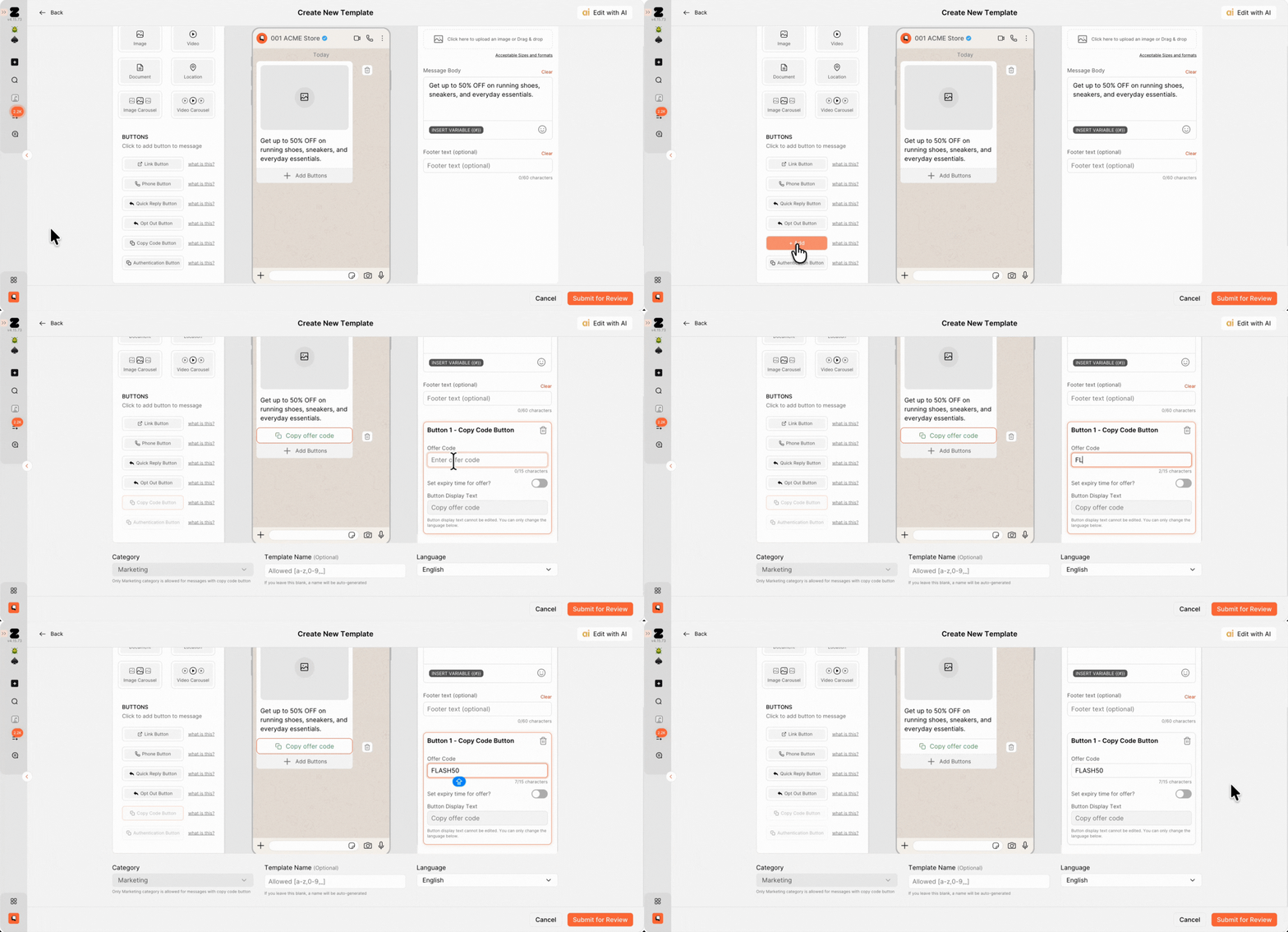
Discount and coupon codes can now be copied instantly with a single tap inside WhatsApp, making redemption significantly easier for customers.
What’s improved? 💡
- One-tap coupon copying
- Faster redemption experience
- Reduced manual copy errors
Perfect for:
- Sale campaigns
- Discount broadcasts
- Cart recovery journeys
Pro tip: Short coupon codes usually perform better on mobile devices.
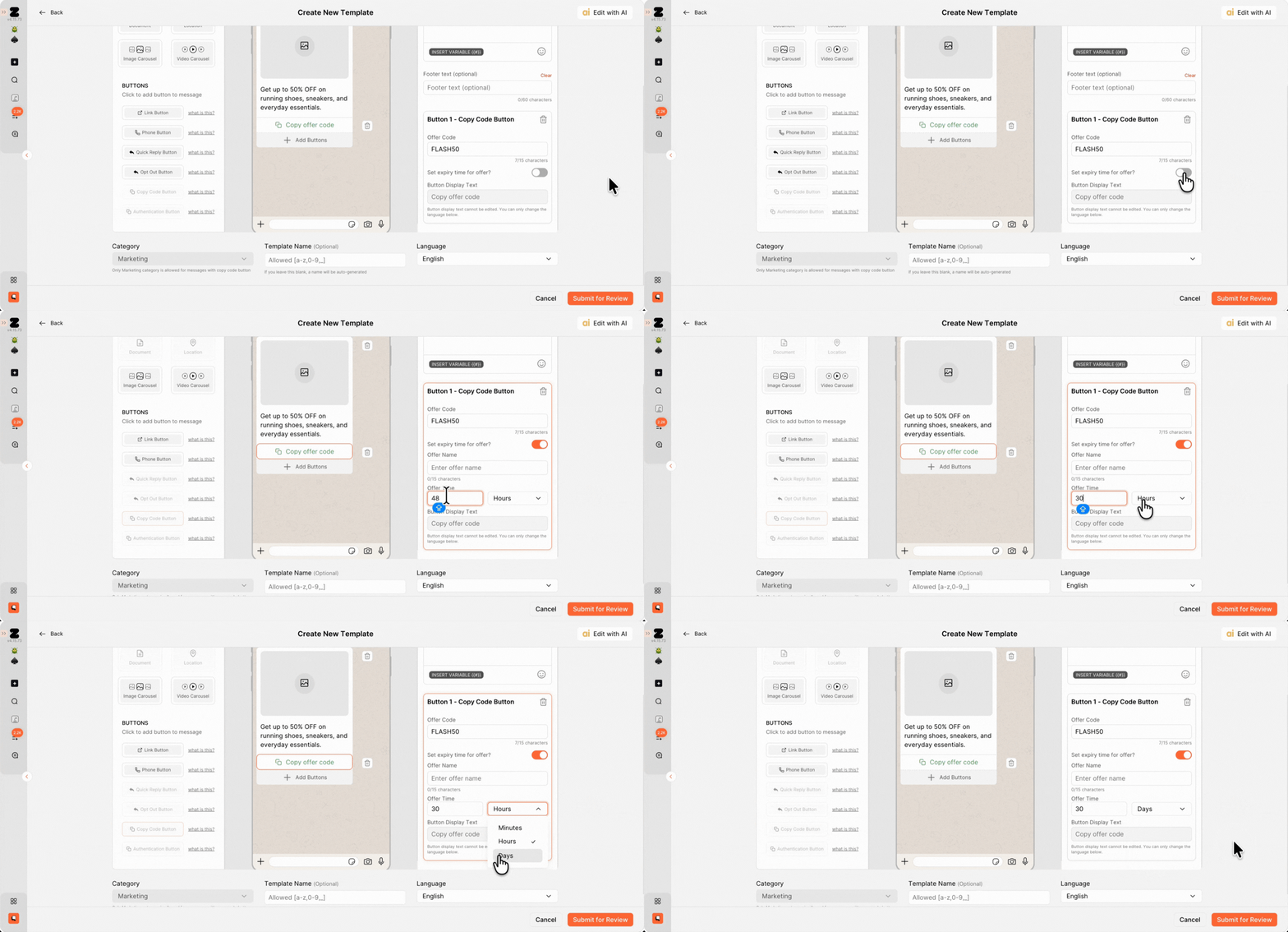
Templates now support Copy Code buttons with visible countdown timers to create urgency directly inside the message.
What’s improved? 💡
- Visible expiry countdown
- Better urgency-driven campaigns
- Higher conversion pressure
Perfect for:
- Flash sales
- Limited-time launches
- BFCM campaigns
- Last-chance offers
Pro tip: Countdown timers are highly effective during the final hours of a campaign.
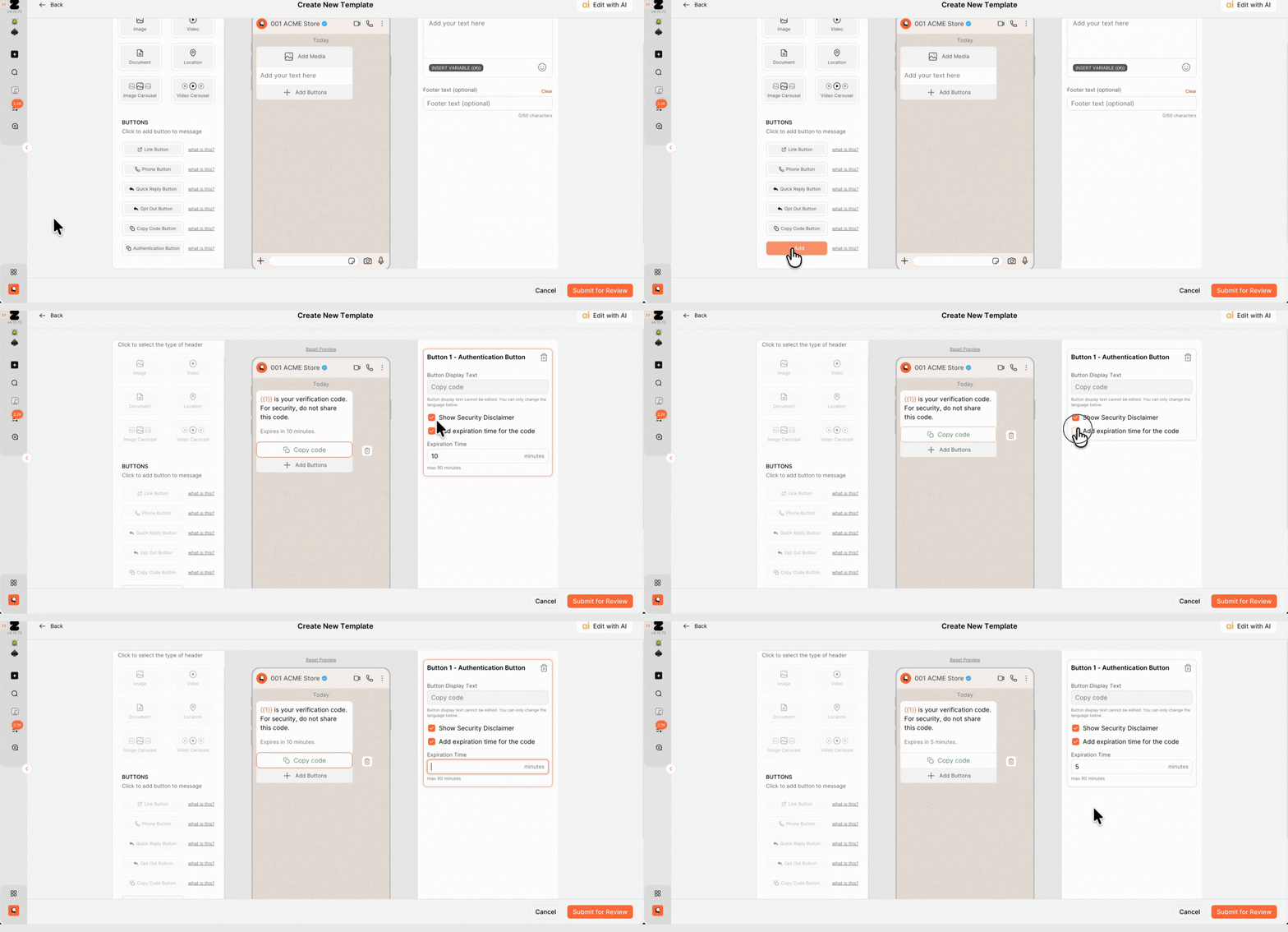
Authentication templates can now be used to deliver OTPs, verification codes, and login authentication messages directly through WhatsApp instead of relying only on SMS.
What’s improved? 💡
- Deliver OTPs on WhatsApp
- Faster verification experience
- Reduced SMS dependency
Perfect for:
- SaaS platforms
- Fintech brands
- Login workflows
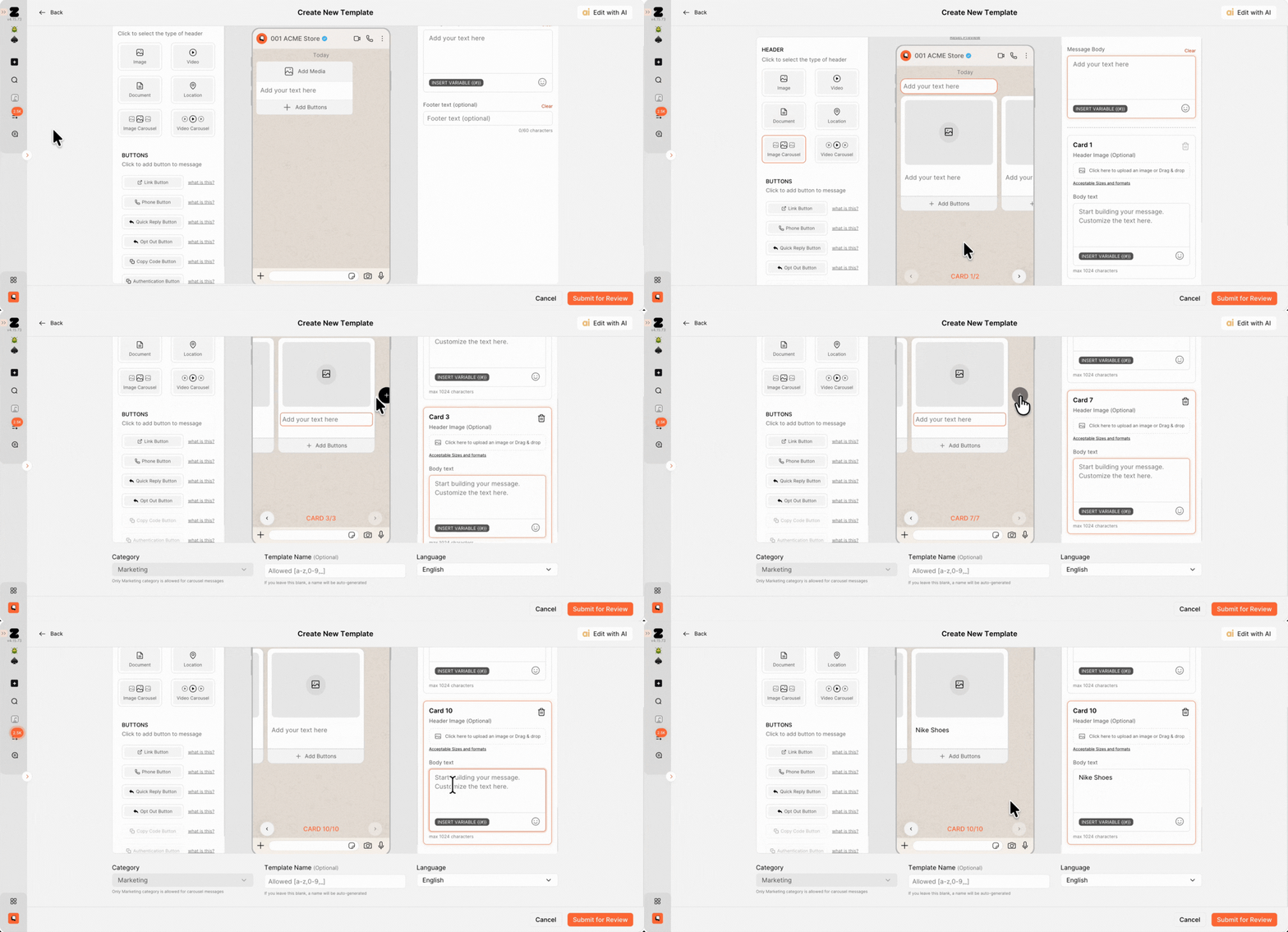
Templates now support image carousels with up to 10 product cards inside a single WhatsApp message. Each card can include its own CTA button, making broadcasts feel more like a mini storefront experience.
What can you do? ✨
- Showcase multiple products
- Add CTAs to each card
- Create shoppable experiences
- Drive product discovery
Perfect for:
- New collection launches
- Bestseller showcases
- Seasonal campaigns
- Multi-product promotions
Pro tip: Put your highest-converting or most visually attractive product as the first card to improve engagement.

Video carousel templates allow brands to showcase products using short-form videos directly inside WhatsApp, creating a much richer shopping experience compared to static images.
What can you do? ✨
- Showcase products with videos
- Create richer campaigns
- Tell better product stories
- Increase engagement
Perfect for:
- Fashion brands
- Beauty launches
- Product demos
- Lifestyle campaigns
Pro tip: Short vertical videos generally perform best inside WhatsApp conversations.
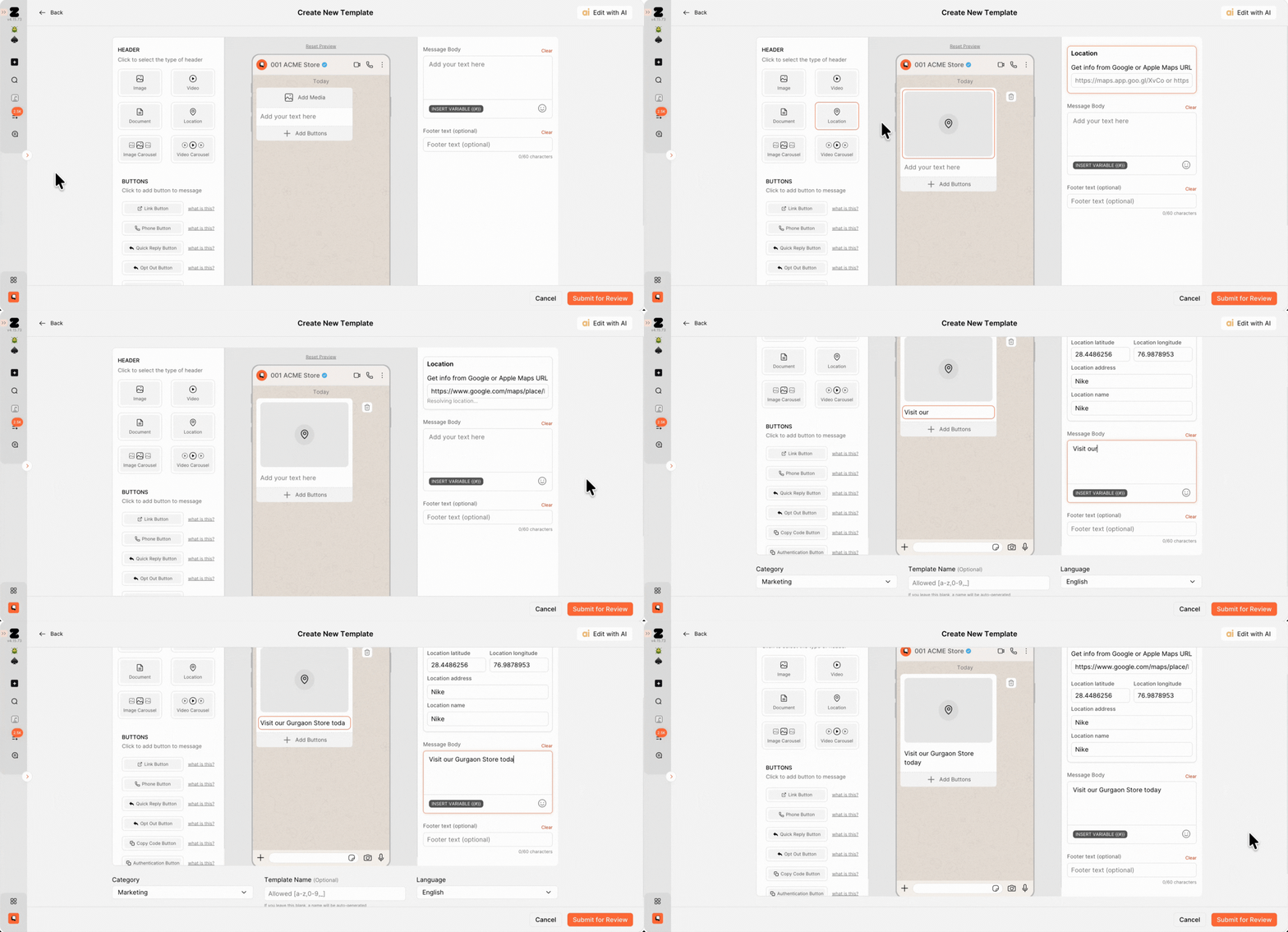
Share store or branch locations directly inside WhatsApp.
What can you do? ✨
- Share store locations
- Send native WhatsApp maps
- Help customers find nearby branches
- Simplify store visits
Perfect for:
- Retail stores
- Restaurants
- Service businesses
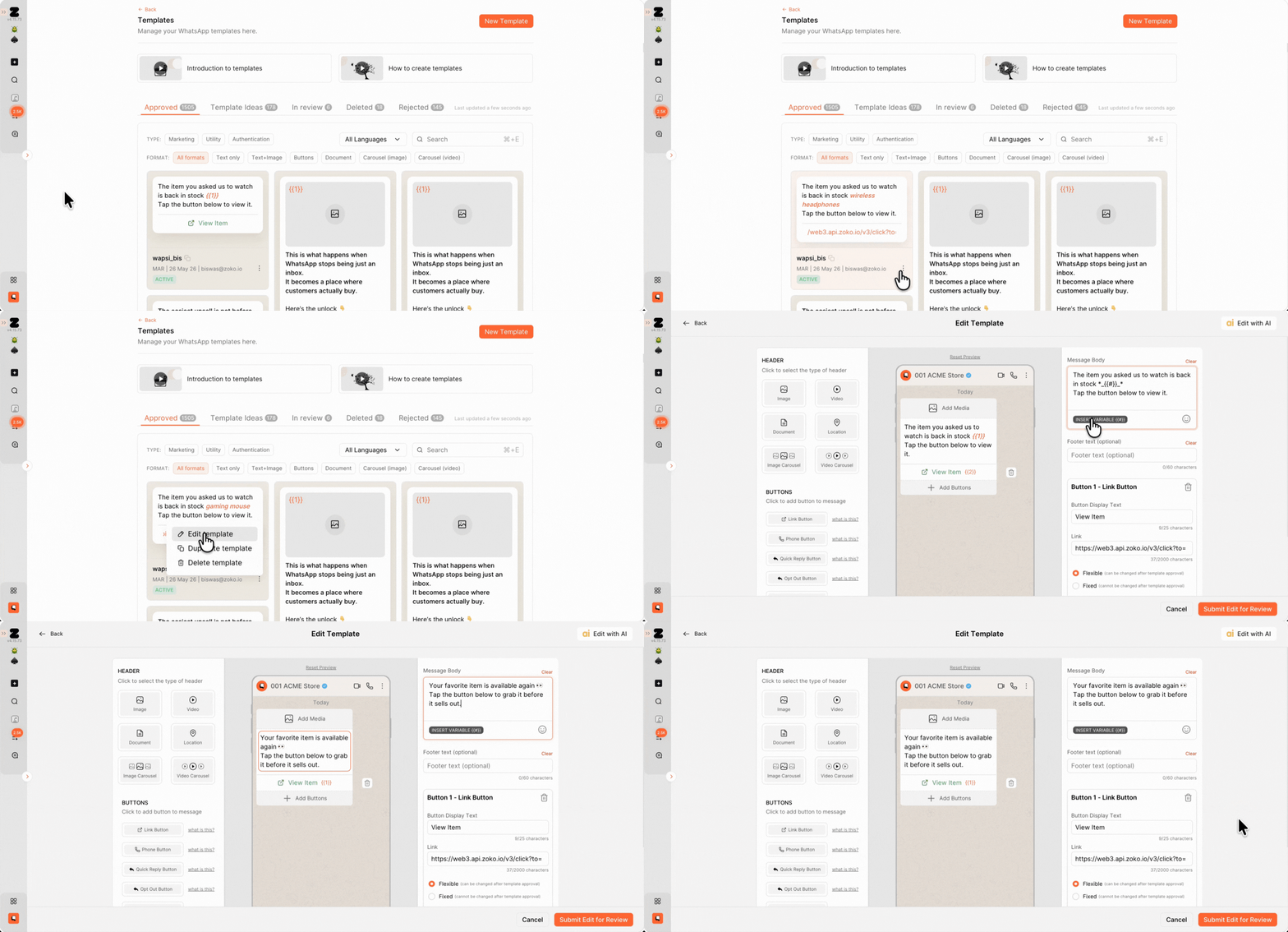
Previously, even a small typo or CTA update required creating an entirely new template and waiting for Meta approval again. Approved templates can now be edited directly.
What’s improved? 💡
- Fix mistakes faster
- No need to recreate templates
- Faster campaign updates
Perfect for:
- Fast-moving teams
- Frequent launches
- Seasonal campaigns
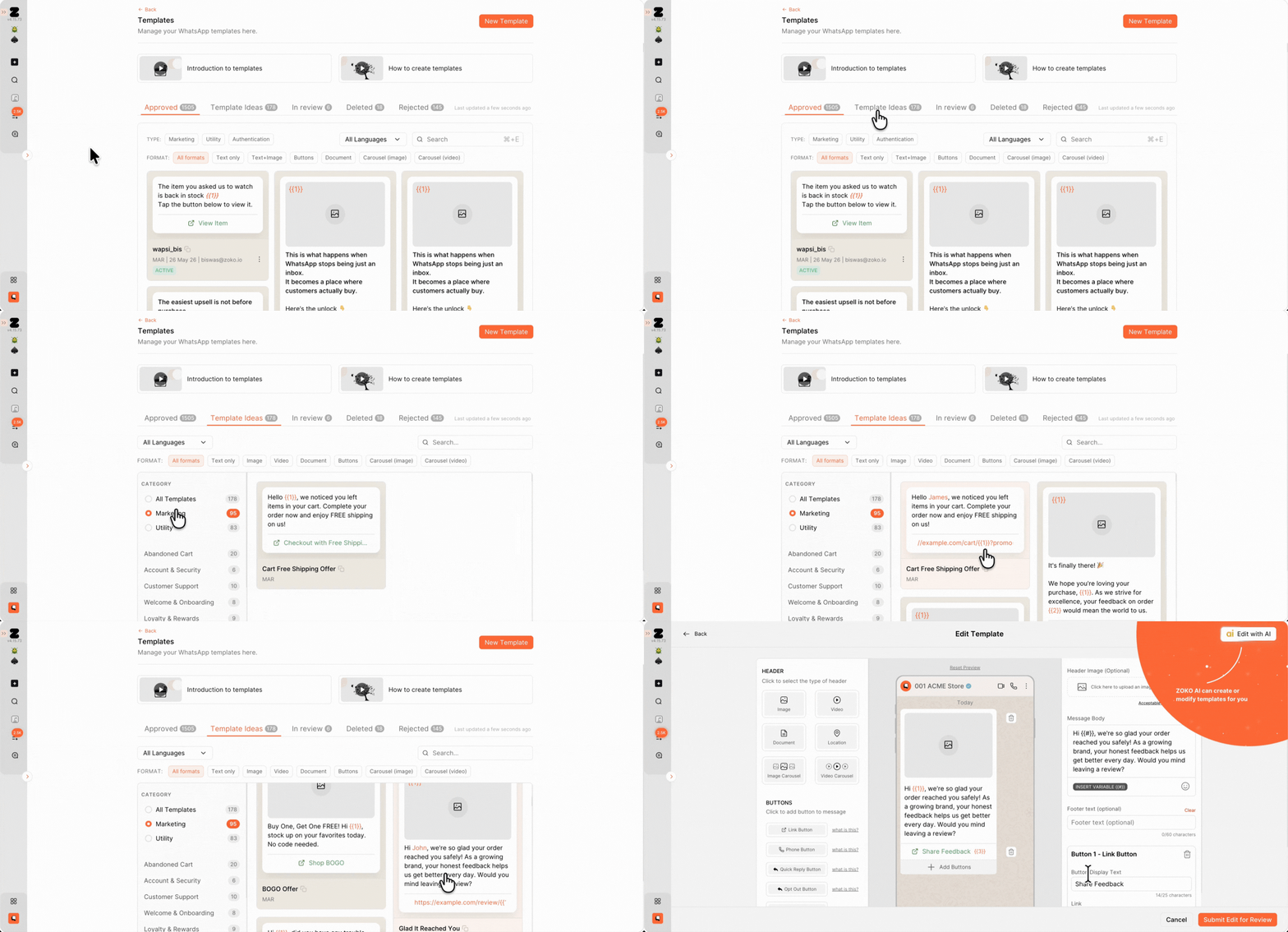
The new Template Ideas library gives businesses ready-made starting points for common campaign and messaging use cases.
What’s improved? 💡
- Faster campaign setup
- Ready-made inspiration
- Reduced blank-page problem
Perfect for:
- New marketers
- Busy teams
- Faster execution
Pro tip: Start with a proven template structure and customize the messaging for your audience instead of building from scratch every time.
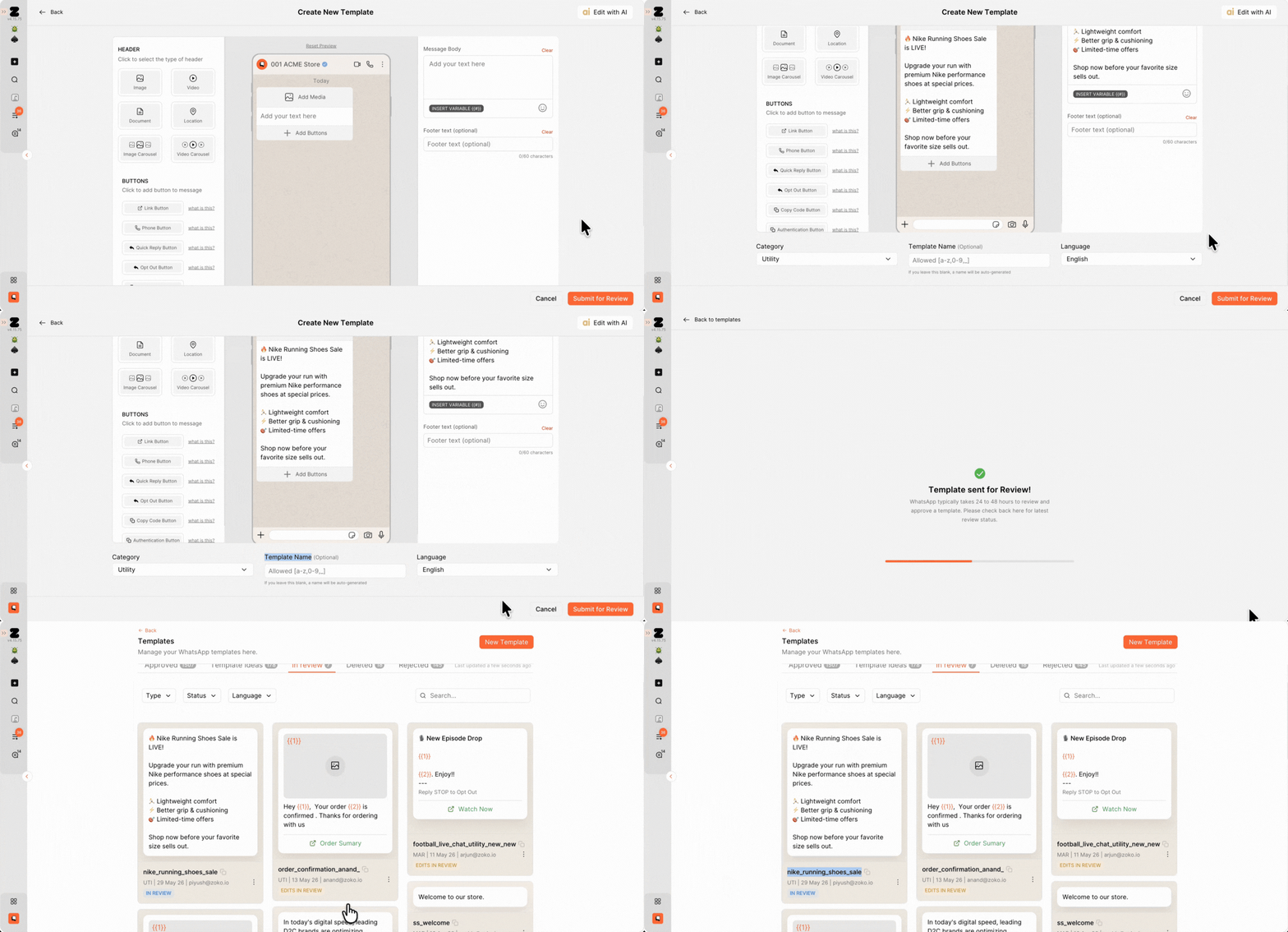
Zoko can now automatically generate template names and assign the correct template category while creating templates.
What’s improved? 💡
- Faster template creation
- Better organization
- Reduced setup effort
Perfect for:
- High-volume campaign teams
- Agencies
- Scaling operations
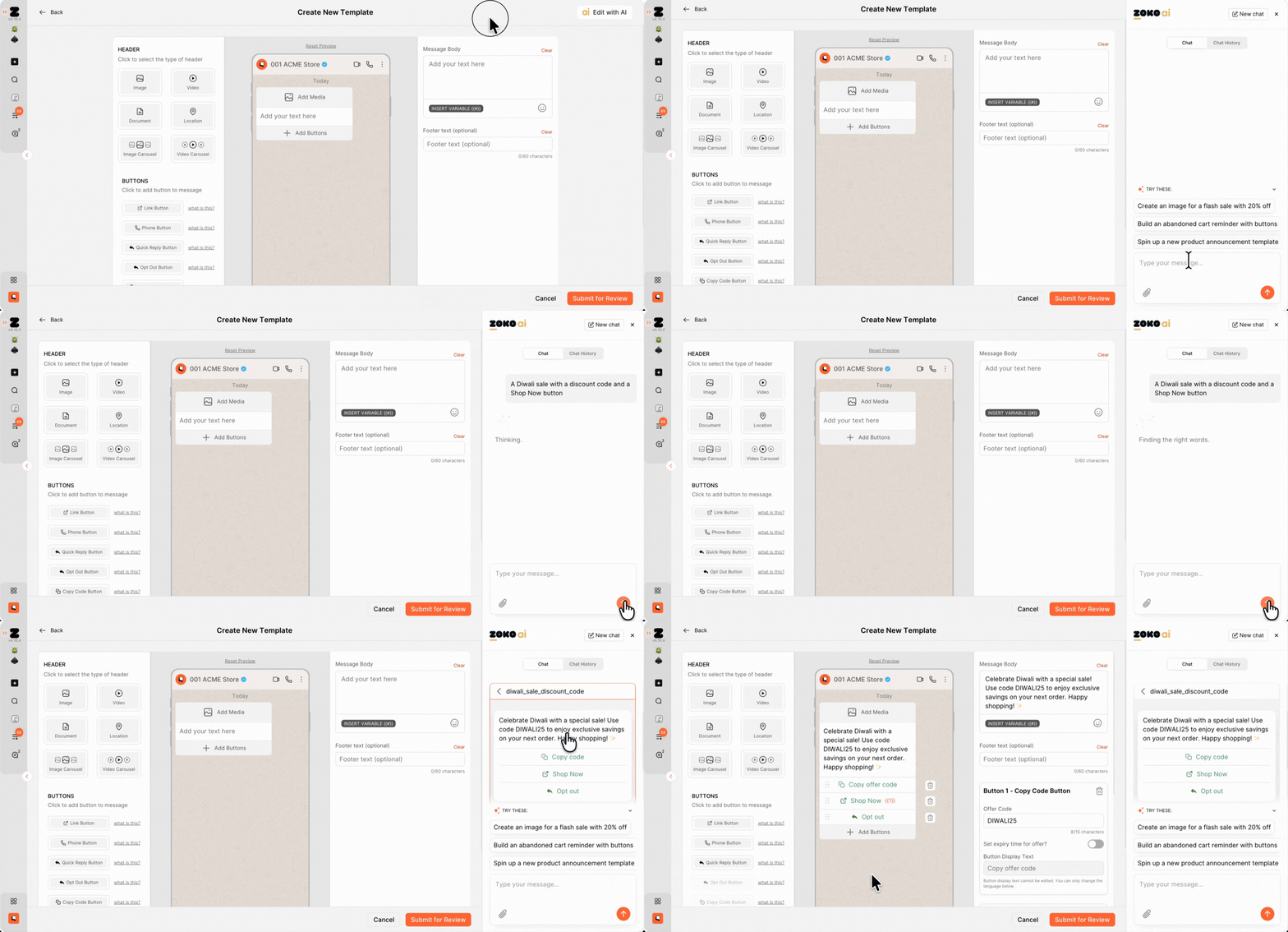
The AI Template Builder helps you create WhatsApp templates using plain English. Simply describe the campaign you want to run, for example, "a Diwali sale with a discount code and a Shop Now button", and Zoko automatically generates the template copy, buttons, category, name, and structure for you. You can also choose the tone to match your brand voice.
What can you do? ✨
- Generate templates using plain English prompts
- Automatically create copy, buttons, headers, and variables
- Get AI-generated template names and categories
- Choose your preferred brand tone
- Edit the generated template before submission
Perfect for:
- Marketing teams running frequent campaigns
- Founders managing their own marketing
- Agencies handling multiple brands
- Non-marketing team members
- Multi-language businesses
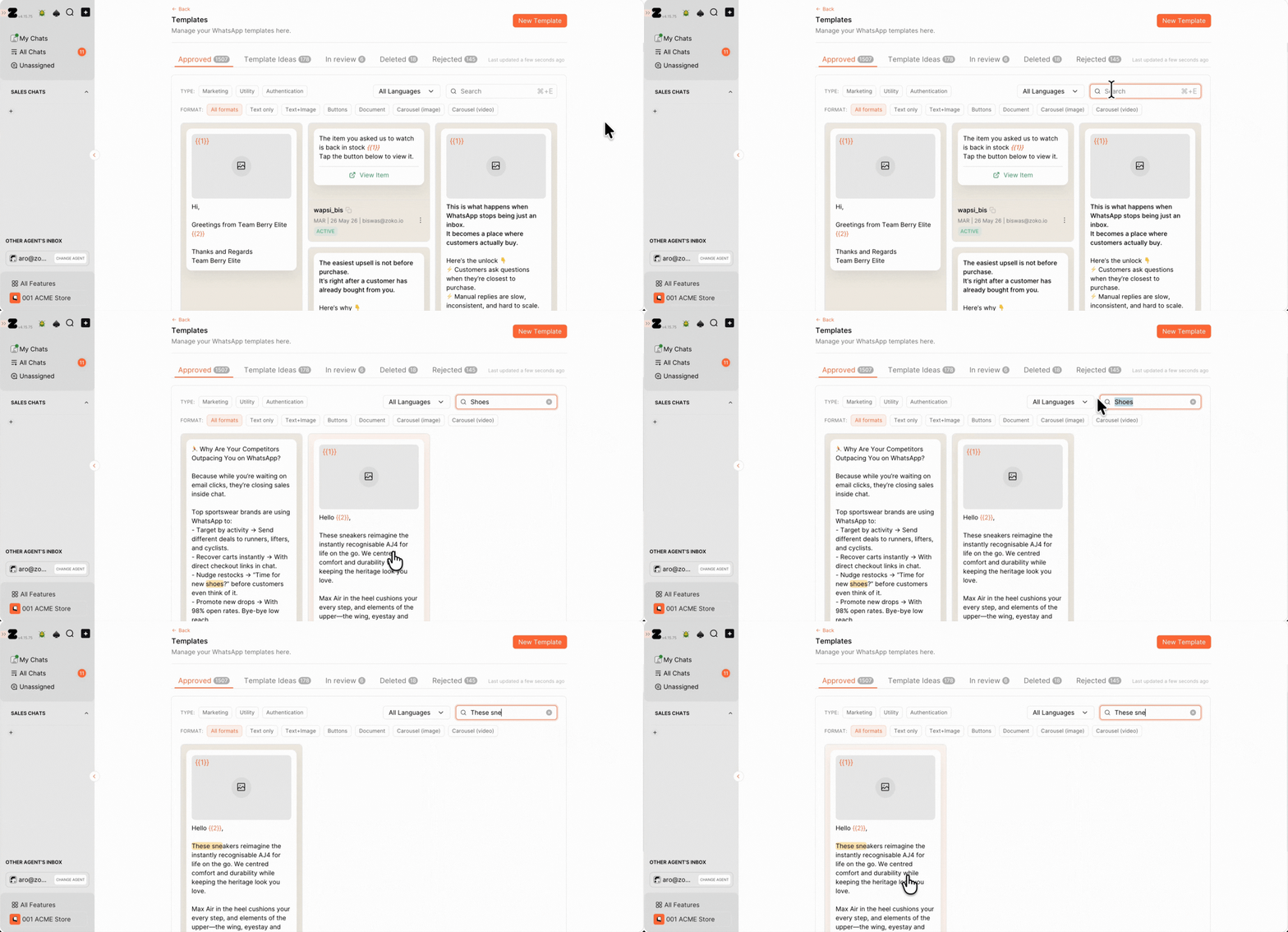
You can now search templates using names, content, keywords, and text directly from inside the Templates page.
What’s improved? 💡
- Faster template discovery
- Better search experience
- Easier large-scale management
Perfect for:
- Enterprise teams
- Large template collections
- Multi-brand operation

The new ROI Analytics Dashboard gives you a complete view of the revenue WhatsApp is generating for your business. Instead of manually pulling data from different reports, you can now see WhatsApp-attributed revenue, return on spend, channel performance, agent performance, and order-level revenue attribution from a single screen.
What’s improved? 💡
- Total WhatsApp revenue tracking
- Return on Spend (ROS) reporting
- Revenue breakdown by Broadcasts, Flows, Chat Sales, and AI Assistants
- Dual-currency reporting
- Downloadable order-level revenue logs
- Direct spend and revenue comparison
Perfect for:
- Marketing teams measuring campaign ROI
- Sales managers tracking agent performance
- Finance teams validating revenue attribution
- Agencies reporting results to clients
Refer to this article to learn more about Analytics.
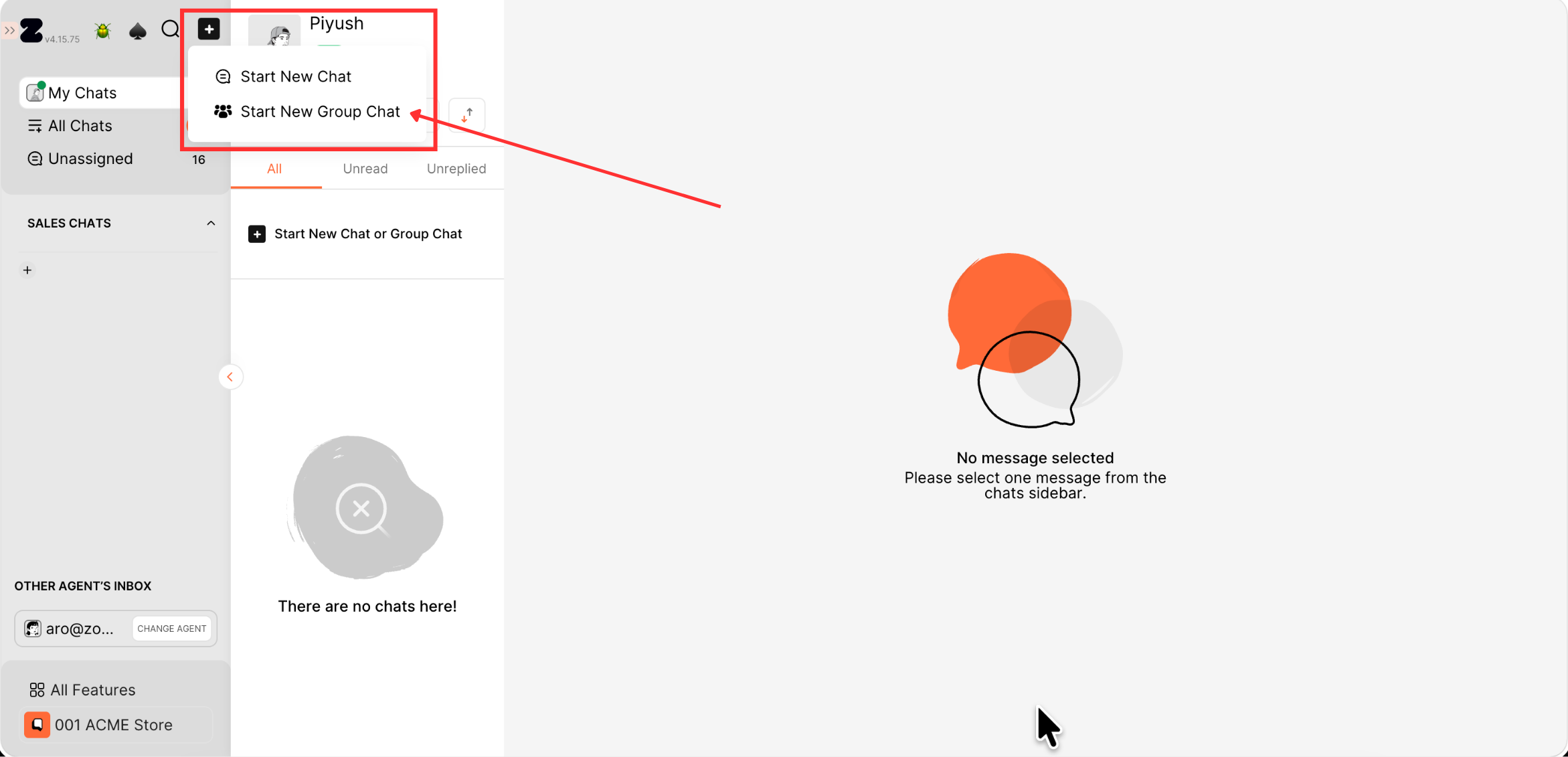
WhatsApp Groups are now supported directly inside Zoko. Previously, businesses could only communicate through 1:1 conversations or broadcasts. With WhatsApp opening Groups to the Business API, brands can now create, manage, and engage communities directly from the Zoko dashboard.
What’s improved? 💡
- Native WhatsApp Group support
- Create and manage Groups from Zoko
- Engage customers in many-to-many conversations
- Build communities around your brand
- Drive engagement beyond broadcasts
Perfect for:
- VIP customer communities
- Product launch groups
- Coaching and education cohorts
- Fan and supporter communities
- Live shopping experiences
Pro tip: Use Groups to give your most loyal customers early access to launches, exclusive updates, and community-driven experiences.
Refer to this article on How to create a Group.
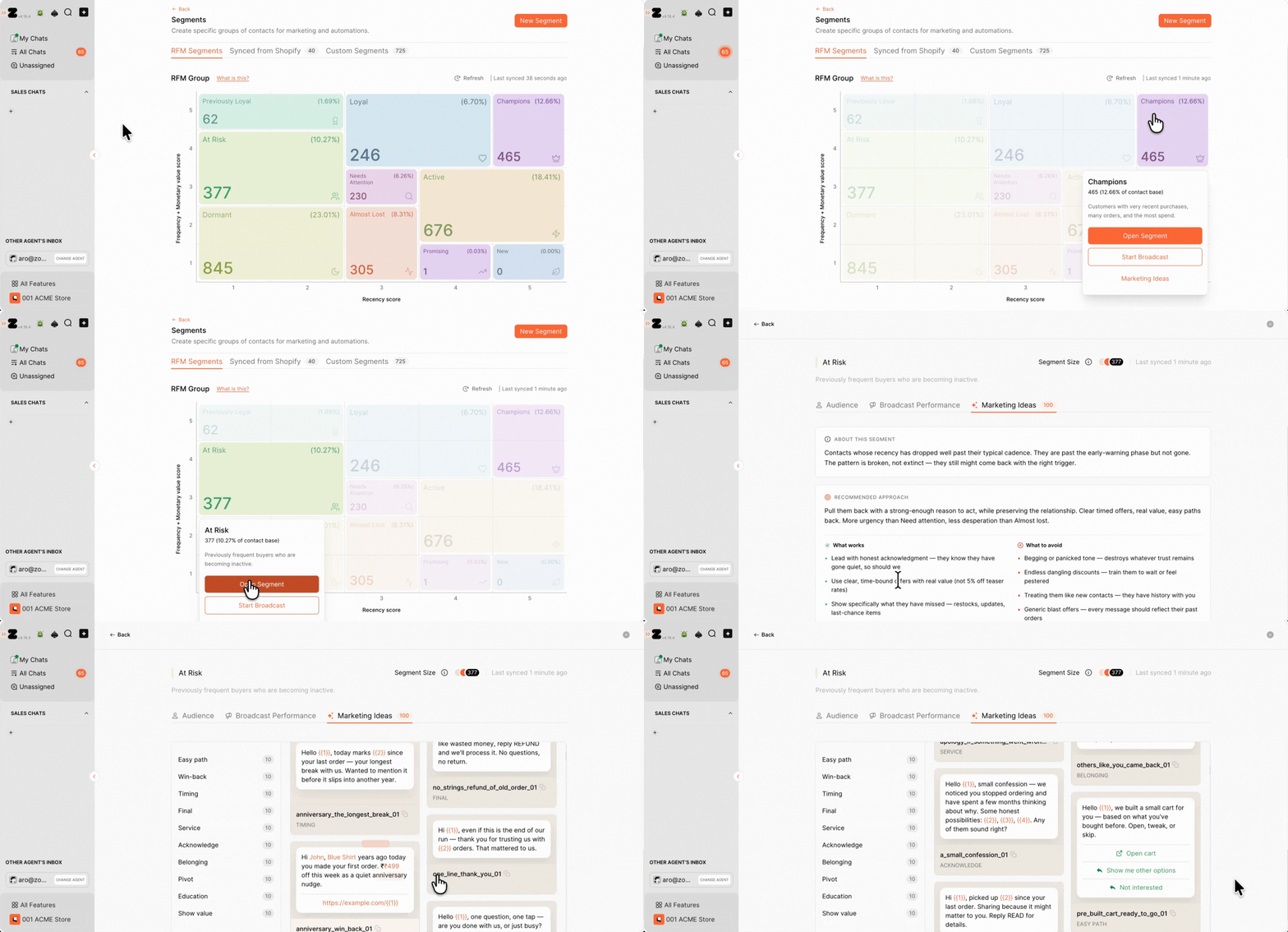
RFM (Recency, Frequency, Monetary) Segments are now available directly inside Zoko. Instead of manually identifying your best customers or customers at risk of churning, Zoko automatically creates segments like Champions, Loyal Customers, At Risk, Lost Customers, and more using your Shopify purchase data.
What’s improved? 💡
- Built-in RFM segmentation
- Automatically updated customer cohorts
- No manual segment creation required
- Smarter lifecycle marketing
Perfect for:
- Retention campaigns
- Win-back campaigns
- VIP customer engagement
- Repeat purchase strategies
Pro tip: Every RFM segment comes with 100 ready-to-use campaign ideas so you never have to start from a blank page.
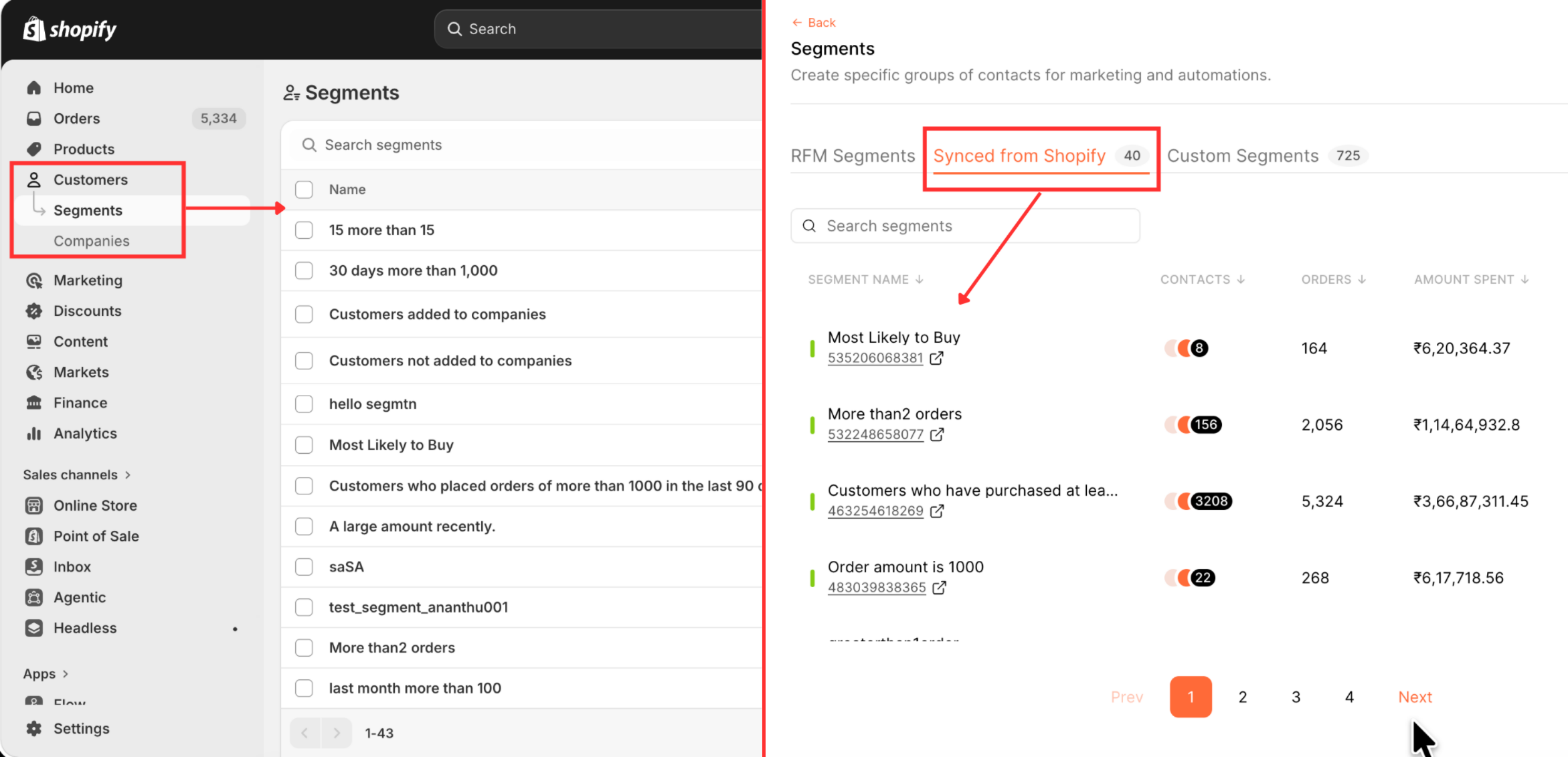
Your Shopify segments now sync directly into Zoko. Any segment you create in Shopify automatically becomes available for targeting inside Zoko, eliminating the need to maintain the same audience in multiple places.
What’s improved? 💡
- Direct Shopify segment sync
- Automatic segment updates
- Exact customer count matching
Perfect for:
- Shopify marketers
- Multi-segment campaigns
- Advanced targeting
- Large customer databases
Note: As long as customers have a valid WhatsApp number, segment counts in Zoko match Shopify exactly.
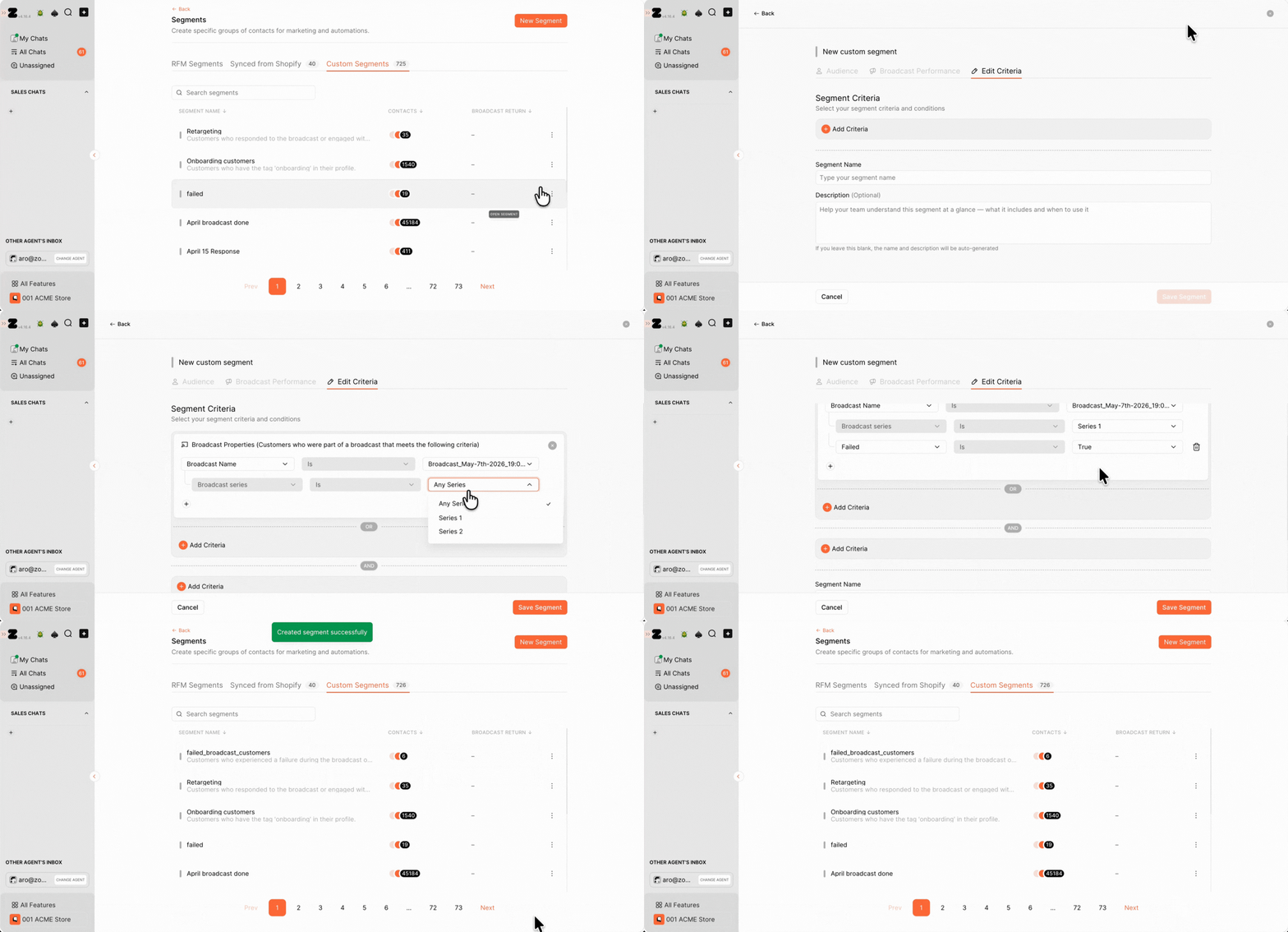
The Custom Segment Builder has been redesigned to give you more flexibility when creating audiences. You can now combine customer properties, broadcast engagement, and Shopify segments to build highly targeted campaigns.
What’s improved? 💡
- New segmentation experience
- Customer property filters
- Broadcast engagement filters
- Shopify segment filters
- More advanced audience targeting
Perfect for:
- Personalized campaigns
- Re-engagement campaigns
- High-intent audience targeting
- Advanced customer journeys
Your WhatsApp Catalog now syncs directly with Shopify. Previously, you had to rely on manual exports, Facebook Catalog Manager, and periodic re-syncs to keep products updated. With the new integration, Shopify becomes the single source of truth.
What’s improved? 💡
- Direct Shopify catalog sync
- No manual exports required
- No Facebook Catalog Manager dependency
- Products stay automatically updated
Perfect for:
- High-SKU brands
- Fast-moving inventories
- Frequent product launches
- Multi-store operations
-
Customers can now complete purchases using your Shopify checkout directly inside WhatsApp, making WhatsApp a seamless extension of your Shopify store.
What’s improved? 💡
- Native Shopify checkout
- Seamless purchase experience
Perfect for:
- Shopify merchants
- Mobile-first shoppers
- D2C brands
- High-conversion stores
All your existing Shopify payment, shipping, delivery, and pickup configurations now work directly inside WhatsApp.
What’s improved? 💡
- Existing payment methods supported
- Delivery & pickup options available
- No additional setup required
Perfect for:
- COD businesses
- Local delivery brands
- Multi-location retailers
Instead of showing customers one long product list, catalogs can now be organized using Shopify collections.
What’s improved? 💡
- Collection-based browsing
- Better product organization
- Easier navigation
- Improved customer discovery
Perfect for:
- Fashion brands
- Beauty stores
- Multi-category retailers
Pro tip: Create collections like "New Arrivals", "Best Sellers", or "Summer Sale" to guide customer browsing.
Customers can now search within the catalog directly in WhatsApp, making it easier to find products without browsing through the entire catalog.
What’s improved? 💡
- Faster product discovery
- Easier catalog navigation
- Reduced browsing friction
Perfect for:
- Large catalogs
- Repeat purchases
- High-intent shoppers
Coming later this month, WhatsApp Calling will let you make and receive WhatsApp calls directly from the Zoko dashboard. Instead of relying on personal SIM cards, external calling tools, or separate workflows, businesses will be able to manage voice and messaging from a single platform.
What can you do? ✨
- Inbound and outbound WhatsApp calling
- Make and receive calls directly from Zoko
- Multiple agents can handle calls simultaneously
- Automatic call transcripts with ChatGPT integration
- Unified voice and chat experience
Perfect for:
- High-AOV sales conversations
- Customer support escalations
- Real estate and property businesses
- Travel and hospitality brands
- Consultation-based businesses
Pro tip: Use WhatsApp Calling to seamlessly move high-intent customers from chat to a call without losing conversation context.
