


Only take WhatsApp calls during business hours

Share on WhatsApp


With Only take calls during business hours turned on, customers can call your WhatsApp number only when you're open. Outside those hours, WhatsApp doesn't ring your team at all. Instead, it tells the customer you're closed, shows them when you're next available, and gives them a way to reach you without calling.
The setting uses the business hours you've already set up in Zoko, so there's nothing new to configure. Your opening times stay in one place and apply to both chats and calls.
What your customers see in WhatsApp
When a customer taps the call button in your chat outside your business hours, the call doesn't go through. WhatsApp opens a small panel at the bottom of the chat instead. You don't need to send anything; WhatsApp shows it automatically.
The panel has four parts:
- Your business name at the top, so the customer knows the message is from you.
- Next available call hours, for example "Mon 9:30 AM - 5:30 PM". WhatsApp works this out from your business hours and time zone, so customers always see your next opening, not a generic "try later".
- A short message explaining that you're unavailable because it's outside your calling hours. WhatsApp writes this message, so you can't edit it.
- What they can do instead: a Chat with this business button, plus a Request a callback button if callback requests are on.
During your business hours, nothing changes. The call button works as normal and the call rings in Zoko.
The example below is from Meta's documentation. On the left, callback requests are off, so the customer can only chat. On the right, they're on, so the customer can also ask you to call them back.
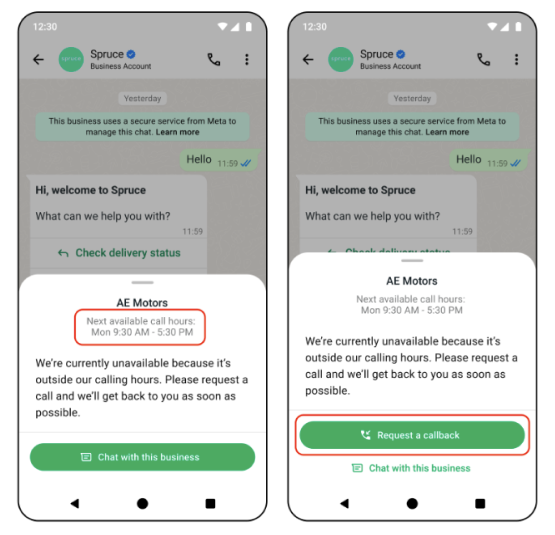
Left: callback requests off. Right: callback requests on.
How to turn it on
It takes under a minute if your business hours are already set.
- In Zoko, go to All Features > WhatsApp Calling, or open WhatsApp Calling settings directly. Calling needs to be enabled for this page to appear.
- At the top of Settings, tick Only take calls during business hours.
- Click Business Hours in the same line to check your opening times and time zone. Customers see their next available slot based on these, so make sure they're right.
- Click Save.
The change applies to the next call a customer makes. To let customers call any time again, untick the box and click Save.
Here's the setting in Zoko:
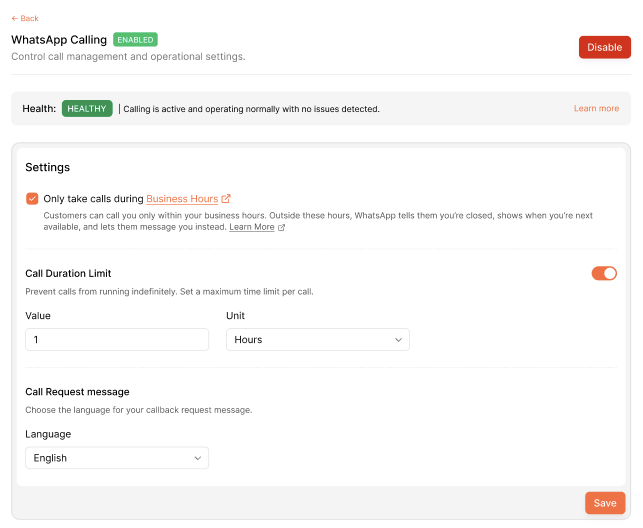
All Features > WhatsApp Calling > Settings.
Common questions
Does this stop customers messaging me outside business hours? No. It only affects calls. Customers can still send you WhatsApp messages at any time, and the panel actively points them to chat.
Does it stop my team calling customers? No. It only applies to calls customers start. Calls your team makes from Zoko work as before.
Will customers hear a ring or get a missed call? No. The call never starts. The customer sees the panel straight away, and your team isn't notified of a missed call.
Which time zone is used? The time zone in your business hours. A customer in another country sees your next available slot in your time zone, as shown in the panel.
Can I change the message customers see? No. WhatsApp writes the panel text and shows it the same way for every business. You control the hours, and whether customers can request a callback.
What if a call is already going when we close? It carries on. The setting only blocks new calls that start outside your hours. Your call duration limit still applies.
Keywords: WhatsApp calling business hours, WhatsApp call hours, restrict WhatsApp calls, WhatsApp Business calling, WhatsApp Cloud API calling, call_hours, WhatsApp callback request, request a callback WhatsApp, next available call hours, WhatsApp calls outside business hours, after-hours calls, block calls after hours, WhatsApp Business API voice calls, customer support calls, Shopify WhatsApp calling, Zoko WhatsApp Calling
