


Invalid Numbers
.png)
Share on WhatsApp
.png)
When you try to send a message through WhatsApp Business and it doesn't go through, you might see that the number has been marked as "invalid." This doesn't necessarily mean you typed the number wrong. There are several reasons why WhatsApp considers a number undeliverable.
What Makes a Number Invalid?
An invalid number is simply one that the WhatsApp API cannot deliver messages to. This can happen for a variety of reasons, most of which are outside your control.
- The recipient isn't on WhatsApp. The most straightforward reason: the person you're trying to reach hasn't registered that phone number with WhatsApp. They might have deleted the app, never signed up, or registered with a different number.
- The recipient hasn't updated their WhatsApp app. If someone is running an outdated version of WhatsApp, they may not be able to receive messages sent through the Business API. The app needs to be updated to a version that supports business messaging features.
- The recipient hasn't accepted WhatsApp's latest terms and conditions. WhatsApp requires users to accept updated terms that permit them to receive messages from businesses via the API. If a user hasn't accepted these terms, messages from business accounts won't be delivered to them.
- The number is part of a WhatsApp experiment. Meta occasionally runs experiments with a subset of users, and during these periods, those numbers temporarily can't receive messages from businesses. This is usually temporary.
- Country restrictions apply. In some cases, your business account may be restricted from messaging users in certain countries due to regulatory or policy reasons.
- WhatsApp has temporarily restricted the number. Sometimes WhatsApp limits messaging to specific numbers. This could be due to the recipient's settings, their account status, or other factors determined by WhatsApp's systems.
Error Codes for API Users
If you're working directly with the WhatsApp API, here are the error codes you might encounter:
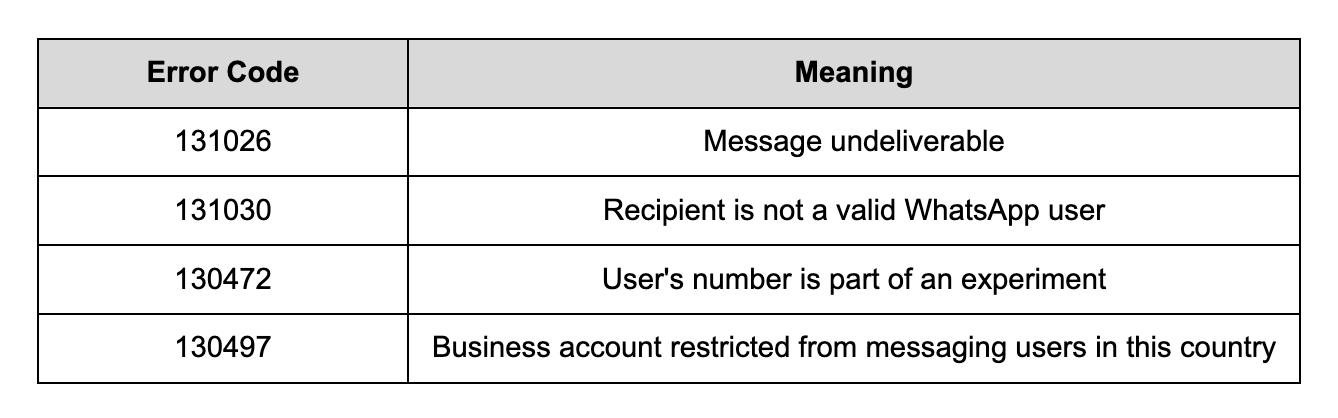
What Can You Do?
Unfortunately, most invalid number issues are resolved on WhatsApp's end or by the recipient themselves. You can periodically retry contacts that were previously invalid, as their status may change. This is especially true for numbers that were part of temporary experiments or restrictions, or for users who have since updated their app or accepted the latest terms. For numbers that consistently fail, it's best to remove them from your active messaging lists to keep your contact database clean and your delivery rates healthy.
Keywords: Invalid numbers, Numbers error, Message failed, Message undeliverable, Account restricted.
