






WhatsApp API Without Business Verification: What Shopify Merchants Can Actually Do in 2026

WhatsApp API Without Business Verification: What Shopify Merchants Can Actually Do in 2026
You have a Shopify store. Your customers are on WhatsApp. You want to send order confirmations, recover abandoned checkouts, confirm COD orders, and handle support queries from one place.
Then you search for the WhatsApp API and find yourself staring at a Meta Business Manager setup, a document verification process, and waiting periods that feel designed for enterprise companies, not a growing D2C brand.
So the question becomes: can you use WhatsApp API without going through the full business verification process? The short answer is yes, with limits you need to understand before you commit to a setup.
This article explains exactly what "WhatsApp API without business" actually means, what Meta now allows, what the real constraints are, and how Shopify merchants should think about the path forward.
Key Takeaways
- Shopify merchants can access the WhatsApp Cloud API before completing Meta business verification.
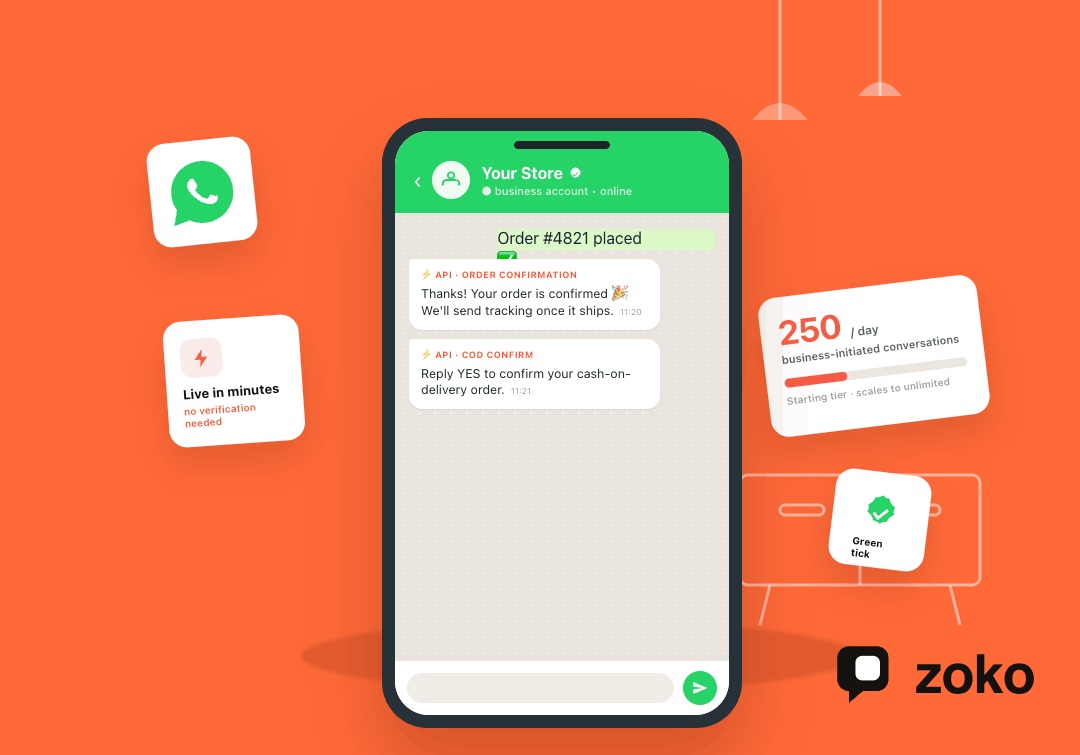
- The starting limit is 250 business-initiated conversations per day, which works for testing but can restrict larger campaigns.
- Verification becomes important when a store needs higher messaging limits, a verified display name, and stronger customer trust signals.
- Messaging limits now apply at the business portfolio level, so multiple phone numbers under the same Meta Business Manager share the same limit.
- WhatsApp API access is only the first step; the larger value comes from turning that access into sales, support, retention, and COD workflows.
What Does "WhatsApp API Without Business" Actually Mean?
Merchants searching this phrase are usually asking one of two distinct questions, and the answers are different enough that mixing them up leads to the wrong setup.
No Meta Business Verification vs No WhatsApp Business Account
The first question is whether you can access the WhatsApp Cloud API without completing Meta's Business Verification process, the part where you submit documents like a GST certificate or bank statement and wait for Meta to approve them.
The second question is whether you need a WhatsApp Business Account at all, or whether a personal number works.
On the first question: yes, you can start the API before completing verification. On the second: when you register a number through the WhatsApp Cloud API, it becomes a WhatsApp Business number by default. There is no path to the API using a personal account.
WhatsApp Business App vs WhatsApp Business API
These are two separate products. Conflating them leads to setups that cannot support the workflows a Shopify store actually needs.
The WhatsApp Business App is the free mobile app. It handles manual chats and broadcasts to up to 256 contacts. It has no Shopify integration, no automation, and no shared team inbox.
The WhatsApp Business API is what you need the moment you want messages to go out automatically: order confirmations, abandoned checkout nudges, COD confirmations, and shipping updates. None of that runs through the app.
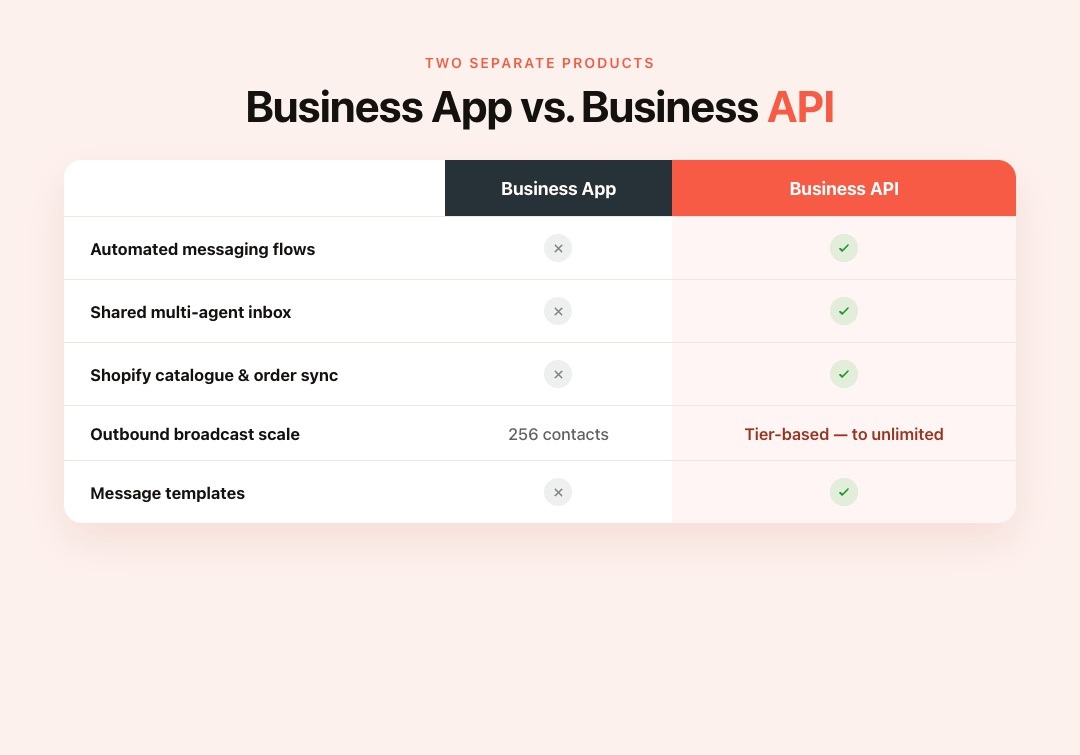
| Feature | WhatsApp Business App | WhatsApp Business API |
|---|---|---|
| Automated messaging flows | No | Yes |
| Shared multi-agent inbox | No | Yes |
| Shopify catalogue and order sync | No | Yes |
| Outbound broadcast scale | 256 contacts | Tier-based, scales to unlimited |
| Message templates | No | Yes |
Also Read: Using WhatsApp for Your Ecommerce Business: Basics and Strategies
Can You Start WhatsApp API Without Business Verification?
Yes. Meta updated its onboarding process in late 2023, which significantly affects small and mid-sized Shopify stores.
How the Process Changed
Previously, Facebook Business Verification was a mandatory first step. That meant document submission, a review period, and potential rejection before a store could send a single test message. Meta removed that requirement. When you connect your number through a WhatsApp Business Solution Provider today, your account starts at Meta's initial messaging tier immediately. No document approval needed first.
What You Can Do at This Stage
As per Meta's messaging limits documentation, new accounts begin at 250 business-initiated conversations in a rolling 24-hour period. Customer-initiated conversations, where a customer messages you first, do not count against this limit and can be replied to freely within a 24-hour service window.
From this starting tier, you can:
- Send order confirmation and shipping update templates
- Set up automated flows for abandoned checkout recovery and COD confirmation
- Handle support queries through a shared inbox
- Run small broadcast campaigns to opted-in customers
For a new Shopify store or an SMB testing the channel, this is enough to run real workflows and measure results.
Who Should Not Treat This as a Long-Term Setup
If your store sends daily promotional campaigns, runs time-sensitive sale events, or handles high-volume COD orders, you will hit the 250/day ceiling fast. A single broadcast to your full customer list can exhaust the daily limit before the day is out. These stores need to move to a higher tier, which the next section explains.
What Are the Limits Without Business Verification?

Starting without verification is practical. Knowing exactly what you are working within is equally important.
Messaging Limits and How Tiers Scale
Since October 2025, the 250-conversation limit applies at the business portfolio level shared across all phone numbers under the same Meta Business Manager account, not per individual number.
Meta evaluates accounts for tier upgrades every 6 hours. To move to the next tier, you need to send template messages to enough unique users within a rolling 30-day period while maintaining a high quality rating. Tiers scale as follows:
| Level | Messaging Limit |
|---|---|
| Starting limit for newly created business portfolios | 250 |
| Scaled limit | 2,000 |
| Scaled limit | 10,000 |
| Scaled limit | 100,000 |
| Highest limit | Unlimited |
You can progress through tiers without completing business verification, as long as your quality rating stays high.
What Verification Unlocks That Scaling Alone Cannot
Higher tiers are achievable without verification. What is not:
- Official Business Account status: Gives your brand a verified display name visible to customers
- The WhatsApp Green Tick: The single most visible trust signal on WhatsApp, especially for customers in India, Brazil, and the Middle East who receive messages from unknown numbers daily
Without a verified display name, your store's order confirmations and COD updates arrive as messages from an unrecognised number. In markets where customers are cautious about unknown WhatsApp senders, this affects open rates and response rates directly.
When You Should Complete Verification
Start the verification process when:
- WhatsApp handles daily order communications and support at volume
- You need to run large promotional broadcasts to your full customer list
- Customers are confirming COD orders or sharing payment details through WhatsApp
- You want the green tick to build brand recognition in new markets
Also Read: Understanding WhatsApp Order Confirmation: Definition and Best Practices
How to Get WhatsApp API Without Business Verification
Here is the practical setup path for a Shopify merchant who wants to go live quickly.
Before starting, note: even without formal verification, you still need a Meta Business Manager account and a dedicated phone number for your store's WhatsApp channel. Follow Meta's WhatsApp Cloud API get-started guide for the official setup steps.
Step 1: Choose Your Access Route
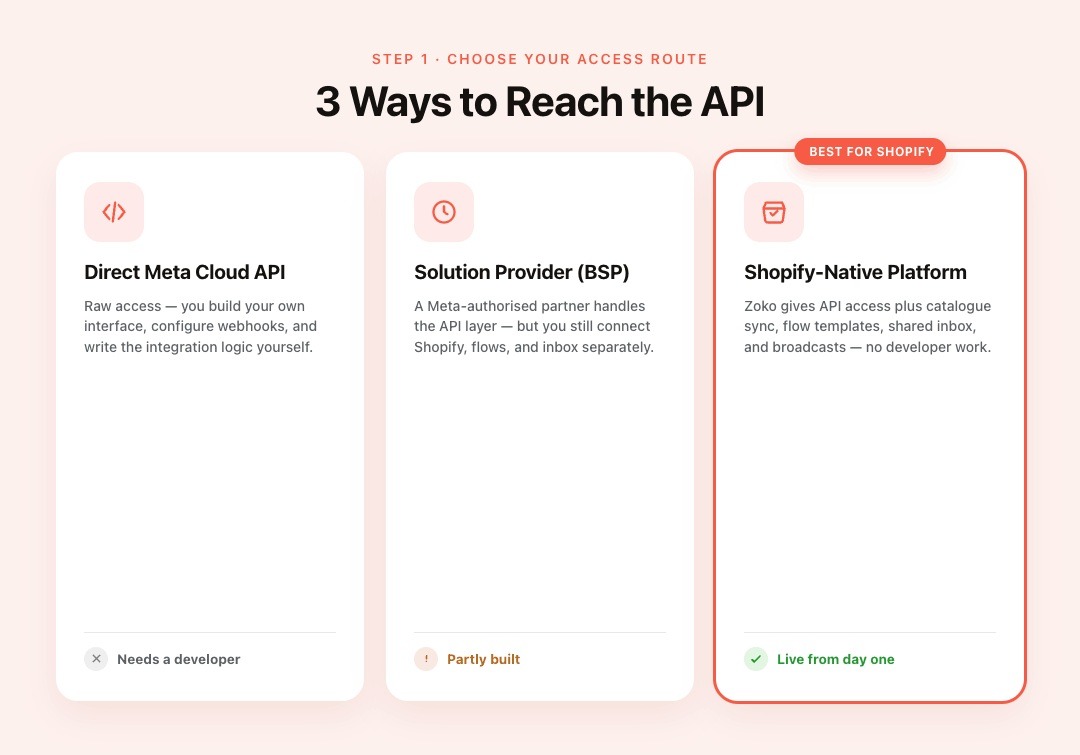
Three routes exist, and they are not equivalent for a Shopify store:
- Direct Meta Cloud API: Raw access that requires building your own interface, configuring webhooks, and writing integration logic. Not practical without a developer.
- WhatsApp Business Solution Provider: A Meta-authorised partner handles the API layer. You still need to connect Shopify, flows, and inbox separately.
- Shopify-native WhatsApp commerce platform: A platform like Zoko provides API access, built-in Shopify catalogue sync, automated flow templates, a shared inbox, and broadcasts, all without requiring developer work.
For most Shopify merchants, the third route is the only one where going live means having working e-commerce workflows from day one, not just a connection that still needs to be built on.
Step 2: Connect Your Number Carefully
Do not connect a number your team already uses for customer conversations without a migration plan. If customers are actively messaging that number, switching to a new API setup without carefully handling the transition can disrupt those conversations. Start with a dedicated number if you are setting up fresh.
Step 3: Protect Your Quality Rating From Day One
Your path to higher tiers depends entirely on your phone number's quality rating. A dropping rating halts tier upgrades and can freeze your outbound messaging.
- Only message customers who have opted in
- Use templates that are relevant and useful to the recipient
- Do not run cold outreach campaigns
- Monitor your rating in Meta's WhatsApp Manager under Account tools, then Phone numbers
Also Read: How to Send Automatic Messages on WhatsApp with WhatsApp Business API
Also read: WhatsApp Business API Chatbot Integration: A Practical Guide for Shopify Merchants
Can You Use WhatsApp Business App and API on the Same Number?
Until early 2025, migrating to the WhatsApp Cloud API meant disconnecting from the Business App and losing chat history. Many Shopify merchants held off on the API for exactly this reason. Meta officially resolved this in early 2025 with the release of WhatsApp Coexistence.
How WhatsApp Coexistence Works
Coexistence lets the WhatsApp Business App and WhatsApp Cloud API run on the same phone number at the same time. Messages on both sides are mirrored in real time through what Meta calls Messaging Echoes. Your team keeps using the app on their phones while the API runs automation and broadcasts on the same number in the background.
Setup happens through Meta's Embedded Signup process. You select "Connect your existing WhatsApp Business App" when connecting, rather than migrating to a new number. Up to six months of chat history syncs across both environments.
What to Know Before Enabling Coexistence
- WhatsApp Groups and Status remain available through the app only. The API does not support them
- App broadcasts and API broadcasts are separate; they do not share recipient lists
- Messages sent via the Cloud API are charged per Meta's conversation pricing; Business App messages remain free
This works well as a transitional setup. A Shopify store can keep staff replying through the app while automating order updates and abandoned cart flows through the API without retraining anyone or asking customers to message a new number.
What Risks Should Shopify Merchants Avoid?

Three decisions in the early setup phase can permanently damage your WhatsApp channel before it has had a chance to perform.
Unofficial API Tools That Bypass Meta
Some services promise instant WhatsApp access with no Meta setup required. These use unofficial methods, typically browser automation or reverse-engineered WhatsApp Web protocols that violate Meta's platform policies. Using them risks permanent suspension with no appeal and no recovery of your contact list or conversation history. Use only Meta-authorised Business Solution Providers.
Sending to Contacts Who Did Not Opt In
WhatsApp's quality rating is how your store earns higher tiers. Customers who receive messages they did not ask for will block or report the sender. A single poorly-targeted broadcast can drop your rating and freeze tier progression. Collect opt-ins at checkout, on your website, or via WhatsApp click-to-chat links before sending any outbound message.
Choosing a Tool That Cannot Support Shopify Workflows
Generic WhatsApp tools that offer basic API access without Shopify integration leave you manually reconciling orders and managing conversations without customer purchase context. If the platform cannot sync your catalogue, pull order data, or run multi-step flows, you will spend more time on workarounds than on selling.
How Zoko Turns WhatsApp API Access Into a Sales Channel for Shopify Stores
API access gets Shopify merchants connected to WhatsApp. The next step is turning that connection into workflows that generate orders, handle support, and bring customers back. Zoko for Shopify is built to help Shopify stores make that shift without requiring a developer or a separate tool stack.
WhatsApp Catalogue Sync With Your Shopify Store
Zoko syncs your WhatsApp catalogue with your Shopify store. Customers can browse products, view images and prices, and add items to their cart in the chat without being redirected to your website. For mobile-first shoppers in India, Brazil, and the Middle East, removing that step reduces drop-off between product interest and purchase.
Zoko Flows: Automated E-Commerce Workflows
Zoko Flows automates the workflows that directly affect revenue and reduce manual support load:
- Abandoned checkout recovery: Sends a follow-up when a customer leaves without completing purchase
- COD confirmation: Confirms orders before dispatch, reducing return-to-origin risk
- Shipping updates: Notifies customers automatically at dispatch and delivery
- Reorder reminders: Re-engages customers who bought consumable or repeat-purchase products
- Review collection: Requests feedback after confirmed delivery
- Upsell messages: Suggests relevant products post-purchase
Shiprocket Integration for COD Management
For Indian Shopify stores where cash-on-delivery makes up a significant share of orders, failed deliveries are a direct margin cost. Zoko’s Shiprocket integration connects logistics data to WhatsApp so that delivery confirmations, status updates, and return communications go out automatically without manual coordination from your team.
WhatsApp Broadcasts for Retention and Repeat Sales
Zoko sends personalised WhatsApp broadcasts to segmented customer lists. Sale announcements, back-in-stock alerts, and loyalty offers go out on a channel customers are likely to check more frequently than email. That makes WhatsApp useful for campaigns that need timely attention.
AI Chatbot for Instant Query Handling
Zoko AI helps resolve FAQs, order status questions, and common post-purchase queries without a team member. Your team handles only conversations that need a person, which keeps response times low as order volume grows.
Zoko is an Official Meta Business Partner and supports merchants through the business verification process when they are ready to scale beyond the initial tier.
Also Read: How to Create a WhatsApp AI Chatbot for Real-Time Interaction
Conclusion
The verification gate that used to block Shopify merchants from the WhatsApp Cloud API is no longer upfront. You can connect your store, configure workflows, and start sending messages to customers before submitting a single document to Meta.
The 250 conversations per day starting limit is real. For stores testing the channel or running contained customer operations, it is workable. For stores running daily campaigns or high-volume COD operations, it quickly becomes a constraint. Verification is what moves you past it and also gives your store a verified display name and a green tick that make your messages credible to customers in India, Brazil, and the Middle East.
Zoko handles the Shopify integration, automated flows, COD management via Shiprocket, and broadcasts so the gap between “API connected” and “WhatsApp generating revenue” is as short as possible.
Start Zoko’s 7-day trial to connect your Shopify store to WhatsApp, test the core workflows, and see whether the channel fits your sales and support operations before you commit. You can also book a demo to see the full setup first.
Also read: WhatsApp Business API Coexistence for Shopify Stores
Also read: WhatsApp Business API Limitations Every Shopify Merchant Should Know
FAQs
Q. Can I use WhatsApp API without completing Meta Business Verification?
Yes. Meta's current onboarding gives new accounts immediate API access at 250 business-initiated conversations per day, before any verification is required. Verification is still needed to apply for Official Business Account status and the WhatsApp green tick.
Q. Do I need a registered business to access the WhatsApp Cloud API?
You need a Meta Business Manager account, which is separate from formal business verification. Whether a registered legal entity is required depends on your country and chosen provider. Many merchants begin with Meta Business Manager set up and verification pending.
Q. Does using WhatsApp API cost anything without verification?
There is no API setup fee, but Meta charges per conversation based on message type and destination country, and most platforms charge a monthly subscription. Review Meta's WhatsApp pricing page alongside your provider's fees before committing.
Q. Can a Shopify store use WhatsApp API for abandoned checkout recovery without verification?
Yes. You need a Shopify-connected WhatsApp platform, customer opt-ins at checkout, and an automation flow that triggers when a checkout is abandoned. Zoko includes this as a pre-built flow.
Q. What does Zoko add beyond WhatsApp API access?
Zoko adds the full e-commerce layer: Shopify catalogue sync for in-chat product browsing, automated flows for COD confirmation, abandoned checkout recovery, shipping updates, and reorder reminders, segmented broadcast campaigns, a shared multi-agent inbox, AI chatbot support, and Shiprocket integration for logistics management.
Interested to know more?
.svg)
Case Studies




















Featured Posts


Continue reading

The E-Commerce Divide: How the Top 10% of Brands Use AI to Grow 5X Faster (And Why It’s Not for Everyone)
Drive Sales with WhatsApp Catalog Integration: Here's How