







If you run a Shopify store in India, Brazil, or the Middle East, you already know WhatsApp is where your customers live. For years, the moment you wanted to move from the WhatsApp Business App to the full API, you had to delete your account. Your chat history, your customer contacts, your entire conversation record with buyers you had spent months building trust with: all of it was gone. That one requirement stopped a lot of Shopify merchants from making the move.
WhatsApp Business API coexistence removes that barrier. You can now run the WhatsApp Business App and the WhatsApp Business API on the same phone number at the same time and sync up to six months of your existing chat history across both. This article explains exactly how it works, what changes, and what you can build on top of it once you are connected.
Key Takeaways
- WhatsApp Business API coexistence lets eligible Shopify merchants use the WhatsApp Business App and API on the same number.
- Recent 1:1 chat history can sync into the API setup, so teams keep customer context from past WhatsApp conversations.
- The Business App remains useful for personal, high-context chats, while API workflows handle repeatable Shopify updates.
- Broadcasts, abandoned checkout reminders, COD confirmations, shipping updates, and reorder prompts should move to API-backed workflows.
- Zoko helps Shopify merchants connect WhatsApp with Shopify data, catalogue selling, AI support, and e-commerce automation.
The WhatsApp Business App and the API Are Not the Same Thing

Before getting into coexistence, it helps to separate the WhatsApp Business App from the WhatsApp Business API. Most Shopify merchants start with the app, then outgrow it once orders, support, and campaigns become harder to manage manually.
The WhatsApp Business App: Good for Getting Started, Limited for Growth
The WhatsApp Business App is the free mobile app many small businesses start with. You install it on your phone, set up a business profile, and reply to customers manually.
It works well for a small team with a manageable inbox. But it is not built for deep Shopify workflows. You cannot connect it directly to Shopify events, trigger order updates from your store, or run advanced automation around abandoned checkouts, COD confirmations, and shipping updates.
The WhatsApp Business API: Built for Shopify Workflows and Automation
The WhatsApp Business API, now part of the WhatsApp Business Platform, is not a mobile app. It is the API layer that lets approved platforms send and receive WhatsApp messages for your business.
Through the API, Shopify merchants can automate order notifications, send approved broadcast campaigns, give support teams a shared inbox, and connect WhatsApp directly to Shopify data. You access it through an official WhatsApp Business Solution Provider.
What Coexistence Solves During the Move to the API
Before WhatsApp Business API coexistence, many merchants saw the API as a risky move. They wanted automation, but they did not want to lose the app experience their team and customers already knew.
The Old Setup Made Migration Feel Costly
Earlier API migration paths could force merchants to remove the WhatsApp Business App from the number before using that number on the API. That meant losing the familiar app setup and starting fresh inside an API platform.
For a Shopify merchant, this was not a small issue. WhatsApp conversations often contain product preferences, delivery problems, COD confirmations, refund context, and repeat buyer history. Losing that context could slow down support and weaken customer trust.
Coexistence Keeps the App and API Active on the Same Number
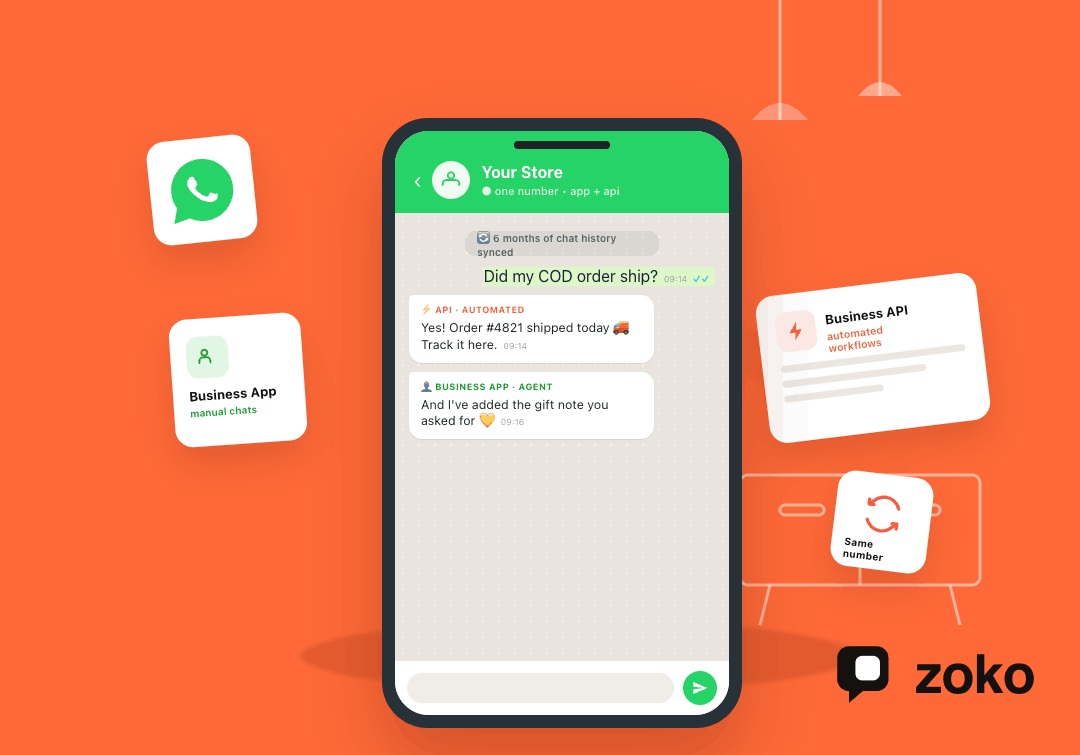
With coexistence, your WhatsApp Business App stays active while your API platform runs in parallel on the same number. Meta’s Business App onboarding documentation says recent 1:1 chat messages can be synchronised, and messages sent or received are mirrored between the Cloud API and the app.
That means your team can still reply from the app when needed. At the same time, the API can handle order confirmations, abandoned cart follow-ups, shipping updates, and common support questions.
Contact information can also sync into the API setup when supported by the onboarding flow. Group chats remain in the app and do not become Shopify automation workflows.
Coexistence Does Not Change Your App Messaging Costs
Messages sent from the WhatsApp Business App remain part of the app experience. On the API side, charges follow Meta’s current WhatsApp Business Platform pricing. Service replies inside the 24-hour customer service window are handled differently from paid template messages.
For Shopify merchants, the simple rule is this: manual app conversations and API automation are not priced the same way. Before sending campaigns, check template category, pricing, and customer opt-in rules.
Also Read: How to Send Automatic Messages on WhatsApp with WhatsApp Business API
What Still Changes Inside the WhatsApp Business App
WhatsApp Business API coexistence does not leave your Business App untouched. Some app features continue as before, while API-connected workflows move into your WhatsApp platform.
What Keeps Working as Before
Your day-to-day app experience remains familiar. One-to-one chats continue. Your team can still respond to customers from the app. Voice and video calls remain app-based. Group chats also stay in the app.
This matters for Shopify merchants who still want the option to handle sensitive or high-value conversations personally.
What Should Move to the API Platform
Campaigns, cart recovery, COD confirmations, shipping updates, and reorder messages should move to the API platform. These are not casual replies. They are repeatable e-commerce workflows that depend on timing, templates, opt-ins, and Shopify data.
API broadcasts replace manual app broadcast habits, but they are not unlimited in practise. They still depend on opt-ins, approved templates when required, Meta’s messaging limits, and account quality.
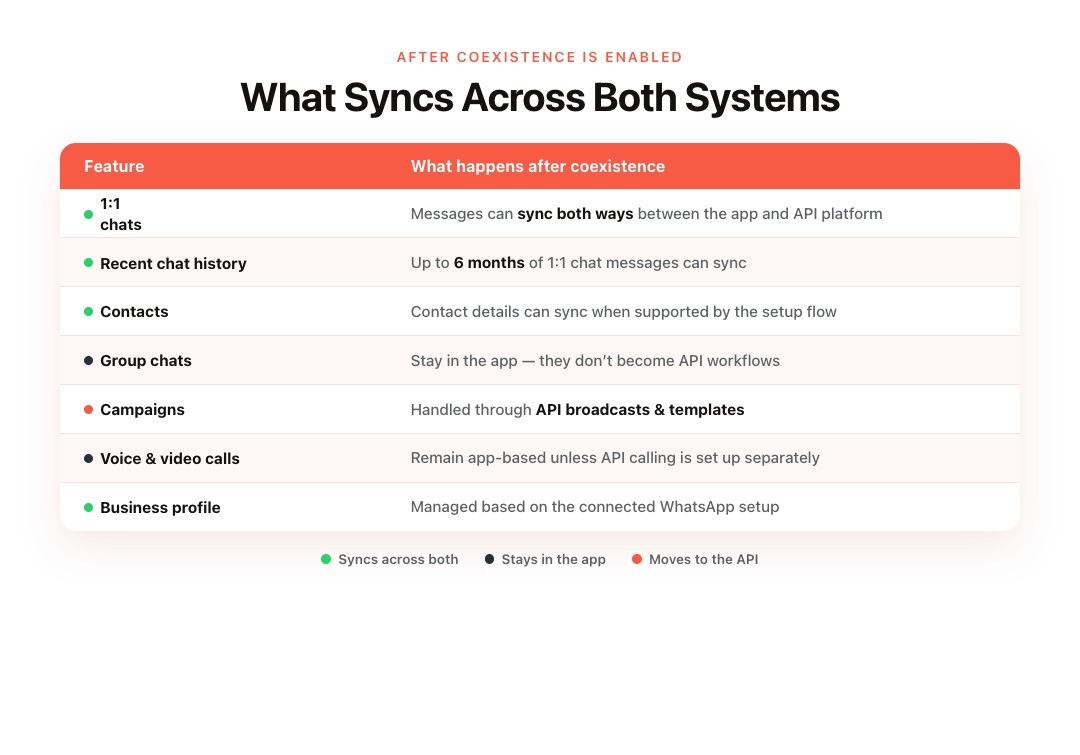
What Syncs Across Both Systems
| Feature | What Happens After Coexistence |
|---|---|
| 1:1 chats | Messages can sync between the app and API platform |
| Recent chat history | Up to six months of 1:1 chat messages can sync |
| Contacts | Contact details can sync when supported by the setup flow |
| Group chats | Stay in the app and do not sync as API workflows |
| Campaigns | Should be handled through API broadcasts and templates |
| Voice and video calls | Remain app-based unless API calling is separately set up |
| Business profile | Managed based on the connected WhatsApp setup |
The biggest benefit is continuity. If a customer has already discussed a COD order, return, size question, or delivery issue, your team can keep that context after moving to the API.
Also read: WhatsApp API Without Business Verification: What Shopify Merchants Can Actually Do in 2026
How to Connect Your Number Without a Custom API Build
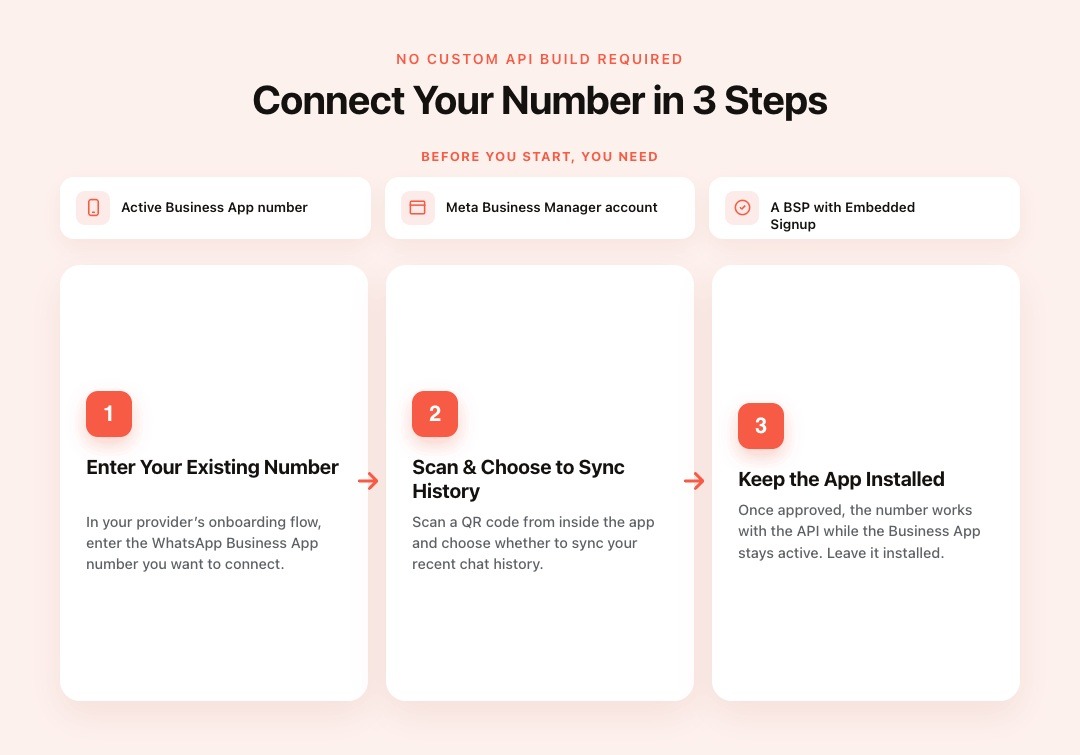
Coexistence setup is designed for business onboarding through Meta and a WhatsApp Business Solution Provider. You do not need to build your own WhatsApp API system from scratch.
What you need before you start:
You need an active WhatsApp Business App account on the number you want to connect. You also need a Meta Business Manager account and access to a provider that supports onboarding existing Business App numbers through Embedded Signup.
How the connection works:
Your provider’s onboarding flow asks you to enter your existing WhatsApp Business App number. You then scan a QR code from inside the app and choose whether to sync recent chat history. Once the setup is approved, the number can work with the API while the Business App remains active.
Keep the app installed and active after setup. If the app is removed or the connection breaks, you may need to reconnect it through the onboarding flow.
Also Read: Step-by-Step Guide to Integrating WhatsApp with Shopify
What Shopify Merchants Can Do After Coexistence
Once coexistence is active, Shopify teams can divide WhatsApp work by job type. The Business App can stay focused on manual conversations, while the API handles repeatable updates tied to orders, carts, payments, and delivery.
Keep High-Context Conversations in the App
Some WhatsApp chats still need a human touch. A skincare brand in Mumbai may need to advise a repeat buyer with sensitive skin. A fashion label in São Paulo may need to help someone choose between two sizes. A home goods store in Dubai may need to handle a damaged-delivery complaint carefully.
These conversations depend on judgment, tone, and customer history. Keeping the WhatsApp Business App active gives the team a familiar place to handle them without forcing every interaction into automation.
Move Repeatable Shopify Updates to the API
The API is better suited for messages that are frequent, time-sensitive, and tied to Shopify data. That includes abandoned checkout reminders, COD confirmations, shipping updates, review requests, reorder prompts, and payment follow-ups.
These messages do not need to be typed manually each time. They need the right trigger, template, customer context, and timing. That is where coexistence becomes useful for daily ecommerce operations: the app can stay useful for personal conversations, while the API takes over the work that slows the team down.
Also Read: Understanding WhatsApp Order Confirmation: Definition and Best Practises
How Zoko Turns Your WhatsApp API Connection Into a Revenue Channel
Getting onto the API is only the first step. What you build on top of it decides whether WhatsApp becomes a stronger sales and support channel.
Zoko is an Official Meta Business Partner built for Shopify merchants. It connects Shopify with WhatsApp so merchants can manage customer conversations, order updates, broadcasts, COD workflows, catalogue selling, and AI support from one place.
Shopify Events Trigger the Right WhatsApp Messages
Zoko’s WhatsApp for Shopify setup connects to your Shopify backend so order placements, abandoned checkouts, and shipment milestones can trigger the right WhatsApp message. Your shared inbox also shows Shopify order context, so the person handling the chat can see what the customer bought, where the order stands, and what action is needed next.
Ecommerce Flows Handle Common WhatsApp Tasks
Zoko Flows supports common ecommerce workflows such as abandoned checkout recovery, COD confirmation, COD-to-prepaid prompts, shipping notifications, reorder reminders, and review collection.
For merchants in India and other COD-heavy markets, these flows help reduce manual follow-ups and missed confirmations.
AI Agents Answer Frequent Support Questions
Zoko’s AI agents are built for common WhatsApp support tasks. Guru handles FAQs, return policies, product questions, and store information. Wismo answers order-tracking questions using Shopify data. Sello helps take orders on WhatsApp when your team is offline or busy.
Human agents still handle complex cases. AI handles the repetitive questions that slow the team down.
Your Shopify Catalogue Becomes Available Inside WhatsApp
Zoko can sync your Shopify product catalogue with WhatsApp. Customers can browse products, ask item-specific questions, and move toward purchase inside the chat.
That matters because many WhatsApp buyers do not want to jump across channels. The shorter the path from question to order, the easier it is to keep the sale moving.
Conclusion
WhatsApp Business API coexistence makes the move to the API easier for Shopify merchants who already use the WhatsApp Business App. The same number can stay active, recent 1:1 chat history can sync, and your team can keep customer context while adding API-based workflows.
For Shopify merchants in WhatsApp-first markets, this makes it easier to improve cart recovery, COD handling, order updates, broadcasts, catalogue selling, and support. Start your 7-day free trial at Zoko, or book a demo to see how Zoko connects WhatsApp with your Shopify store.
Also read: WhatsApp Business API Limitations Every Shopify Merchant Should Know
Frequently Asked Questions
Q. Can I use the WhatsApp Business App and the WhatsApp Business API on the same number?
Yes. Coexistence lets eligible businesses keep the WhatsApp Business App active while using the same number with the WhatsApp Business Platform.
Q. Will I lose my chat history when I enable coexistence?
No. Meta supports syncing up to six months of recent 1:1 chat messages during Business App onboarding to the API.
Q. Is WhatsApp coexistence available in India?
WhatsApp Business App onboarding to the API is supported in many markets. Shopify merchants in India should check current eligibility during Embedded Signup because market support can change.
Q. Do messages sent from the WhatsApp Business App cost anything after coexistence is enabled?
Messages sent from the app remain part of the Business App experience. API-side messages follow Meta’s current WhatsApp Business Platform pricing.
Q. As a Shopify merchant, what can I automate once I am on the API?
With Zoko, you can automate abandoned cart recovery, COD confirmation, shipping updates, reorder reminders, review collection, and common support replies triggered by Shopify events.
Q. Is coexistence available in Brazil and other markets?
It is available in many supported markets, but eligibility can change. Check the current Embedded Signup flow for your country and business account.
Interested to know more?
.svg)
Case Studies


















Featured Posts


Continue reading

The E-Commerce Divide: How the Top 10% of Brands Use AI to Grow 5X Faster (And Why It’s Not for Everyone)
Drive Sales with WhatsApp Catalog Integration: Here's How