






WhatsApp Business API Limitations Every Shopify Merchant Should Know

WhatsApp Business API Limitations Every Shopify Merchant Should Know
You set up an abandoned cart recovery message on WhatsApp, sent it, and heard nothing back. No delivery confirmation or customer response. If your first thought was “technical error,” you were not entirely wrong. The real issue is often a rule nobody flagged before you went live.
The WhatsApp Business API does not work like email or SMS. It runs on defined limits: a 24-hour customer service window, approved message templates for re-engagement, Meta-set messaging limits, setup rules for phone numbers, and extra eligibility requirements for features like calling and groups.
For Shopify merchants, these limits affect cart recovery, COD confirmation, shipping updates, support speed, broadcasts, and customer engagement on WhatsApp. Knowing these WhatsApp Business API limitations up front helps you design better workflows rather than fixing broken ones after launch.
Key Takeaways
- WhatsApp Business API limitations directly affect Shopify workflows such as cart recovery, COD confirmation, shipping updates, support replies, and broadcasts.
- The 24-hour customer service window controls when merchants can send free-form replies; after that, approved templates are needed.
- Messaging limits and account quality shape how many customers a store can reach through WhatsApp campaigns.
- Group messaging and voice calling have specific access rules, so most Shopify stores should build around one-to-one customer journeys first.
- Zoko helps merchants manage these limits through WhatsApp sales, support, COD, catalogue, broadcast, and automation workflows.
WhatsApp Business API vs. the WhatsApp Business App
If you are running a Shopify store on WhatsApp at any meaningful volume, you are likely better served by the API, not only the App.
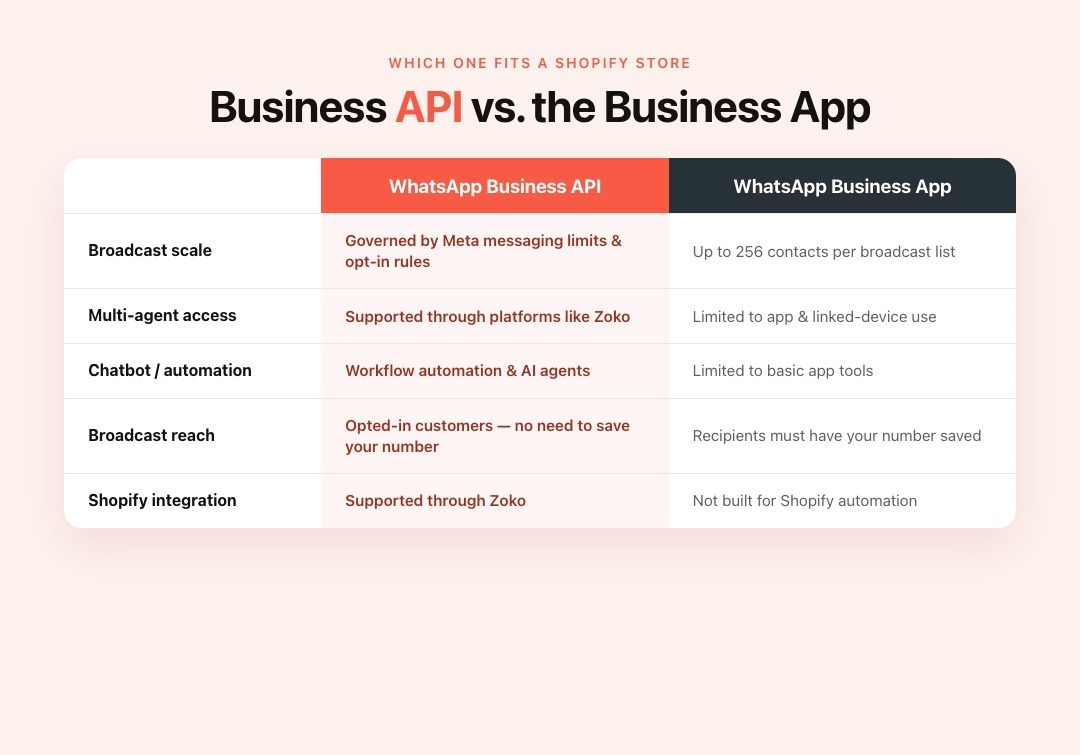
The WhatsApp Business App is the free, phone-based tool built for small businesses handling conversations manually. The API connects WhatsApp to platforms, CRMs, automation tools, and Shopify workflows through providers like Zoko. That makes it more suitable for multi-agent support, broadcasts, chatbot automation, order updates, catalogue selling, and COD workflows.
| Feature | WhatsApp Business API | WhatsApp Business App |
|---|---|---|
| Broadcast Scale | Governed by Meta messaging limits and opt-in rules | Up to 256 contacts per broadcast list |
| Multi-Agent Access | Supported through platforms like Zoko | Limited to app and linked-device use |
| Chatbot/Automation | Supports workflow automation and AI agents | Limited to basic app tools |
| Broadcast Reach | Opted-in customers, without needing them to save your number | Recipients must have your number saved |
| Shopify Integration | Supported through Zoko | Not built for Shopify automation |
Also Read: WhatsApp Business API Features and Setup Guide
6 Main WhatsApp Business API Limitations at a Glance
| Limitation | What It Means in Practice |
|---|---|
| 24-hour customer service window | After a customer messages you, you have 24 hours to reply freely. After that, use approved templates. |
| Template approval for re-engagement | Business-initiated messages outside the service window need Meta-approved templates. |
| Messaging limits | Meta controls how many unique customers you can reach with template messages. |
| Group messaging has specific eligibility rules | Group API access exists, but it is not the default model for Shopify support or sales workflows. |
| Calling requires specific setup | WhatsApp Business Calling API is available, but it requires Cloud API setup and eligibility. |
| Phone numbers have setup rules | Your number must be registered correctly before it can send and receive API messages. |
Limitation 1: You Can Only Message Freely Within a 24-Hour Session
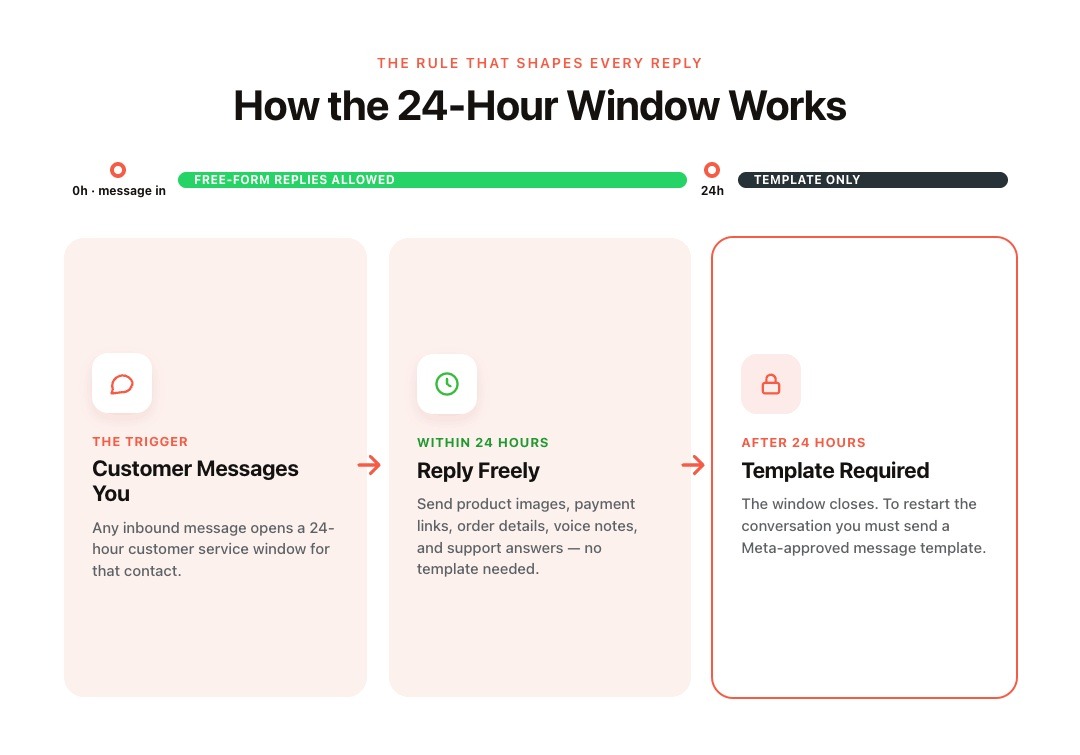
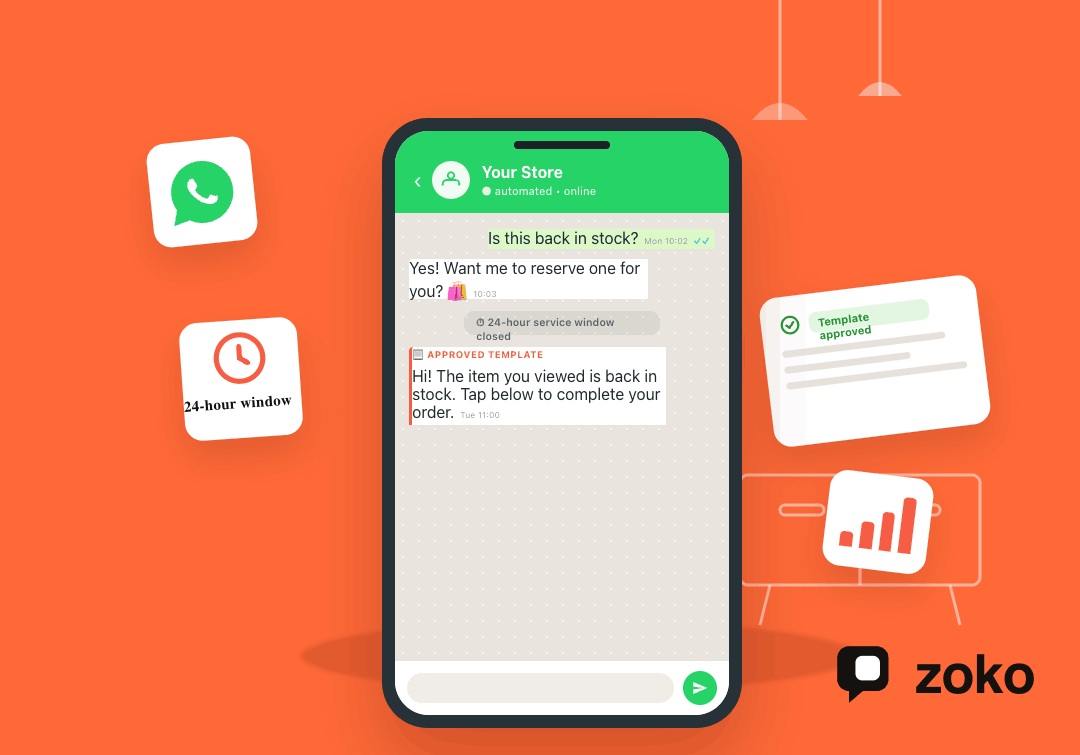
Once a customer messages your store, a 24-hour customer service window opens. During that window, your team can send regular service replies through the WhatsApp Business API. After it closes, you need an approved template to restart the conversation, as explained in Meta’s service message documentation.
How the Session Works
During the 24-hour period, you can reply with product images, payment links, order details, voice notes, or support answers. Once the window closes, free-form replies stop working. Any follow-up must use an approved message template.
For example, a customer messages at 10 AM Monday asking about a product. If your team replies at 11 AM Tuesday, the customer service window has already closed. That reply needs to be sent as an approved template, not a regular message.
What It Means for Cart Recovery and Order Follow-ups
For Shopify merchants, this rule directly affects abandoned cart recovery, COD confirmation, payment reminders, and order follow-ups. Even a short nudge like "Still interested?" needs Meta's clearance after 24 hours have passed.
Also Read: Step-by-Step Guide to Recovering Abandoned Carts on WhatsApp
Limitation 2: Business-Initiated Messages Need Meta-Approved Templates
If your store starts or restarts a conversation outside the customer service window, you need an approved message template. This applies to common Shopify workflows like abandoned cart reminders, COD confirmation, shipping alerts, reorder prompts, and review requests.
What a Template Message Is
A template is a reusable message format submitted for approval before use. Meta explains template rules in its official WhatsApp message template documentation.
Common ecommerce template use cases include:
- COD order confirmation requests
- Shipping and delivery updates
- Abandoned cart reminders
- Reorder reminders
- Post-delivery review requests
- Payment or prepaid conversion prompts
For Shopify teams, templates should be prepared before a campaign or automation goes live. Otherwise, a workflow may be ready in your tool but blocked at the message level.
Why Templates Get Rejected
Rejection is one of the most common friction points for merchants new to the API. Most rejections follow a recognisable pattern.
Common causes include:
- Unclear purpose: The message does not explain why the customer is receiving it.
- Weak opt-in context: The message feels unexpected or irrelevant to the customer.
- Incorrect variables: Dynamic fields need to follow Meta’s required formatting.
- Policy issues: The message conflicts with the WhatsApp Business Messaging Policy or Meta’s Commerce Policy.
A good template should have one clear purpose, a relevant customer context, and a simple action. For example, a COD confirmation template should focus on confirming the order, not adding unrelated promotions.
Limitation 3: Your Account Has Messaging Limits
Meta assigns a daily cap on unique customers you can reach with business-initiated messages. It starts low and moves based on your account behavior.
How the Tier System Works
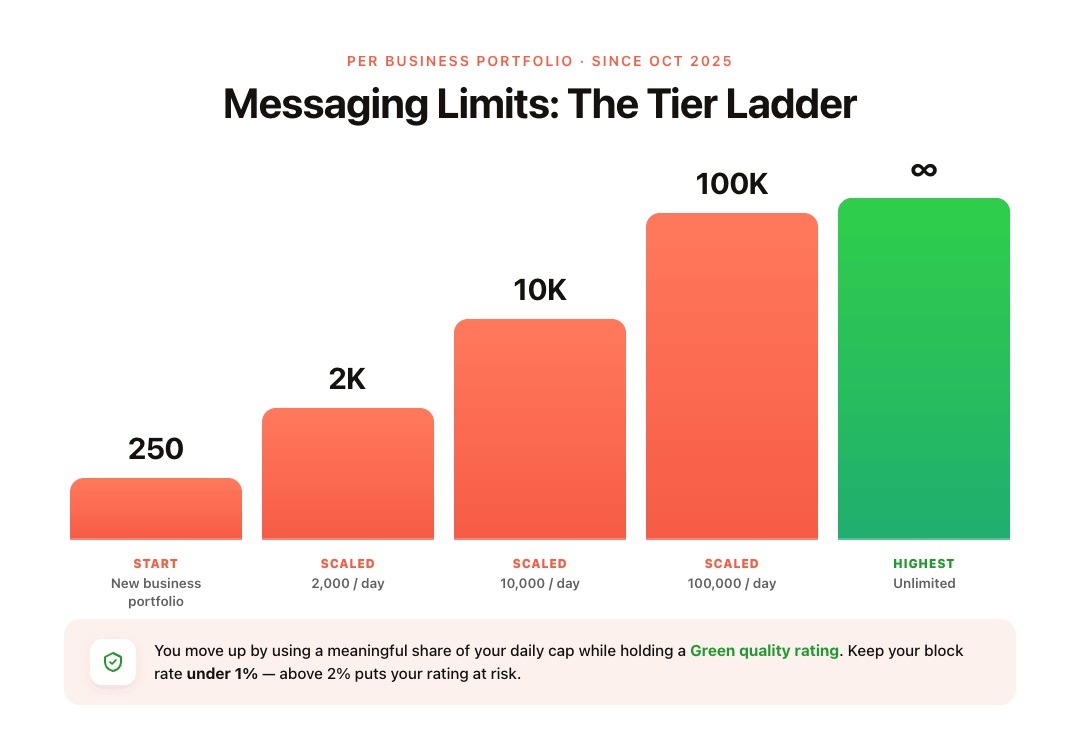
According to Meta's official Messaging Limits documentation, all accounts begin at a set daily threshold and progress through tiers as trust is established:
| Level | Messaging Limit |
|---|---|
| Starting limit for newly created business portfolios | 250 |
| Scaled limit | 2,000 |
| Scaled limit | 10,000 |
| Scaled limit | 100,000 |
| Highest limit | Unlimited |
As of October 2025, these caps apply per business portfolio rather than per phone number. Adding a second WhatsApp number does not increase your cap. Both numbers share the same tier. For Shopify merchants running more than one store under the same portfolio, this directly affects campaign planning.
What Moves You Up or Down a Tier
Meta upgrades your tier automatically when you consistently use a meaningful portion of your current daily cap while holding a Green quality rating. Quality is shaped by what recipients do after receiving your messages: block rates, spam reports, and overall relevance all factor in. Keeping your block rate below 1% is healthy. Above 2% puts your quality rating at risk.
Note: As of October 2025, a quality rating drop no longer triggers an automatic tier downgrade. A Red rating prevents you from advancing to a higher tier, but your current cap stays in place.
Also Read: How to Send WhatsApp Broadcast Messages at Scale
Also read: WhatsApp Template Message API: A Complete 2026 Guide
Limitation 4: Group Messaging Is Not the Default Workflow for Shopify Automation
The old assumption was simple: WhatsApp Business API conversations are one-to-one. That is still the most practical model for Shopify sales, support, cart recovery, COD confirmation, and order updates.
However, it is no longer accurate to say group messaging has “no workaround.” Meta now documents a WhatsApp Groups API, with access rules tied to business eligibility.
For most Shopify merchants, the better takeaway is this: do not design core WhatsApp commerce workflows around groups. Abandoned cart messages, order tracking, payment links, support answers, and product recommendations need customer-specific data. They work best as one-to-one journeys connected to Shopify.
Groups may support specific community or announcement use cases, but they should not replace personalised customer messaging.
Limitation 5: Voice Calls Are Available but Require Setup
Meta introduced the WhatsApp Business Calling API so businesses can add voice calling to customer journeys. The feature can help with high-intent sales, delivery issues, COD verification, and support escalations.
Access is not automatic for every new API account. Meta’s Cloud API Calling documentation includes specific setup and eligibility requirements.
Most Shopify merchants should launch with strong messaging workflows first:
- Abandoned checkout recovery
- COD confirmation
- Order and shipping notifications
- Product questions
- Support replies
- Review requests
Calling can be added later when your account, support volume, and customer journey justify it.
Limitation 6: Your Phone Number Has Registration Constraints
A WhatsApp business phone number must be registered before it can send and receive messages through Cloud API. Meta’s business phone number documentation explains the registration requirement.
Historically, using the same number across the WhatsApp Business App and API was difficult. Meta now supports onboarding some WhatsApp Business App users to Cloud API through an official flow, explained in its Business App user onboarding documentation.
For Shopify merchants, the practical issue is customer continuity. If buyers already know your WhatsApp number, changing it can create friction. Zoko helps merchants connect Shopify with WhatsApp and set up the right number, workflows, templates, and automations without treating the API as a manual technical project. Connect Your Shopify Store to WhatsApp.
What These Limitations Mean for Your Shopify Store
Each limit affects a different part of daily ecommerce operations. Here is where Shopify merchants will feel them most.
Customer Support Response Time Becomes a Business Requirement
If your team misses the 24-hour customer service window, a normal support reply may need to become a template message. That slows down conversations and can hurt conversion when the customer is still deciding.
For busy Shopify stores, this makes response speed more than a support metric. It affects cart recovery, product questions, payment clarifications, and order-related conversations.
Broadcast Campaigns Need a Different Workflow Than Email
You cannot treat WhatsApp like an email newsletter. WhatsApp broadcasts need opt-in, approved templates when required, and tighter audience selection.
This is good discipline. A back-in-stock alert to interested shoppers is stronger than a generic discount blast to everyone. Relevance protects quality and improves the chance that customers reply, buy, or reorder.
COD Confirmations and Order Flows Depend on Approved Templates
COD confirmations, shipping alerts, and reorder reminders are business-critical for many Shopify stores, especially in India and other WhatsApp-first markets.
If these templates are not ready before launch, teams end up confirming orders manually, chasing customers after the service window closes, or sending delayed updates. The better approach is to prepare these workflows before campaigns and order flows go live.
How Zoko Helps Shopify Merchants Work Within These Limits

Zoko is built around WhatsApp Business API rules, so merchants do not have to manage every constraint manually.
Flows Timed to the Session Window
Zoko Flows helps merchants automate key ecommerce journeys at the right moment. Abandoned checkout recovery, COD confirmation, shipping updates, reorder reminders, and review collection can run without constant manual follow-up.
Template and Broadcast Management in One Place
Through Zoko’s Broadcasts, merchants can send campaigns to relevant customer segments instead of treating every subscriber the same. This helps protect account quality and keeps broadcasts tied to real shopper intent.
AI Agents That Keep Conversations Moving
Zoko’s AI agents, including Guru, Wismo, and Sello, help answer common questions, resolve order-tracking queries, and support sales conversations inside WhatsApp. This keeps customer interactions moving before interest drops or the service window closes.
Shopify Catalogue and WhatsApp Commerce
Zoko also helps merchants sync their Shopify catalogue with WhatsApp, so customers can browse and buy inside the chat. That matters because the API is not only a support channel. For Shopify stores, it can become a direct sales channel connected to product discovery, payments, follow-ups, and retention.
Also Read: How to Create a WhatsApp AI Chatbot for Real-Time Interaction
Wrapping Up
WhatsApp Business API limitations are not dealbreakers for Shopify merchants. They are operating rules that affect when you can reply, which messages need approval, how broadcasts should be planned, and how customer conversations move through WhatsApp.
The stores that get this right prepare templates before launch, respond before the 24-hour customer service window closes, send broadcasts to relevant segments, and keep COD, shipping, cart recovery, and support flows ready as they scale.
Zoko helps Shopify merchants turn those rules into practical sales, support, COD, catalogue, and automation workflows. Start your 7-day free trial to set up WhatsApp for your Shopify store, or book a demo to walk through the right setup with the Zoko team.
Also read: WhatsApp API Without Business Verification: What Shopify Merchants Can Actually Do in 2026
Also read: WhatsApp Business API Broadcast Limit: What Shopify Stores Must Know
Frequently Asked Questions
Q. What are the main WhatsApp Business API limitations?
The main WhatsApp Business API limitations include the 24-hour customer service window, approved templates for re-engagement, Meta-set messaging limits, business phone-number setup rules, and extra eligibility requirements for features like calling and groups.
Q. Can I send promotional messages on the WhatsApp Business API at any time?
No. Outside an active customer service window, promotional or marketing outreach must use approved templates and follow WhatsApp’s messaging policies.
Q. What happens if I hit my messaging limit?
Messages beyond your current limit may not be sent until capacity becomes available again. Check your current limit in WhatsApp Manager and plan broadcasts around priority segments.
Q. Can multiple agents use the same WhatsApp number?
Yes. Through a platform like Zoko, multiple team members can manage customer conversations from one WhatsApp number.
Q. Does adding a second phone number increase my daily limit?
Not automatically. Messaging capacity is governed by Meta’s WhatsApp Business Platform rules, so adding numbers should be done for operational reasons, not as a shortcut around quality or sending limits.
Interested to know more?
.svg)
Case Studies





















Featured Posts


Continue reading

The E-Commerce Divide: How the Top 10% of Brands Use AI to Grow 5X Faster (And Why It’s Not for Everyone)
Drive Sales with WhatsApp Catalog Integration: Here's How