





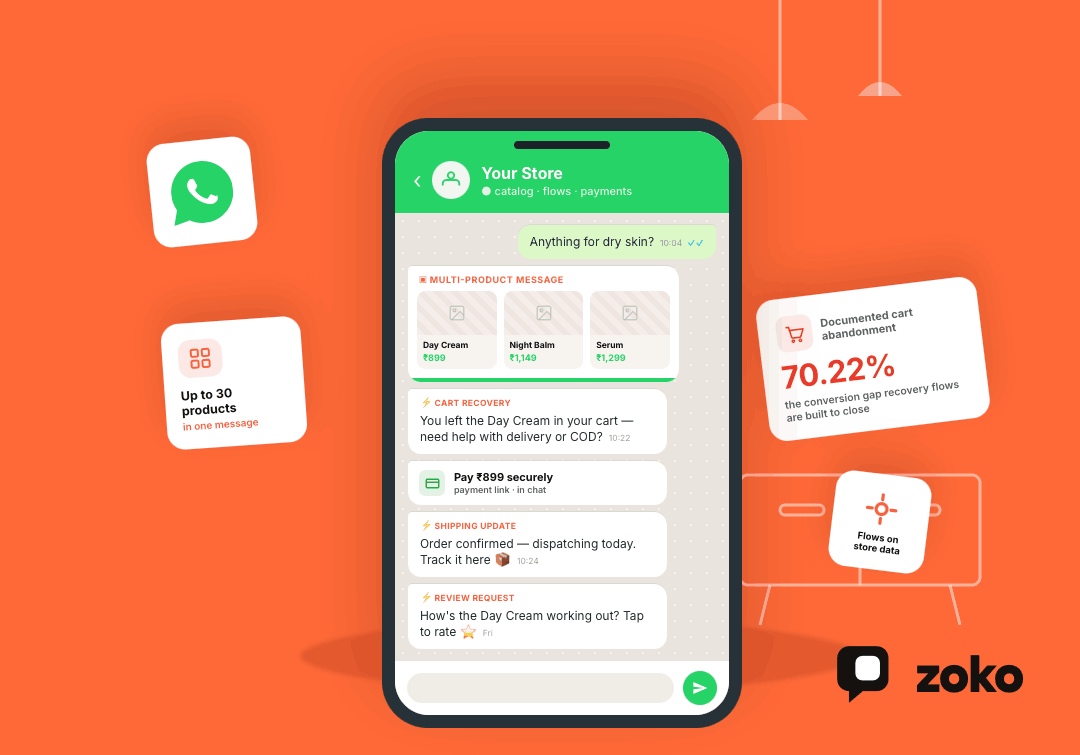


E-commerce customers expect quick answers about products, payments, delivery, returns, and order status. Managing these conversations manually becomes difficult as order volume grows.
WhatsApp already plays a central role in this buying journey. A 2025 Kantar study found that 91% of online adults in India chat with businesses weekly. Meanwhile, the average documented online cart abandonment rate remains 70.22%, showing how often merchants lose customers close to checkout.
The WhatsApp Business API helps e-commerce brands connect customer conversations with product catalogs, store data, automated workflows, payments, and support teams.
Quick Answer
The most important WhatsApp Business API e-commerce features in 2026 include:
- Product catalogs and interactive commerce messages
- Shopify and e-commerce platform integrations
- Automated customer journeys
- Personalized message templates
- WhatsApp broadcasts
- Abandoned cart recovery
- Order, payment, and delivery updates
- AI chatbots with human handover
- Shared team inboxes
- Payments, webhooks, and performance analytics
The API provides the messaging infrastructure. A WhatsApp commerce platform adds the dashboard, automation builder, Shopify connection, team inbox, and reporting tools merchants use daily.
What Is the WhatsApp Business API for E-commerce?
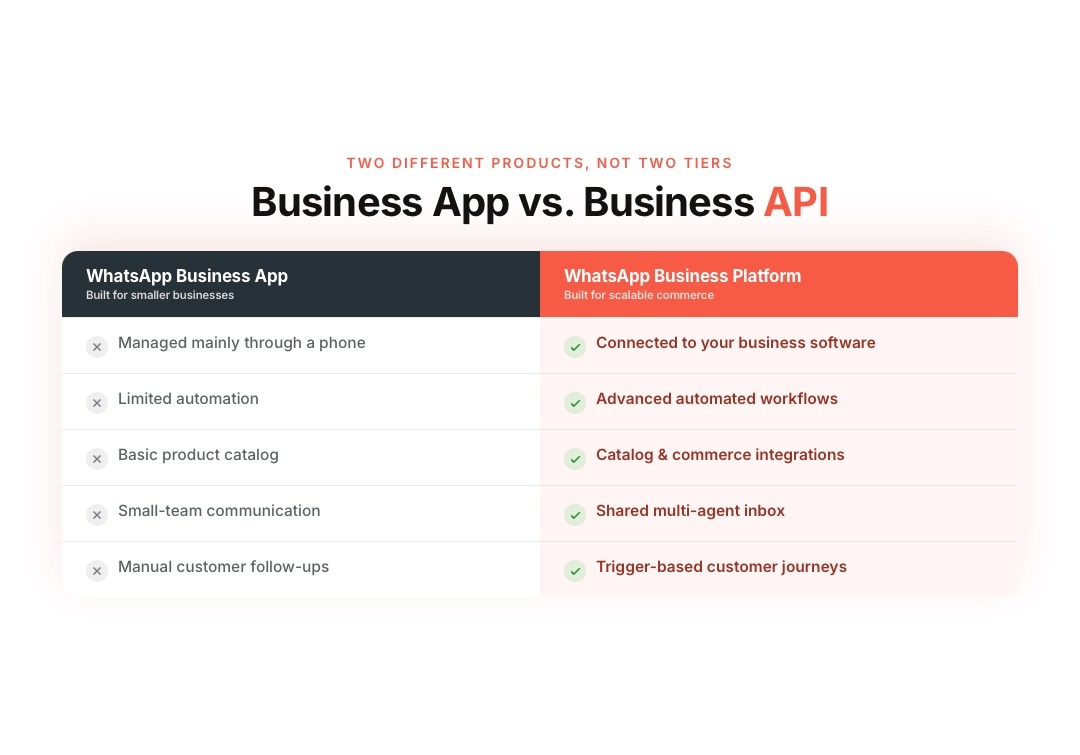
The WhatsApp Business API, officially called the WhatsApp Business Platform, lets businesses connect WhatsApp with their e-commerce systems.
Unlike the standard WhatsApp Business app, the platform supports automation, software integrations, approved outbound messages, customer data triggers, and team-based communication.
| WhatsApp Business app | WhatsApp Business API |
|---|---|
| Designed for smaller businesses | Designed for scalable communication |
| Primarily managed through a phone | Connected to business software |
| Limited automation | Supports advanced automated workflows |
| Basic product catalog | Supports catalog and commerce integrations |
| Small-team communication | Supports shared inbox platforms |
| Manual customer follow-ups | Trigger-based customer journeys |
Meta’s Cloud API can send and receive messages, process message-status events, connect with webhooks, and support business calls where available.
1. Product Catalogs and Interactive Commerce Messages
WhatsApp Catalog allows customers to explore products without moving immediately to another channel.
Merchants can send:
- Full catalog messages
- Single-product messages
- Multi-product messages
- Catalog links
- Interactive product carousels
- Product images, descriptions, and prices
Multi-product messages can display up to 30 products organized into separate sections. Interactive carousels present horizontally scrollable product cards within the conversation.
A beauty store could share a catalog section containing moisturizers after a customer asks for dry-skin recommendations.
2. Shopify and E-commerce Platform Integration
Store integration connects WhatsApp conversations with current customer, product, cart, and order information.
A strong integration can access:
- Product availability
- Customer profiles
- Shopping activity
- Abandoned checkouts
- Order details
- Payment status
- Fulfillment updates
- Previous purchases
This data helps businesses send messages based on real customer actions instead of generic campaign schedules.
For example, a Shopify event can trigger a WhatsApp message after a customer abandons checkout or places a COD order.
3. Automated Customer Journeys
Automated workflows turn repeated customer interactions into structured processes.
E-commerce merchants can automate:
- Product recommendation journeys
- Frequently asked questions
- Abandoned checkout reminders
- COD confirmations
- Payment follow-ups
- Shipping notifications
- Review requests
- Reorder reminders
- Customer feedback collection
WhatsApp Flows can also create structured in-chat experiences for forms, selections, and guided customer actions.
The customer receives a clear next step while the merchant reduces repeated manual work.
4. Personalized Message Templates
Businesses need approved templates when starting conversations outside the open customer service window.
Meta separates templates into three categories:
- Marketing: Offers, product launches, cart reminders, and re-engagement campaigns
- Utility: Order confirmations, shipping updates, invoices, and payment notifications
- Authentication: OTPs, verification codes, and account-access messages
Templates can include customer names, order numbers, delivery dates, images, documents, quick replies, and action buttons.
Personalization should use relevant store data rather than adding a customer’s name to every message.
5. Targeted WhatsApp Broadcasts
WhatsApp broadcasts help merchants communicate with opted-in customer groups at scale.
Brands can create separate audiences based on:
- Purchase history
- Product interest
- Customer location
- Average order value
- Previous campaign engagement
- Loyalty status
- Abandoned carts
- Time since the last purchase
A clothing store could send a restock alert only to shoppers who viewed or previously purchased that product category.
Meta may limit how many marketing messages individual users receive. Sending relevant campaigns protects message quality and reduces blocks or opt-outs.
6. Abandoned Cart Recovery
Cart recovery connects Shopify checkout activity with timely WhatsApp reminders.
A complete recovery workflow may:
- Detect an abandoned checkout
- Wait for a selected period
- Send an approved reminder
- Display the abandoned products
- Answer purchase questions
- Share the checkout link
- Stop reminders after purchase
Cart reminders can also address common objections around delivery, sizing, returns, COD, or product suitability.
Since around 70% of online carts are abandoned, even a focused recovery workflow can address a major conversion gap.
Learn more about using WhatsApp for Shopify abandoned cart recovery.
Also read: What Is Shopify WhatsApp Checkout? How It Works and Use Cases in 2026
7. Order, COD, Payment, and Shipping Automation
Transactional messages keep customers informed after checkout and reduce repetitive support questions.
Merchants can automate:
- Order confirmations
- COD verification
- COD-to-prepaid requests
- Payment links
- Payment receipts
- Invoice delivery
- Dispatch notifications
- Delivery tracking
- Delay alerts
- Return and refund updates
India-focused merchants can also connect WhatsApp communication with logistics tools such as Shiprocket for smoother COD and delivery workflows.
These messages should contain the exact information customers need without adding unrelated promotions.
8. AI Chatbots With Human Handover
AI chatbots can answer common product, order, delivery, payment, and return questions in real time.
A commerce-focused chatbot can:
- Recommend relevant products
- Answer product questions
- Check order information
- Explain delivery policies
- Handle common FAQs
- Identify buying intent
- Collect required details
- Transfer complex cases to an agent
The bot should receive current catalog, policy, and store information. It should never invent availability, delivery dates, discounts, or refund decisions.
Human handover remains essential for complaints, unusual payment issues, high-value purchases, and sensitive customer situations.
9. Shared Multi-Agent Inbox
A shared inbox allows sales and support teams to manage one WhatsApp number together.
Useful inbox features include:
- Automatic chat assignment
- Team and agent routing
- Internal notes
- Conversation labels
- Customer history
- Priority queues
- Saved replies
- Agent performance reports
- Bot-to-agent handover
Customer and Shopify data inside the inbox helps agents understand the conversation without asking shoppers to repeat every detail.
10. Payments, Webhooks, and Performance Tracking
WhatsApp payment availability depends on the merchant’s country, provider, and payment partner. Where supported, businesses can share payment requests or approved payment links within the buying conversation.
Webhooks connect WhatsApp with real-time customer events. They can record:
- Incoming replies
- Sent and delivered messages
- Read receipts
- Button selections
- Payment events
- Order updates
- Workflow completions
Merchants should track more than delivery and read rates. The most useful metrics include completed purchases, recovered carts, support resolution, opt-outs, payment completion, and revenue per campaign.
What Changed for WhatsApp E-commerce in 2026?
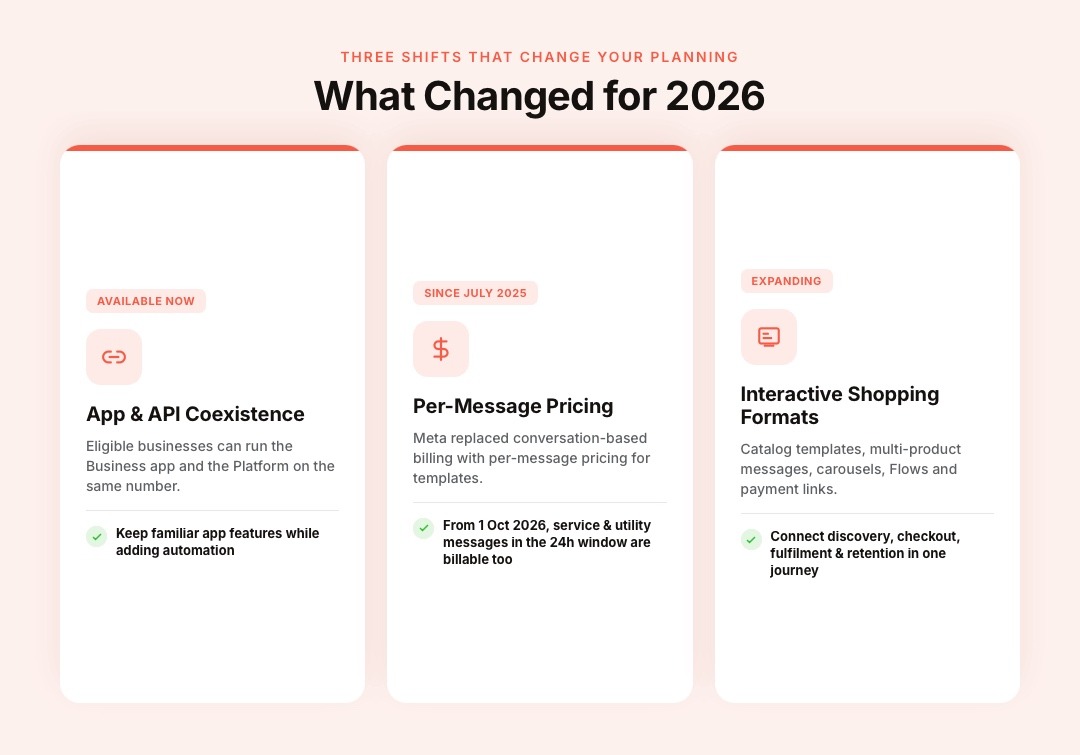
Several updates affect how merchants plan their WhatsApp strategy in 2026.
WhatsApp App and API Coexistence
Eligible businesses can use the WhatsApp Business app and the Business Platform with the same phone number. This allows smaller teams to retain familiar app features while adding automation and platform integrations.
Per-Message Pricing
Meta replaced its older conversation-based structure with per-message pricing for template messages in July 2025.
Starting October 1, 2026, Meta plans to charge for service messages and utility templates sent within an open 24-hour customer service window. Merchants should review support volume and automation costs before this change takes effect.
More Interactive Shopping Formats
Catalog templates, multi-product messages, carousels, Flows, and payment connections are moving WhatsApp beyond basic notifications.
The strongest e-commerce setups now connect product discovery, customer questions, checkout, fulfillment, and retention inside one coordinated journey.
How Zoko Brings WhatsApp E-commerce Features Together
Shopify merchants often manage catalogs, customer chats, cart reminders, COD orders, campaigns, and support across disconnected tools. This creates incomplete customer data, slower responses, repeated manual tasks, and missed sales opportunities.
Zoko connects Shopify with the official WhatsApp Business API, helping merchants manage sales, marketing, support, automation, and post-purchase communication from one platform.
With Zoko, Shopify merchants can:
- Sync their Shopify products with WhatsApp Catalog
- Automate cart recovery, COD confirmation, shipping updates, reviews, and reorders with FlowHippo Flows
- Send segmented broadcasts based on Shopify customer and purchase data
- Answer product and order questions with a WhatsApp AI chatbot
- Manage sales and support conversations through a shared team inbox
- Share payment links and build WhatsApp payment workflows
- Connect Shiprocket updates with COD and delivery communication
- Track campaign, conversation, and customer activity from one system
Zoko turns WhatsApp into a connected commerce channel covering product discovery, purchase assistance, order communication, and repeat sales.
Common WhatsApp Business API E-commerce Mistakes
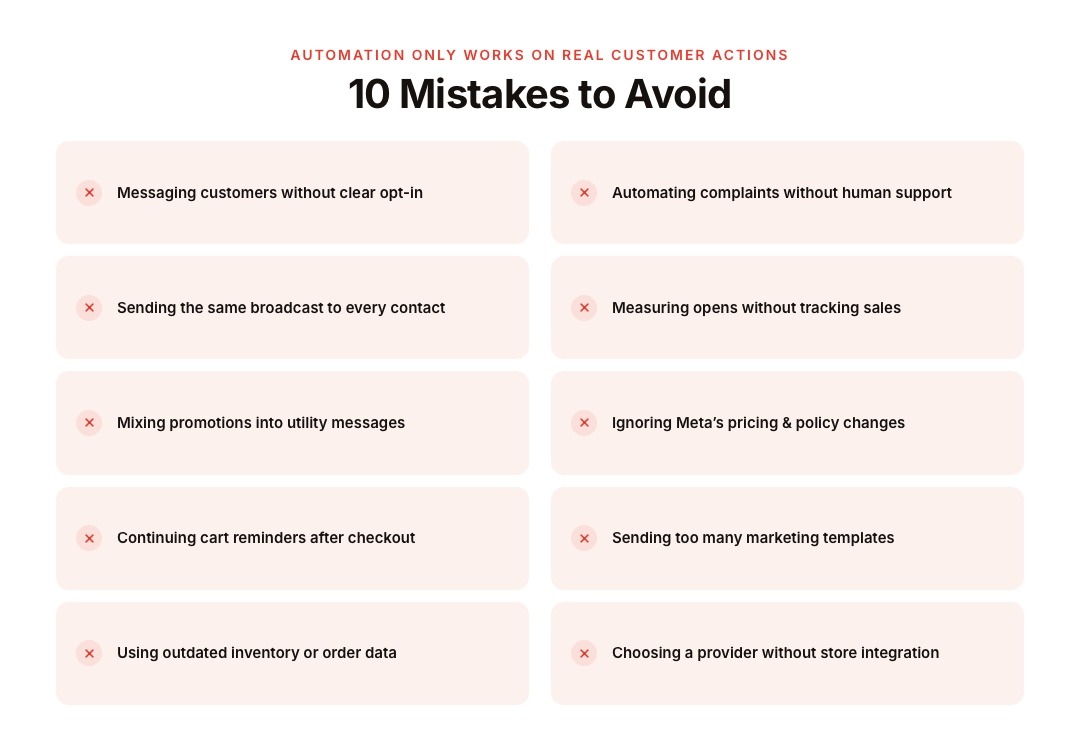
WhatsApp automation works best when messages reflect real customer actions. Poor setup can create irrelevant campaigns, repeated notifications, and frustrating support experiences.
Avoid these common mistakes:
- Messaging customers without clear opt-in
- Sending the same broadcast to every contact
- Mixing promotional content into utility messages
- Continuing cart reminders after checkout
- Using outdated inventory or order information
- Automating complaints without human support
- Measuring message opens without tracking sales
- Ignoring Meta’s pricing and policy changes
- Sending too many marketing templates
- Choosing a provider without strong store integration
Conclusion
The most valuable WhatsApp Business API e-commerce features connect customer conversations with products, carts, payments, orders, support, and retention. Merchants should choose features based on real customer problems rather than automating every possible message.
Zoko gives Shopify merchants the catalog sync, broadcasts, Flows, AI chatbot, shared inbox, payment workflows, and COD communication needed to manage this journey. Book a Zoko demo or start a trial to build a WhatsApp sales channel connected directly to your Shopify store.
Also read: WhatsApp API for Small Business: A Practical Guide for 2026
Also read: D2C Brand Marketing: 12 Strategies for Profitable Growth in 2026
Frequently Asked Questions
What are the best WhatsApp Business API features for e-commerce?
The most useful features include product catalogs, store integrations, automated Flows, cart recovery, broadcasts, AI support, shared inboxes, payment workflows, and order notifications.
Can customers purchase products through WhatsApp?
Customers can browse catalogs, view products, ask questions, receive payment options, and complete supported buying steps through WhatsApp. The exact checkout experience depends on the merchant’s platform, country, and payment setup.
Does the WhatsApp Business API integrate with Shopify?
Yes. Shopify-focused WhatsApp platforms can connect customer, product, checkout, and order data with messaging workflows.
Can the WhatsApp Business API recover abandoned carts?
Yes. A Shopify checkout event can trigger an approved WhatsApp reminder containing product information, customer support options, and a checkout link.
Are WhatsApp broadcasts allowed for e-commerce marketing?
Yes, businesses can send approved marketing templates to customers who have provided valid consent. Campaigns should remain relevant and include clear opt-out handling.
Is the WhatsApp Business API free in 2026?
The API does not operate as a completely free service. Meta charges for eligible delivered messages, while platform providers may charge subscription, setup, or feature fees. Meta’s pricing rules also changes on October 1, 2026.
Interested to know more?
.svg)
Case Studies




















Featured Posts


Continue reading

The E-Commerce Divide: How the Top 10% of Brands Use AI to Grow 5X Faster (And Why It’s Not for Everyone)
Drive Sales with WhatsApp Catalog Integration: Here's How