







WhatsApp has become one of the most important sales channels for ecommerce businesses, but choosing a WhatsApp API provider is one of the most important technology decisions for a growing ecommerce business.
While every provider connects to the same WhatsApp infrastructure, the experience you get—from automation and Shopify integration to reporting and customer support—depends on the platform you choose. Understanding those differences before you commit can save significant time, cost, and operational complexity.
The challenge is that "WhatsApp Business APIs" is not really a product you buy directly from Meta.
You're actually choosing two things here: Meta's infrastructure and the Business Solution Provider (BSP) that sits on top of it. Most buying guides oversimplify this distinction, which is why many small businesses end up switching providers within a year.
This guide explains exactly how the WhatsApp Business API works, how pricing changed in 2025, what features actually matter for small businesses, and how to evaluate providers if you're running a Shopify store.
TL;DR:
- WhatsApp Business API enables multi-agent access and advanced automation, making it suitable for growing businesses that have outgrown the free WhatsApp Business app.
- Meta switched to a per-message pricing model in 2025, so your choice of Business Solution Provider (BSP) affects not only the features you get but also your overall operating costs.
- Look for providers that offer native Shopify integration, in-chat product catalogs and checkout, no-code automation, a shared team inbox, and logistics integrations to streamline sales and support.
- Shopify-native platforms like Zoko provide deeper ecommerce integrations, helping merchants automate repetitive tasks, keep customer and order data synchronised, and drive more revenue through WhatsApp.
- When comparing providers, prioritize integration quality, automation, scalability, and long-term operational value—not just the lowest monthly price.
What the WhatsApp Business API Actually Is (and Isn't)
The free WhatsApp Business app, the one small shop owners already have on their phones, is not the same product as the WhatsApp Business API. Confusing the two leads to the wrong buying decision.
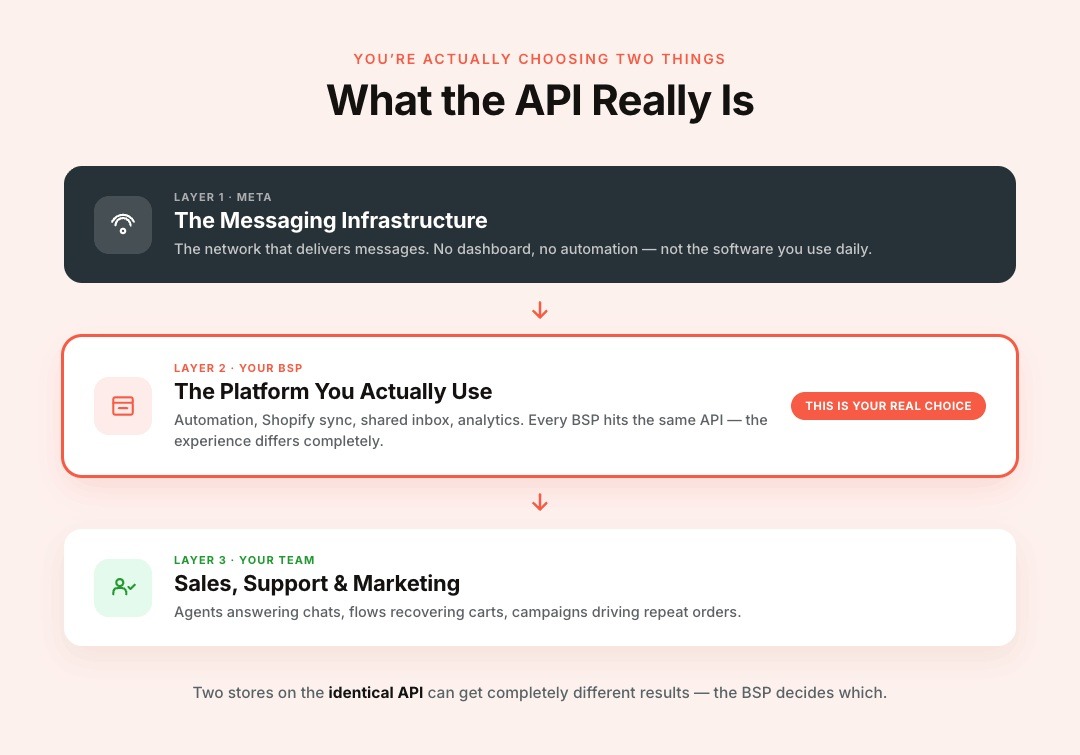
Think of the API as the infrastructure layer—not the software you'll use every day.
Meta provides the messaging network, but it doesn't provide a complete interface for running sales, marketing, or customer support. That's why businesses work through a Business Solution Provider (BSP), which provides automation, integrations, analytics, and the tools your team actually uses.
Although every Business Solution Provider connects to the same WhatsApp infrastructure, each offers different integrations, automation capabilities, pricing models, and user experiences. That's why evaluating the provider (not just the API) is one of the most important decisions for a growing business.
WhatsApp Business App vs. WhatsApp Business Platform
The app works for a single phone, a single person, and a handful of daily chats. It has a basic catalog, quick replies, and simple automation, but no multi-agent access and no deep integrations.
The WhatsApp Business Platform, commonly called the API, is built differently:
- Multiple team members can access one WhatsApp number at the same time
- Automated workflows trigger based on Shopify events like a new order or an abandoned cart
- Approved message templates let you message customers outside an open conversation window
- System integrations connect WhatsApp to your store, your shipping partner, and your CRM
Why You Need a Business Solution Provider
Meta doesn't hand out direct API access to most small businesses. Instead, you sign up through an approved Business Solution Provider (BSP), such as Zoko, which builds the interface, automation, and integrations on top of Meta's raw infrastructure.
This is why comparing BSPs purely on monthly pricing is misleading. Every provider connects to the same WhatsApp infrastructure, but what happens after that varies significantly. Some providers focus on developers and APIs, while others are built for ecommerce teams that need Shopify sync, shared inboxes, automation, and campaign management without writing code.
This is the detail most surface-level guides skip: two businesses using the identical underlying API can have completely different results depending on the BSP layered on top of it.
How WhatsApp Business API Pricing Actually Works in 2026
Pricing confuses small business owners more than any other part of this decision, largely because Meta overhauled its model in mid-2025. Understanding the current structure prevents nasty billing surprises later.
The Shift to Per-Message Billing
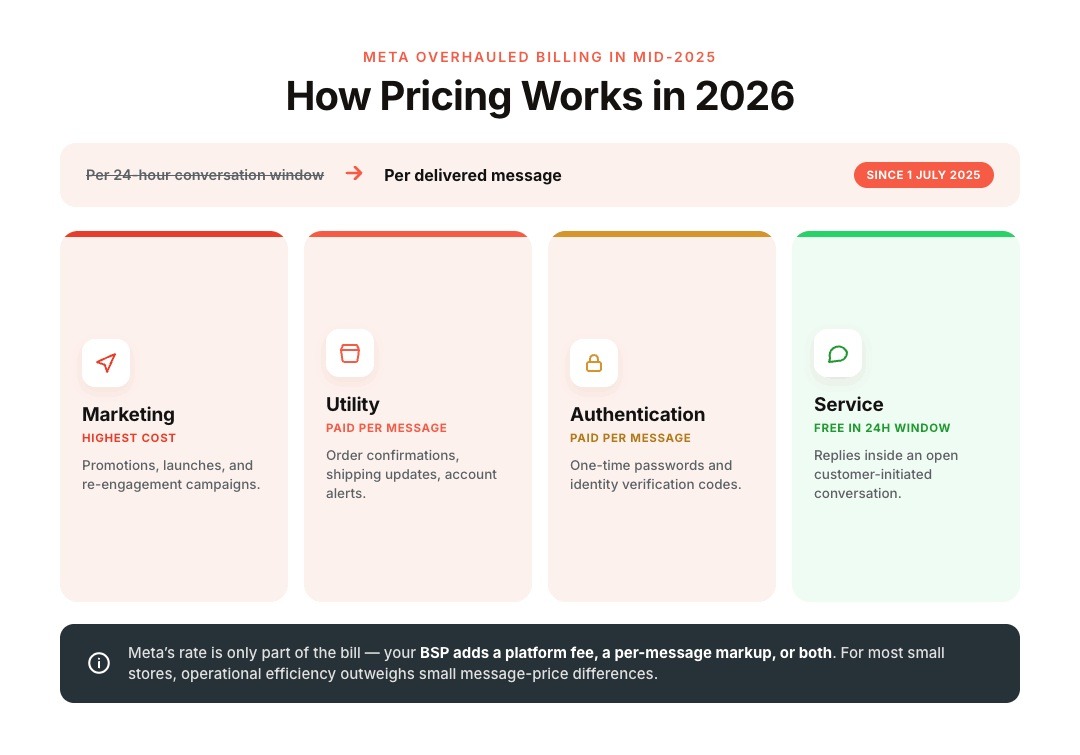
Meta previously charged per 24-hour "conversation window," letting you send unlimited template messages inside that window for one flat fee. As of July 1, 2025, Meta moved to per-message billing instead, charging separately for each delivered template based on its category and the recipient's country, according to Meta's official developer documentation.
Meta groups every business-initiated message into four categories, and your bill depends heavily on which one applies:
- Marketing: promotions, product launches, and re-engagement campaigns; the highest-cost category
- Utility: order confirmations, shipping updates, and account alerts tied to a customer action
- Authentication: one-time passwords and identity verification codes
- Service: replies inside an open customer conversation
The Free 24-Hour Service Window Still Matters: When a customer messages you first, that opens a free service window for 24 hours. Any reply you send inside that window doesn't incur Meta's per-message charge, according to the same Meta pricing documentation. Support-heavy small businesses can run most day-to-day conversations inside this free window.
What Your BSP Adds on Top
Meta's rate is only part of your actual bill. Your BSP typically adds a monthly platform fee, a small per-message markup, or both, on top of Meta's published rates. This is exactly why the provider you choose changes your total cost, not just your feature set.
For most small businesses, Meta's messaging charges aren't the highest cost. Operational efficiency is. Saving an employee from manually answering shipping questions or recovering abandoned carts can outweigh small differences in message pricing. That's why evaluating total value (not just Meta's rates) is usually the better approach to buying.
Why Small Businesses Are Moving Their Budget to WhatsApp
WhatsApp crossed more than 3 billion monthly users globally in 2025, making it one of the only apps at that scale besides Facebook itself.
Unlike email or SMS, WhatsApp keeps marketing, support, and transactions within a single continuous conversation.
A customer can discover a product, ask sizing questions, receive payment links, track shipping, and return later for support—all from the same chat thread. That continuity makes WhatsApp particularly valuable for Shopify merchants managing repeat purchases and customer retention.
For small business owners without ten-channel marketing budgets, that reach matters for a few concrete reasons.
- Near-universal reach: customers already have the app installed, so there's no download friction
- Higher engagement than email: messages get read and answered far faster than a typical marketing email
- Two-way, in-chat conversation: customers can ask questions, get recommendations, and check out in one thread
- A real answer to cart abandonment: the average online store loses 70.22% of carts before checkout, according to Baymard Institute's meta-analysis of 50 separate studies, and a quick WhatsApp nudge recovers sales that an email would have missed
For a small Shopify store, that combination turns WhatsApp from a support line into a genuine revenue channel, provided the setup behind it is solid.
The Five Non-Negotiables in a WhatsApp API Provider
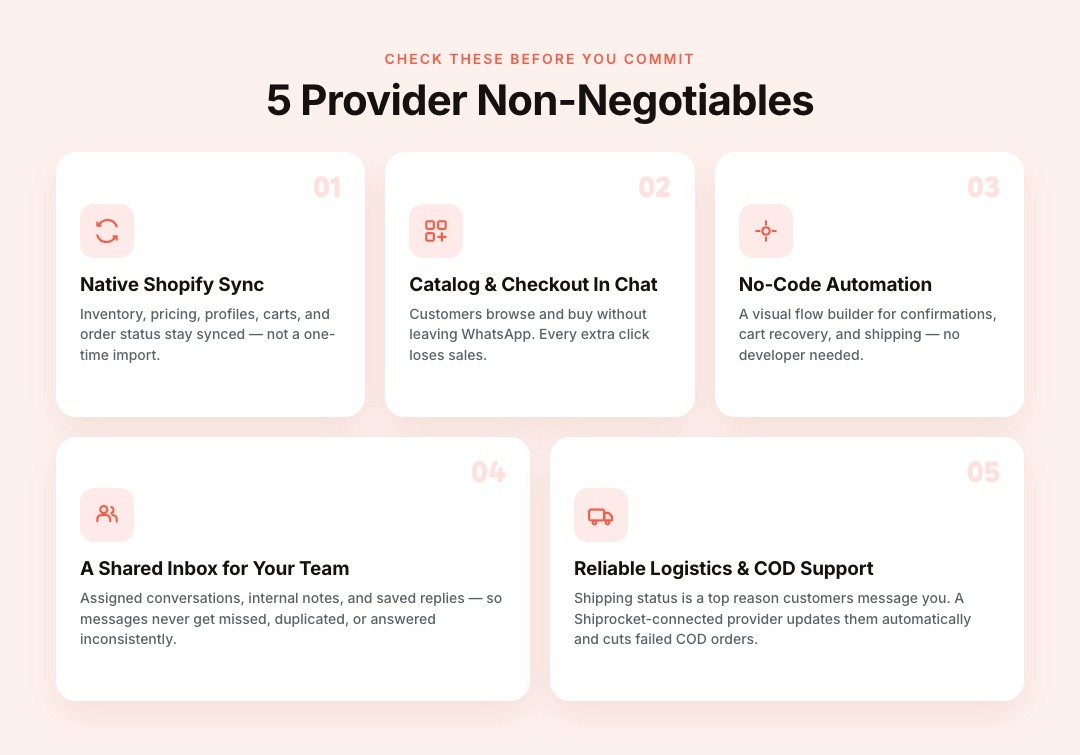
Not every provider solves the same problems, and feature lists alone can be misleading. Before you commit, check whether a platform genuinely covers these five essentials.
1. Native Shopify Sync
Your product catalog, order status, and customer data should flow automatically between Shopify and WhatsApp. Manual updates waste time you don't have as a small business owner, and outdated product data erodes customer trust fast.
Native Shopify integration goes beyond a one-time product import. Inventory, pricing, customer profiles, abandoned carts, order status, and purchase history should remain automatically synchronised. Without native sync, teams often rely on manual exports or middleware, increasing the risk of outdated product information and inconsistent customer experiences.
2. Catalog and Checkout Inside the Chat
Customers should browse products and complete a purchase without leaving WhatsApp. Every extra step, like clicking out to a separate website, is a chance to lose a sale you'd already nearly closed.
3. No-Code Automation
Look for a visual flow builder that lets you configure order confirmations, cart recovery, and shipping updates yourself. Small teams can't wait on developer availability every time a workflow needs a small change.
4. A Shared Inbox for Your Team
If more than one person answers customer chats, you need assigned conversations, internal notes, and saved reply templates. Otherwise, messages get missed, duplicated, or answered inconsistently across the team.
5. Reliable Logistics and COD Support
Shipping status is one of the top reasons customers message a store. A provider connected to a logistics partner like Shiprocket keeps customers informed automatically and reduces failed cash-on-delivery orders.
Also read: MSG91 WhatsApp API Pricing in India: How the Cost Structure Actually Works
How Zoko Delivers Each of These for Shopify Merchants
Zoko was purpose-built around Shopify's data model, not retrofitted onto it.
Small teams often spend hours each week answering the same order-status questions or reminding customers to complete their purchases. Zoko Flows lets merchants automate these repetitive conversations through a visual builder, triggering messages based on Shopify events such as abandoned carts, COD confirmations, or successful orders.
Here's what that looks like feature by feature.
- WhatsApp Catalog: Zoko syncs your entire Shopify catalog to WhatsApp, so customers can browse and buy real-time inventory directly inside the chat
- Broadcasts: send personalized, opt-in marketing campaigns that land where customers are already most engaged, detailed further in Zoko's guide to WhatsApp broadcast messaging
- Zoko Flows: build no-code automations for COD confirmations, cart recovery, and multi-step journeys, explained in Zoko's WhatsApp Business API feature guide
- Shared Team Inbox: assign chats, use quick replies, and keep every conversation organized across your whole team
- Shiprocket Integration: automatically push shipping and delivery updates and confirm COD orders before dispatch, cutting down on failed deliveries
- Official Meta Business Partner status: Zoko can guide you through the process of earning the WhatsApp Blue Tick, which builds instant trust with new customers
If you're evaluating Zoko against a general-purpose messaging tool, Zoko's own breakdown of WhatsApp API versus Twilio walks through the tradeoffs of Shopify-specific platforms versus developer-first infrastructure.
Shopify-Native Platforms vs. Generic Omnichannel Tools: What's the Difference?
On paper, many WhatsApp Business API providers offer similar features—shared inboxes, broadcasts, automation, and analytics. The real difference lies in how deeply those features connect with your ecommerce operations.
Generic omnichannel platforms are built to support businesses across industries, from healthcare to banking and logistics. As a result, Shopify is often treated as just another integration, connected through APIs or middleware. While this approach works, it can require additional setup, ongoing maintenance, and custom workflows to keep customer data, orders, and inventory in sync.
A Shopify-native platform takes a different approach. Instead of adapting to ecommerce later, it's built around how Shopify stores operate. Product catalogs, abandoned carts, order updates, customer profiles, and purchase history stay synchronised automatically, allowing merchants to launch campaigns, automate workflows, and resolve support queries without constantly switching between tools.
For growing Shopify brands, this usually translates into faster setup, fewer manual processes, and a more consistent customer experience. Rather than stitching together multiple systems, merchants can manage marketing, sales, and support from the same WhatsApp workspace.
Real-World Use Case: Cutting Cart Abandonment and Manual Support
Picture a small skincare brand running a Shopify store with a two-person support team.
Before adopting automation, every shipping inquiry required an agent to check Shopify manually before replying on WhatsApp. Customers waited longer, agents repeated the same responses dozens of times daily, and abandoned carts required manual follow-up—if they were followed up at all.
After connecting Shopify with WhatsApp automation, shipping updates were triggered automatically, COD orders were confirmed without manual calls, and abandoned carts entered a predefined recovery sequence. Support shifted from answering repetitive questions to handling exceptions and high-value customer conversations.
After connecting Zoko, the brand set up automated shipping updates through the Shiprocket integration, and a cart recovery flow was triggered a few hours after checkout was abandoned.
Support tickets dropped because customers got answers before they had to ask, and recovered carts became a steady, measurable revenue stream, a pattern explored further in Zoko's guide to WhatsApp marketing conversion strategies.
This is the model Zoko is designed around: fewer manual tasks, more automated revenue, without adding headcount.
WhatsApp API Providers: Common Mistakes to Avoid
Many WhatsApp API providers serve dozens of industries at once and connect to Shopify through generic webhooks rather than a native app. That approach often means manual configuration and no automatic catalog sync, a gap Zoko's own comparison guide walks through in detail for Shopify merchants specifically.
Common Mistakes Small Businesses Make When Choosing a BSP
Many merchants compare WhatsApp providers by monthly pricing alone. In practice, long-term success depends just as much on the platform's integration quality and automation capabilities.
Some of the most common mistakes include:
- Choosing based only on subscription cost: A lower monthly fee may come with limited automation, weaker Shopify integration, or higher operational effort. Consider the total cost of ownership rather than the platform fee alone.
- Treating WhatsApp as only a support channel: If you're only responding to customer questions, you're missing opportunities to recover abandoned carts, send personalized product recommendations, and drive repeat purchases through permission-based campaigns.
- Ignoring Shopify integration depth: Not every provider offers native catalog sync or real-time order updates. Manual imports and disconnected customer data can quickly become bottlenecks as your store grows.
- Overlooking automation: Without workflows for order confirmations, shipping updates, abandoned carts, or COD verification, your team continues spending valuable time on repetitive conversations.
- Not measuring business outcomes: Look beyond message delivery rates. Track how WhatsApp influences conversions, recovered revenue, repeat purchases, and customer support efficiency.
Questions to Ask Before Choosing a WhatsApp API Provider
Before committing to a provider, ask a few practical questions that go beyond pricing and feature lists.
1. Is the Shopify integration truly native?
Find out whether product catalogs, inventory, abandoned carts, and order updates sync automatically or require third-party connectors and manual setup.
2. What automation capabilities are included?
Check whether you can build workflows for cart recovery, order notifications, COD confirmations, and customer support without depending on developers.
3. How is pricing structured?
Understand what's included in the platform subscription, whether Meta's messaging charges are billed separately, and if there are additional markups or usage-based fees.
4. Can multiple team members manage conversations?
As your business grows, shared inboxes, conversation assignments, internal notes, and performance tracking become essential for maintaining consistent customer support.
5. Will the platform grow with your business?
Evaluate whether it supports advanced automation, campaign management, analytics, and integrations you'll need as order volume and customer conversations increase.
Choosing the right provider isn't about finding the longest list of features. It's about selecting a platform that matches how your business operates today while giving you room to scale tomorrow.
Getting Started the Right Way
The best WhatsApp API isn't necessarily the cheapest provider or the one with the longest feature list. It's the platform that fits the way your business operates.
If you're running a Shopify store, prioritize providers that combine native Shopify integration, automation, shared team collaboration, compliant messaging, and ecommerce-focused workflows rather than treating WhatsApp as just another communication channel.
Platforms like Zoko are designed around that operating model, helping merchants manage marketing, support, and sales from one WhatsApp number instead of stitching together multiple tools.
See it in action. Sign up for a 7-day Free Trial with Zoko and start turning your WhatsApp number into a real sales channel for your Shopify store.
Also read: WhatsApp Template Message API: A Complete 2026 Guide
Also read: WhatsApp Business API for Education: Complete Guide for 2026
FAQs
1. Can I use my existing WhatsApp Business number with the WhatsApp API?
In many cases, yes. Businesses can migrate an existing WhatsApp Business number to the WhatsApp Business Platform without changing the phone number, provided they meet Meta's eligibility requirements. The migration process varies depending on your current setup and should be planned carefully to avoid interruptions to customer communication.
2. How long does it take to set up the WhatsApp Business API?
Setup time depends on your business verification status, the provider you choose, and whether your Meta Business account is already configured. For businesses with the required approvals in place, onboarding can often be completed within a few days, while new businesses may take longer if verification is still pending.
3. Do I need technical knowledge to use the WhatsApp Business API?
Not necessarily. While the API itself is developer-focused, most Business Solution Providers offer user-friendly dashboards, no-code automation builders, and Shopify integrations that let non-technical teams manage campaigns, customer conversations, and workflows without writing code.
4. Can multiple team members use the same WhatsApp number?
Yes. One of the biggest advantages of the WhatsApp Business API is that it allows multiple agents to manage conversations from a single business number. Most providers also offer features like conversation assignment, internal notes, and shared inboxes to help teams collaborate efficiently.
5. Is the WhatsApp Business API suitable for very small businesses?
It can be, especially if your business is growing beyond what the free WhatsApp Business app can handle. If you're managing increasing order volumes, customer inquiries, or marketing campaigns, the API provides automation and collaboration features that help small teams scale without significantly increasing manual work.
6. Can I automate abandoned cart recovery using the WhatsApp Business API?
Yes, provided your provider supports automation and your messaging complies with WhatsApp's policies. Many ecommerce businesses use automated workflows to send timely reminders after a customer abandons their cart, helping recover potential sales without requiring manual follow-up from the team.
7. Does the WhatsApp Business API integrate with other ecommerce tools?
Most providers support integrations with ecommerce platforms, CRMs, shipping solutions, and payment systems. However, the depth of these integrations varies significantly. It's worth checking whether data syncs automatically or relies on third-party connectors and manual configuration.
8. Will using the WhatsApp Business API improve customer support?
The API can significantly improve support efficiency by routing conversations to the right team members, automating common responses, and providing customers with order updates automatically. Rather than replacing human agents, it helps them spend more time resolving complex issues instead of repetitive queries.
9. Can I send promotional messages to all my customers?
No. Businesses must follow WhatsApp's messaging policies, including obtaining appropriate customer opt-ins before sending marketing messages. Sending unsolicited promotions or ignoring Meta's guidelines can affect message delivery and may put your account at risk of restrictions.
10. How do I choose the right WhatsApp Business Solution Provider?
Look beyond pricing. Evaluate how well the provider integrates with your ecommerce platform, the quality of its automation features, shared inbox capabilities, analytics, scalability, and customer support. The right provider should simplify your operations rather than add another tool to manage.
11. Can I switch to a different WhatsApp API provider later?
Yes. Businesses aren't permanently locked into one provider, although the migration process may require planning to avoid disruption. Before signing up, ask how migrations are handled, whether your phone number can be retained, and what assistance the provider offers during the transition.
12. What should I prioritize when comparing WhatsApp API providers?
Instead of focusing solely on feature lists, evaluate how each provider supports your daily operations. Consider factors such as native Shopify integration, automation, compliance, reporting, scalability, onboarding support, and how easily your team can manage customer conversations as the business grows.
Interested to know more?
.svg)
Case Studies




















Featured Posts


Continue reading

The E-Commerce Divide: How the Top 10% of Brands Use AI to Grow 5X Faster (And Why It’s Not for Everyone)
Drive Sales with WhatsApp Catalog Integration: Here's How