







Your Shopify store does not lose every cart because shoppers suddenly stop wanting the product. Often, they pause at checkout because delivery dates, COD comfort, discounts, or sizing still feel unclear. By the time your team replies through email, that buying intent may already be cooling. For India-first Shopify merchants, this gap can mean missed revenue, repeated support work, and uncertain COD orders.
This guide explains how WhatsApp abandoned cart Shopify recovery works through timely, consent-based WhatsApp messages. You will learn what triggers the flow, what each message should include, and how to set it up. It also shows how Zoko connects Shopify checkout data with WhatsApp Flows, support, and cart recovery.
Overview:
WhatsApp abandoned cart Shopify recovery helps merchants bring shoppers back with timely, consent-based messages tied to checkout intent.
- Shopify merchants can use WhatsApp to send saved cart links after shoppers leave checkout.
- The best recovery messages answer buyer doubts about size, delivery, COD, payment, or returns.
- A strong flow usually includes an early reminder, support-led follow-up, and careful final nudge.
- WhatsApp works well for high-intent recovery, while email is better suited to longer product details.
- Merchants should track recovered orders, revenue, clicks, replies, and completed purchases.
- Zoko connects Shopify with WhatsApp Flows, Catalog, COD confirmation, support, and post-purchase messages.
What Is WhatsApp Abandoned Cart Recovery for Shopify?
WhatsApp abandoned cart recovery is a follow-up message sent to a shopper who starts checkout on your Shopify store but leaves before completing payment. The goal is simple: bring the shopper back to the same cart while their purchase intent is still fresh.
How It Works in a Shopify Store
Shopify records an abandoned checkout when a shopper enters contact details but does not place the order. A connected WhatsApp setup can use that checkout event to send a recovery message with the cart link, product details, and a clear prompt to continue.
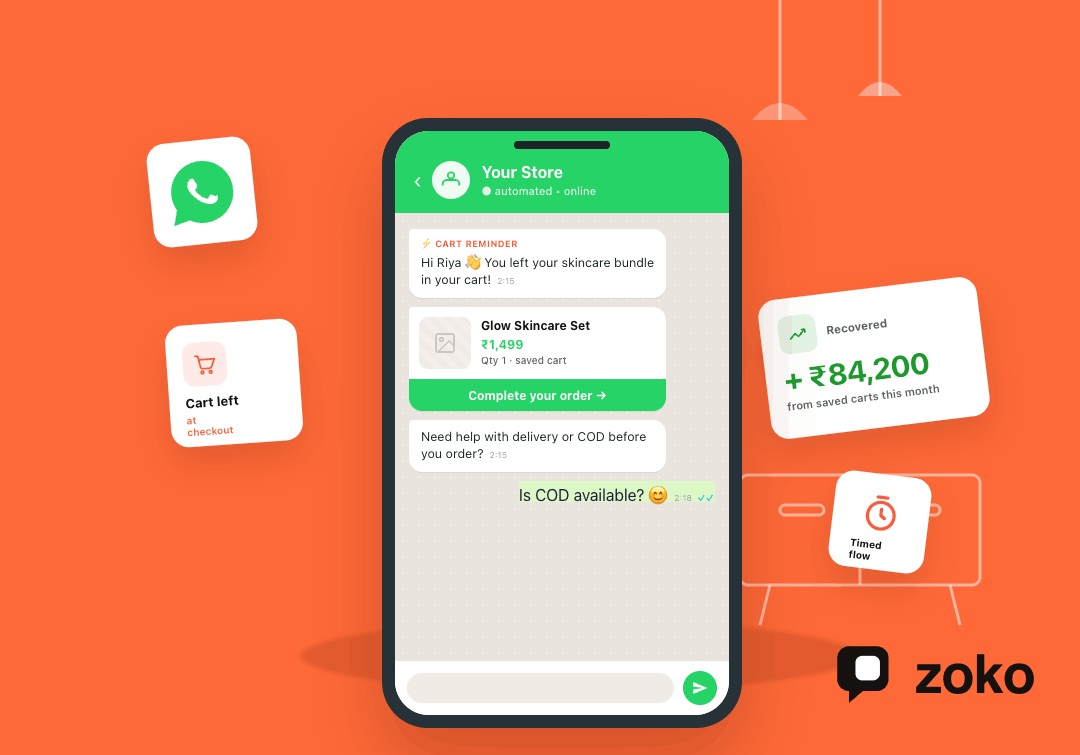
For example, if a customer leaves a skincare bundle at checkout, the WhatsApp message can remind them of the bundle and link back to the saved checkout.
Why WhatsApp Fits This Moment
A cart reminder works best when it feels useful, not pushy. WhatsApp lets you add a quick support path to the reminder, so shoppers can ask about size, delivery, COD, payment, or returns before buying.
That makes it different from a generic campaign. The message is tied to a recent action, sent with consent, and focused on helping the shopper finish the order. Why Shopify Shoppers Abandon Carts and Where WhatsApp Helps
Cover the main abandonment reasons
Mention common causes such as unexpected costs, delivery concerns, payment doubts, comparison shopping, distractions, and lack of support. Add a placeholder for one verified cart-abandonment benchmark or Baymard statistic while drafting.
Match each reason with a WhatsApp response
Show how WhatsApp can answer doubts quickly: shipping questions, COD concerns, size queries, delivery timelines, and discount clarification. This adds decision value beyond generic “send a reminder” advice.
Keep the India-first angle clear
Explain that COD questions, delivery confidence, and WhatsApp-first customer behavior are highly important for India-focused Shopify merchants. Mention Brazil, South America, the Middle East, and Western Europe only where the use case fits naturally.
Suggested Read: A Complete Guide to WhatsApp API Pricing
How a WhatsApp Abandoned Cart Flow Works in Shopify
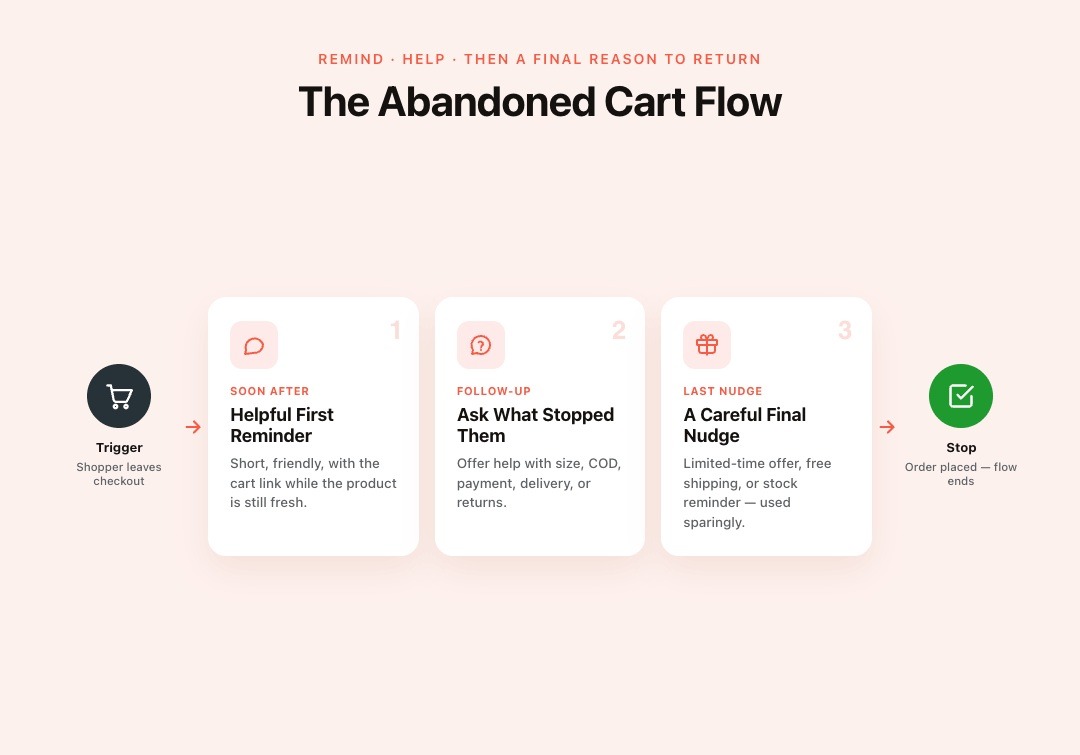
A WhatsApp abandoned cart flow starts when Shopify records that a shopper left checkout unfinished. From there, each message should solve one clear problem: remind, help, then give a final reason to return.
Trigger: Shopper Leaves Checkout Incomplete
The flow begins when a shopper adds products, reaches checkout, shares contact details, and leaves before payment. Your WhatsApp setup needs Shopify checkout data to know which cart was abandoned and where to send the reminder.
This is why a Shopify connection matters. Without cart data, the message becomes a generic follow-up instead of a useful recovery prompt.
Message 1: Send a Helpful First Reminder
The first message should go out while the product is still fresh in the shopper’s mind. Keep it short, include the cart link, and make the next step easy.
Example: “Hi Riya, you left your skincare bundle in your cart. You can complete your order here: [cart link]. Need help choosing the right variant?”
Message 2: Ask What Stopped the Purchase
The second message should focus on the likely reason behind the drop-off. Ask whether the shopper needs help with size, COD, payment, delivery date, return policy, or product details.
This matters because many abandoned carts are not yet lost orders. They are unanswered questions waiting for a quick reply.
Message 3: Use a Final Nudge Carefully
The final message can include a limited-time offer, a free shipping note, or a stock reminder. Use discounts carefully, especially if shoppers may learn to wait for them.
A good final nudge protects your margin while giving undecided shoppers one last clear reason to complete checkout.
Stop the Flow When the Order Is Placed
The flow should stop as soon as the shopper completes the order. This prevents awkward reminders after purchase and keeps the customer experience clean.
A connected Shopify and WhatsApp setup should check order status before every follow-up message.
What to Include in Your WhatsApp Cart Recovery Messages
A cart reminder should make the next step obvious and remove the reason the shopper paused. For Shopify merchants, the strongest messages combine cart context, a helpful reply option, and careful timing.
Add the Cart Link and Product Context
Your message should help the shopper return without having to search again. Include the saved cart link, product name, and one short reminder of what they left behind.
Example: “Hi Aisha, your cotton kurta set is still in your cart. Complete your order here: [cart link].”
This works better than a plain “complete your purchase” message because the shopper instantly remembers the product.
Give Shoppers a Reason to Reply
Many shoppers leave because one doubt remains unanswered. Invite a reply on the most common purchase blockers.
You can ask about size, delivery date, COD availability, payment issues, return policy, or product comparison.
For example: “Need help with size or delivery before placing the order?”
This turns WhatsApp cart recovery into a support-assisted sale, not a one-way reminder.
Keep Timing and Tone Simple
The first message should feel helpful, not pushy. Send it while the product is still fresh, and avoid starting with a discount unless your margin plan supports it.
Use short sentences, the shopper’s first name, and clear next steps. A good tone feels like store support, not a mass campaign.
Use Short Message Templates
Write templates that match the shopper’s stage and product category. Keep each one focused on one action.
| Message Type | Example |
|---|---|
| Early reminder | “Hi Riya, your items are still in your cart. Complete your order here: [cart link].” |
| Support prompt | “Still deciding? Reply with your size, delivery, or payment question. We’ll help.” |
| COD reassurance | “Want COD for this order? Reply ‘COD’ and we’ll help confirm availability.” |
| Final offer | “Your cart is still saved. Complete your order today: [cart link].” |
Also Read: WhatsApp Marketing Strategies for Emerging Markets
How to Set Up WhatsApp Abandoned Cart Recovery for Shopify
Setting up a WhatsApp abandoned cart Shopify flow is mostly about connecting the right data. Your flow needs consent, checkout details, approved messages, and a clear stop point after purchase.
Step 1: Collect WhatsApp Opt-Ins
Ask shoppers for WhatsApp consent at checkout, pop-ups, or sign-up forms. The opt-in should clearly state your store name and the message type they agree to receive.
Step 2: Connect Shopify With WhatsApp
Connect Shopify checkout data with your WhatsApp tool so the flow can read cart links, customer details, and order status. This lets each reminder match the shopper’s actual cart.
Step 3: Create Approved Message Templates
Create templates for messages sent outside the customer service window. Start with cart reminders, COD confirmation, shipping updates, and review requests.
Step 4: Build and Test the Flow
Set the trigger, delay, first reminder, support branch, final nudge, and order-completed stop condition. Test names, links, cart items, opt-out text, and recovery tracking before sending at volume.
Also read: Abandoned Cart Recovery Messages: Top 17 Templates for 2026
WhatsApp, Email, and SMS: Where Each Channel Fits

Cart recovery works best when each channel has a clear job. For Shopify merchants, WhatsApp should handle fast, high-intent follow-ups while email and SMS support narrower moments.
WhatsApp for Recent Checkout Drop-Offs
Use WhatsApp when the shopper recently reached checkout and may need a quick answer.
- Send saved cart links while the product is still fresh in the shopper’s mind.
- Use it for COD questions, delivery doubts, payment issues, and size help.
- Keep the message helpful, so the shopper can return or reply with a purchase blocker.
Email for Longer Product Context
Use email when the shopper needs more details before deciding.
- Share product benefits, reviews, return policies, size charts, or comparison details.
- Use it for shoppers who need more time before returning to checkout.
- Keep the email tied to the abandoned product, not a broad store promotion.
SMS for Short Urgent Alerts
Use SMS when WhatsApp is unavailable or the customer has not opted in there.
- Send brief reminders with the saved cart link.
- Avoid long product explanations because SMS gives little room for context.
- Move support-heavy conversations to WhatsApp or email when the shopper needs help.
How to Measure and Improve Your Shopify Cart Recovery Flow
A WhatsApp abandoned cart Shopify flow should prove that it is recovering orders, not just sending reminders. Measure what shoppers do after each message, then improve the flow based on real buyer behavior.
Track Recovered Orders and Revenue
Start with the numbers that show business impact.
- Track how many abandoned carts turn into completed Shopify orders.
- Measure recovered revenue from WhatsApp-linked cart recovery messages.
- Compare clicks, replies, and completed purchases across each message in the flow.
Track Customer Replies by Reason
Replies show why shoppers paused before payment.
- Group replies to delivery doubt, COD question, size issue, payment concern, discount request, and product comparison.
- Use those patterns to improve product pages, checkout notes, FAQs, and support replies.
- Watch for repeated COD or delivery questions if your store primarily serves customers in India.
Adjust Timing, Copy, and Segmentation
Improve one part of the flow at a time, so results stay clear.
- Test reminder timing based on cart value, product type, and shopper behavior.
- Adjust message copy for new buyers, returning customers, prepaid orders, and COD orders.
- Move discounts later in the flow if early offers reduce margin without raising recovery.
Connect Cart Recovery With the Full WhatsApp Sales Journey
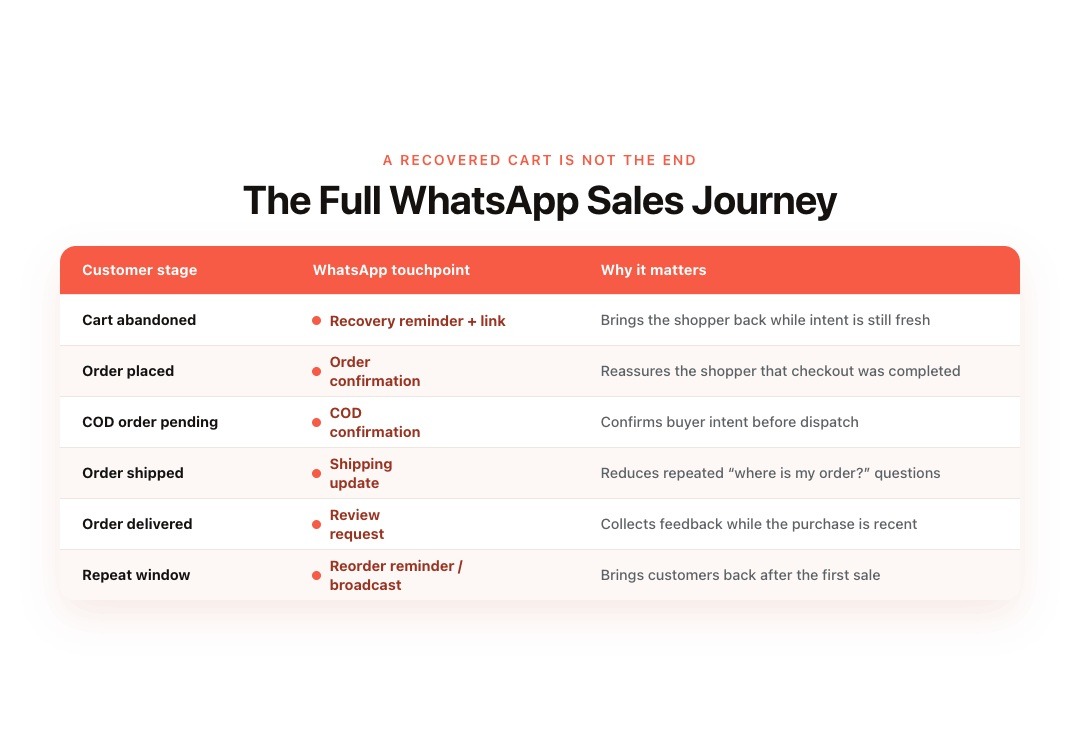
A recovered cart is not the end of the journey. For Shopify merchants, the stronger WhatsApp setup connects that first recovery message with order confirmation, COD checks, delivery updates, support, and repeat purchases.
After the Cart Is Recovered, Confirm the Order
Once the shopper completes checkout, the next WhatsApp message should reassure them that the order went through. This reduces confusion and keeps the customer from asking your team for basic order confirmation.
| Customer Stage | WhatsApp Touchpoint | Why It Matters for Shopify Merchants |
|---|---|---|
| Cart abandoned | Recovery reminder with cart link | Brings the shopper back while intent is still fresh |
| Order placed | Order confirmation | Reassures the shopper that checkout was completed |
| COD order pending | COD confirmation | Helps confirm buyer intent before dispatch |
| Order shipped | Shipping update | Reduces repeated delivery questions |
| Order delivered | Review request | Collects feedback while the purchase is recent |
| Repeat purchase window | Reorder reminder or broadcast | Brings customers back after the first sale |
Before Dispatch, Confirm COD and Delivery Details
For India-first Shopify stores, COD orders often need an extra check before packing. Zoko Flows can help send COD confirmation messages, delivery updates, and related follow-ups through WhatsApp.
This keeps the team from manually checking doubtful orders one by one.
During Delivery, Reduce Repeated Support Questions
After dispatch, shoppers often ask where their order is or when it will arrive. WhatsApp updates and AI chatbot support can answer repeated delivery, sizing, return, and order-status questions faster.
This gives customers quick answers while reducing routine support work for your team.
After Delivery, Bring Customers Back
Once the product reaches the customer, WhatsApp can support reviews, reorders, product upsells, and broadcasts. Zoko helps Shopify merchants connect these moments through Flows, Catalog, AI support, and customer segments.
That is what turns cart recovery into a longer WhatsApp sales journey, not just a one-time reminder.
Conclusion
A strong WhatsApp abandoned cart Shopify flow works best when it is timely, consent-based, and tied to checkout intent. The right setup helps you send the saved cart link, answer buyer doubts, protect margins, and stop reminders once the order is placed.
Zoko helps Shopify merchants connect abandoned checkout recovery with WhatsApp Flows, Catalog, support, COD confirmation, and post-purchase messages. That means fewer missed carts, less manual follow-up, and clearer customer conversations.
Start your 7-day free trial and see what a Shopify-sized WhatsApp bill actually looks like.
Also read: How to Reduce Cart Abandonment Across Stages of the Full Buyer Journey
Also read: WhatsApp Automation for Ecommerce: A Practical 2026 Guide
FAQs
1. Can Shopify send abandoned cart messages on WhatsApp?
Yes, but Shopify needs a connected WhatsApp setup to send messages from abandoned checkout events. The setup should read checkout details, cart links, and customer contact data, then send messages only to shoppers who have agreed to receive WhatsApp updates from your store.
2. Is WhatsApp better than email for abandoned carts?
WhatsApp works well for fast, chat-led cart follow-ups because shoppers can reply with questions about size, COD, delivery, payment, or returns. Email still works when you need more space for reviews, product details, policy notes, or longer buying guidance.
3. Do I need customer consent for WhatsApp cart recovery?
Yes. For business-initiated WhatsApp cart recovery messages, you need customer consent before sending messages. Your opt-in should clearly mention your store name and the type of WhatsApp messages the shopper will receive, such as cart reminders or order updates.
4. What should the first WhatsApp cart recovery message say?
The first message should remind the shopper what they left in the cart, include the saved cart link, and offer help. Keep it useful and simple. For example: “Hi Riya, your items are still in your cart. Complete your order here: [cart link]. Need help with size or delivery?”
5. How does Zoko help Shopify merchants recover abandoned carts?
Zoko connects Shopify with WhatsApp flows for abandoned checkout recovery, COD confirmation, order updates, broadcasts, catalog browsing, and support. This helps Shopify merchants send timely cart reminders, answer purchase doubts in chat, and continue the customer journey after checkout.
Interested to know more?
.svg)
Case Studies




















Featured Posts


Continue reading

The E-Commerce Divide: How the Top 10% of Brands Use AI to Grow 5X Faster (And Why It’s Not for Everyone)
Drive Sales with WhatsApp Catalog Integration: Here's How