





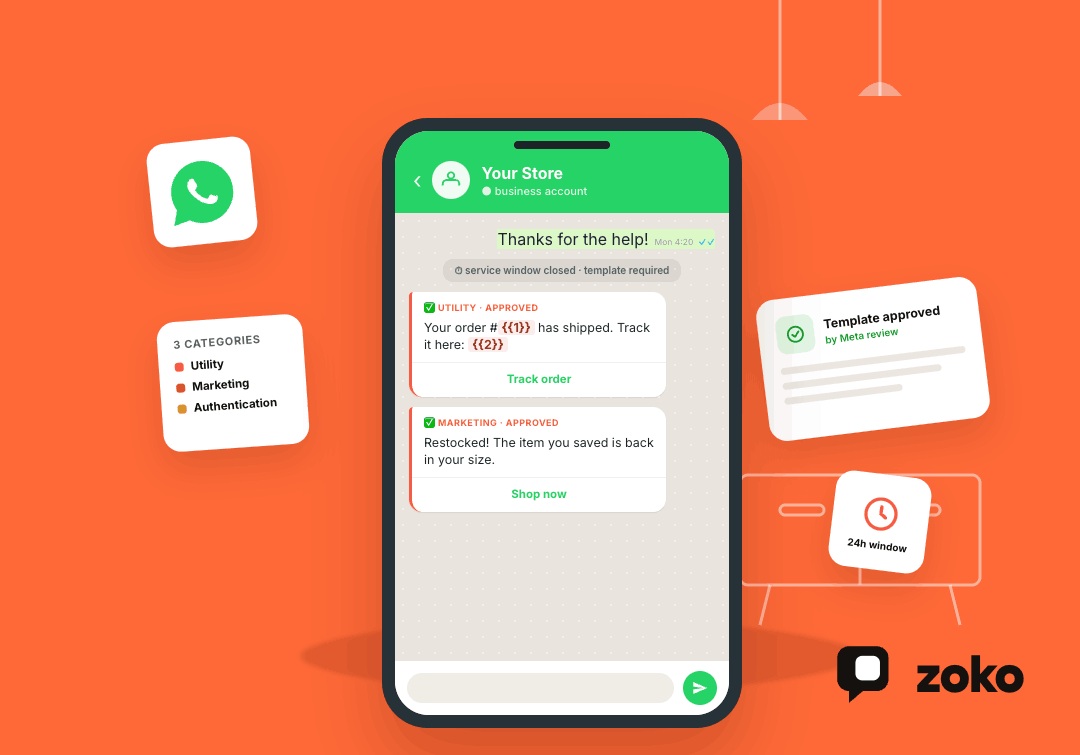


A WhatsApp message template is a pre-approved message format that Meta reviews before you can send it. If you're using the WhatsApp Business API (now built entirely on Meta's Cloud API), templates are the only way to message a customer when you don't have an open service window, meaning the customer hasn't messaged you recently.
This exists for one reason: WhatsApp doesn't want businesses spamming people the way email and SMS lists often do. So instead of letting any company send any message at any time, Meta requires that all business-initiated messages, order updates, shipping alerts, cart reminders, and promotions go through a template that's been submitted, categorised, and approved in advance.
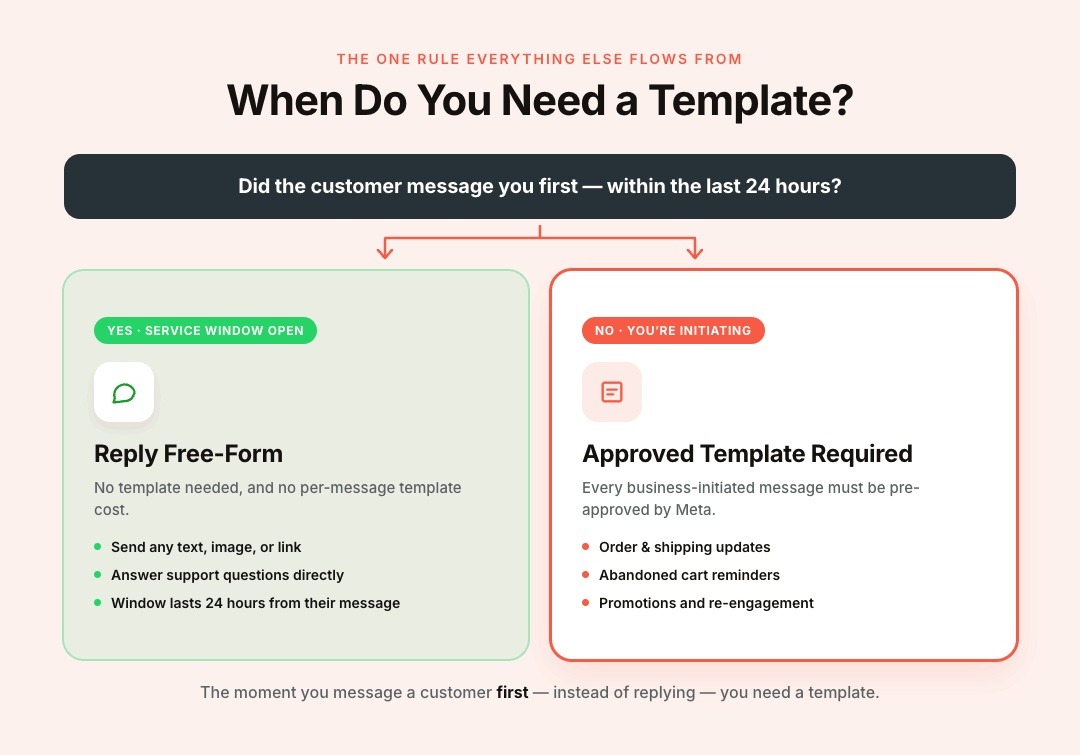
If you only remember one thing from this piece, remember this: the moment you want to message a customer first, instead of replying to them, you need a template. Everything else (categories, approval, cost, rejection reasons) flows from that one rule.
Why Does This Trip Up So Many Merchants
Most confusion around the template API comes from three places:
- Not knowing when a template is required. If a customer messages you first, you get a free-form reply window (commonly referred to as the 24-hour service window). Anything you send after that window closes, or anything you send to start a conversation, needs to be approved by a template.
- Picking the wrong category. Meta sorts every template into one of three types, and picking the wrong one is the single most common reason templates get rejected or, worse, silently reclassified after you've already been using them.
- Assuming approval is guaranteed or instant. Meta reviews every submission. Review times are commonly quick, but they're not fixed, and approval is never guaranteed — Meta can also reclassify or restrict templates after the fact if the content doesn't match how you've categorised it.
The Three Template Categories
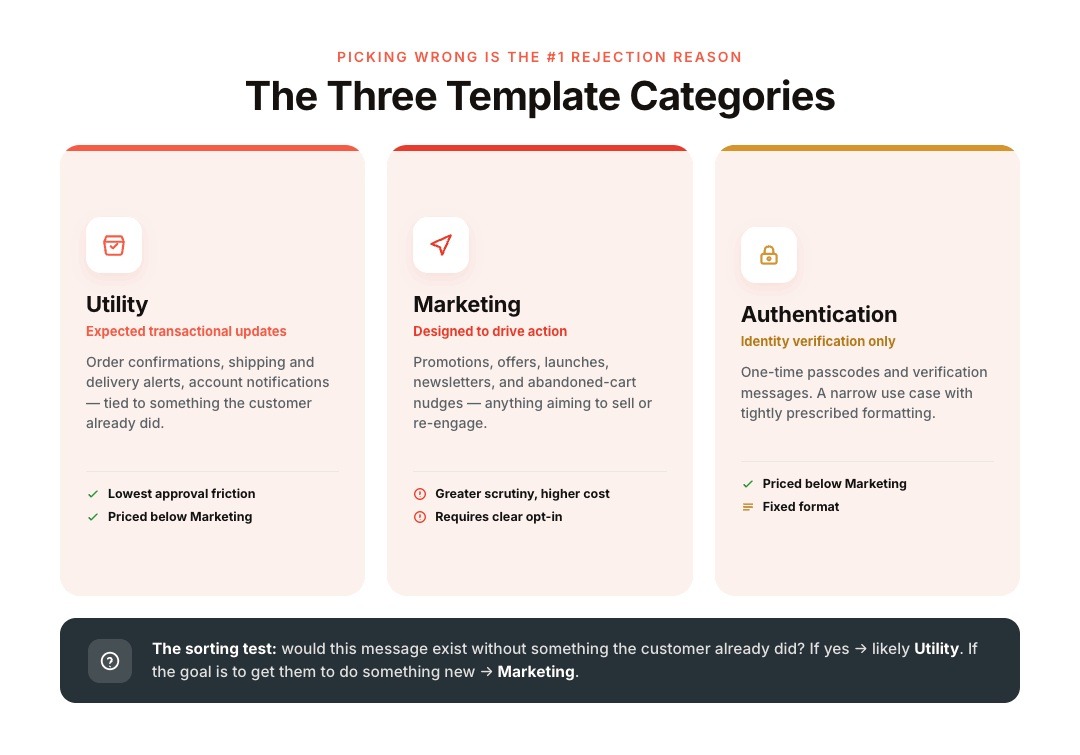
Every template you submit gets assigned one of these categories:
Utility: Transactional, non-promotional updates that the customer is already expecting as a result of something they did: order confirmations, shipping updates, delivery alerts, account notifications. These typically face the lowest approval friction and are priced lower than marketing templates.
Marketing: Anything designed to drive sales or re-engagement: promotions, offers, product launches, newsletters, abandoned-cart nudges. These are subject to greater scrutiny, cost more, and require clear opt-in from the recipient.
Authentication: One-time passcodes and identity verification messages. Narrow use case, tightly formatted.
A simple test that's commonly used to sort a message: would this message exist without something the customer already did? If yes, it's likely Utility. If the goal is to get them to do something new (buy, re-engage, click), it's Marketing.
Getting this wrong isn't just a risk of rejection. Businesses that repeatedly mislabel promotional content as Utility (to dodge marketing pricing or opt-in requirements) risk warnings, rate limits, or template restrictions from Meta. This is a compliance issue, not a technicality — treat it that way.
How Approval Actually Works
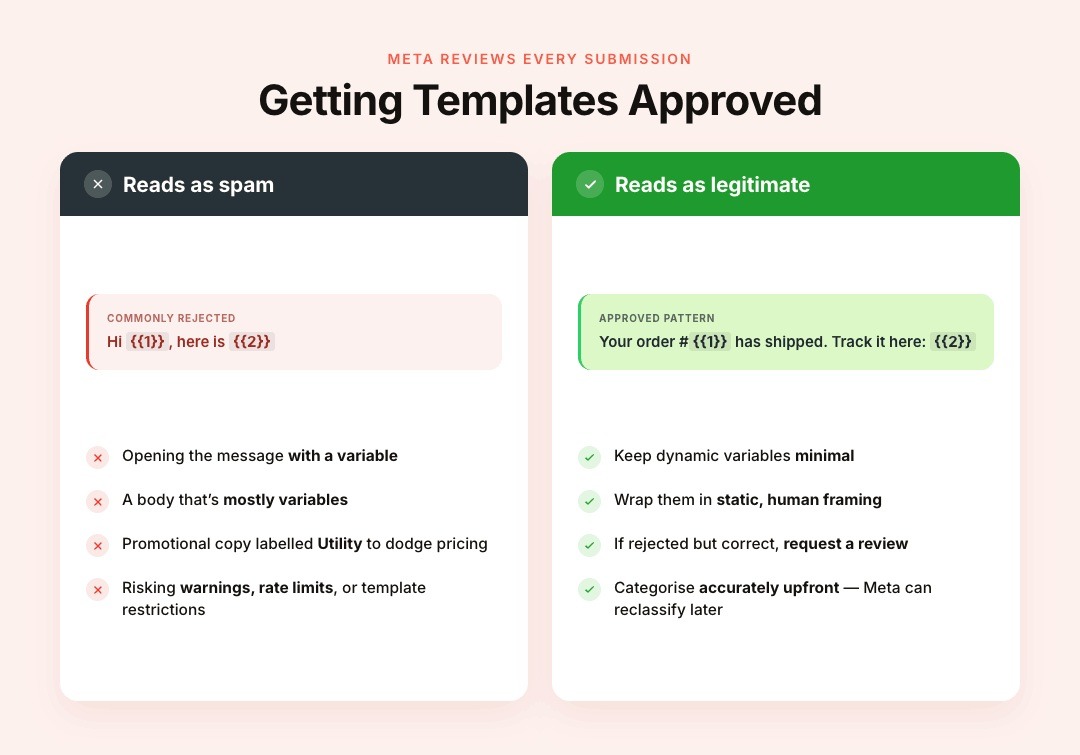
You submit a template — the copy, any variables, buttons, media — through the API or your provider's template manager. Meta reviews it against its WhatsApp Business Messaging Policy and either approves it, rejects it, or occasionally flags it for further review. A few practical notes worth knowing before you submit:
- Keep dynamic variables (like {{1}}, {{2}}) minimal, and don't open a message with a variable or fill the entire body with them — templates that look like Hi {{1}}, here is {{2}} read as spam patterns by Meta's reviewers and are commonly rejected.
- Add static, human framing around variables instead: something like "Your order #{{1}} has shipped. Track it here: {{2}}."
- If a template is rejected but you believe it's categorised correctly, most providers offer a way to request a review rather than resubmitting from scratch.
Pricing is also tied to category and recipient country, and it changes based on Meta's rate card — so avoid treating any specific number as fixed. What's stable is the pattern: Utility and Authentication templates are consistently priced lower than Marketing templates, and free-form replies within an open service window don't carry a per-message template cost.
One more thing merchants running promotions should know: Meta caps the number of marketing templates a single person can receive across all businesses in a day, not just from you. If your message gets blocked for this reason, sending more volume won't fix it — better targeting and timing will.
Where Merchants Actually Get Stuck
This is rarely a coding problem. It's an operations problem. Most Shopify merchants don't have someone whose full-time job is watching template statuses, correcting rejected categories, tracking which templates are tied to which flow, and making sure marketing sends only go to people who've actually opted in. When that falls on a founder or a lean ops team on top of running the store, templates get miscategorised, sends get blocked, and nobody notices until a customer complains or a number gets restricted.
This is also where the "just use the raw API" path gets expensive in time, even when it's free in dollars. Someone still has to build the submission workflow, track approval states, and keep marketing sends compliant with opt-in rules — every week, indefinitely.
Also read: WhatsApp CRM API: What It Means and How to Actually Use It for Ecommerce
Where Does This Fit into a Shopify WhatsApp Setup
Once you're clear on categories, the practical question becomes: how do you actually run this without manually managing templates for every order update, cart reminder, and promotion?
This is where the category should shape the tool, not the other way around. Order confirmations, shipping updates, and COD confirmations are Utility-style messages — in Zoko, these are typically handled through Flows, which trigger the right message automatically off Shopify order events instead of someone submitting and monitoring a template by hand.
Promotional sends (the Marketing category) are where Broadcasts with Segments matter, since a targeted, permissioned list is what keeps a marketing template's engagement (and approval standing) healthy in the first place.
The reason native Shopify integration matters here specifically: your order and customer data are already structured and synced, so the right template fires off the right trigger without a developer wiring up custom webhooks for each event. And because Zoko operates as an official Meta Business Partner, category and compliance groundwork (opt-in handling, template structure guidance) is built into the workflow rather than something your team has to independently police.
None of this replaces Meta's approval process — no provider controls that. What a Shopify-native platform can do is reduce the amount of compliance and category logic that sits on your team's shoulders day-to-day.
In-house Cloud API vs. a Shopify-Native Platform
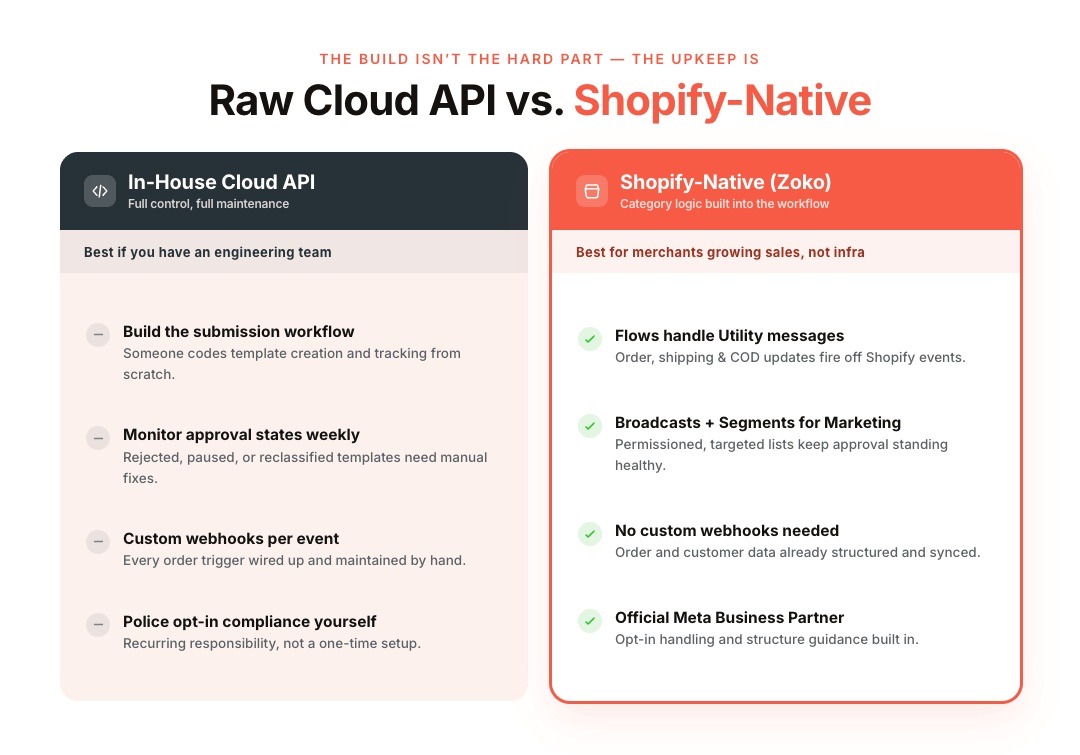
If you have an engineering team and your business requires highly customised messaging logic, integrating directly with Meta's Cloud API can be a viable option. It gives you complete control over template creation, webhook handling, message routing, and backend integrations. For businesses building proprietary systems or managing multiple internal applications, that flexibility can be valuable.
However, for most Shopify merchants, the integration itself isn't the biggest challenge—maintaining it is. Every new template needs to be created, categorised correctly, submitted for approval, and monitored over time. Marketing campaigns require valid customer opt-ins, while transactional workflows need to stay synchronised with order events. If templates are rejected, paused, or reclassified, someone on your team must identify the issue, make corrections, and resubmit them. As your catalogue, campaigns, and customer base grow, those operational tasks quickly become recurring responsibilities rather than one-time setups.
A Shopify-native platform removes much of that overhead by connecting your store data, customer information, and WhatsApp workflows out of the box. Instead of building custom webhooks for every order event, merchants can automate common journeys—such as abandoned cart recovery, order confirmations, shipping updates, COD verification, and post-purchase follow-ups—using pre-built workflows that stay connected to Shopify.
For businesses focused on growing sales rather than maintaining infrastructure, this approach shifts the effort from managing the API to optimising customer conversations. Platforms like Zoko combine native Shopify integration, automation, and Meta-compliant messaging in one place, allowing merchants to scale WhatsApp operations without building and maintaining the underlying infrastructure themselves.
The Bottom Line
The WhatsApp Template Message API is more than a technical requirement—it's the foundation of compliant, scalable business messaging on WhatsApp. By understanding when templates are required, choosing the right category, and following Meta's approval process, businesses can automate customer communication without compromising trust or risking policy violations.
For Shopify merchants, the bigger opportunity is turning approved templates into automated customer journeys. When order updates, abandoned cart reminders, COD confirmations, and promotional campaigns are triggered automatically through a Shopify-native platform like Zoko, WhatsApp becomes more than a messaging channel—it becomes a revenue-driving commerce engine that scales with your business.
Also read: 14 Common Reasons for WhatsApp Business Messages Not Delivering
FAQs
1. Do I need a template for every WhatsApp message?
No. If a customer messages you first, you can reply free-form within the open service window. Templates are required when you're initiating the conversation or messaging after that window closes.
2. How long does template approval take?
Review times are commonly fast, often within a day, but Meta doesn't publish a fixed guarantee, and timing can vary by submission.
3. Can a template get reclassified after it's approved?
Yes. Meta can review and reassign a template's category later if the content doesn't match how it's been used, which is another reason to categorise accurately upfront rather than to save on marketing pricing.
4. Is Marketing more expensive than Utility?
Generally, yes, though exact rates depend on Meta's current category-specific pricing and the recipient's country, so it's worth checking the current rates rather than relying on a fixed figure.
5. Can I use the same WhatsApp template in multiple languages?
No. Each language version of a template must be submitted separately for Meta's approval. While the structure and variables can remain the same, the translated content is reviewed independently to ensure it complies with WhatsApp's messaging policies and accurately reflects the intended category.
6. Can I delete a WhatsApp template I no longer use?
Yes. Businesses can delete unused templates from their WhatsApp Business account or through their Business Solution Provider. Removing outdated templates helps keep your template library organised, although deleting a template doesn't affect messages that have already been delivered.
7. Can I include product links in WhatsApp template messages?
Yes, provided the links comply with Meta's policies and are relevant to the template's purpose. For ecommerce businesses, it's common to include links to product pages, checkout pages, order tracking, or payment pages within approved templates using dynamic variables where appropriate.
8. What happens if my WhatsApp template is rejected?
If Meta rejects a template, you'll receive a reason for the rejection. In most cases, you can edit the content, correct the category if necessary, and resubmit it for review. Some Business Solution Providers also allow you to request a review if you believe the template was incorrectly rejected.
9. Do I need coding knowledge to use WhatsApp template messages?
Not necessarily. While businesses using Meta's Cloud API directly may need technical expertise, many Business Solution Providers offer visual interfaces for creating, submitting, and managing templates. Shopify-native platforms like Zoko also let merchants automate template messages through no-code workflows instead of custom development.
Interested to know more?
.svg)
Case Studies





















Featured Posts


Continue reading

The E-Commerce Divide: How the Top 10% of Brands Use AI to Grow 5X Faster (And Why It’s Not for Everyone)
Drive Sales with WhatsApp Catalog Integration: Here's How