







WhatsApp Business API Broadcast Limit: What Shopify Stores Must Know

WhatsApp Business API Broadcast Limit: What Shopify Stores Must Know
When your Shopify store depends on WhatsApp, every broadcast has a job to do. A sale message has to move before the stock runs out. A cart reminder has to bring buyers back without sounding pushy. A COD confirmation has to reduce failed deliveries before they cost you money. But as your list grows, sending more messages also increases the risk of spam reports, poor delivery, and loss of customer trust.
Understanding the WhatsApp Business API broadcast limit helps in such scenarios. It lets you know where safe messaging ends and when you enter risky bulk-sending territory. This article explains how WhatsApp broadcast rules work, why limits exist, what changes with API-led messaging, and how to send campaigns at scale without putting your business number or customer conversations at risk.
In a Nutshell
The WhatsApp Business API broadcast limit is different from the WhatsApp Business App limit, and Shopify merchants should understand both before sending campaigns at scale.
- WhatsApp Business App broadcasts are limited to manual lists, saved contacts, and basic tracking, making them better for small customer groups.
- WhatsApp Business API broadcasts use messaging tiers, opt-ins, approved templates, account quality, and campaign tracking to enable safer scaling.
- Limit figures differ by setup. WhatsApp Business App broadcasts allow up to 256 contacts per list, while API messaging starts at 250 customers and can scale to 2,000, 10,000, 100,000, or unlimited, depending on the tier.
- Standard broadcasts can hurt reach because messages only reach customers who have saved your business number.
- Risky bulk sender tools can trigger spam signals, poor delivery, account restrictions, or loss of customer trust. That's why WhatsApp blocks them.
- Safer scaling depends on official API access, business verification, approved templates, clear opt-ins, segmentation, and response handling.
- You should track replies, clicks, orders, engagement decline, and delivery drops instead of only counting sent messages.
WhatsApp Broadcast List vs WhatsApp Business API: Where the Limit Actually Applies
The phrase “WhatsApp broadcast limit” can mean two different things. In the WhatsApp Business App, you deal with broadcast list limits. In the WhatsApp Business API, you deal with messaging limits. If you run a Shopify store, this difference matters.
WhatsApp Business App Broadcast Limit
WhatsApp Business App broadcasts are manual messages you send to selected saved contacts. Each broadcast list can include up to 256 contacts, and the message reaches only customers who have saved your business number. This setup can work when your Shopify store is small.
You can use app broadcasts for:
- Small sale alerts
- New arrival updates
- Simple order follow-ups
- Local customer updates
- Repeat buyer messages
WhatsApp Business API Broadcast Limit
The WhatsApp Business API is built for larger, rule-based customer messaging. API-led broadcasts depend on:
- Customer opt-ins
- Approved message templates
- Account quality
- Message relevance
- 24-hour service window
- Sending volume rules
- A connected platform for campaign tracking
New business portfolios start with a 250-customer messaging limit. You can increase this to 2,000 after completing Meta’s scaling path. After that, your limits can move to 10,000, 100,000, and unlimited through automatic scaling. That said, “unlimited” does not mean unrestricted. WhatsApp still expects you to send relevant messages to customers who agreed to receive them.
For your Shopify store, the API becomes useful when WhatsApp supports sales, customer support, cart recovery, COD confirmation, and post-purchase communication.
Quick Comparison
| Factor | WhatsApp Business App Broadcasts | WhatsApp Business API Broadcasts |
|---|---|---|
| Broadcast limit | Up to 256 contacts per list | 250 - unlimited (tier-based) |
| Best for | Small customer groups | Growing Shopify stores |
| Sending model | Manual broadcast lists | API-led messaging |
| Contact rule | The customer must save your number. | Customer opt-in is required. |
| Scheduling | Not possible | Possible |
| Personalization | No dynamic fields | Supports deeper segmentation |
| Automation | Limited | Supports flows and follow-ups |
| Tracking | Basic or manual | Campaign-level tracking |
| Shopify fit | Limited | Stronger cart, order, and customer workflows |
Key insight: The app limits the number of contacts per broadcast list. The API limits the number of unique customers you can message in a rolling 24-hour period outside the customer service window.
Also Read: How to Get Your Tiers Upgraded
Why Standard Broadcast Limits Matter for Shopify Merchants
Broadcast limits affect more than how many customers you can message. They shape your actual reach, message relevance, team workload, tracking, and account safety. Here are the key factors that make standard app broadcasts less suitable for scaled e-commerce campaigns.
1. Your actual reach may be smaller than your list.
With standard WhatsApp broadcasts, delivery depends on one key condition: customers must have your business number saved in their contacts. Otherwise, your message will not reach them.
This makes the list size misleading. You may add 200 contacts to a broadcast list, but only a smaller group (say 100) may receive the message if the rest never saved your number.
For Shopify merchants, this is problematic because:
- New leads rarely save a store's number immediately.
- Existing customers may lose saved contacts when they change devices.
- Dormant buyers may not remember why your number is messaging them.
That way, a festive sale, cart reminder, or back-in-stock alert can miss high-intent buyers if saved-number delivery breaks down.
2. Your lists become messy as your store grows.
Manual lists work when your customer base is small. Once your store grows, you'll need a separate list for every 257th contact. And that can include buyers, leads, repeat customers, and dormant shoppers.
That creates friction:
- Duplicate contacts across multiple lists
- Manual updates after every new order
- No way to create/manage separate lists from the WhatsApp Web either
3. Generic messages reduce relevance.
Standard broadcasts send the same message to everyone. You cannot easily add names, order details, cart items, or product preferences. That weakens campaigns because different customers need different messages. A first-time buyer, cart abandoner, COD customer, and repeat shopper should not receive the same offer.
4. Broadcast lists do not connect with Shopify workflows.
Manual broadcast lists do not sync with Shopify, CRM, billing, or automation tools. This makes it hard to connect messages to abandoned carts, order updates, delivery status, or repeat-purchase flows.
5. Replies can overload your team.
A good broadcast often brings questions about size, price, discounts, COD, delivery, returns, or stock. Without a shared inbox or automation, replies pile up, and high-intent buyers may wait too long.
6. Tracking becomes harder.
Manual broadcasts give you little visibility after a message goes out. For a Shopify store, that creates guesswork. You cannot easily tell which customer segment responded, which offer drove orders, or which campaign helped recover abandoned carts. You also struggle to compare festive sale alerts, back-in-stock messages, and COD confirmation campaigns. And without campaign-level tracking, WhatsApp becomes a busy chat channel instead of a measurable sales channel.
Also read: How to Send a WhatsApp Blast: Complete Guide for Businesses in 2026
Why WhatsApp Limits Broadcasts and Blocks Risky Bulk Sending
WhatsApp limits broadcasts to ensure business messages feel expected rather than random. The 256-contact cap and saved-number rule create a basic trust filter. If someone has saved your business number, they are more likely to know your store and expect updates from you.
For Shopify merchants, this matters because WhatsApp is often tied to active buying moments. Customers use it to ask about products, confirm COD orders, check delivery timelines, and follow up after purchase. If your number gets flagged, you risk more than just one campaign. You risk the channel customers already use to buy from you.
Note: WhatsApp does not only look at message volume. It also looks at behavioral/engagement patterns, message quality and relevance, delivery signals, and recipient responses.
Risky bulk sender tools make this problem worse. Many browser extensions, desktop tools, and web apps claim they can bypass WhatsApp limits. Most work by automating WhatsApp Web and sending the same message at high speed.
That may look convenient during a sale, but it creates patterns WhatsApp can flag:
- The same message goes to many people too quickly.
- Recipients do not recognize your number.
- Customers block or report the message as spam.
- Delivery patterns look unnatural.
- Your number behaves more like a bot than a business.
And the risk is not limited to the tool you use. Since WhatsApp accounts are tied to phone numbers, restrictions or bans can affect the business number your customers already know. That can break active chats, support conversations, COD confirmations, and follow-ups. Recovery is also uncertain.
Also Read: Understanding Quality Ratings and improving your store's Quality Rating
The Safer Way to Scale WhatsApp Broadcasts Without Triggering Spam Risk
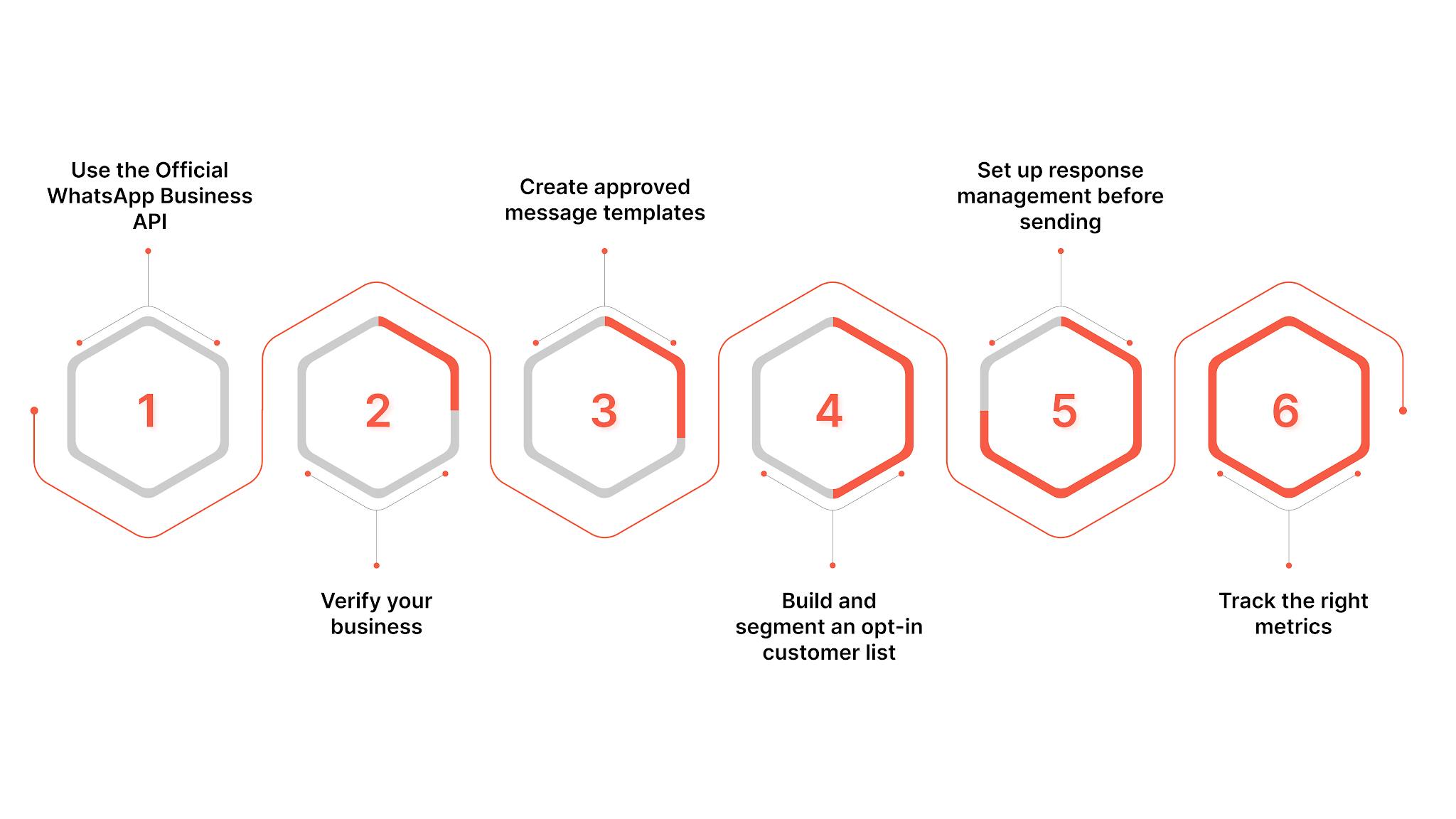
Scaling WhatsApp broadcasts is about using an approved setup, sending to customers who expect your messages, and making every campaign easy to reply to. Remember, safe scale comes from consent, relevance, response handling, and message quality, not from bypassing WhatsApp limits.
1. Use the Official WhatsApp Business API
If your Shopify store has outgrown manual broadcast list limits, use the Official WhatsApp Business API through Meta or an approved platform like Zoko. This gives you a structured way to send campaigns, manage customer replies, and track performance without relying on risky bulk-sender tools.
2. Verify your business
Complete Meta’s business verification and keep your business details consistent. Your store name, website, phone number, and legal details should match across Meta Business Manager, Shopify, and your storefront. This gives your WhatsApp setup a clean foundation.
3. Create approved message templates
Many outbound WhatsApp messages require approval before you send them. Treat this as a quality step, not just a rule.
A good template should answer three questions:
- Who is this message for?
- Why are they receiving it?
- What should they do next?
Example: Avoid a flat message like: “End of Season Sale Live Now! Up to 50% Off.”
Use a more conversational message: “Hi {name}, our end-of-season collection has a few styles that match your last order. Would you like to see them?”
This shifts your broadcast from a one-way promotion to a useful conversation.
4. Build and segment an opt-in customer list
Consent should sit at the center of every WhatsApp campaign. Ensure customers can opt in at checkout, via website forms, through post-purchase prompts, or in earlier WhatsApp conversations.
Then, segment your list before sending:
| Segment | How to message them |
|---|---|
| Hot contacts | Send priority offers and timely updates. |
| Warm contacts | Send product reminders or helpful prompts. |
| Cold contacts | Use careful re-engagement messages. |
Prioritize hot and warm contacts for important broadcasts. They are more likely to recognize your store, reply, and take action.
5. Set up response management before sending
A strong broadcast can create a reply spike. Customers may ask about size, price, stock, COD, delivery timelines, returns, or discounts. So, before sending, make sure you have:
- Quick replies for common questions
- Team members assigned to WhatsApp during business hours
- Notifications across devices
- A shared inbox for campaign replies
- Follow-up flows for common customer actions
Consider Zoko's FlowHippo Flows to automate common follow-ups around product questions, COD confirmations, shipping updates, review requests, and reorder reminders.
6. Track the right metrics
Do not judge a WhatsApp broadcast only by how many people received it. Track what happens next.
Focus on:
- Reply rate: how many recipients responded
- Click rate: how many tapped your product or checkout link
- Order impact: how many purchases followed the campaign
- Engagement decline: how quickly contacts move from hot to warm or cold
- Delivery drops: sudden changes that may signal list or quality issues
How Zoko Helps Shopify Merchants Scale WhatsApp Broadcasts Safely
A WhatsApp broadcast can bring back customers to your store, but the message itself is only the first step. The real value comes after a customer replies, asks about a product, checks delivery, confirms COD, or shows interest in buying.
For Shopify merchants, this is where Zoko helps. It connects WhatsApp broadcasts to Shopify workflows, customer conversations, and post-campaign automations so that each campaign can move beyond one-way promotion.
With Zoko, you can:
- Connect broadcasts with Shopify context: Use customer, product, cart, and order data to make campaigns more useful.
- Send media-rich campaigns: Share product images, videos, or files using pre-approved media templates, so customers can see what you are promoting before they reply.
- Send broadcasts to sharper customer segments: Use tags and segments to target groups such as repeat buyers, VIP shoppers, pop-up leads, product-interest groups, or abandoned-cart customers.
- Add variables to templates: Personalize broadcast messages with template variables instead of sending the same flat message to every customer.
- Track broadcast conversions: Use campaign names and conversion tracking to link broadcasts to customer actions and measure the return from each campaign.
- Manage failed sends, bulk broadcasts, and timing: Reattempt failed broadcasts, import prepared XLSX recipient lists, and schedule campaigns for the right sale window.
- Guide shoppers to WhatsApp Catalog when relevant: Let customers move from a broadcast to product browsing and buying within WhatsApp.
Proof point: Petsy used Zoko Broadcast via Segments to boost revenue by $79K in four months, showing how targeted WhatsApp broadcasts can support real Shopify sales.
If WhatsApp broadcast limits are starting to slow your Shopify campaigns, it may be time to move from manual sending to a safer, API-led setup. Book a demo with Zoko to see how you can send targeted broadcasts, manage replies, track conversions, and turn WhatsApp into a measurable sales channel for your store.
FAQs
1. Are WhatsApp API broadcast charges based on sent or delivered messages?
WhatsApp Business Platform pricing is based on delivered messages, not attempted sends. Costs also depend on the message category and the customer’s country.
2. Do saved-number rules apply to WhatsApp API broadcasts?
The saved-number rule applies to WhatsApp Business App broadcasts. For API-led broadcasts, the stronger requirement is customer opt-in. Your Shopify store should collect clear consent before sending sale alerts, cart reminders, or reorder prompts.
3. Can WhatsApp broadcast limits increase automatically?
Yes. API messaging limits can increase when your business maintains good quality, sends relevant messages, and avoids negative feedback. Scaling depends on customer response and account health.
4. Are WhatsApp broadcast limits the same in every country?
The app broadcast list cap is generally fixed, but API pricing, message categories, and customer behavior can vary by country. Shopify merchants selling across India, Brazil, Europe, or the Middle East should plan campaigns by market.
Interested to know more?
.svg)
Case Studies




















Featured Posts


Continue reading

The E-Commerce Divide: How the Top 10% of Brands Use AI to Grow 5X Faster (And Why It’s Not for Everyone)
Drive Sales with WhatsApp Catalog Integration: Here's How