





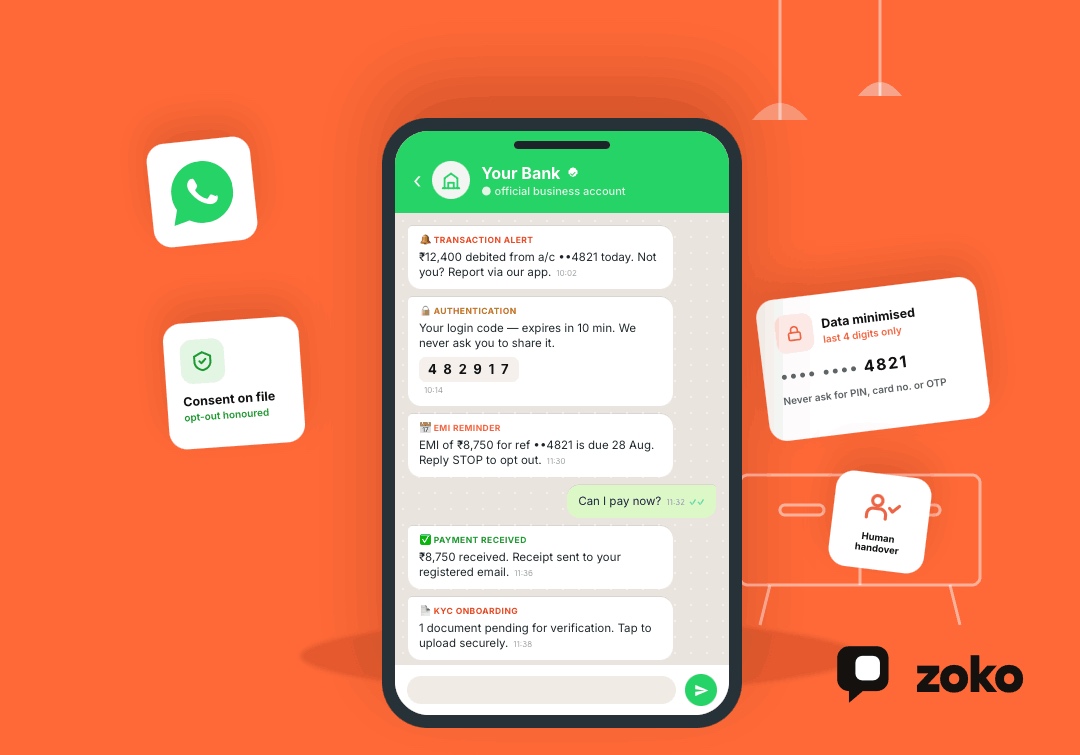

WhatsApp Business API for Financial Services: Use Cases, Compliance, and Setup

WhatsApp Business API for Financial Services: Use Cases, Compliance, and Setup
Customers no longer want to call a branch or wait hours for basic financial updates. They expect quick answers through channels they already use.
WhatsApp now serves more than three billion people across over 180 countries. For financial service providers, the WhatsApp Business API creates a direct channel for alerts, support, onboarding, reminders, and secure customer journeys.
However, financial communication needs stronger controls than ordinary customer messaging. Banks, insurers, lenders, fintech companies, and payment providers must consider consent, data protection, recordkeeping, fraud risks, and local regulations before launching any workflow.
Key Takeaways
The WhatsApp Business API allows financial service providers to send approved notifications, automate common questions, authenticate users, and connect customer conversations with internal systems.
Common use cases include:
- Transaction and fraud alerts
- Loan or application status updates
- EMI and premium reminders
- Customer onboarding guidance
- OTP authentication
- Insurance claim updates
- Payment links and receipts
- Automated support with human handover
Businesses should use the official WhatsApp Business Platform, collect clear consent, avoid requesting sensitive financial identifiers, and maintain proper audit records.
What Is the WhatsApp Business API for Financial Services?
The WhatsApp Business API, now commonly called the WhatsApp Business Platform, connects WhatsApp with a company’s CRM, support desk, payment system, or internal software.
Unlike the regular WhatsApp Business app, the API supports:
- Multiple customer service agents
- Automated messages and chatbots
- Approved outbound templates
- CRM and software integrations
- Authentication messages
- Customer segmentation
- Analytics and conversation tracking
- Large-scale customer communication
When a customer messages a business, WhatsApp opens a 24-hour customer service window. During this period, the business can send normal conversational replies.
Outside that window, the company generally needs an approved WhatsApp message template to restart the conversation.
Why Financial Services Are Moving Customer Communication to WhatsApp
Financial services depend on timely communication. A delayed fraud warning, payment reminder, or document request can affect both the customer and the provider.
WhatsApp helps companies deliver information through a familiar mobile interface. This is particularly relevant in India, where digital financial activity continues to grow.
For example, India processed approximately 22.7 billion UPI transactions during June 2026, according to the National Payments Corporation of India. As digital payments increase, customers also need faster payment confirmations, support, and security alerts.
The API can help financial teams:
- Reduce repetitive support requests
- Send time-sensitive notifications
- Guide customers through structured processes
- Keep conversations connected to customer records
- Escalate complex cases to trained agents
- Provide service outside normal branch hours
WhatsApp should still complement secure financial applications, official websites, and required regulatory communication channels.
WhatsApp Business API Use Cases for Financial Services
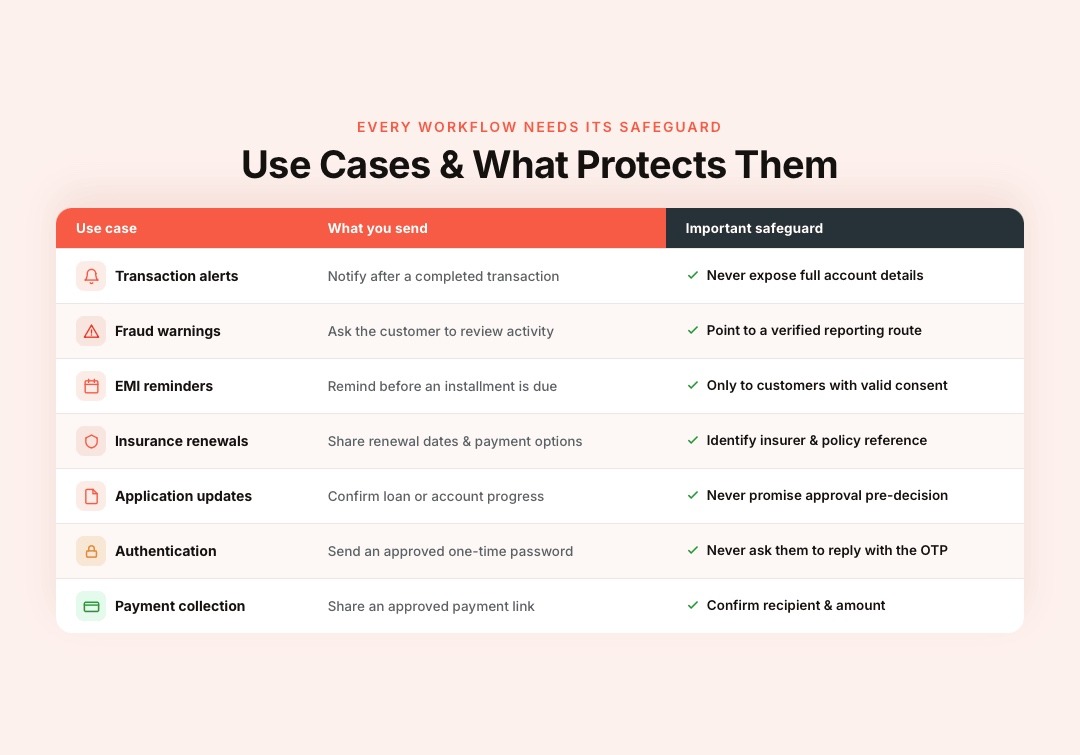
The right workflow depends on the company’s services, regulatory responsibilities, and customer needs.
| Use case | Example message or action | Important safeguard |
|---|---|---|
| Transaction alerts | Notify customers about a completed transaction | Do not expose complete account details |
| Fraud warnings | Ask customers to review suspicious activity | Provide a verified reporting route |
| EMI reminders | Remind borrowers before an installment is due | Send only to customers with valid consent |
| Insurance renewals | Share policy renewal dates and approved payment options | Clearly identify the insurer and policy reference |
| Application updates | Confirm loan, card, or account application progress | Avoid promising approval before a final decision |
| Customer support | Answer questions about fees, claims, or payment status | Escalate sensitive cases to a human agent |
| Authentication | Send approved one-time passwords | Never ask customers to reply with their OTP |
| Payment collection | Share an approved payment link or payment request | Confirm the payment recipient and amount |
1. Transaction and Account Notifications
Financial institutions can send alerts after transactions, deposits, payment attempts, or account changes.
Messages should reveal only the information needed to help the customer identify the event. A notification may display the last four digits of an account rather than the complete number.
Customers should also receive a clear method for reporting an unfamiliar transaction.
2. Fraud and Security Alerts
A quick WhatsApp notification can warn customers about unusual activity or a new login attempt.
However, the message should not ask customers to share passwords, PINs, card numbers, or OTPs. It should direct them to a verified app, website, helpline, or secure reporting process.
3. Loan and Application Status Updates
Banks, NBFCs, fintech companies, and loan providers can automate application milestones such as:
- Application received
- Documents pending
- Verification completed
- Application under review
- Decision available
- Disbursement processed
These updates reduce repeated calls without exposing confidential underwriting information.
4. EMI, Premium, and Payment Reminders
Financial service providers can send reminders before an EMI, insurance premium, subscription, or scheduled payment becomes due.
The message can include:
- Due date
- Reference number
- Amount due
- Approved payment link
- Support contact
- Opt-out instructions
Reminder campaigns should exclude customers who have already paid or changed their payment schedule.
5. Customer Onboarding and KYC Guidance
WhatsApp can guide customers through the onboarding process by explaining required steps and sharing secure links.
For example, a company can send:
- A welcome message
- A list of accepted documents
- A link to its verified KYC portal
- A confirmation after submission
- A status update after review
WhatsApp template guidance prohibits requesting full payment card numbers, complete financial account numbers, national identification numbers, and similar sensitive identifiers inside templates.
Therefore, sensitive information should usually be collected through a secure, authenticated system rather than an ordinary chat reply.
6. Insurance Policy and Claim Updates
Insurers can automate notifications for:
- Policy issuance
- Premium reminders
- Renewal dates
- Missing claim documents
- Surveyor appointments
- Claim review status
- Settlement confirmation
Meta also provides WhatsApp Flows examples for insurance enrollment journeys, showing how structured forms can support guided customer processes.
7. OTP and Authentication Messages
The WhatsApp Business Platform supports authentication templates for sending one-time passwords.
The message should clearly state:
- The purpose of the code
- Its expiration time
- That employees will never request it
- What customers should do if they did not initiate the request
Authentication messages should be connected to proper rate limits, fraud controls, and account monitoring.
8. Payment Links, Confirmations, and Receipts
Businesses can share approved payment links or supported in-chat payment requests through WhatsApp.
A complete payment workflow may include:
- Payment reminder
- Order or invoice summary
- Verified payment option
- Successful payment confirmation
- Digital receipt
- Refund or failure update
In India, WhatsApp supports approved payment-gateway configurations for eligible business payment experiences. Availability depends on the business, provider, payment partner, and market.
How to Implement WhatsApp Business API for Financial Services
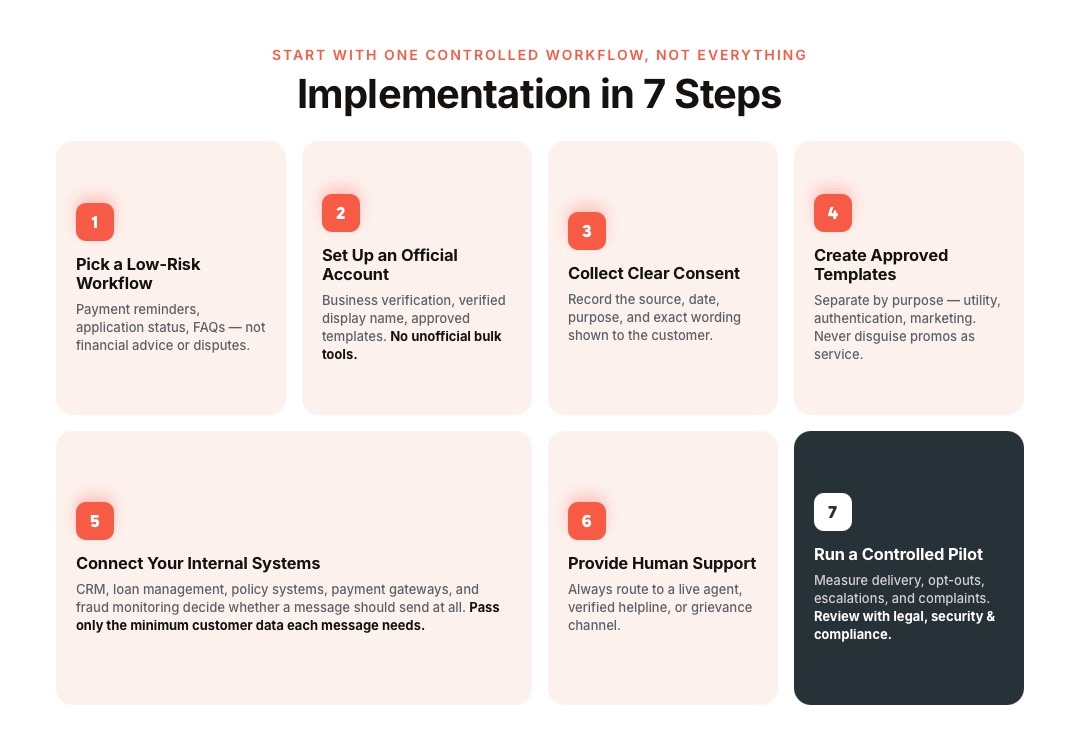
A financial organization should not begin by automating every customer conversation. Start with one controlled, measurable use case.
Step 1: Select a Low-Risk Workflow
Good first workflows include:
- Payment reminders
- Application status updates
- Branch appointment booking
- Policy renewal reminders
- Frequently asked questions
Avoid starting with complex financial advice, disputed transactions, or decisions requiring human judgment.
Step 2: Set Up an Official WhatsApp Business Account
Use the official WhatsApp Business Platform through Meta or an approved provider.
The setup generally requires:
- A Meta Business Portfolio
- Business verification
- A WhatsApp Business Account
- An eligible phone number
- A verified display name
- Approved message templates
- A billing method
Businesses should avoid unofficial bulk-messaging software because it may create security, compliance, and account-quality risks.
Step 3: Collect Clear Customer Consent
Customers should know:
- Which business will contact them
- What messages they will receive
- How often messages may arrive
- How their data will be processed
- How they can withdraw consent
Consent records should include the source, date, purpose, and wording shown to the customer.
Businesses must also honor requests to stop receiving marketing messages.
Step 4: Create Approved Message Templates
Templates should be direct, specific, and easy to understand.
A financial reminder template might say:
Your payment of ₹[amount] for reference [last four digits] is due on [date]. Pay through our verified portal: [link]. Reply STOP to opt out of reminders.
Separate templates by purpose, such as:
- Utility notifications
- Authentication
- Marketing
- Customer service follow-ups
Do not disguise promotional content as a service notification.
Step 5: Connect WhatsApp With Internal Systems
Connect the API with the systems that determine whether a message should be sent.
These may include:
- CRM software
- Loan management systems
- Insurance policy systems
- Payment gateways
- Fraud monitoring tools
- Customer support platforms
Only send the minimum customer data needed for each message.
Step 6: Provide Human Support
Automation should answer routine questions, not trap customers inside a chatbot.
Always provide a route to:
- A live support agent
- A verified phone number
- A secure support form
- A branch or office
- An official grievance channel
High-risk requests should move to trained employees immediately.
Step 7: Run a Controlled Pilot
Test the workflow with a limited customer group before a wider launch.
Measure:
- Successful delivery
- Customer replies
- Opt-out rate
- Human escalations
- Resolution time
- Failed authentication attempts
- Customer complaints
- Template rejections
Review the workflow with legal, security, compliance, and customer service teams.
Also read: 10 WhatsApp Business API E-commerce Features to Use in 2026
Security and Compliance Checklist
WhatsApp uses the Signal protocol to protect message delivery between the user and the Cloud API acting for the business. However, the financial company remains responsible for data stored or processed in its own systems.
Before launching, financial service providers should confirm that they:
- Use the official WhatsApp Business Platform
- Collect and record valid consent
- Provide clear opt-out options
- Avoid requesting full financial identifiers
- Limit the personal data included in messages
- Encrypt stored customer information
- Restrict employee access by role
- Maintain logs required by their regulator
- Review every external integration
- Create a process for reporting fraud
- Provide human support
- Follow local retention requirements
Indian businesses must also consider the Digital Personal Data Protection Act and the Digital Personal Data Protection Rules, 2025. The rules have staged commencement dates, so companies should confirm which obligations currently apply to their operations.
For Indian banks, RBI guidance requires mandatory SMS alerts for electronic banking transactions. WhatsApp should therefore act as an additional communication channel unless the bank’s compliance team confirms another treatment.
How Zoko Simplifies Payment-Related WhatsApp Commerce
Shopify merchants often manage payment reminders, failed transactions, COD confirmations, refunds, and customer questions across separate tools. This creates slower responses, missed follow-ups, and unnecessary friction during checkout and post-purchase communication.
Zoko connects Shopify with the official WhatsApp Business API, allowing merchants to manage payment-related conversations, orders, support, and automation from one platform.
With Zoko, Shopify merchants can:
- Send automated payment reminders for incomplete or unpaid orders
- Share secure payment links directly through WhatsApp
- Confirm successful payments and send order receipts
- Follow up on failed or abandoned payment attempts
- Send refund and payment-status updates
- Automate COD confirmation messages before dispatch
- Encourage customers to convert COD orders into prepaid orders
- Answer payment, installment, and order-related questions using a WhatsApp AI chatbot
- Build automated payment and post-purchase journeys with FlowHippo Flows
- Move complex payment issues to a live agent through a shared team inbox
- Connect payment communication with the Shopify catalog, checkout, and order data
- Manage WhatsApp payment workflows using Zoko’s payment gateway integration
For example, Zoko can detect an unpaid Shopify order, send an approved reminder, share a payment option, confirm the transaction, and update the customer without manual follow-ups.
Common WhatsApp API Mistakes in Financial Services
Financial institutions handle sensitive customer data, time-sensitive transactions, and strict communication requirements. Small WhatsApp API mistakes can lead to failed messages, poor customer experiences, privacy risks, or compliance issues.
Avoiding these errors helps businesses build safer, more reliable, and more effective customer communication workflows.
Sending Messages Without Proper Consent
A customer providing a phone number does not automatically mean they agreed to every WhatsApp campaign.
Consent should match the message purpose.
Including Too Much Sensitive Information
Avoid displaying full account numbers, card details, identification numbers, balances, or personal financial information unnecessarily.
Treating Encryption as Complete Compliance
Encryption protects message delivery. It does not automatically solve employee access, storage, retention, consent, or regulatory requirements.
Automating High-Risk Decisions
Chatbots should not independently approve loans, reject claims, provide regulated investment advice, or resolve fraud disputes.
Removing Human Support
Customers need fast access to a trained person when a request involves money, identity, security, or complaints.
Conclusion
The WhatsApp Business API can help financial service providers deliver faster alerts, reminders, onboarding guidance, authentication, and customer support. Success depends on careful consent management, limited data exposure, secure system connections, approved templates, and clear human escalation.
For Shopify merchants managing payment-related customer conversations, Zoko connects WhatsApp with orders, payment workflows, customer support, and automation.
Start a Zoko trial or book a demo to see how WhatsApp can support the complete customer journey from payment reminder to post-purchase service.
Frequently Asked Questions
Can financial service providers use the WhatsApp Business API?
Yes. Banks, insurers, lenders, fintech companies, and payment providers can use it for eligible customer communication. Each workflow must comply with WhatsApp policies, local laws, and applicable financial regulations.
Is the WhatsApp Business API secure for financial communication?
WhatsApp protects message delivery through the Signal protocol. The business must still secure connected databases, employee access, integrations, stored records, and customer authentication.
Can banks send OTPs through WhatsApp?
Yes. The WhatsApp Business Platform supports authentication templates. Businesses should connect them to proper fraud monitoring, expiration rules, and rate limits.
Can WhatsApp be used for KYC?
WhatsApp can guide customers through KYC and share secure links. Companies should avoid collecting sensitive identifiers through ordinary messages unless their security and compliance teams approve the process.
Can WhatsApp replace mandatory SMS banking alerts?
Not necessarily. Indian banks must follow RBI requirements for mandatory transaction alerts. WhatsApp should normally supplement required channels rather than replace them.
Is Zoko suitable for banks and financial institutions?
Zoko is primarily a Shopify-focused WhatsApp commerce platform. It is best suited to payment, order, support, and customer communication workflows connected to e-commerce, rather than core banking operations.
Interested to know more?
.svg)
Case Studies




















Featured Posts


Continue reading

The E-Commerce Divide: How the Top 10% of Brands Use AI to Grow 5X Faster (And Why It’s Not for Everyone)
Drive Sales with WhatsApp Catalog Integration: Here's How