






WhatsApp Business API Ecommerce Features 2026: What You're Actually Buying

WhatsApp Business API Ecommerce Features 2026: What You're Actually Buying
WhatsApp Business API for ecommerce users actually bundles together a handful of distinct features that different providers implement with very different depth.
Knowing what each feature is supposed to do, and what separates a basic implementation from a genuinely useful one, is what makes a provider comparison meaningful instead of just a features checklist.
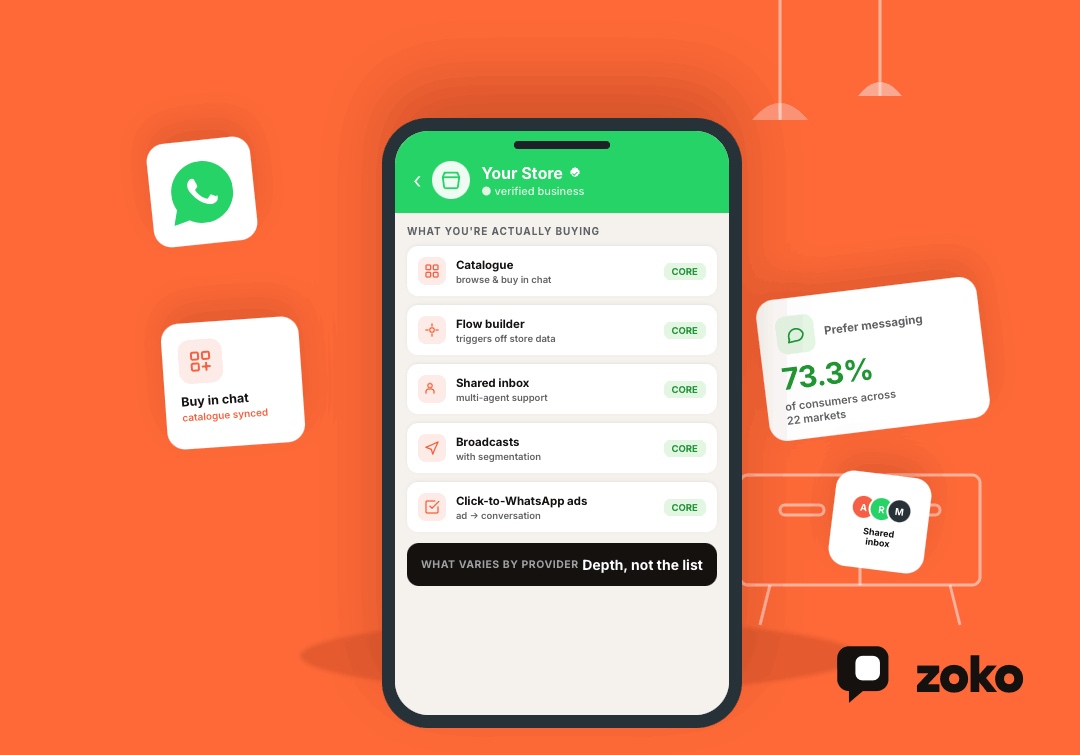
That distinction matters because messaging has become a preferred way to shop and get support. Meta's latest State of Business Messaging report found that 73.3% of consumers across 22 markets prefer messaging when communicating with businesses, making platforms like WhatsApp a core commerce channel rather than just a customer support tool.
This article is a feature-by-feature breakdown, not a strategy guide. If you're looking for how to actually build cart recovery flows or structure a WhatsApp automation program, that's a separate question with a separate answer.
Here, the focus is narrower: what the API and the platforms built on it actually let an ecommerce brand do in 2026.
TL;DR
- WhatsApp Business API features for ecommerce fall into five core categories: catalogue and product browsing, automated messaging, a shared team inbox, broadcast and segmentation tools, and ad-to-chat entry points.
- Catalogue integration lets customers browse and buy without ever leaving the chat, which is the feature most directly tied to WhatsApp functioning as a sales channel rather than just support.
- Automation quality varies enormously between providers — some offer basic auto-replies, others offer visual flow builders that trigger off real store data like cart status and order stage.
- A shared inbox with multi-agent support becomes necessary the moment more than one person on a team is replying from the same number.
- The features that matter most for ecommerce specifically are the ones tied to actual store data (Shopify, in most cases), not generic messaging capability.
WhatsApp Catalogue: Selling Inside the Chat
Catalogue is the feature that turns WhatsApp from a support channel into an actual point of sale. It syncs your product listings (images, pricing, descriptions) directly into WhatsApp, so a customer asking about a product can browse and add to cart without being redirected to a website.
For an ecommerce brand, this is arguably the single feature that most changes what WhatsApp is capable of, since it collapses the gap between "answering a question" and "closing a sale" into one conversation.
What Separates a Good Catalogue Integration From a Basic One
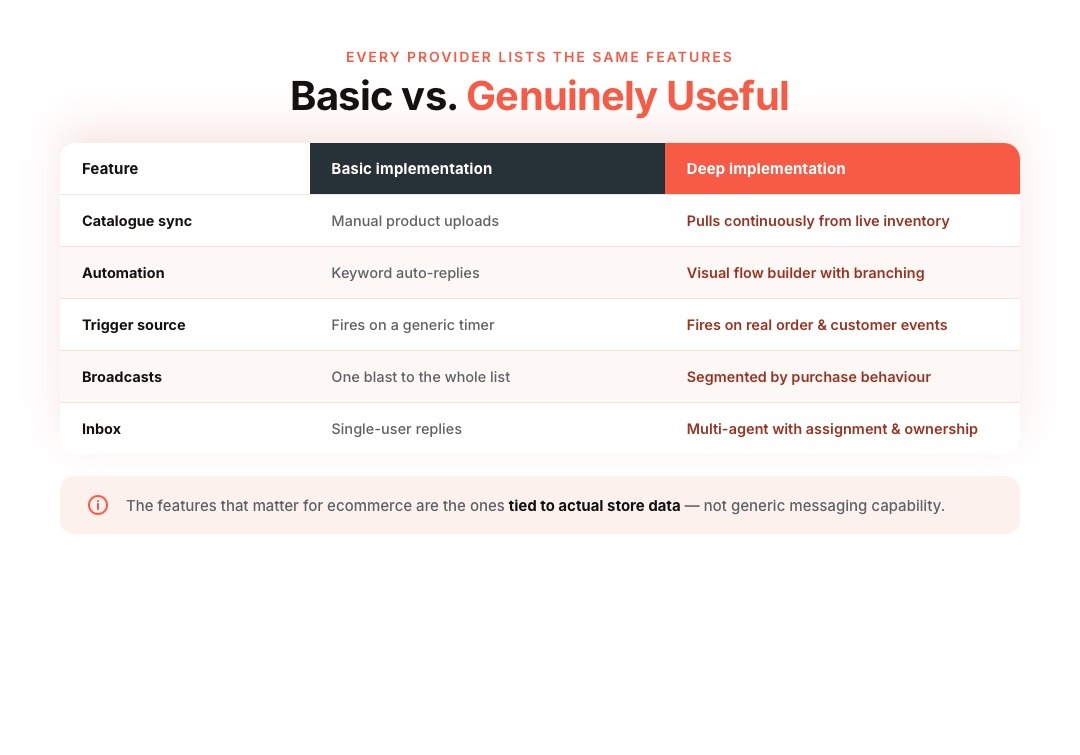
The difference shows up in sync frequency and depth. A basic integration might require manually uploading products; a strong one pulls directly and continuously from your store's live inventory, so pricing, stock status, and new products stay accurate without manual maintenance.
Automated Messaging and Flow Builders
Automation is where the biggest quality gap between providers shows up. At the basic end, this means simple auto-replies to common keywords.
At the more capable end, it means a visual flow builder that can trigger messages off real store events (a cart abandonment, an order status change, a COD confirmation) and branch based on the customer's response.
Why Trigger Source Matters More Than Message Volume
A flow that only fires on a timer isn't the same as one that fires based on actual store data.
The more useful implementations read directly from order and customer events, so a shipping update goes out the moment a Shopify order actually ships, not on a generic delay that may or may not match reality.
Shared Team Inbox and Multi-Agent Support
Once more than one person is replying to customers from the same WhatsApp number, a shared inbox becomes a hard requirement, not a nice-to-have.
This feature lets multiple team members see and respond to the same conversation thread, with conversations assignable to specific agents so two people don't answer the same customer with conflicting information.
Broadcasts and Customer Segmentation
Broadcast tools let a brand message a group of opted-in customers at once — a sale announcement, a restock alert, a new product launch.
The feature that separates a useful broadcast tool from a spam risk is segmentation: the ability to target broadcasts to specific customer groups (repeat buyers, cart abandoners, high-value customers) rather than blasting an entire contact list identically every time.
Also read: Conversational Commerce Definition: What It Actually Means in 2026
Click-to-WhatsApp Ads and Chat Entry Points
Ads that open directly into a WhatsApp conversation, rather than a landing page, are increasingly common as an acquisition channel.
This feature matters for ecommerce brands running paid acquisition, since it turns an ad click straight into a conversational sales moment instead of a static page a customer might bounce from.
Order Confirmation and COD Verification
For markets where cash-on-delivery is common, an automated COD confirmation message, sent before an order ships, asking the customer to confirm, reduces return-to-origin shipments and failed deliveries.
This is one of the more measurable ROI features for ecommerce brands operating in COD-heavy markets, since it directly reduces a real operational cost.
Official Verification and Meta Business Partner Status
A green tick or verified badge signals to customers that a business account is authentic, which matters for trust at scale.
Providers with official Meta Business Partner status typically offer more direct support through the verification process, though it's worth being clear that no provider controls Meta's own approval decision or timeline — that sits entirely with Meta.
How WhatsApp Business API Features Affect Pricing
One of the biggest misconceptions about the WhatsApp Business API is that you're paying for "the API" itself. In practice, your monthly cost usually has several components, and the features you use determine which ones matter most.
For most Shopify brands, your total cost typically includes:
- Your platform subscription, which gives you access to features like a shared inbox, catalogue sync, broadcasts, analytics, and automation.
- Meta's messaging charges, which are billed separately based on the template messages you send and the recipient's country.
- Optional add-ons, such as advanced automation, AI agents, or premium workflows, depending on the platform you choose.
Which Features Usually Increase Your Costs?
Not every feature affects your bill equally.
Features like a shared team inbox or catalogue sync are generally included in your platform plan. Costs typically increase when you scale messaging volume, add more support agents, build custom automation, or use AI-powered workflows.
For example, a growing Shopify store sending regular order updates, cart recovery messages, and promotional broadcasts will generally spend more than a business using WhatsApp only for customer support because message volume and automation usage increase as customer conversations grow.
Estimate Your Costs Before You Commit
Rather than comparing monthly subscription prices alone, estimate your expected usage first:
- How many WhatsApp conversations or template messages will you send each month?
- How many support or sales agents need access?
- Will you automate order updates, COD verification, cart recovery, and review requests?
- Do you expect to add AI agents or custom workflows as your business grows?
Answering these questions gives a much more accurate picture of your monthly investment than comparing plan prices in isolation.
Where Zoko Fits
Zoko brings these features together specifically for Shopify brands, rather than as a generic feature list retrofitted with a Shopify connector.
WhatsApp Catalogue syncs continuously with your live Shopify inventory, Zoko Flows triggers automation off real Shopify orders and customer events, and the shared inbox lets your whole team work off one number.
Merchants can check Zoko's pricing and estimate their cost with the bill estimator, or see how these features play out for other Shopify brands in Zoko's case studies.
Frequently Asked Questions
1. Is WhatsApp Catalogue the same as a Shopify storefront?
No. Catalogue lets customers browse and select products inside WhatsApp itself, but it depends on syncing from an actual storefront like Shopify for product data, pricing, and inventory. It's a sales layer on top of your existing store, not a replacement for it.
2. Do I need a developer to set up these features?
Not usually. Most ecommerce-focused WhatsApp platforms handle catalogue sync, automation setup, and Shopify integration through a no-code interface, though more advanced custom automation may benefit from developer involvement.
3. How many agents can typically use a shared WhatsApp inbox at once?
This varies by provider and plan, but most ecommerce-focused platforms support multiple simultaneous agents on one number, with the exact limit tied to your specific subscription tier.
4. Does WhatsApp Business API support payment collection directly in chat?
Some markets and providers support in-chat payment links or buttons that connect to a payment gateway, letting a customer complete checkout without leaving WhatsApp, though the exact implementation depends on the provider and region.
5. What's the difference between a basic auto-reply and a flow builder?
An auto-reply typically responds to a fixed keyword or question with a static message. A flow builder can trigger a sequence of messages based on a real event, branch based on the customer's response, and pull in live data like order status.
6. Can WhatsApp Business API features work without a Shopify store?
Yes, most features work with other ecommerce platforms or even without a storefront at all, though the depth of automation tied to real-time inventory and order data depends on how well the platform integrates with whichever system you're using.
7. Is Click-to-WhatsApp advertising only available on Meta platforms?
Click-to-WhatsApp ads run through Meta's ad platforms, primarily Facebook and Instagram, since the entry point needs to connect directly to a WhatsApp Business number through Meta's own ad infrastructure.
8. How does COD confirmation actually reduce failed deliveries?
By having the customer explicitly confirm the order before it ships, businesses can catch accidental orders, wrong addresses, or changed minds before a shipment is dispatched, rather than discovering the issue after a failed delivery attempt.
9. Do all WhatsApp Business API providers offer the same core feature set?
No. While most offer some version of catalogue, automation, and shared inbox, the depth and reliability of each feature varies significantly, particularly around how directly automation ties into real store data versus running on generic triggers.
10. What feature should an ecommerce brand prioritise first?
This depends on the biggest operational pain point, but catalogue integration and automated order/COD messaging tend to deliver the fastest, most measurable impact for most ecommerce brands before layering in broader broadcast or ad-entry features.
Interested to know more?
.svg)
Case Studies





















Featured Posts


Continue reading

The E-Commerce Divide: How the Top 10% of Brands Use AI to Grow 5X Faster (And Why It’s Not for Everyone)
Drive Sales with WhatsApp Catalog Integration: Here's How