







For Shopify merchants, WhatsApp can become the place where customers ask, decide, and return for support. But unclear opt-ins, aggressive promotions, or poorly timed messages can damage trust and affect delivery. India-first brands also need to handle customer data, COD updates, and support chats with care while keeping sales conversations smooth.
The WhatsApp Business API policy explains how businesses should message customers through WhatsApp in a safe and responsible way. This guide covers opt-ins, templates, customer expectations, data handling, and Shopify sales workflows. You will also see how Zoko helps merchants connect WhatsApp, Shopify, and automation without losing customer context.
Overview
The WhatsApp Business API policy explains how Shopify merchants should message customers safely, with clear consent, relevant templates, and responsible data handling.
- Businesses need customer opt-in before sending business-initiated WhatsApp messages.
- Message templates should match the purpose, such as marketing, utility, or authentication.
- Cart recovery, COD confirmations, delivery updates, and broadcasts should follow customer expectations.
- Shopify merchants should avoid sending the same promotional message to every customer.
- Customer data, including phone numbers, order details, and delivery addresses, should be handled carefully.
- Zoko helps connect WhatsApp and Shopify workflows so messages stay relevant to real customer actions.
What Is the WhatsApp Business API Policy?
The WhatsApp Business API policy is Meta’s framework for how businesses can communicate with customers on WhatsApp. It defines when businesses can send messages, what types of messages are allowed, and how customer consent should be managed.
It Defines Who Businesses Can Message
Businesses cannot send WhatsApp messages to every phone number they collect. They need clear customer opt-in before sending business-initiated messages, especially for promotions, cart reminders, and campaign updates.
For Shopify merchants, this means consent should be collected through clear touchpoints such as checkout, sign-up forms, order pages, or WhatsApp subscription prompts.
It Defines What Businesses Can Send
The policy also outlines the types of messages businesses can send through WhatsApp. Messages should be relevant, accurate, and connected to a real customer action or need.
For example, an order update, COD confirmation, delivery alert, or product reply should match the customer’s shopping journey. Unrelated promotions can weaken trust and increase reporting risk.
It Defines How Businesses Should Protect Customer Trust
The policy is not only about message approval. It also supports better customer experiences by reducing spam, unclear communication, and unwanted business messaging.
For Shopify merchants, policy-safe messaging keeps WhatsApp useful for sales, support, cart recovery, and post-purchase updates. Zoko helps connect WhatsApp with Shopify workflows, so customer messages stay relevant, timely, and tied to real store actions.
Also Read: Steps and Strategies for WhatsApp Marketing Success
Why Shopify Merchants Must Understand WhatsApp API Rules
WhatsApp API rules affect how Shopify merchants send sales, support, and order messages. Understanding them helps stores protect trust while keeping WhatsApp useful for customer communication.
To Avoid Sending Messages Customers Did Not Expect
Shopify shoppers often use WhatsApp when they are close to buying. They may ask about size, stock, delivery time, COD, returns, or payment options before checkout.
When messages match this context, they feel helpful. When they feel unrelated, customers may ignore them, report them, or lose trust in the store.
To Protect Message Quality and Delivery
Unclear opt-ins, excessive broadcasts, wrong template categories, and aggressive follow-ups can create delivery and approval issues. These problems can affect how reliably a store reaches customers on WhatsApp.
For Shopify merchants, message quality supports conversion. Customers should feel every WhatsApp message relates to their order, question, cart, or stated interest.
To Handle Consent and Customer Data Responsibly
Indian Shopify merchants often handle COD orders, delivery addresses, phone numbers, payment updates, and support conversations. These details should be treated carefully across every WhatsApp workflow.
Clear consent, relevant messages, and responsible data handling help Shopify merchants reduce risk while keeping WhatsApp useful. They also make sales chats, COD updates, delivery messages, and post-purchase support feel more reliable for customers.
Key WhatsApp Business API Policy Areas Merchants Should Know
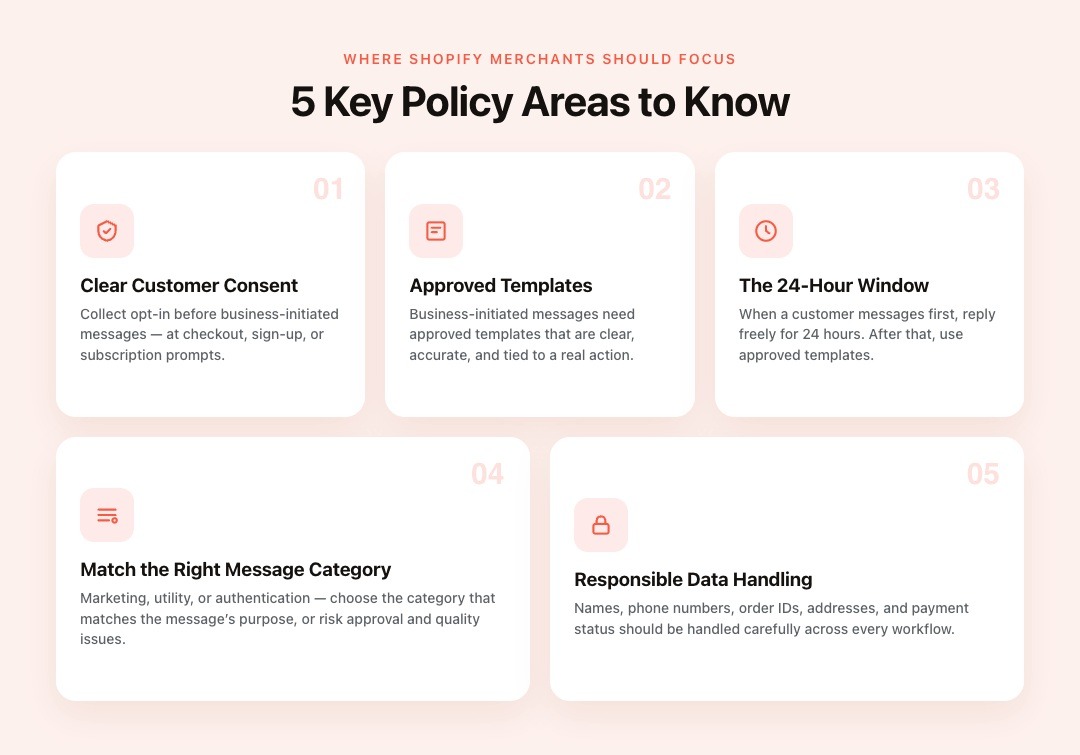
The WhatsApp Business API policy can feel complex at first, but most Shopify merchants should focus on a few core areas. These rules shape how businesses collect consent, send messages, and protect customer trust.
Merchants Need Clear Customer Consent Before Messaging
Shopify merchants should collect clear consent before sending business-initiated WhatsApp messages. This is especially important for promotional broadcasts, cart recovery messages, and campaign updates.
Common opt-in points include checkout pages, sign-up forms, order confirmation pages, and WhatsApp subscription prompts. Customers should also have a simple way to stop receiving non-essential messages.
Merchants Need Approved Templates for Certain Messages
Many business-initiated WhatsApp messages need approved templates before they can be sent. These templates should be clear, accurate, and tied to a real customer action or business purpose.
For example, an abandoned cart reminder should not read like an unrelated offer blast. Order updates, delivery alerts, and COD confirmations should clearly explain what the customer needs to know.
Merchants Need to Respect the 24-Hour Service Window
When a customer messages a business first, it opens a limited service window for replies. During this window, merchants can respond to the customer’s question or issue more naturally.
After that window closes, businesses usually need approved templates for business-initiated follow-ups. Shopify merchants should plan support, cart recovery, and delivery messages around this rule.
Merchants Need to Match Each Message to the Right Category
WhatsApp message categories help define the purpose of a business message. Marketing messages promote offers or campaigns, utility messages share order-related updates, and authentication messages support verification.
Shopify merchants should choose the category that matches the message purpose. Wrong categories can affect approval, customer experience, and message quality.
Merchants Need to Handle Customer Data Responsibly
WhatsApp conversations can include names, phone numbers, order IDs, delivery addresses, payment status, and support history. Shopify merchants should handle this information carefully across all workflows.
Responsible data handling supports trust and reduces risk. It also keeps WhatsApp useful for sales, support, COD updates, and post-purchase communication.
Also Read: Mastering Customer Support on WhatsApp with Zoko
Also read: WhatsApp Message Automation for Business
How WhatsApp API Policy Shapes Shopify Sales Workflows
WhatsApp API policy affects more than general compliance. For Shopify merchants, it shapes how cart reminders, COD messages, campaigns, and support replies should be sent.
Cart Recovery Messages Should Be Permission-Based
Abandoned cart recovery messages should connect to a clear shopping action. If a customer leaves items in their cart, the follow-up should mention the product or cart clearly.
These messages should not feel like random promotions. With Zoko’s Shopify-connected workflows, merchants can send cart reminders that match real customer behavior.
COD and Delivery Messages Should Stay Transactional
COD confirmations, address checks, shipping alerts, and delivery reminders should focus on the customer’s order. This is especially important for India-first Shopify stores, where COD is common.
These messages should help customers confirm details and understand what happens next. When connected with Shiprocket workflows, they can also support clearer logistics communication.
Campaign Broadcasts Should Match Customer Interest
Promotional broadcasts need careful audience selection and clear consent. A customer who bought skincare should not receive every fashion, electronics, or unrelated sale update.
Shopify merchants should segment campaigns by product interest, purchase history, or order stage. This keeps WhatsApp useful for engagement instead of becoming irrelevant or overwhelming.
Support Replies Should Solve the Customer’s Request
Customer support chats should stay focused on the issue raised by the shopper. If someone asks about tracking, returns, sizing, or payment, the reply should answer that need first. Support that follows WhatsApp policies builds trust because customers feel heard. It also keeps WhatsApp useful for sales, post-purchase updates, and encouraging repeat purchases.
Once the rules are clear, merchants need a practical way to apply them. Zoko helps connect WhatsApp messages with Shopify actions, so customer communication stays relevant, timely, and workflow-ready.
Turn WhatsApp Policy Into Clear Shopify Messaging Workflows
Most WhatsApp policy guides explain rules such as consent, templates, message categories, and privacy. Shopify merchants also need to know how those rules apply to daily sales, support, and order workflows.
Map Each Message to a Clear Business Purpose
Every WhatsApp message should answer one question: why is the customer receiving this now? For Shopify merchants, the reason may be a cart reminder, order update, COD confirmation, delivery alert, product answer, or support reply.
This makes policy easier to follow because the message connects to a clear customer action. It also helps reduce irrelevant messages that can weaken trust.
Keep Promotional and Transactional Messages Separate
Promotional messages and order-related messages should not be treated the same way. A festival offer, restock alert, abandoned cart reminder, COD confirmation, and shipping update each serve different purposes.
Separating these workflows helps merchants write clearer templates and choose better audience segments. It also makes WhatsApp communication feel more useful for customers.
Use Shopify Data to Avoid Irrelevant Messaging
Shopify context can help merchants send messages based on cart status, order stage, product interest, or delivery updates. This reduces the chance of sending broad messages that do not match customer needs.
With Zoko, Shopify merchants can connect WhatsApp conversations with store workflows. This helps keep customer messaging relevant, timely, and tied to real actions.
Review Automation Before Scaling Campaigns
Automation should support approved workflows, not send every message to every customer. Before scaling broadcasts, cart recovery, or support automation, merchants should review consent, message purpose, and opt-out paths.
This keeps WhatsApp useful for sales while reducing policy and customer-experience risks.
Common WhatsApp API Policy Mistakes to Avoid
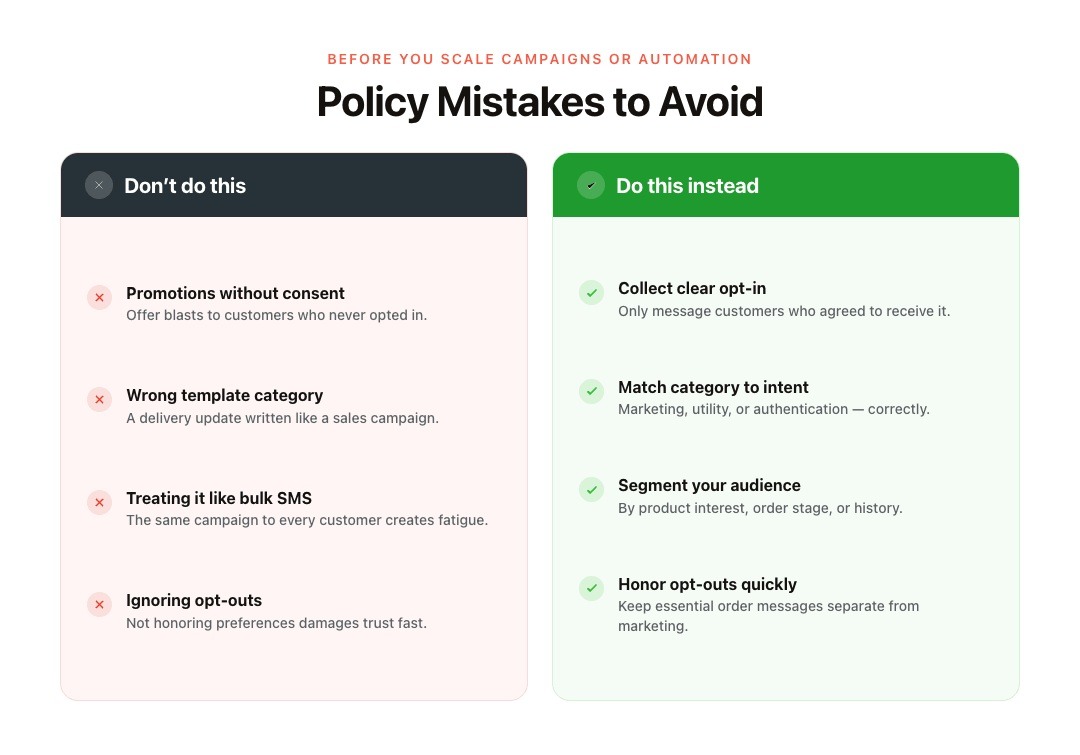
Most WhatsApp policy mistakes happen when messages feel unclear, unwanted, or unrelated to the customer’s journey. Shopify merchants should avoid these issues before scaling campaigns or automation.
Sending Promotions Without Clear Consent
Promotional messages should only go to customers who have clearly agreed to receive them. This includes offer blasts, restock alerts, festival campaigns, and product launch updates.
Without clear consent, even a strong offer can feel intrusive. It can also weaken customer trust and increase reporting risk.
Using the Wrong Template Category
Order updates, promotions, and authentication messages serve different purposes. Shopify merchants should choose the template category that matches the message intent.
For example, a delivery update should not be written like a sales campaign. Clear categories help protect message quality and customer experience.
Treating WhatsApp Like a Bulk SMS Channel
WhatsApp works best when messages feel personal, timely, and connected to customer actions. Sending the same campaign to every customer can quickly create fatigue.
Instead, merchants should segment messages by product interest, order stage, or purchase history. This keeps WhatsApp useful for engagement and repeat sales.
Ignoring Opt-Outs and Customer Preferences
Customers should have a simple way to stop receiving promotional WhatsApp messages. Ignoring preferences can damage trust and make future communication harder.
A safer approach is to honor opt-outs quickly and keep essential order messages separate from marketing updates.
Conclusion
The WhatsApp Business API policy helps Shopify merchants keep customer messaging clear, expected, and trustworthy. When stores understand opt-ins, templates, message categories, data handling, and opt-outs, they can use WhatsApp for sales and support without adding unnecessary risk.
Zoko helps Shopify merchants connect WhatsApp chats with store workflows, so messages stay relevant to carts, orders, COD updates, and support needs.
Try Zoko free for 7 days and see how much smoother your WhatsApp workflows can be.
FAQs
1. What is WhatsApp Business API policy?
The WhatsApp Business API policy is the set of platform rules businesses must follow when messaging customers through WhatsApp. It covers consent, templates, message quality, customer expectations, and responsible communication.
2. Do Shopify merchants need opt-in before sending WhatsApp messages?
Yes. Shopify merchants need a clear customer opt-in before sending business-initiated WhatsApp messages, especially promotional messages. The opt-in should clearly show the business name and the message's purpose.
3. Can Shopify stores send abandoned cart messages on WhatsApp?
Yes, Shopify stores can send abandoned cart messages when they follow WhatsApp policy, customer consent expectations, and template rules. These reminders should feel helpful, relevant, and tied to the customer’s cart.
4. What data should merchants protect in WhatsApp conversations?
Merchants should protect phone numbers, names, order IDs, delivery addresses, payment status, and support history. India-first businesses should also get legal review for privacy obligations.
5. Can automation be used under the WhatsApp Business API policy?
Yes. Automation can be used when it supports defined workflows such as cart recovery, order updates, COD confirmations, support routing, or FAQs. It should still follow opt-in, template, and customer experience rules.
Interested to know more?
.svg)
Case Studies




















Featured Posts


Continue reading

The E-Commerce Divide: How the Top 10% of Brands Use AI to Grow 5X Faster (And Why It’s Not for Everyone)
Drive Sales with WhatsApp Catalog Integration: Here's How