






WhatsApp CRM API: What It Means and How to Actually Use It for Ecommerce

WhatsApp CRM API: What It Means and How to Actually Use It for Ecommerce
Once a business moves past a single person answering WhatsApp messages, a familiar problem shows up: conversations pile up with no connection to what's actually happening in the order system, the support desk, or the marketing list.
"WhatsApp CRM API" is the term that's grown up around solving that problem, but it gets used loosely enough that two businesses searching for it can end up building entirely different setups.
This article separates what the term actually refers to, what it's genuinely useful for in ecommerce, and how to decide between wiring WhatsApp into an existing CRM versus using a platform where Shopify and WhatsApp data already live together.
TL;DR
- A WhatsApp CRM API refers to connecting the WhatsApp Business API to a CRM system — either a general-purpose CRM linked via API/middleware, or a platform where messaging and customer data live natively together.
- For ecommerce specifically, this matters because a customer's order history, cart status, and support history are otherwise scattered across Shopify, a helpdesk, and email, and WhatsApp becomes a fourth silo without a connection.
- Core use cases are order status visibility inside conversations, automated order/cart follow-ups triggered by real customer data, lead and repeat-customer prioritisation, and shared-inbox context across multiple agents.
- Connecting WhatsApp to a general CRM (Salesforce, HubSpot) suits businesses where WhatsApp is one channel among several reporting into a broader system; a Shopify-native platform suits brands where WhatsApp is a primary commerce channel.
- The deciding question is whether your team needs real-time Shopify data inside the WhatsApp conversation itself, or whether WhatsApp is mainly a logging channel for a CRM used elsewhere.
What "WhatsApp CRM API" Actually Refers To
The phrase gets used two different ways, and it's worth separating them because they lead to different setups. The first is a technical integration: a business uses the raw WhatsApp Business API (via Meta directly or a BSP) and connects it to an existing CRM — Salesforce, HubSpot, Zoho — through that CRM's own API or a middleware tool like Zapier, as described in Kommo's guide to WhatsApp CRM.
In this setup, WhatsApp messages, contact creation, and conversation logs are pushed into the CRM as activity records, so a sales or support rep can see WhatsApp history alongside every other customer touchpoint.
The second is a platform-native approach: a WhatsApp business messaging platform that includes CRM-like functionality — contact records, deal or ticket tracking, conversation history, team assignment — built directly into the same interface where messages are sent and received, as outlined in Sleekflow's overview of WhatsApp CRM integration.
Two Paths, Same Underlying Problem
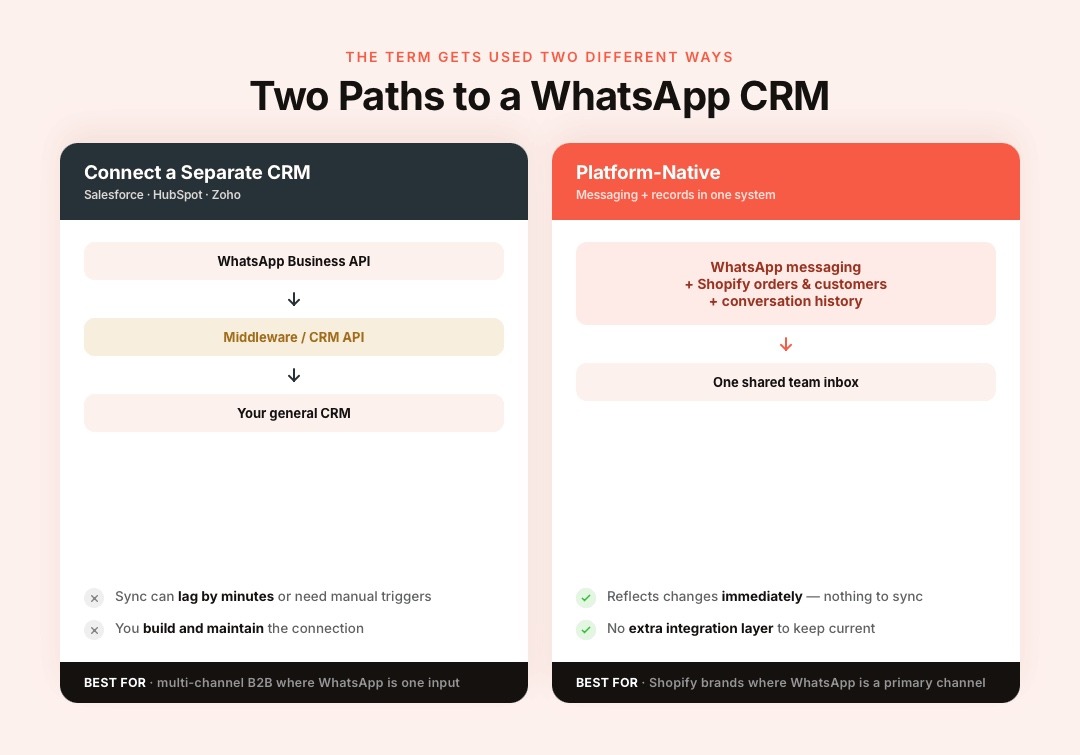
Both approaches solve the same underlying problem — WhatsApp conversations shouldn't be siloed from the rest of what you know about a customer — but they differ significantly in setup complexity and in how real-time the data actually is.
A middleware-based sync between WhatsApp and a general CRM can lag by minutes or require manual triggers; a native platform typically reflects changes immediately since there's no separate system to keep in sync.
Why This Matters More for Ecommerce Than It Sounds
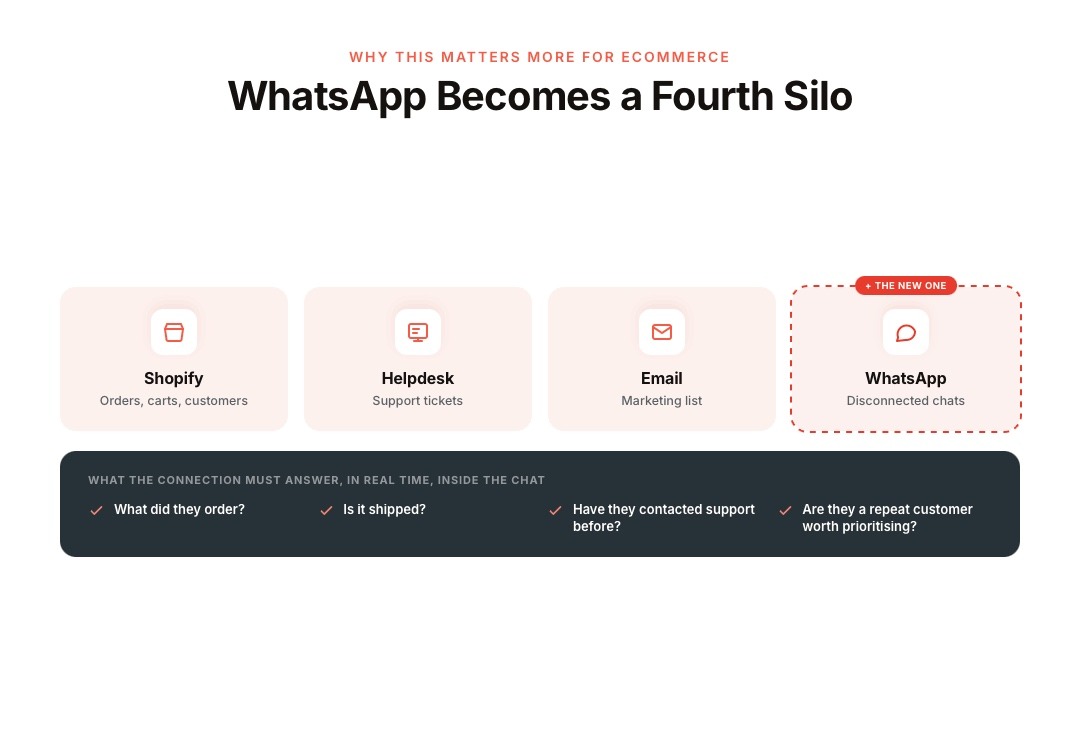
For a Shopify brand, the customer record already includes order history, cart status, and support tickets scattered across Shopify itself, a helpdesk tool, and possibly an email platform.
Adding WhatsApp as a channel without connecting it to that data creates a fourth silo — an agent replying to a WhatsApp message about a delayed order has no visibility into the order itself unless they manually switch tabs and look it up.
This is where "WhatsApp CRM" earns its place in an ecommerce stack, specifically, more than in a lot of other B2B use cases where the CRM's job is mostly to prevent a lead from falling through the cracks.
In ecommerce, the CRM connection to WhatsApp needs to answer, in real time, inside the conversation: what did this customer order, is it shipped, have they contacted support before, are they a repeat customer worth prioritising.
Where WhatsApp Template Messages Add Value
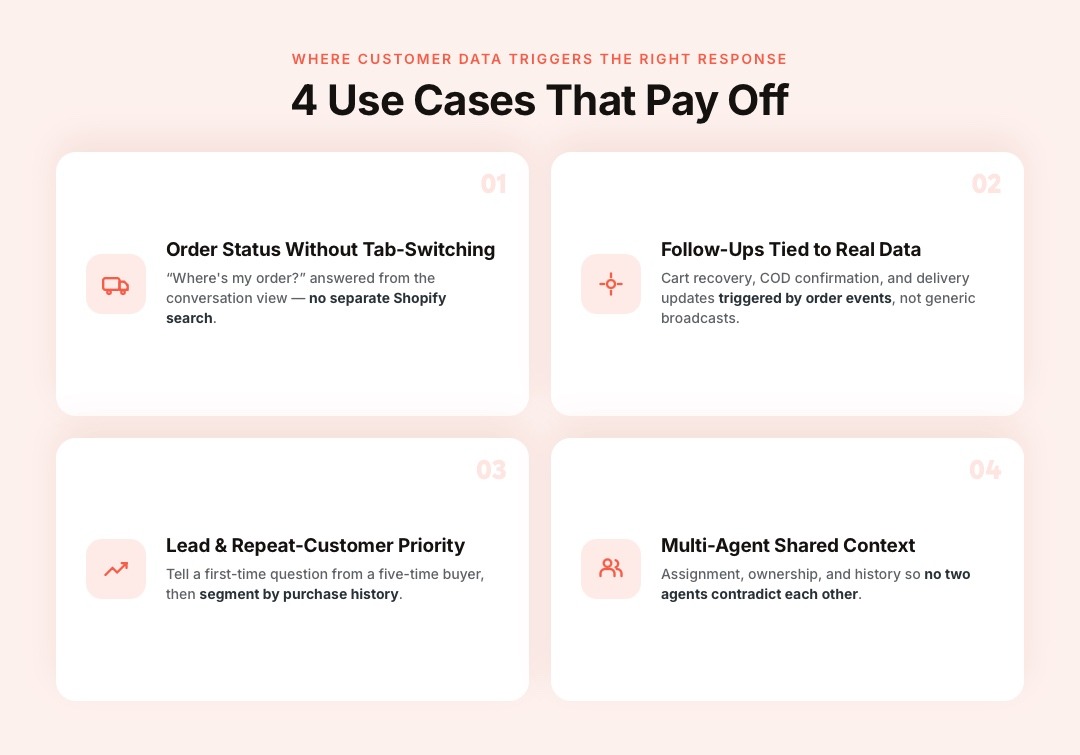
Businesses that get real value from a WhatsApp-CRM setup tend to concentrate on a specific set of moments where customer data triggers the right response.
1. Order Status and Support Without Tab-Switching
When a customer messages about "where's my order," an agent working from a WhatsApp-CRM integration can see the order status pulled directly into the conversation view, rather than needing to search Shopify separately. For a native integration — where WhatsApp and Shopify data live in the same platform — this happens automatically; for a generic CRM connected via middleware, it depends on how well that sync is built and how current the data is.
2. Automated Order and Cart Follow-Ups Tied to Customer Data
Abandoned cart messages, COD order confirmations, and delivery updates work best when they're triggered by actual order and customer events rather than sent as a generic broadcast. Zoko's Flows handles this by reading Shopify order and customer status directly to decide what to send and when, which is closer to automation logic than to a traditional CRM record.
3. Lead and Repeat-Customer Prioritisation
A new WhatsApp enquiry, when logged as a contact with purchase history attached, lets a team distinguish a first-time question from a message coming from a customer who's ordered five times. Segmenting broadcasts or follow-ups by this kind of purchase data is a meaningfully different and better-targeted approach than messaging an entire opted-in list the same way regardless of order history.
4. Multi-Agent Support With Shared Context
Once a business has more than one or two people replying on WhatsApp, a shared inbox tied to customer records becomes necessary just to avoid two agents replying to the same customer with conflicting information, or a customer having to repeat their issue to a second agent.
This is, functionally, a CRM feature (assignment, ownership, history) delivered within the messaging tool itself.
WhatsApp Template Best Practices for Ecommerce Brands
Using template messages isn't just about getting approval from Meta. The highest-performing ecommerce brands treat templates as part of the customer experience rather than another promotional channel.
A few practices consistently improve delivery, engagement, and customer trust:
- Match the template to the customer's journey. Shipping updates, COD confirmations, abandoned cart reminders, and review requests should each have their own purpose-built template instead of reusing one generic message.
- Personalise using real customer data. Including the customer's name, order number, product purchased, or delivery status makes messages significantly more relevant than static broadcasts.
- Keep templates concise. Customers usually scan WhatsApp messages within seconds. Lead with the most important information before adding any supporting details or CTAs.
- Send messages based on customer actions. Triggering templates after cart abandonment, successful payment, shipment updates, or support events is far more effective than sending them at fixed times.
- Monitor template quality ratings. Meta tracks customer feedback and engagement. Templates that generate frequent blocks or reports can see reduced delivery or even be paused, making ongoing optimisation important.
According to Meta, businesses that use approved template messages for transactional customer communication can maintain high message quality while staying compliant with WhatsApp Business Platform policies.
Also read: WhatsApp Integration With Salesforce: How Sales Teams Manage Conversations From CRM
Common WhatsApp Template Categories Used in Ecommerce
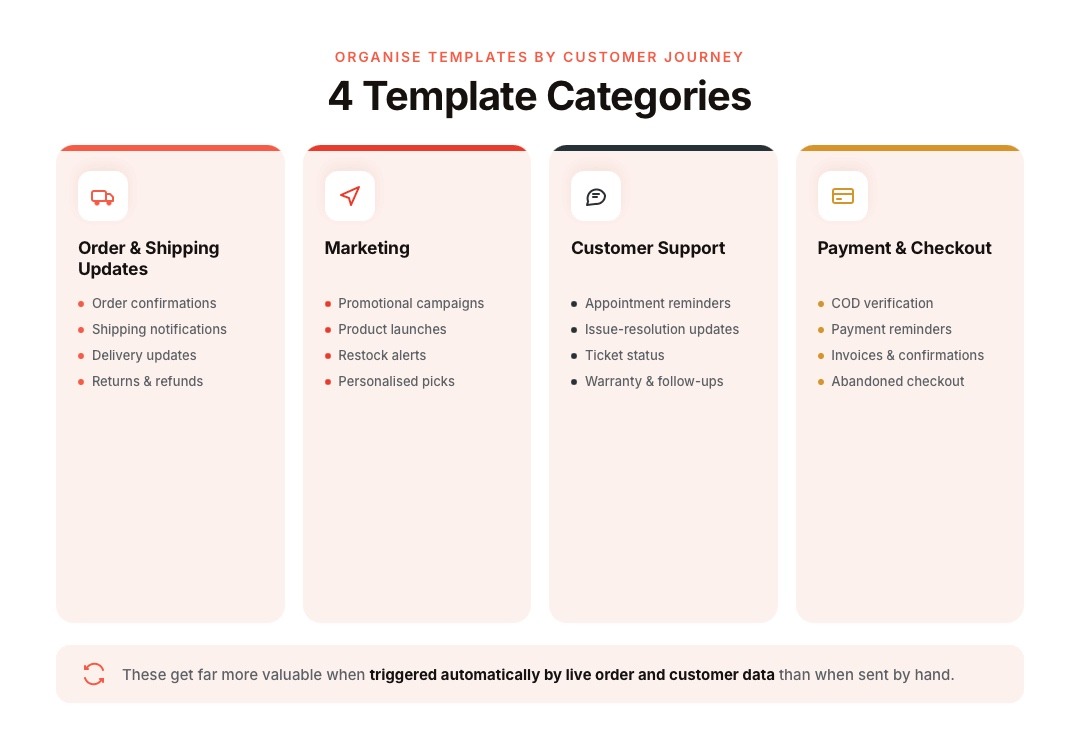
Not every template serves the same purpose. Organising templates by customer journey makes automation easier and improves message relevance. The most commonly used categories include:
- Order & Shipping Updates: Used for order confirmations, shipping notifications, delivery updates, return approvals, and refund confirmations.
- Marketing Templates: Promotional campaigns, product launches, seasonal offers, restock alerts, and personalised recommendations for opted-in customers.
- Customer Support: Appointment reminders, issue-resolution updates, ticket-status notifications, warranty communications, and service follow-ups.
- Payment & Checkout: COD verification, payment reminders, invoice notifications, payment confirmations, and abandoned checkout reminders.
For Shopify brands, these template categories become even more valuable when they're triggered automatically by live order and customer data rather than sent manually.
How to Create and Submit a WhatsApp Template
Creating a template is straightforward, but approval depends on following Meta's formatting and policy requirements. A typical workflow looks like this:
- Draft the message with placeholders for dynamic information such as customer names or order IDs.
- Select the appropriate template category (Marketing, Utility, or Authentication).
- Add variables, media, quick replies, or CTA buttons where required.
- Submit the template for Meta's review through your WhatsApp Business Platform provider.
- Once approved, use automation to trigger the template based on real customer events such as order placement, shipping updates, or abandoned carts.
Most template reviews are completed quickly, although approval times can vary depending on message complexity and compliance checks.
With platforms like Zoko, approved templates can then be connected directly to Shopify events using Flows, eliminating the need for manual message sending.
Read: How to Create WhatsApp Message Templates
Native Integration vs. Connecting a Separate CRM: What to Actually Weigh
Connecting WhatsApp to an existing CRM makes sense when a business already runs its entire operation through that CRM and WhatsApp is one channel among several that all need to report into the same system — this is common for larger, multi-channel B2B operations where WhatsApp isn't the primary channel.
For a Shopify-first ecommerce brand where WhatsApp is a primary sales and support channel rather than one input among many, a platform where Shopify data (orders, customers, catalogue) and WhatsApp messaging are natively connected removes a layer of integration work and reduces the lag between something happening in Shopify and that information being usable inside a WhatsApp conversation.
The tradeoff is usually flexibility — a dedicated general-purpose CRM can do more things a niche WhatsApp platform won't, but at the cost of needing to build and maintain that connection yourself.
The practical question to ask before picking either path: does the customer-facing team need WhatsApp to show real-time Shopify order and customer data inside the chat, or is WhatsApp mostly a logging channel that reports into a CRM used for other purposes? The answer usually points clearly toward one setup or the other.
Where Zoko Naturally Fits
Zoko is built as a Shopify-native platform, which means the "CRM" layer — customer contact history, order status, conversation ownership across a shared team inbox — is connected to Shopify data by default rather than requiring a separate CRM integration to be built and maintained.
For catalogue-driven selling, abandoned cart recovery, and order status conversations, this native connection through Zoko Flows is the more direct path for a Shopify brand than wiring WhatsApp into a general-purpose CRM and hoping the sync stays current.
For brands already running a broader CRM like HubSpot or Salesforce for other operations, WhatsApp activity can still often be pushed into that system in parallel — but the day-to-day commerce use case (order status, cart recovery, catalogue selling) is what Zoko's Shopify-native setup handles without the extra integration layer.
FAQs
1. What is a WhatsApp CRM API in simple terms?
It's the connection between WhatsApp Business API messaging and a CRM system — either through a technical integration with a separate CRM, or through a platform where messaging and customer records live in the same system natively.
2. Do I need a CRM to use the WhatsApp Business API?
No. The WhatsApp Business API works independently of any CRM. A CRM connection becomes useful once you need conversation history, order data, or team assignment visible alongside the messaging itself, which typically happens once volume or team size grows.
3. Can I connect WhatsApp to Salesforce or HubSpot directly?
Yes, this is commonly done either through the CRM's native integrations, a BSP that offers a direct connector, or middleware tools. The reliability and real-time accuracy of that sync vary by the specific integration used, so this is worth testing before relying on it for time-sensitive use cases like order support.
4. Is a Shopify-native WhatsApp platform the same thing as a WhatsApp CRM?
Not exactly the same, but functionally overlapping. A Shopify-native platform connects WhatsApp messaging to Shopify's customer and order data directly, which covers much of what a general CRM integration would otherwise need to be built to do, though it's scoped to Shopify data specifically rather than being a general-purpose CRM.
5. What data actually gets shared between WhatsApp and a CRM?
Typically, contact details, conversation history, and any custom fields the integration is set up to sync, such as order status, purchase history, or ticket status. The exact scope depends entirely on how the specific integration is configured.
6. Does using a WhatsApp CRM integration affect message deliverability or compliance?
No — deliverability and template approval are governed by Meta's WhatsApp Business Platform policies regardless of what CRM sits behind the messaging. A CRM integration doesn't change opt-in or template requirements; those apply the same way either way.
7. Can automation (like abandoned cart messages) work without a CRM connection?
Basic broadcast-style automation can work without deep CRM data, but triggering messages based on actual customer or order events (cart abandonment, COD confirmation, delivery status) requires the messaging platform to read that data from somewhere, which is effectively a CRM-adjacent function even if it's not labelled as one.
8. Is it better to build a custom WhatsApp-CRM integration or use a platform with it built in?
This depends on how central WhatsApp is to the business and how much engineering resource is available to build and maintain a custom sync. For a Shopify brand where WhatsApp is a primary commerce channel, a platform with native Shopify data access typically requires less ongoing maintenance than a custom integration.
9. How do I know if my business needs a WhatsApp CRM setup at all?
If more than one person is replying on the same WhatsApp number, or if agents regularly need order/customer context they currently have to look up manually in a separate system, that's usually the point where a CRM-connected setup starts paying for itself in reduced response time and fewer repeated questions to customers.
Interested to know more?
.svg)
Case Studies




















Featured Posts


Continue reading

The E-Commerce Divide: How the Top 10% of Brands Use AI to Grow 5X Faster (And Why It’s Not for Everyone)
Drive Sales with WhatsApp Catalog Integration: Here's How