





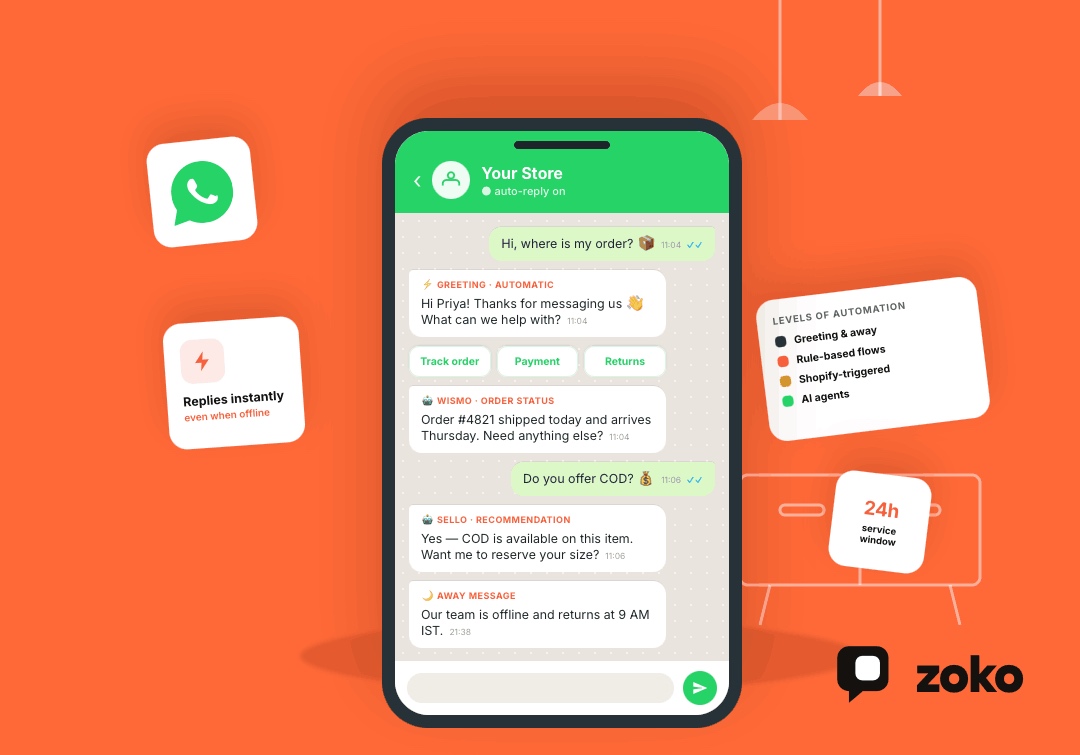

WhatsApp Auto Reply: How to Set Up Automatic Replies for Business in 2026

WhatsApp Auto Reply: How to Set Up Automatic Replies for Business in 2026
Customers messaging a business on WhatsApp often expect an answer quickly, whether they are asking about a product, payment, delivery, return, or existing order.
That expectation matters in India, where 91% of online adults chat with a business every week, according to a 2025 Kantar study cited by Meta. WhatsApp itself now has more than three billion users globally.
A WhatsApp auto reply can acknowledge customers immediately, answer repetitive questions, route conversations, or trigger complete e-commerce workflows. The right setup depends on whether you need a simple greeting, rule-based automation, Shopify-triggered messages, or AI-powered customer support.
Quick Answer
You can set up a WhatsApp auto reply in three main ways:
- Greeting messages: Automatically welcome new or returning customers.
- Away messages: Respond automatically when your team is unavailable.
- Business Platform automation: Connect WhatsApp APIs and webhooks with rules, chatbots, Shopify data, and other business systems.
The WhatsApp Business app works well for basic automatic responses. Businesses that need order lookups, product recommendations, routing, COD workflows, or AI support usually need the WhatsApp Business Platform connected to automation software.
What Is a WhatsApp Auto Reply?
A WhatsApp auto reply is a message sent automatically after a defined customer action or business event.
For example, an automatic response might appear when:
- A customer messages your business for the first time
- Someone contacts you outside business hours
- A shopper asks where an order is
- A customer asks a common product question
- A Shopify order is created
- A COD order requires confirmation
- A shopper needs help finding a product
The WhatsApp Business app provides built-in greeting and away messages. For more advanced use cases, the WhatsApp Business Platform provides APIs and webhooks that businesses can connect with automation rules, chatbots, customer-support software, and e-commerce systems. Meta uses webhooks to send connected systems notifications about incoming messages and other WhatsApp events.
WhatsApp Auto Reply vs. Quick Reply
Auto replies and Quick Replies solve different problems.
WhatsApp defines Quick Replies as shortcuts for frequently sent messages. An agent still selects and sends the saved response during the conversation.
So, a Quick Reply can save time, but it is not the same as an automatic response.
How to Set Up a WhatsApp Auto Reply in the Business App
The WhatsApp Business app provides two useful built-in automatic responses: greeting messages and away messages.
1. Set Up a Greeting Message
A greeting message automatically welcomes customers when they start or restart a conversation.
To set one up:
- Open the WhatsApp Business app.
- Go to Tools.
- Select Greeting message.
- Turn on Send greeting message.
- Write your message.
- Choose the recipients.
- Save the changes.
WhatsApp can send the greeting when a customer messages for the first time or contacts the business again after 14 days of inactivity.
For example:
Hi! Thanks for messaging Acme. 👋
Tell us what you're looking for, and we'll help you find the right product.
A useful greeting tells customers what they can do next instead of simply saying hello.
2. Set Up an Away Message
Away messages automatically respond when your team is unavailable.
To create one:
- Open Tools.
- Select Away message.
- Turn on Send away message.
- Write the response.
- Select the schedule.
- Choose the recipients.
- Save the message.
WhatsApp Business allows businesses to schedule away messages instead of keeping them active continuously.
For example:
Thanks for reaching out. Our support team is currently offline.
We're available from 9 AM to 6 PM IST and will reply when we're back.
Tell customers when they can realistically expect a response.
WhatsApp Greeting Message vs. Away Message
Use each message for a different purpose.
Use a Greeting Message When:
- A customer starts a conversation
- You want to introduce the business
- You want customers to choose a sales or support option
- You want to tell customers what they can ask about
Use an Away Message When:
- Your support team is offline
- Customers message outside business hours
- Support is temporarily unavailable
- Response times are longer during weekends or holidays
Many businesses benefit from using both because they solve different parts of the customer journey.
How to Set Up Advanced WhatsApp Auto Replies
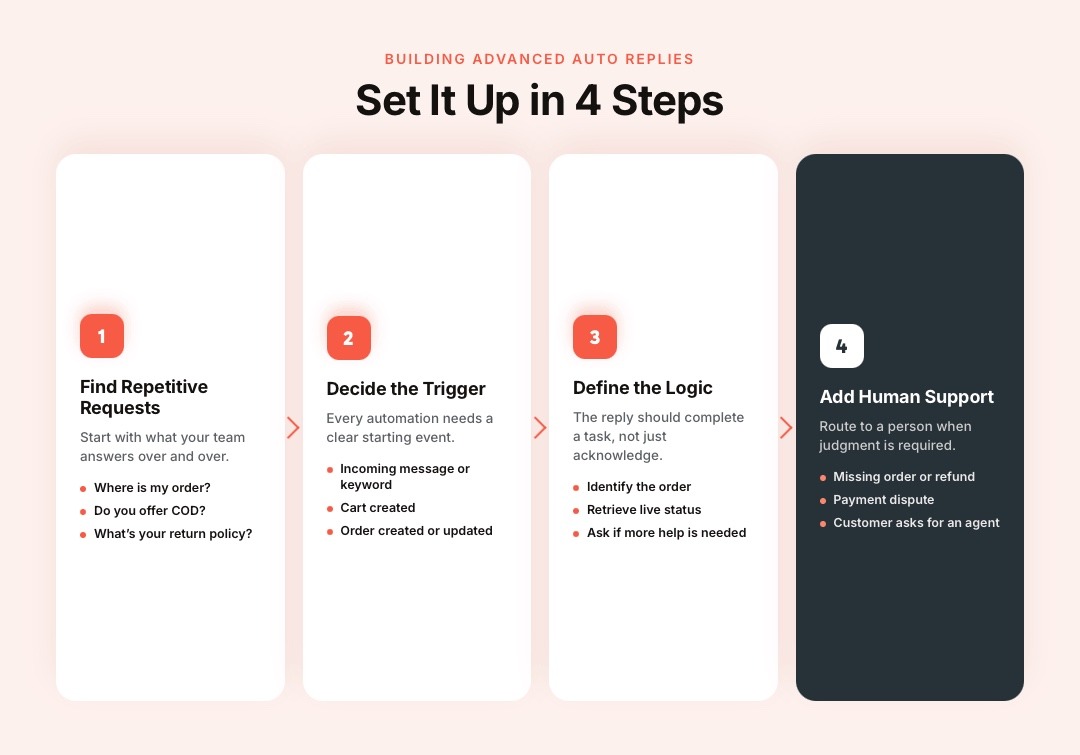
The WhatsApp Business Platform provides the messaging infrastructure for more advanced automation. Businesses then connect those APIs and webhooks with their own software or platforms such as Zoko.
Step 1: Identify Repetitive Customer Requests
Start with questions your team answers repeatedly.
Common e-commerce examples include:
- Where is my order?
- Do you offer COD?
- When will my order arrive?
- Is this product available?
- What is your return policy?
- Which product is right for me?
- Can I change my delivery address?
Automating clear, predictable requests saves agent time without making the customer experience complicated.
Step 2: Decide What Should Trigger the Reply
An automation needs a clear trigger.
A trigger might be:
- An incoming customer message
- A selected menu option
- A keyword or detected intent
- A new Shopify order
- A cart being created
- A customer record being updated
- An order reaching a specific status
Shopify-connected systems can also use store events to start workflows. Zoko's FlowHippo, for example, supports Shopify triggers such as Cart created, Customer updated, and Order created.
Step 3: Define the Response Logic
The automation needs to know what happens after the trigger.
For example:
Customer: Where is my order?
Workflow:
- Identify the relevant order.
- Retrieve the current order status.
- Send the customer the available status information.
- Ask whether more help is needed.
- Route an unresolved request to an agent.
A useful automation completes a task. It does not simply tell customers that their message was received.
Step 4: Add Human Support
Some customer requests require judgment.
Route the conversation to a person when:
- An order is missing
- A payment dispute occurs
- A refund needs manual review
- Automation repeatedly misunderstands the customer
- The request falls outside available information
- The customer asks for an agent
Automation works best when repetitive requests move faster and difficult conversations reach the right person.
Understand the 24-Hour Customer Service Window
When a customer messages a business through the WhatsApp Business Platform, a 24-hour customer service window opens. Each new customer interaction covered by Meta's rules can refresh that window.
During an open customer service window, businesses can respond using service messages under Meta's current messaging rules. When the window is closed, businesses generally need an approved template to initiate another message.
This distinction matters for workflows such as:
- Abandoned checkout recovery
- Reorder reminders
- Delivery notifications
- Marketing campaigns
- Delayed customer follow-ups
These messages may be automated, but they are not necessarily “replies” because they can occur after the original conversation has ended.
Rule-Based Auto Reply vs. AI Auto Reply
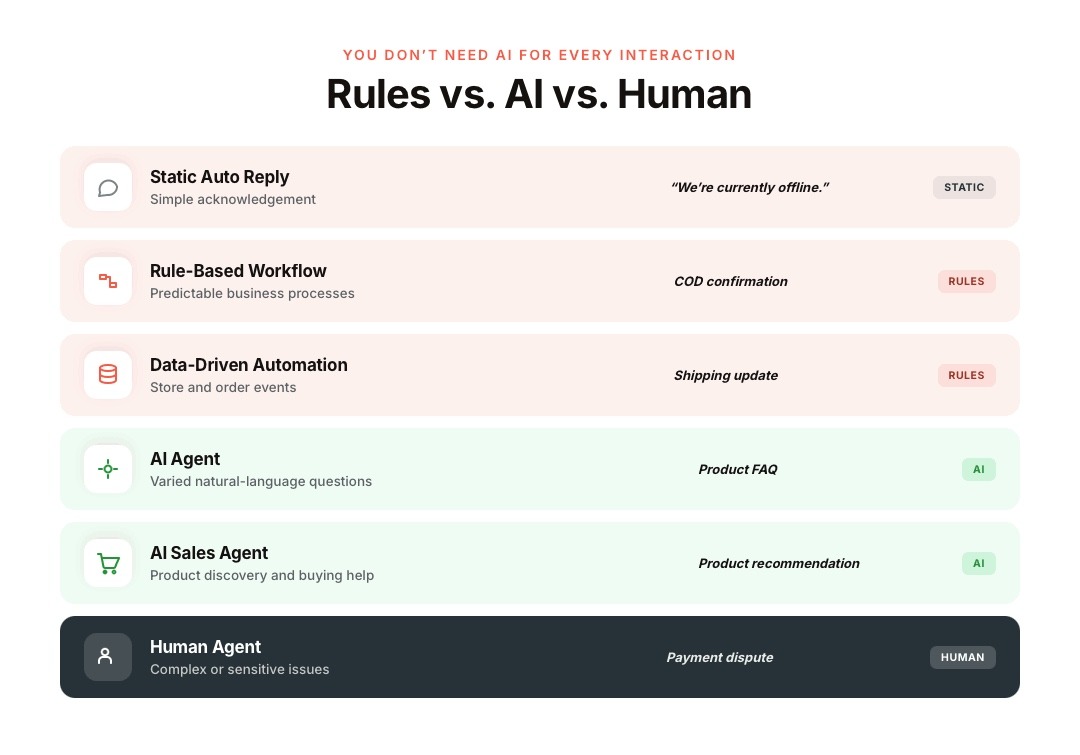
Businesses do not need AI for every WhatsApp interaction.
A rule-based system is often better when an action must follow exact business logic. AI becomes more useful when customers can express the same question in many different ways.
WhatsApp Auto Reply Examples for E-commerce
Welcome Message
Hi {{name}}! Thanks for messaging us.
You can ask about products, orders, delivery, payments, or returns here.
Outside Business Hours
Thanks for your message. Our team is currently offline and returns at 9 AM tomorrow.
Leave your question here and we'll pick it up when we're back.
Order Support
I can help with your order.
Choose an option: Track order | Payment issue | Return help
Product Question
Happy to help. Tell us which product you're interested in and what you'd like to know.
Human Handover
I'm sending this conversation to our support team so someone can review it properly. You can continue messaging here.
High-Volume Support
We've received your message. We're currently handling more requests than usual, but your conversation is in the queue.
Specific messages create clearer expectations than generic responses such as “We'll get back to you soon.”
What Changed for WhatsApp Auto Replies in 2026?
WhatsApp automation is moving from static responses toward more capable AI-assisted business conversations.
In May 2026, Meta expanded Business AI on WhatsApp to eligible small businesses in India. Meta says it can answer questions, recommend products, and let business owners take over more complex customer conversations.
In June 2026, Meta also expanded Meta Business Agent more broadly. The company says Business Agent can answer business-specific questions, recommend catalog products, qualify leads, and transfer conversations when a team member needs to take over.
Businesses now have several levels of automation:
- Static messages for greetings and away responses
- Rule-based workflows for predictable processes
- Store-triggered automation for Shopify events
- AI agents for natural-language questions and sales conversations
- Human agents for complex situations
The right system can combine several of these approaches instead of forcing every conversation through one chatbot.
How Zoko Automates WhatsApp Replies for Shopify Stores
Shopify merchants handle repeated questions about products, orders, COD, shipping, returns, and delivery throughout the day. Manually answering every request slows response times and keeps sales and support teams focused on repetitive tasks.
Zoko connects Shopify with WhatsApp and combines FlowHippo automation with specialized AI agents for FAQs, order-status requests, and sales conversations.
With Zoko, Shopify merchants can:
- Build Shopify-triggered workflows using FlowHippo Flows
- Start automations from events such as cart creation, customer updates, or new orders
- Add conditions that control when each workflow runs
- Send automated WhatsApp messages based on Shopify activity
- Automate COD confirmations, COD-to-prepaid journeys, shipping updates, review requests, and reorder reminders
- Use Guru, Zoko's AI-powered FAQ agent, to answer common product, business, and niche questions
- Use WISMO to automate customer questions about order status
- Use Sello as an AI-powered sales agent that guides shoppers through the buying journey
- Assign conversations and customer tags through FlowHippo actions when workflows require team involvement
This creates a clearer automation system: FlowHippo handles predictable workflows, Guru handles FAQs, WISMO handles order-status questions, Sello supports sales conversations, and human agents handle requests that need judgment.
Common WhatsApp Auto Reply Mistakes
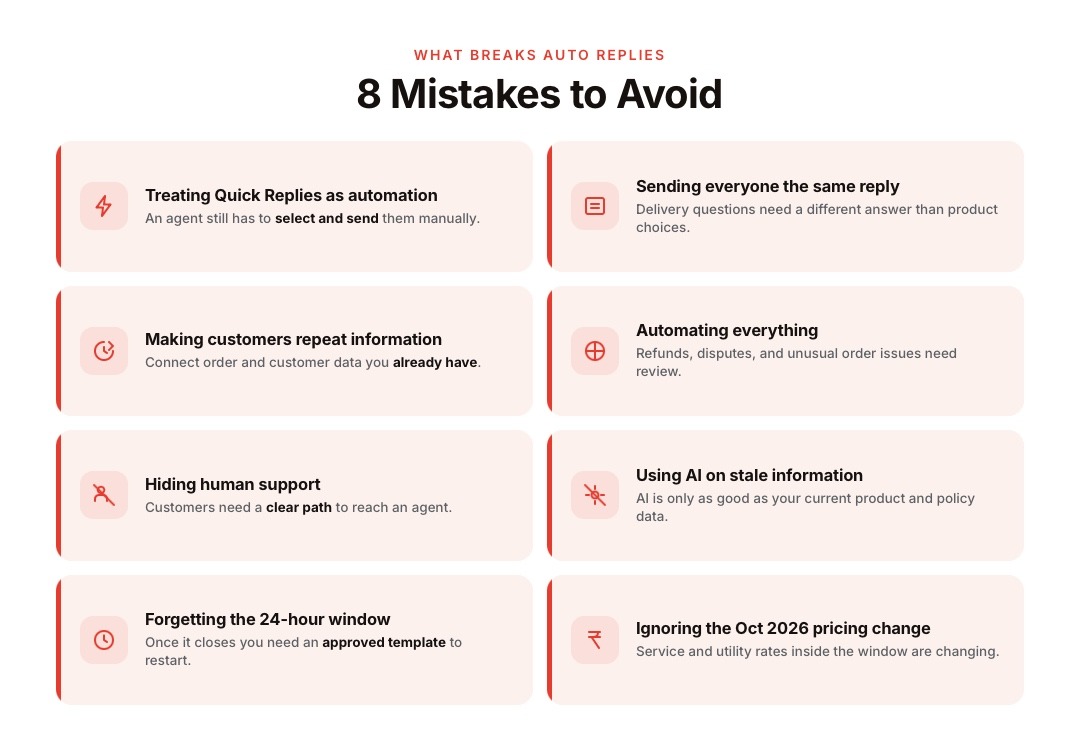
Treating Quick Replies as Automation
Quick Replies reduce typing, but an agent still selects and sends them manually.
Sending the Same Reply to Every Customer
Someone asking about a delivery needs a different response from someone choosing between two products.
Build separate responses around customer intent.
Making Customers Repeat Information
Connect automation with order and customer data where possible. Do not repeatedly ask customers for information your systems already contain.
Automating Everything
Simple automation works well for repetitive tasks. Complicated refunds, disputes, complaints, and unusual order issues often need human review.
Hiding Human Support
Customers need a clear way to reach an agent when automation cannot resolve their request.
Using AI Without Accurate Business Information
AI responses are only useful when the underlying product, order, policy, and store information is current.
Forgetting the 24-Hour Window
Business Platform messaging changes once the customer service window closes. Businesses may need approved templates to restart communication.
Ignoring Upcoming 2026 Pricing Changes
Meta has announced additional WhatsApp Business Platform pricing changes effective October 1, 2026, including changes affecting service and utility messages inside customer service windows. Businesses building high-volume support automation should review Meta's current pricing before estimating future messaging costs.
Conclusion
WhatsApp auto replies can start with simple greeting and away messages, then expand into rule-based workflows, Shopify-triggered automation, and AI-powered customer conversations.
The best setup matches each customer request with the right level of automation while keeping human support available for complex situations.
Zoko gives Shopify merchants FlowHippo automation alongside specialized AI agents for FAQs, order-status requests, and sales conversations. Start a free trial with Zoko or book a demo to connect WhatsApp automation with your Shopify customer journey.
Frequently Asked Questions
Can WhatsApp Send Automatic Replies?
Yes. The WhatsApp Business app supports greeting and away messages. Businesses can also build or connect rule-based and AI-powered automation through the WhatsApp Business Platform.
How Do I Set Up an Auto Reply on WhatsApp Business?
Open WhatsApp Business, go to Tools, and select either Greeting message or Away message. Turn the feature on, write the response, choose the recipients, and save it.
Can I Set an Auto Reply for Specific Hours?
Yes. WhatsApp Business allows businesses to schedule away messages for periods when the team is unavailable.
Are WhatsApp Quick Replies Automatic?
No. Quick Replies are shortcuts for frequently used responses that an agent manually selects and sends.
Can WhatsApp Automatically Reply to Keywords?
More advanced keyword or rule-based automation can be built through systems connected to the WhatsApp Business Platform. The platform provides the messaging APIs and events, while the connected automation software defines what response each trigger produces.
Can a WhatsApp Chatbot Answer Customers 24/7?
Automation can process incoming messages outside normal staff hours, but businesses still need to follow WhatsApp's messaging rules and provide human support where required.
Can Shopify Stores Automate WhatsApp Replies?
Yes. Shopify-connected systems can use store events, customer data, and order activity to trigger WhatsApp workflows. Zoko's FlowHippo supports Shopify triggers and actions for these types of automations.
What Is the Difference Between a WhatsApp Auto Reply and a Chatbot?
An auto reply typically sends a predefined response after a specific trigger. A chatbot can process customer input and select or generate different responses based on the request.
Should I Use Rules or AI for WhatsApp Automation?
Use rules for predictable processes such as COD confirmations, shipping updates, and order workflows. AI works better for varied customer questions, product discovery, and conversations where customers may phrase the same intent differently.
Interested to know more?
.svg)
Case Studies




















Featured Posts


Continue reading

The E-Commerce Divide: How the Top 10% of Brands Use AI to Grow 5X Faster (And Why It’s Not for Everyone)
Drive Sales with WhatsApp Catalog Integration: Here's How