





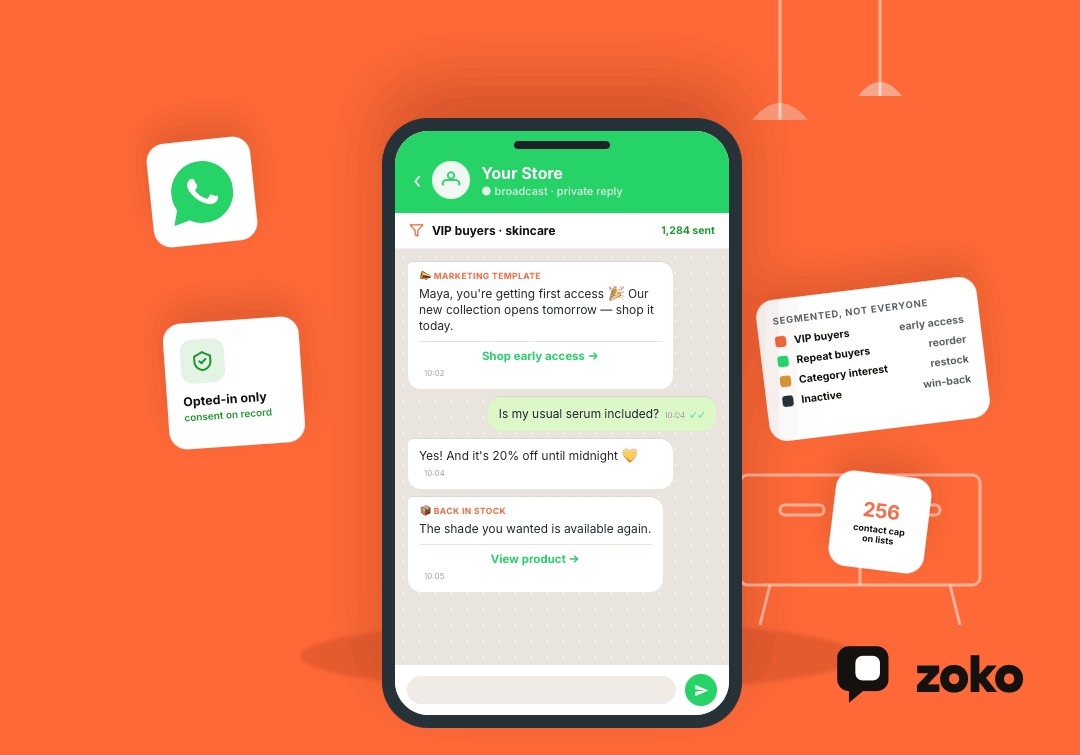

How to Send a WhatsApp Blast: Complete Guide for Businesses in 2026

How to Send a WhatsApp Blast: Complete Guide for Businesses in 2026
A WhatsApp blast can put a product launch, restock alert, limited-time offer, or important update directly into customers' conversations.
The opportunity is especially strong in India. A 2025 Kantar study found that 91% of online adults in India chat with a business every week. WhatsApp also surpassed three billion users globally by June 2026.
But sending more messages does not automatically create better marketing. Businesses need customer permission, relevant audience segments, suitable message templates, sensible frequency, and campaign tracking.
This guide explains how to send a WhatsApp blast safely, which WhatsApp broadcasting option to use, and how e-commerce businesses can turn bulk messaging into targeted sales campaigns.
What Is a WhatsApp Blast?
A WhatsApp blast means sending the same core message to multiple customers at once.
“WhatsApp blast” is an informal marketing term. WhatsApp itself provides several ways for businesses to send one-to-many messages, including standard broadcast lists, newer Business Broadcasts inside the WhatsApp Business app, and approved marketing templates through the WhatsApp Business Platform. Meta describes Business Broadcasts as a more advanced paid message type for businesses using the app.
Businesses commonly use WhatsApp blasts for:
- Product launches
- Sales and promotions
- Back-in-stock alerts
- New collection announcements
- Seasonal campaigns
- Event reminders
- Customer re-engagement
- Reorder reminders
- Personalized product recommendations
Unlike a WhatsApp Group, broadcast recipients receive messages privately. Their replies return as individual customer conversations.
WhatsApp Blast vs. Broadcast vs. Group
These terms are often mixed together, but they describe different communication methods.
| Method | How it works | Best for |
|---|---|---|
| WhatsApp blast | Informal term for sending one campaign to many recipients | Marketing and announcements |
| Broadcast list | Sends private messages to selected saved contacts | Smaller contact lists |
| Business Broadcast | Paid broadcast feature inside the WhatsApp Business app | Eligible small businesses |
| Business Platform/API messaging | Sends approved business messages at scale | E-commerce and larger campaigns |
| WhatsApp Group | Members communicate inside one shared conversation | Communities and discussions |
| WhatsApp Channel | One-way content distributed through the Updates tab | Audience and content updates |
Businesses selling products usually need private broadcasts or API-based campaigns instead of groups.
Three Ways Businesses Can Send a WhatsApp Blast
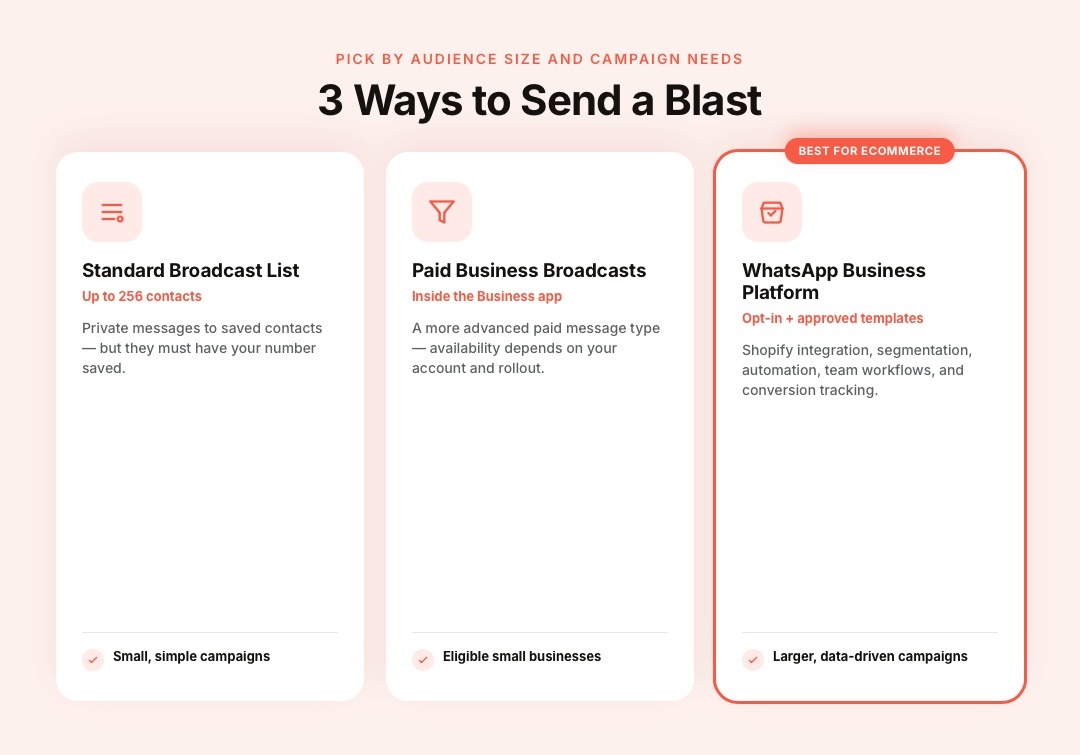
The right method depends on audience size, automation needs, customer data, and campaign complexity.
1. Standard WhatsApp Broadcast Lists
Classic broadcast lists work well for smaller audiences.
WhatsApp currently allows up to 256 contacts in each broadcast list. WhatsApp also says contacts on the list need to have saved the sender's number in their address book.
This method works for businesses with a relatively small customer base and simple campaigns.
2. Paid Business Broadcasts
Meta has introduced Business Broadcasts inside the WhatsApp Business app.
Unlike classic broadcast lists, Business Broadcasts are designed as a more advanced paid messaging option. Meta introduced the feature specifically to encourage businesses to be more deliberate about what they send.
Availability and functionality can depend on the business account and current rollout.
3. WhatsApp Business Platform
Businesses that need Shopify integration, customer segmentation, automation, larger campaigns, team workflows, and deeper tracking can use the WhatsApp Business Platform through Meta or a platform built on it.
The Business Platform uses customer opt-in and approved templates for business-initiated messaging.
For growing e-commerce stores, this approach makes it possible to connect WhatsApp campaigns with actual customer and purchase data.
How to Send a WhatsApp Blast With a Standard Broadcast List
For smaller audiences, the WhatsApp Business app provides the simplest starting point.
Step 1: Build an Opted-In Contact List
Collect phone numbers from customers who expect to hear from your business.
Opt-in opportunities can appear during:
- Checkout
- Account creation
- Loyalty registration
- Website forms
- QR-code campaigns
- In-store purchases
- Product registrations
Tell customers what type of WhatsApp communication they are signing up for.
Step 2: Create a Broadcast List
Create a new broadcast list inside WhatsApp Business and select the relevant contacts.
Remember that standard lists currently support up to 256 contacts, and those contacts need to have saved your business number.
Step 3: Write One Focused Message
Keep each broadcast centered on one action.
For example:
The Summer Linen Collection is live.
Lightweight styles designed for warmer days.
Shop the collection: [link]
Reply if you need help choosing your size.
Step 4: Send and Manage Replies
Recipients receive the broadcast privately and can reply directly to the business.
This works for smaller campaigns. Larger stores usually need better segmentation, automation, scheduling, and conversion tracking.
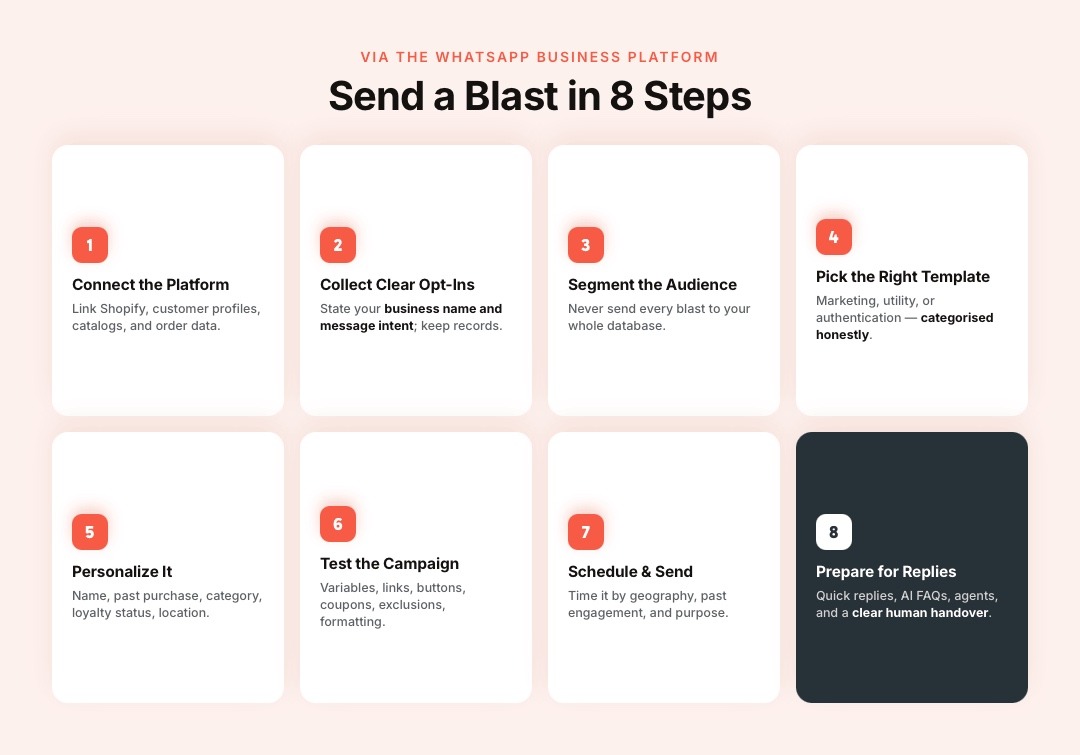
How to Send a WhatsApp Blast With the Business API
The WhatsApp Business Platform provides a more scalable process for customer campaigns.
Step 1: Connect Your Business to the WhatsApp Business Platform
Businesses can access WhatsApp's business messaging infrastructure directly or through a provider.
E-commerce businesses often connect it with systems such as:
- Shopify
- Customer profiles
- Product catalogs
- Order data
- Customer support tools
- Marketing automation
This lets campaigns respond to actual customer behavior instead of operating from standalone phone-number lists.
Step 2: Collect Clear WhatsApp Opt-Ins
Businesses must obtain opt-in before sending message templates.
Meta requires the opt-in to clearly communicate both the business name and the intent of the messages the customer will receive.
For example:
Receive product launches, restock alerts, and exclusive offers from Brand X on WhatsApp.
Keep records showing how and when customers opted in.
Step 3: Segment the Audience
Do not send every WhatsApp blast to your entire customer database.
Useful e-commerce segments include:
- First-time customers
- Repeat buyers
- VIP customers
- Customers interested in specific categories
- Customers from selected locations
- Recent purchasers
- Inactive customers
- Previous campaign responders
- Customers who have never ordered
Segmentation makes the message more relevant to the person receiving it.
Step 4: Create the Right Message Template
WhatsApp templates are currently categorized as:
- Marketing: Promotions, offers, product recommendations, launches, and re-engagement
- Utility: Transactional communication connected to a customer action
- Authentication: Verification and authentication messages
Meta requires each template to be categorized as marketing, utility, or authentication.
A sale announcement belongs in a marketing template. Do not add promotional content to a utility message simply to avoid the marketing category.
Step 5: Personalize the Message
A broadcast does not need to read like a mass message.
Personalization can use information such as:
- Customer name
- Previous purchase
- Product category
- Loyalty status
- Location
- Relevant collection
Compare these two messages:
Generic
Big sale! Get 20% off today.
Relevant
Hey Maya, the skincare collection you purchased from last time is 20% off until midnight.
The second message connects the offer to an existing customer relationship.
Step 6: Test the Campaign
Before sending, verify:
- Customer-name variables
- Product links
- Images
- Buttons
- Coupon codes
- Mobile formatting
- Landing pages
- Tracking links
- Audience exclusions
Testing prevents a small configuration mistake from reaching thousands of customers.
Step 7: Schedule and Send
Choose timing based on customer geography, past engagement, campaign purpose, and purchase behavior.
There is no universal send time that works equally well for every WhatsApp audience.
Step 8: Prepare for Replies
A successful broadcast can create a surge in customer questions.
Prepare:
- Product information
- Quick replies
- Automated FAQ handling
- Sales agents
- Customer support routing
- AI chatbot support
- Clear human handover
The broadcast earns attention. The conversation that follows can determine whether that attention becomes a sale.
WhatsApp Blast Examples for E-commerce
Product Launch
Hi {{1}}, our new {{2}} collection just dropped.
Explore the collection here: {{3}}
Back-in-Stock Alert
Good news, {{1}}.
{{2}} is back in stock. View it here before your preferred option sells out: {{3}}
Reorder Reminder
Hi {{1}}, running low on {{2}}?
Reorder your usual product here: {{3}}
VIP Early Access
{{1}}, you're getting first access.
Our new collection opens tomorrow, but you can shop it today: {{2}}
Win-Back Campaign
It's been a while, {{1}}.
We've added several new products since your last order. See what's new: {{2}}
Each message should match the customer's consent and the actual purpose of the campaign.
WhatsApp Blast Rules Businesses Need to Follow
High-volume messaging requires more control than uploading a list and pressing send.
Send Messages to Customers Who Opt In
Meta requires businesses to obtain customer opt-in for message templates and clearly state the business and messaging purpose.
Customers can also block businesses, report unwanted communication, and provide feedback about business messages.
Respect WhatsApp's Marketing Message Limits
WhatsApp can limit the number of marketing template messages an individual receives when that person is less likely to engage with them.
There is no reason to chase maximum message volume. Sending fewer campaigns to better-matched audiences can produce a healthier customer experience.
Monitor Message Quality
WhatsApp uses customer feedback and engagement signals to assess business messaging quality. Meta also gives businesses information such as read rates to help them evaluate message frequency and relevance.
Zoko's documentation notes that continued negative feedback can reduce delivery and may lead to templates being paused or disabled.
Monitor quality before increasing campaign frequency.
Understand WhatsApp Pricing in 2026
Meta switched WhatsApp Business Platform template messaging to per-message pricing on July 1, 2025.
Another important change arrives on October 1, 2026. Meta has announced that service messages will become chargeable on a per-message basis. Meta's pricing documentation also lists upcoming changes affecting service and utility messaging during 2026.
Businesses running high-volume marketing, support, or automated customer journeys should therefore review Meta's latest pricing when calculating campaign costs.
How to Improve WhatsApp Blast Performance
A strong campaign reaches the right customer with one clear reason to act.
Segment Before Sending
A smaller relevant audience can be more valuable than a large unrelated contact list.
Segment using purchase history, product interest, customer lifecycle, location, or previous campaign behavior.
Give Each Blast One Main Goal
Choose one primary action:
- Shop a collection
- Reorder a product
- View a restock
- Claim an offer
- Reply for assistance
- Explore a launch
Too many competing actions make the message harder to process.
Use Customer Behavior
Customer behavior gives campaigns context.
A reorder reminder makes sense for an existing buyer. A launch announcement may work better for shoppers interested in that product category.
Make Replies Easy
WhatsApp is a conversational channel.
Give customers an obvious way to ask questions about sizing, delivery, products, payment, or returns.
Control Campaign Frequency
Meta has introduced message limits, quality checks, customer feedback controls, and paid Business Broadcasts partly to reduce unwanted business messaging.
Send when there is a useful message, not simply because another campaign slot appears on the calendar.
WhatsApp Blast Metrics to Track
Do not judge a broadcast only by how many messages were sent.
| Metric | What It Tells You |
|---|---|
| Delivery rate | Whether messages reached recipients |
| Read rate | Whether recipients opened them |
| Reply rate | Whether the campaign started conversations |
| Click-through rate | Whether recipients followed the link or button |
| Conversion rate | Whether recipients completed the desired action |
| Revenue | Sales associated with the campaign |
| Revenue per recipient | Value generated across the targeted audience |
| Opt-out rate | Whether customers want fewer messages |
| Negative feedback | Whether targeting, content, or frequency needs attention |
For e-commerce businesses, conversion and revenue data provide more context than message engagement alone.
How Zoko Helps Shopify Brands Send Targeted WhatsApp Blasts
Shopify brands often outgrow manual broadcast lists as their customer database expands. Managing audience selection, personalization, campaign scheduling, exclusions, replies, and sales tracking across separate systems makes every broadcast harder to execute.
Zoko connects Shopify with WhatsApp, giving merchants one platform for running targeted WhatsApp campaigns using their customer and store data.
With Zoko, Shopify merchants can:
- Send Single Message or Series of Messages broadcasts
- Target broadcasts using customer tags and custom segments
- Use Shopify segments that automatically sync into Zoko
- Build segments from previous broadcast behavior
- Personalize templates with customer-specific variables
- Test broadcasts before sending them to the full audience
- Schedule campaigns for later delivery
- Review estimated maximum campaign cost before sending
- Enable conversion tracking for broadcast campaigns
- Automatically reattempt eligible failed messages
- Exclude customers who have opted out
- Route responses from specific broadcasts into custom team inboxes
Zoko's current broadcast workflow includes testing, scheduling, estimated campaign cost, conversion tracking, and reattempt controls. Shopify-created customer segments can also sync automatically into Zoko and be used directly for broadcasts.
Customers tagged OPT_OUT are automatically excluded from broadcasts by default, while custom inboxes can route responses from a specific broadcast to the appropriate sales or support agents.
Zoko Broadcasts connect WhatsApp campaigns with Shopify customer data, audience behavior, conversations, and downstream sales activity.
Common WhatsApp Blast Mistakes
WhatsApp blasts usually become ineffective when volume becomes more important than relevance.
Avoid:
- Buying WhatsApp contact lists
- Messaging customers without clear permission
- Sending every campaign to every customer
- Using unofficial bulk-sender tools
- Ignoring opt-outs
- Repeating promotions too frequently
- Sending irrelevant offers
- Adding several competing CTAs
- Launching without testing variables and links
- Failing to prepare for customer replies
- Tracking reads without measuring conversions
- Ignoring message quality and pricing changes
The strongest WhatsApp blast is one the customer expected and has a reason to care about.
Conclusion
A WhatsApp blast can help businesses announce products, promote offers, re-engage customers, drive reorders, and start sales conversations. Effective campaigns depend on clear opt-in, relevant audience segmentation, suitable templates, controlled frequency, testing, and meaningful performance tracking.
Zoko connects WhatsApp broadcasts with Shopify customer and purchase data, helping merchants segment audiences, personalize messages, manage campaign replies, and track conversions from one platform. Try Zoko for 7 days to start building WhatsApp campaigns around your Shopify customer journey.
Frequently Asked Questions
What Is a WhatsApp Blast?
A WhatsApp blast means sending the same core message or campaign to many recipients. Businesses can use broadcast lists, Business Broadcasts, or WhatsApp Business Platform messaging depending on their needs.
How Many People Can I Add to a WhatsApp Broadcast List?
A standard WhatsApp broadcast list currently supports up to 256 contacts. Businesses needing larger and more advanced campaigns can consider Business Broadcasts or the WhatsApp Business Platform.
Do Customers Need to Save My Number to Receive a WhatsApp Blast?
For classic WhatsApp broadcast lists, yes. WhatsApp says contacts on the broadcast list need to have saved your number in their address book.
Business Platform messaging uses a different permission model based on customer opt-in and approved business messaging.
Can I Send a WhatsApp Blast to Thousands of Customers?
Businesses can run messaging campaigns at larger scale through the WhatsApp Business Platform. They still need to follow Meta's opt-in, template, quality, messaging, and delivery requirements.
Is WhatsApp Blasting Allowed?
Yes. WhatsApp provides supported business broadcast and marketing-message features. Businesses must follow WhatsApp's opt-in and messaging policies, respect customer preferences, and comply with the privacy and marketing rules applicable to their markets.
Can Businesses Send Promotional Messages Through WhatsApp?
Yes. Promotional messages can be sent using marketing templates through the WhatsApp Business Platform to appropriately opted-in customers. Meta classifies messages intended to promote products, offers, or engagement as marketing messages.
Is a WhatsApp Blast the Same as a WhatsApp Group?
No. Broadcast recipients receive private messages, while members of a WhatsApp Group participate in the same shared conversation.
Are WhatsApp Business Broadcasts Free?
Meta has introduced Business Broadcasts inside the WhatsApp Business app as a paid feature. This is separate from classic broadcast lists and WhatsApp Business Platform pricing.
How Can Shopify Stores Use WhatsApp Blasts?
Shopify stores can use WhatsApp campaigns for product launches, restock alerts, personalized promotions, reorders, customer re-engagement, VIP campaigns, and other targeted customer communication.
Platforms such as Zoko can connect these broadcasts with Shopify segments and customer data.
Interested to know more?
.svg)
Case Studies





















Featured Posts


Continue reading

The E-Commerce Divide: How the Top 10% of Brands Use AI to Grow 5X Faster (And Why It’s Not for Everyone)
Drive Sales with WhatsApp Catalog Integration: Here's How