








For Shopify merchants in the UAE, WhatsApp isn’t just another channel, it’s where most customers prefer to talk and buy. With 85% of residents in UAE using WhatsApp, it’s often the first place shoppers ask about products, confirm COD, or check delivery updates.
But here’s the problem: without the right WhatsApp Business API tool, teams get stuck doing everything manually, replying to every query, sending payment links one by one, confirming COD orders, updating Shopify by hand, and trying to manage support from a single phone. It’s slow, messy, and easy to lose sales.
That’s why choosing the right WhatsApp business solution provider matters. The right platform helps you:
- Sync orders with Shopify
- Send fast payment links
- Automate COD confirmations
- Reduce abandoned carts
- Manage support with a shared inbox
In this guide, we compare the top WhatsApp solution providers in Dubai, with clear pros, cons, and features, so you can pick the one that actually makes selling easier.
TL;DR
- WhatsApp is the most widely used communication channel in the UAE, preferred by over 85% of residents.
- Businesses use WhatsApp API tools to manage orders, COD confirmation, payments, and high message volumes.
- We compared leading WhatsApp Business Solution Providers in Dubai across features, automation, and e-commerce readiness.
- Some platforms focus on messaging and support, while others offer commerce-friendly tools like payment links and Shopify sync.
- The best provider depends on your needs, sales, support, automation, or full WhatsApp commerce.
Why Businesses in the UAE Need WhatsApp Business API Tools
For most shoppers in the UAE, WhatsApp is the quickest way to reach a brand. It’s where people ask about product details, confirm COD, share delivery locations, and expect updates. But the regular WhatsApp app can’t support the volume, speed, or automation that growing businesses need. That’s where the WhatsApp Business API comes in.
Faster Sales with Chat-based Buying
UAE shoppers often make decisions in chat. With the API, you can share product details, send payment links, or nudge customers who paused before paying, all in real time.
COD is Still Strong in the Region
Since COD remains popular, merchants deal with follow-ups, fake orders, and RTO losses.
API tools let you automate COD confirmations, send reminders, and reduce returns.
Teams Need More Than a Single Phone
Growing brands can’t handle sales and support from one device. The API provides a multi-agent shared inbox, so your team can reply faster without switching phones.
Commerce Features are Not Available on Regular WhatsApp
With the API, merchants unlock:
- Product catalogs inside WhatsApp
- Automated order updates
- Payment collection
- Custom workflows for Shopify orders
These features make WhatsApp a true sales channel, not just a chat app.
Automation reduces daily workload
From FAQ replies to abandoned cart reminders, API-driven automation saves hours of manual effort, especially during Ramadan, holiday sales, and high-volume campaigns.
Now that the value is clear, let’s compare the top WhatsApp Business Solution Providers available in Dubai.
Also Read: Effortless WhatsApp Business Integration Guide
Top WhatsApp Business Solution Providers in Dubai
Below is a breakdown of the leading WhatsApp Business Solution Providers (BSPs) serving the UAE market. Each platform includes an overview, key features, and honest pros and cons, so you can quickly understand which one fits your Shopify workflow best.
1. Zoko
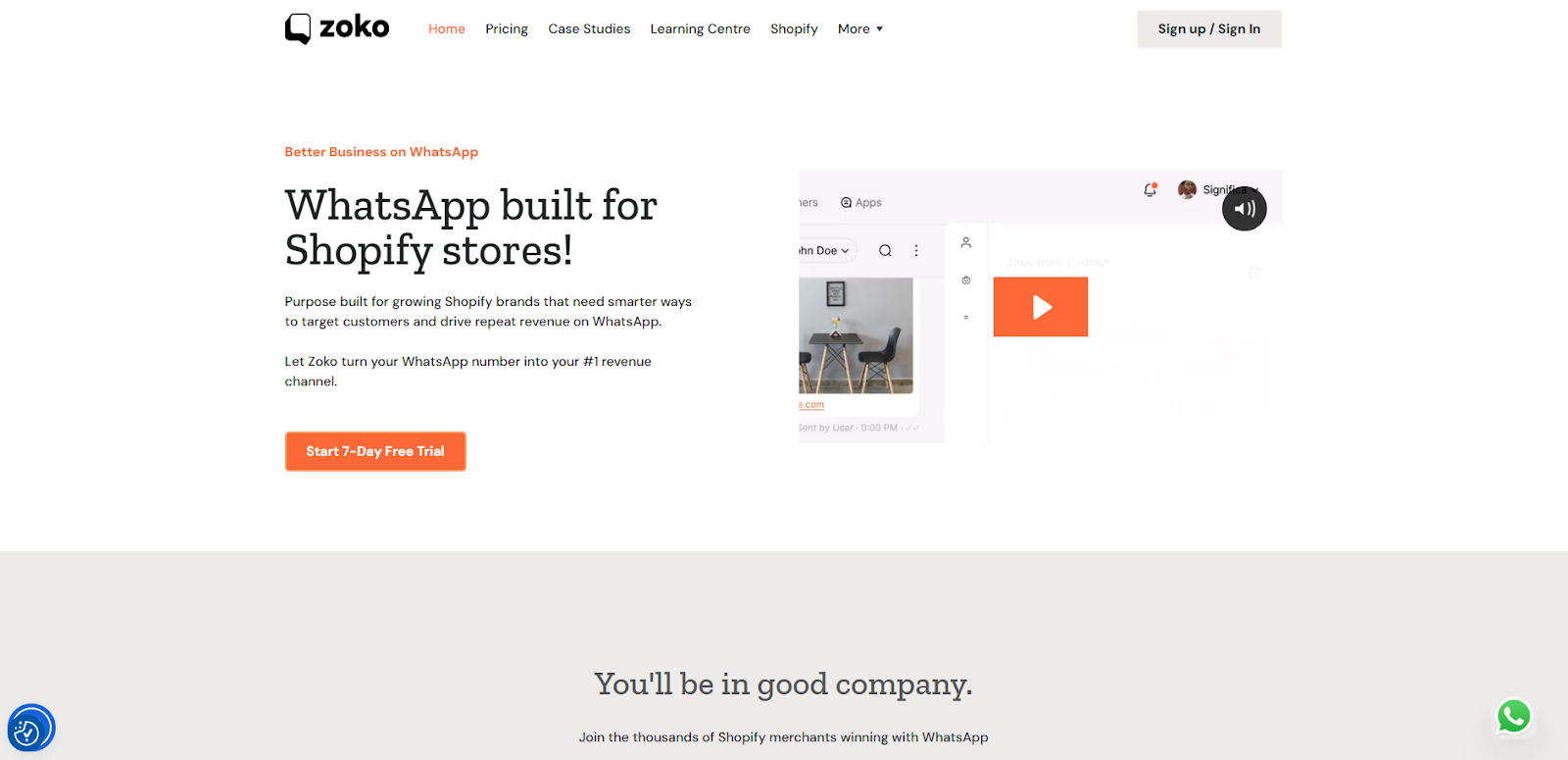
Best for Shopify merchants, D2C brands, and teams that want to sell directly through WhatsApp.
Zoko is designed for businesses that want to run real commerce on WhatsApp. It connects with Shopify, so your products, orders, payments, and customer conversations all stay in one place. The platform supports direct WhatsApp payments, shared inbox, COD flows, and automation that helps small teams handle high volumes.
Key Features
- Syncs your Shopify products, orders, and inventory
- WhatsApp payment links and seamless in-chat checkout
- WhatsApp product catalog and conversational cart
- COD confirmation and Shiprocket workflows to reduce returns
- Shared inbox for sales and support teams
- Automation: abandoned cart, order updates, follow-ups
- AI replies and product suggestions
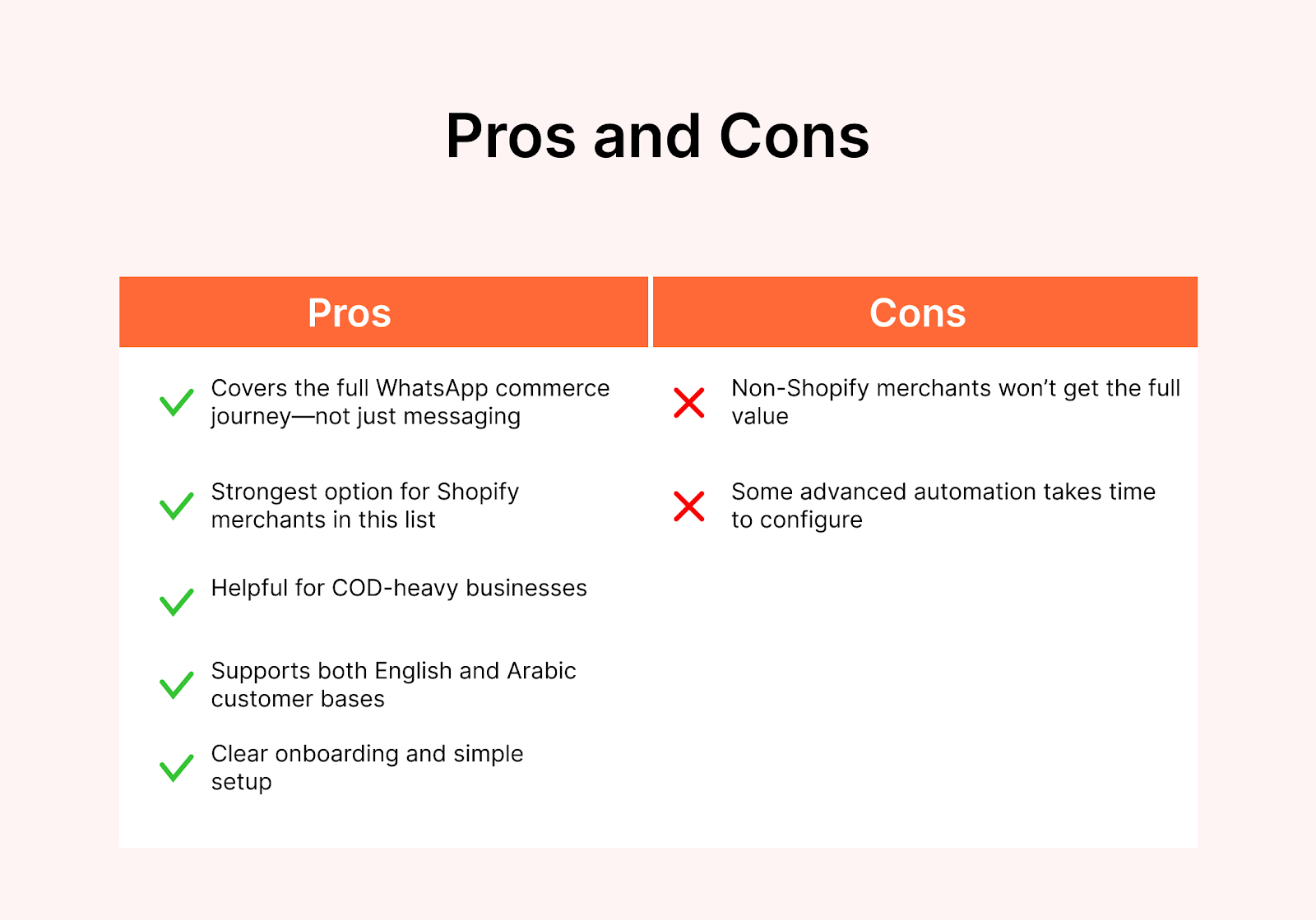
Pros
- Covers the full WhatsApp commerce journey—not just messaging
- Strongest option for Shopify merchants in this list
- Helpful for COD-heavy businesses
- Supports both English and Arabic customer bases
- Clear onboarding and simple setup
Cons
- Non-Shopify merchants won’t get the full value
- Some advanced automation takes time to configure
Zoko offers four plans based on your scale:
- MAX: $404.99/month + $0 per conversation
- ELITE: $114.99/month + $0 per conversation
- PLUS: $64.99/month + $0 per conversation
- STARTER: $39.99/month + $0.015 per conversation
All plans include:
Instagram integration ($9.99/month), WhatsApp rate card fees, fair-use charges, and applicable taxes.
Also Read: ChatGPT in WhatsApp: A Zoko Solution to Streamline E-commerce Workflows
2. DoubleTick
DoubleTick focuses on managing customer conversations and team workflows. It’s useful for businesses that need multiple agents working from a single WhatsApp number and want basic sales tools.
Key Features
- Shared inbox for teams
- Product catalog sharing during chats
- Bulk broadcast messaging
- Chat assignment and tagging
- Analytics on reply times
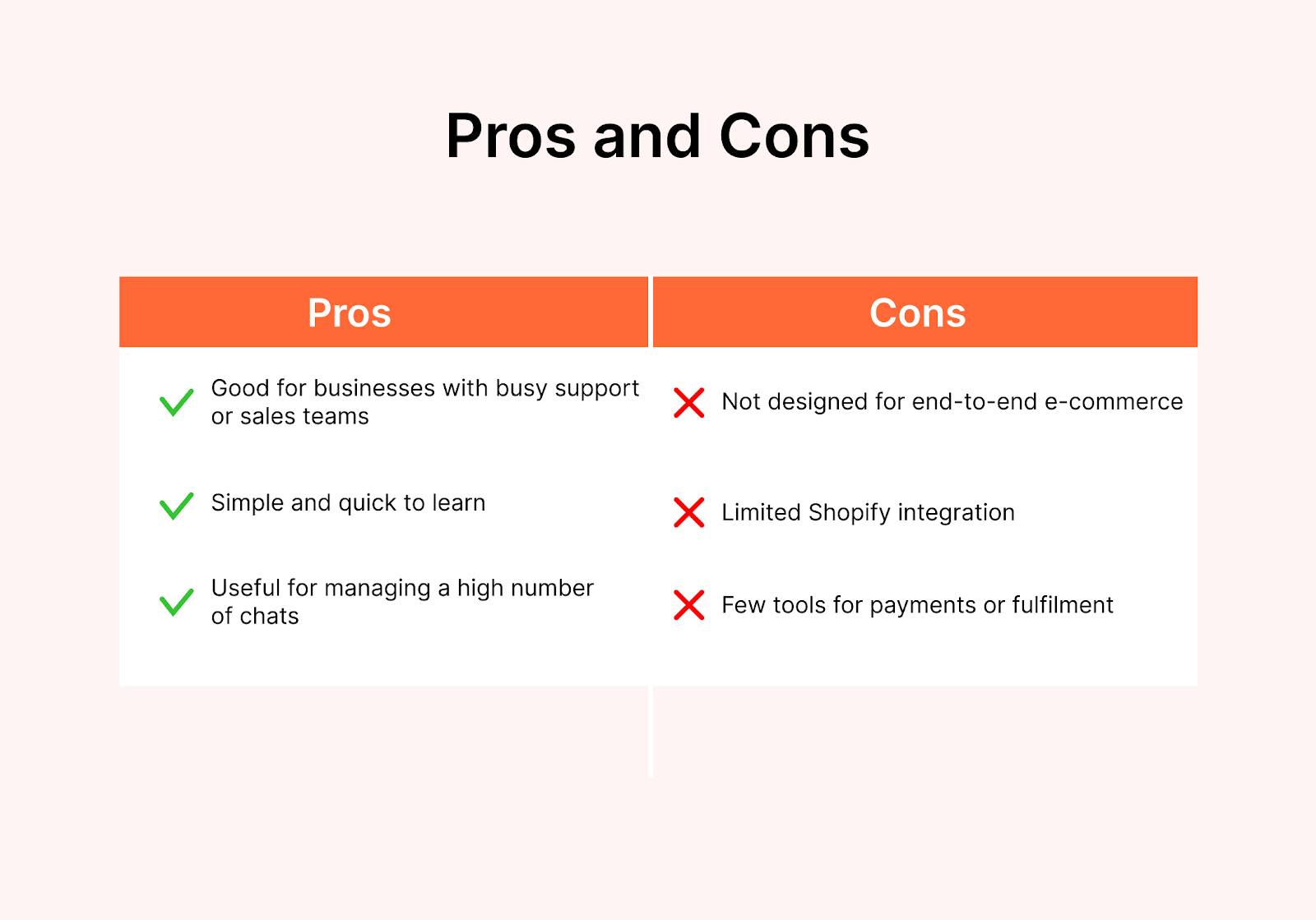
Pros
- Good for businesses with busy support or sales teams
- Simple and quick to learn
- Useful for managing a high number of chats
Cons
- Not designed for end-to-end e-commerce
- Limited Shopify integration
- Few tools for payments or fulfilment
3. WebMaxy
WebMaxy offers WhatsApp API tools focused on customer engagement. It supports catalog sharing, chat automation, and multi-agent management. It suits businesses that want to do more marketing and customer communication on WhatsApp.
Key Features
- WhatsApp catalogue and product sharing
- Automated message flows
- Multi-agent shared inbox
- Broadcast and campaign tools
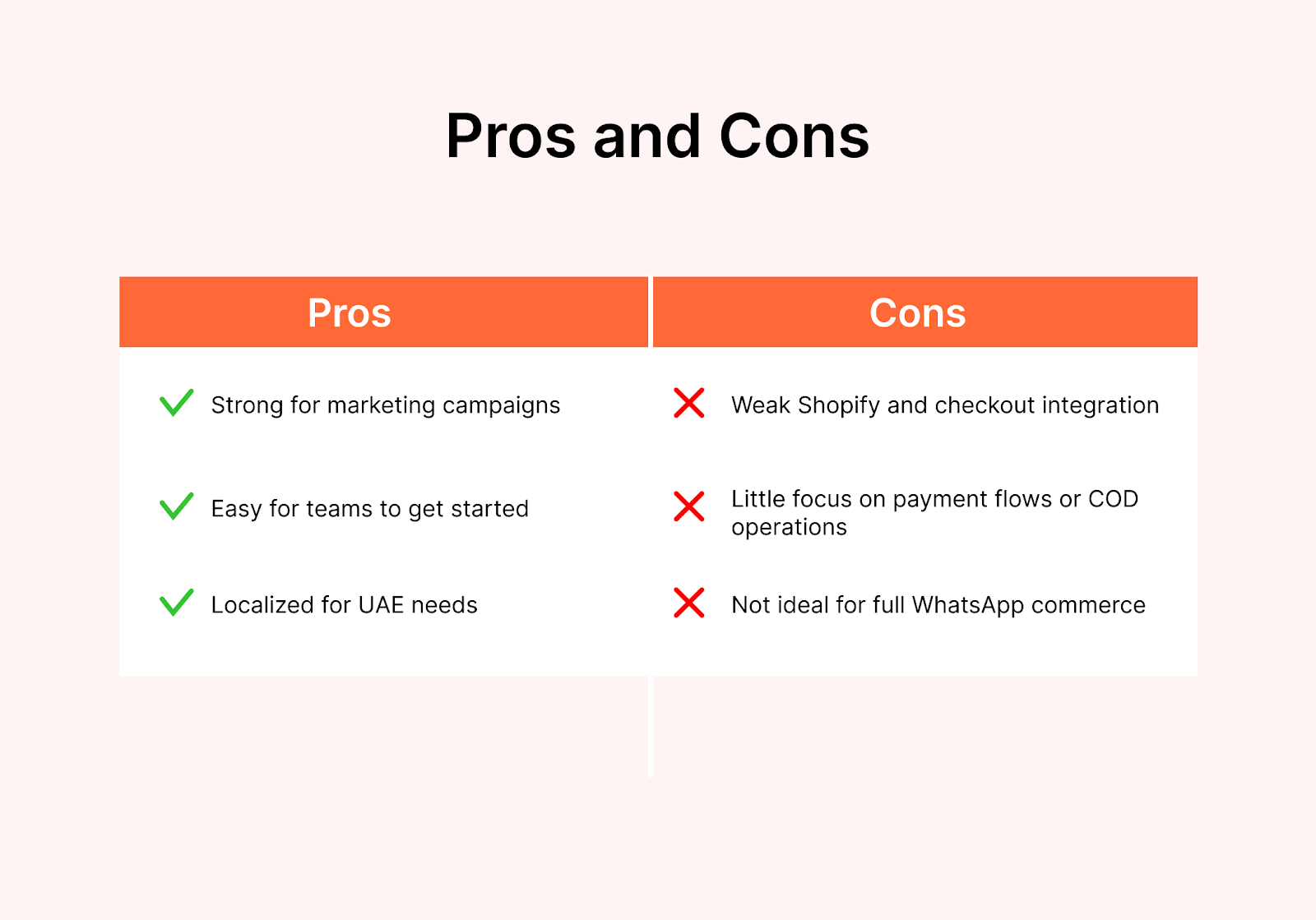
Pros
- Strong for marketing campaigns
- Easy for teams to get started
- Localized for UAE needs
Cons
- Weak Shopify and checkout integration
- Little focus on payment flows or COD operations
- Not ideal for full WhatsApp commerce
4. YCloud
YCloud is a WhatsApp API provider built for flexibility. It offers automation, a shared inbox, and developer-friendly integrations. It’s better suited for companies that want custom workflows or more technical control.
Key Features
- Full WhatsApp API access
- Chatbot builder
- Shared inbox for teams
- Campaign tools for broadcasts
- Third-party integrations including Shopify and CRMs
Pros
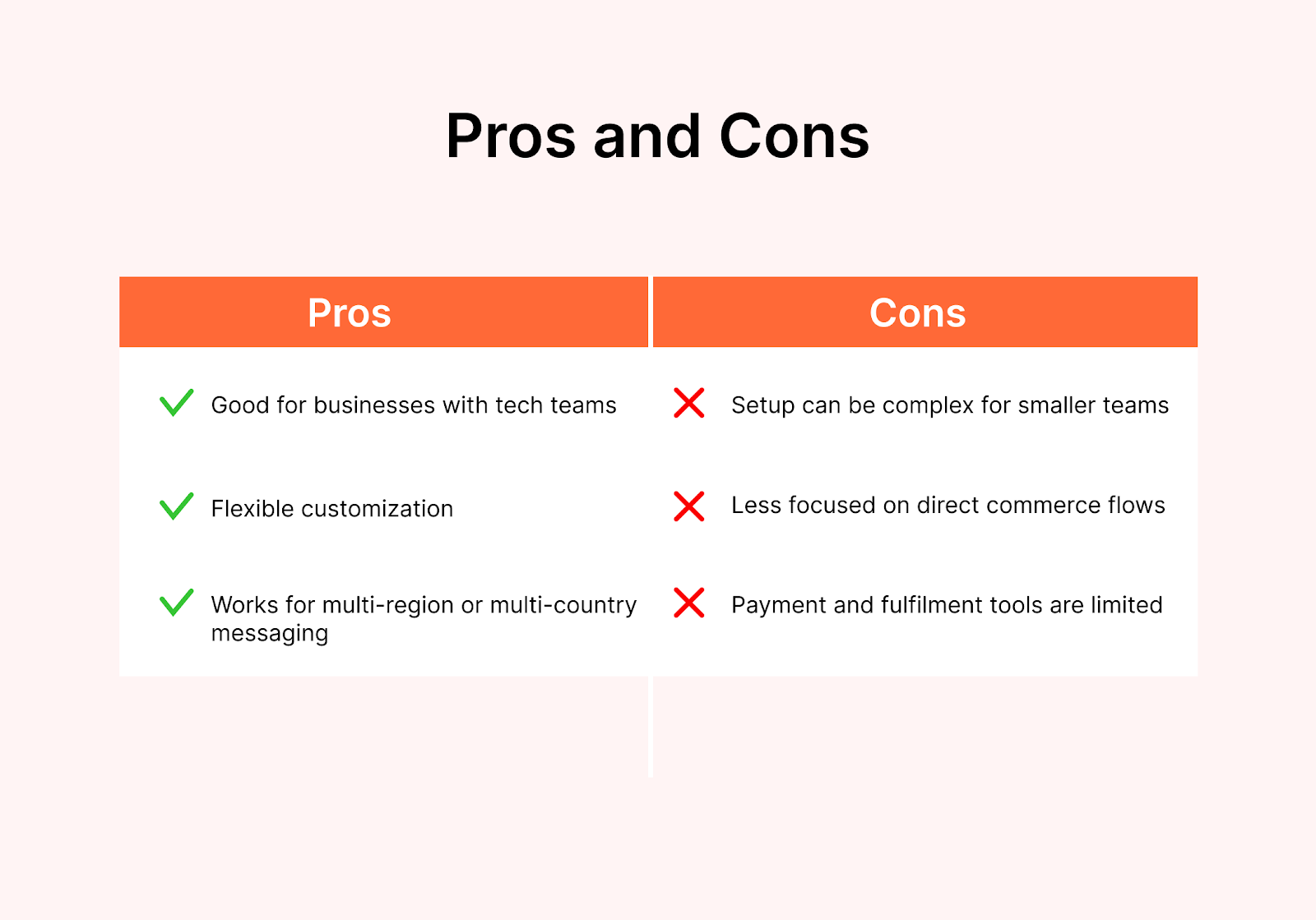
- Good for businesses with tech teams
- Flexible customization
- Works for multi-region or multi-country messaging
Cons
- Setup can be complex for smaller teams
- Less focused on direct commerce flows
- Payment and fulfilment tools are limited
5. Happilee
Happilee is a simple WhatsApp API tool suitable for SMEs in the UAE. It provides basic automation, chatbots, and shared inbox features. It’s mainly for businesses that want to improve customer support, not full WhatsApp commerce.
Key Features
- Easy WhatsApp API onboarding
- Chatbots and reply automation
- Broadcast messaging
- Shared inbox for small teams
Pros
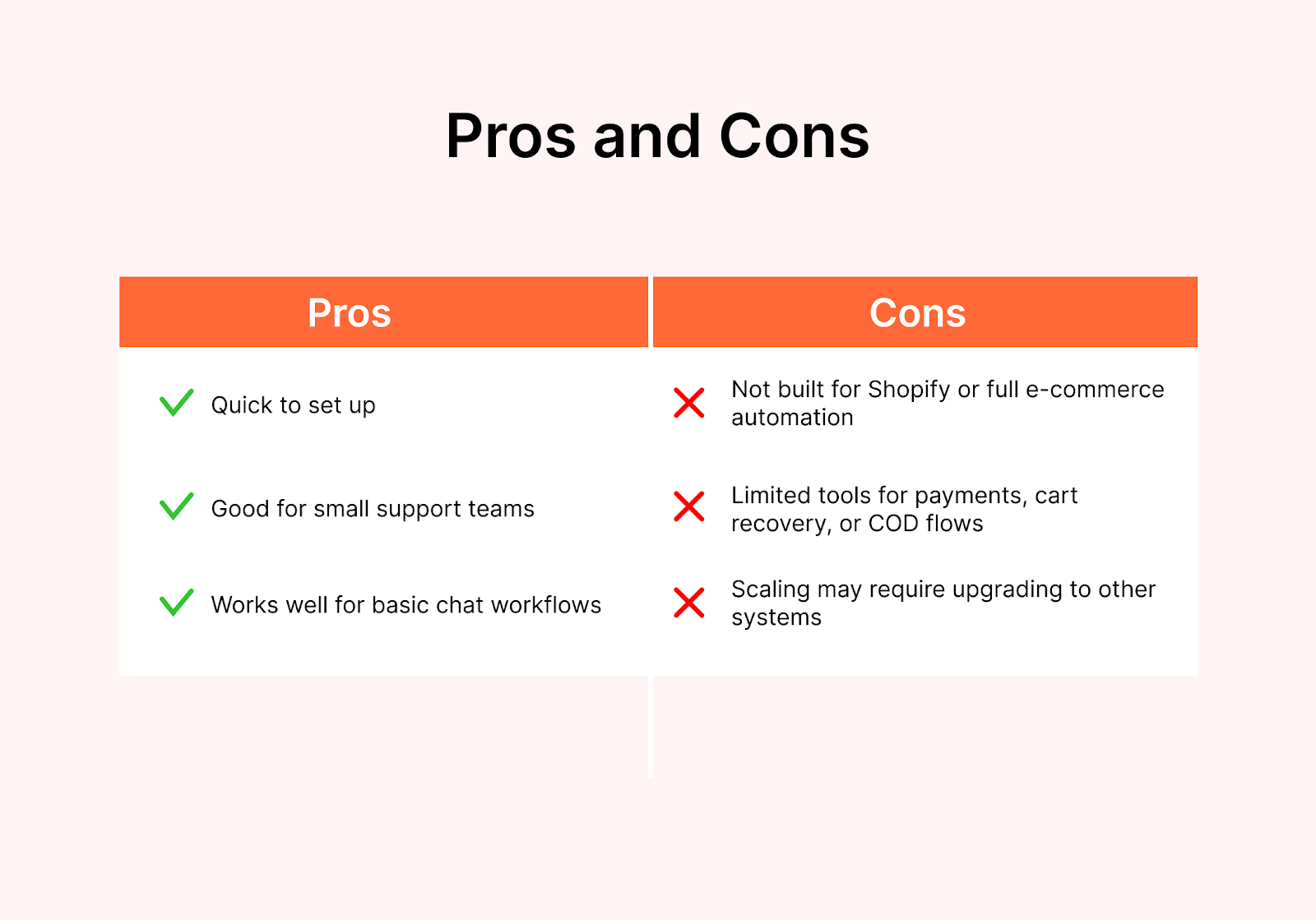
- Quick to set up
- Good for small support teams
- Works well for basic chat workflows
Cons
- Not built for Shopify or full e-commerce automation
- Limited tools for payments, cart recovery, or COD flows
- Scaling may require upgrading to other systems
Comparison Table: Best WhatsApp BSPs in Dubai at a Glance
Choosing the right WhatsApp provider becomes a lot easier when you view them side by side. Here’s a clear breakdown of how each platform performs on features that matter most to Shopify businesses in the UAE.
Once you’ve chosen your provider, the next step is using WhatsApp the right way. Let’s cover the best practices that help UAE merchants get the most out of the channel.
How to Choose the Right WhatsApp BSP for Your Business
Choosing a WhatsApp provider becomes much easier when you look at what your business actually needs day-to-day. Here’s how Shopify merchants and growing e-commerce teams in the UAE can make the right decision.
1. Start With Your Main Goal
The first step is to be clear about what you want WhatsApp to do for your business. Some brands want to drive more sales directly from chat, while others want to reduce abandoned checkouts or manage customer questions faster.
Many Shopify merchants use WhatsApp to confirm COD orders, follow up on payments, or share delivery updates. Once you know your primary goal, it becomes easier to choose a provider that supports that specific workflow instead of adding tools you won’t use.
2. Check Shopify Compatibility
If your store runs on Shopify, proper integration should be a top priority. A good WhatsApp provider should sync your products, create orders directly from chat, update inventory, pull customer data, and trigger fulfilment steps automatically.
Without this sync, your team will waste time copying details manually, and mistakes will happen. A provider with strong Shopify integration will save hours each week and improve accuracy across orders.
3. Consider COD and Delivery Workflows
COD remains popular in the UAE, which often leads to follow-up messages, unconfirmed orders, and higher return rates. The right WhatsApp BSP should help you confirm COD orders automatically, send reminders, and reduce fake or abandoned deliveries.
If delivery coordination is part of your workflow, choose a provider that can automate status updates so customers feel informed without your team sending manual messages all day.
4. Look at Team Size and Daily Volume
Your team structure plays a big role in deciding which platform fits. Smaller teams may only need simple automation and a shared inbox to respond faster. Growing teams often need agent assignment, chat routing, reply-time tracking, and clearer visibility across conversations.
High-volume brands also need reliable broadcast tools and segmentation to reach the right customers without overwhelming their system. Choose a provider that can support today’s workload and scale with your growth.
5. Review the Automation You Actually Need
Automation should reduce your workload, not complicate it. Useful automations include greeting messages, FAQ replies, order updates, abandoned cart reminders, COD confirmations, and payment follow-ups.
These small time-savers make a big difference when you’re handling dozens of chats a day. Pick a provider that offers the automations you truly need, rather than one that overloads you with features you won’t use.
6. Make Sure Pricing Is Clear
Transparent pricing is important because WhatsApp API costs can get confusing. Some platforms charge extra for additional users, premium features, or higher message volumes. Look for a provider with clear pricing, no hidden fees, and predictable billing. This helps you plan better and avoid surprise charges at the end of the month.
7. Test Before You Commit
Before choosing a provider, run a short trial or a one-week pilot. See how easy it is for your team to use the platform, how customers respond, and whether orders and payments flow smoothly.
Check if automation saves time and whether support is responsive when you need help. A quick test will show you which provider fits your daily operations best.
Also Read: Trying to Find Best WhatsApp Business API Provider? This Guide will Help you Choose your Provider
Best Practices to Get the Most Out of WhatsApp Commerce in the UAE
Using WhatsApp can boost sales, reduce support load, and speed up COD processing — but only when it’s set up the right way. Here are practical tips that help UAE businesses get the most value from WhatsApp commerce.
1. Set Up Clear and Helpful Automated Messages
Automation saves hours of manual work each week. Set up automatic greetings for new customers, quick replies for common questions, and order updates that go out without human involvement. These simple automations reduce wait times and cut repetitive tasks.
This works best when your WhatsApp system is connected to your Shopify-WhatsApp integration so messages reflect the real order status.
2. Use WhatsApp for COD Confirmation and RTO Reduction
Since COD is still popular in the UAE, confirming orders before shipping is important. Use WhatsApp to send a quick confirmation message, remind customers about delivery, and reduce returns-to-origin.
A dedicated WhatsApp COD workflow can stop fake orders early and protect your margin, especially for Shopify stores with frequent cash orders.
3. Send Broadcasts That Add Real Value
Broadcasts are powerful when they’re used to share helpful updates: restocks, launches, and time-sensitive offers. They work especially well when paired with WhatsApp commerce automation, which helps you send the right message to the right group without manual effort.
4. Improve Your Response Time
WhatsApp is a fast channel, and customers expect quick replies. A unified WhatsApp shared inbox helps teams stay organized, assign conversations properly, and respond faster during busy periods. For many merchants, improving response time alone has a major impact on conversions.
5. Use WhatsApp for Post-Purchase Care
After the sale, WhatsApp is ideal for tracking updates, return requests, and quick support messages. When connected to your WhatsApp order tracking setup, customers get updates instantly, and your support team avoids digging through multiple systems. This keeps the post-purchase experience smooth and increases repeat purchases.
6. Track the Metrics That Matter
Keep an eye on a few key numbers to understand how well your WhatsApp channel is performing: conversion rate from chats, payment link completion rate, response times, COD confirmation rate, RTO rate, and repeat purchases.
If you’re using a platform with good WhatsApp analytics, these metrics are easy to monitor and improve over time.
Conclusion
WhatsApp has become the most reliable way for UAE shoppers to reach a business, ask questions, and complete purchases. But the real difference comes from choosing a WhatsApp Business Solution Provider that fits how your team works, especially if you run a Shopify store with COD orders, frequent customer questions, and daily sales conversations.
Among the top providers in Dubai, each offers something useful. But if your goal is to manage products, payments, COD workflows, and customer conversations in one place, Zoko is the most complete option for commerce-focused brands. It helps you handle the entire flow, from discovery to payment to fulfilment, without switching between tools.
If you want WhatsApp to become a real revenue channel, not just a chat app, Zoko makes the process simple.
Ready to see how WhatsApp can drive more sales for your Shopify store? Book a 7-day free trial with Zoko today!
FAQs
1. Do I need the WhatsApp Business API if I already use the WhatsApp Business app?
Yes. The regular app is built for small businesses using a single phone. The API is needed when you want multiple agents, automation, Shopify sync, payment links, COD workflows, and large-scale messaging.
2. Is Zoko available for businesses in Dubai and the UAE?
Yes. Zoko fully supports UAE businesses, including Shopify merchants, COD-heavy stores, and brands selling to both Arabic and English-speaking customers.
3. Can I manage COD orders and reduce returns through WhatsApp?
Absolutely. With the right provider, you can confirm COD orders automatically, send reminders, and cut down RTO losses. Tools like Zoko offer built-in COD workflows suited for UAE logistics.
4. How long does it take to set up WhatsApp API for my Shopify store?
Most merchants can get started within a day once their WhatsApp number is approved. Platforms like Zoko streamline onboarding, product sync, and automations so you can start selling quickly.
5. Which WhatsApp solution provider is best for Shopify stores?
For Shopify merchants who want product sync, payment links, abandoned cart recovery, and COD workflows in one place, Zoko is the strongest option. Other platforms work well for messaging, but Zoko is designed for end-to-end WhatsApp commerce.
Interested to know more?
.svg)
Case Studies




















Featured Posts


Continue reading

The E-Commerce Divide: How the Top 10% of Brands Use AI to Grow 5X Faster (And Why It’s Not for Everyone)
Drive Sales with WhatsApp Catalog Integration: Here's How