







Most Shopify stores don’t lose customers because of pricing or product quality. They lose them in the gaps between steps: when shoppers pause, hesitate, or drop off before checkout. Globally, average e-commerce conversion rates remain around 2.5% to 3%, meaning only a small fraction of visitors complete a purchase, and many never reach the final stage of the buying process.
Mapping your Shopify customer journey helps you see those moments clearly. It shows how shoppers move from discovery to checkout, where hesitation creeps in, and what stops them from completing a purchase. When you understand that path, you can remove friction at the right points and unlock better engagement and growth.
Key Takeaways
- A Shopify customer journey maps the real path shoppers take from discovery to post-purchase, including browsing, checkout decisions, order updates, and support interactions, not just on-site clicks.
- Most Shopify stores can map their customer journey across five stages: awareness, consideration, purchase, retention, and advocacy, with different risks and expectations at each stage.
- Effective journey mapping starts by focusing on one journey at a time, such as a first-time buyer, COD buyer, or repeat buyer, to avoid cluttered maps and unclear insights.
- Tracking stage-specific signals, as product page exits during consideration or order-status queries after purchase, helps identify friction more accurately than broad store-wide metrics.
What does “Shopify Customer Journey” Means?
The Shopify customer journey is the actual path a shopper takes from first contact to post-purchase. It includes every step, pause, question, and decision that happens before and after checkout.
This journey rarely moves in a straight line. A shopper may land on a product page, leave to compare options, return through a message link, ask a question, and only then decide to buy. Mapping the Shopify customer journey helps you see the actual sequence rather than assuming how customers should behave.
For Shopify merchants, the journey is shaped by:
- Product discovery pages
- Product details and reviews
- Pricing, shipping, and return clarity
- Checkout and payment choices
- Order updates and support after purchase
Once the Shopify customer journey is clear, the next step is breaking it down into the key stages shoppers move through as they decide, buy, and return.
You can also support your Shopify customer journey through WhatsApp using Zoko, which connects product conversations, order updates, and customer support directly with your Shopify store. Book a demo to see how Zoko fits into your customer journey.
The 5 Stages You’ll Map for a Shopify Store
Most Shopify customer journeys can be understood through five clear stages. These stages reflect how shoppers move, pause, and decide across an online store. Not every shopper follows them in order, but each stage reveals different needs and risks.
Mapping these stages helps you focus on what matters at each stage, rather than treating every visitor the same way.
1. Awareness
This is where shoppers first discover your store or product. At this stage, people are not ready to buy. They are scanning, comparing, and deciding if your store feels relevant and trustworthy.
Common actions include:
- Landing on a product or category page
- Coming from ads, search, social media, or referrals
- Browsing without interacting much
Common drop-off reasons:
- Unclear product value
- Weak visuals or descriptions
- No immediate trust signals
Your goal here is clarity, not persuasion.
2. Consideration
In the consideration stage, shoppers are interested but cautious. They start asking questions, checking details, and comparing options before committing.
Common actions include:
- Reading reviews and FAQs
- Checking delivery timelines and return policies
- Asking questions through chat or WhatsApp
- Adding products to the cart but not checking out
Common drop-off reasons:
- Missing or unclear information
- Doubts about delivery, returns, or payment safety
- Slow or unavailable responses to questions
This stage is where hesitation usually begins.
3. Purchase
This is the moment of decision. Shoppers move to checkout and choose how they want to pay. Minor issues here can undo all earlier efforts.
Common actions include:
- Entering address and contact details
- Selecting payment methods, including COD
- Completing or abandoning checkout
Common drop-off reasons:
- Unexpected costs
- Payment failures
- Lack of reassurance during checkout
- Unclear COD confirmation steps
The purchase stage needs speed, simplicity, and reassurance.
4. Retention
The journey does not end after checkout. Once an order is placed, shoppers want confirmation, updates, and easy access to support.
Common actions include:
- Checking order status
- Asking delivery-related questions
- Contacting support for changes or issues
- Deciding if they would buy again
Common drop-off reasons:
- Poor communication after purchase
- Confusing tracking updates
- Slow responses to support queries
A smooth retention stage builds confidence for future purchases.
5. Loyalty
In this stage, satisfied customers become promoters. They share feedback, recommend your store, or return for repeat purchases.
Common actions include:
- Leaving reviews
- Referring friends or family
- Sharing products on social media
- Buying again
Common missed opportunities:
- No review reminders
- No follow-up after delivery
- No apparent reason to return
Advocacy grows naturally when earlier stages are handled well.
Also Read: The Power of Personalization: Elevate Your WhatsApp Marketing with Segmentation Strategies
Step-by-step process to map your Shopify customer journey
Creating a customer journey map for your Shopify store is about more than just tracking clicks or sales. It’s about understanding how shoppers move from discovery to purchase, and where they need more clarity or reassurance along the way. Here’s how you can do it:
Step 1: Develop hypotheses about your customer’s journey
Before diving into data, start by identifying potential friction points. What aspects of the customer journey could be causing hesitation or drop-offs? For example, you might think that first-time buyers need clearer product details or that shoppers abandon their carts due to complicated shipping options. These initial insights will help focus your data collection and determine which metrics to prioritize.
Step 2: Gather the data you need
Once you have your hypotheses in place, it’s time to gather both quantitative and qualitative data. Look at your Shopify reports and analytics to understand shopping behaviour: which products attract the most views, where shoppers are dropping off, and where they seem to hesitate.
Qualitative data also plays a role: customer support transcripts, feedback from WhatsApp chats, and even social media comments can reveal concerns, questions, or pain points that aren’t obvious in the numbers alone.
Step 3: Create customer personas
Next, use the data to create a customer persona. This is a representation of your ideal customer, based on the actual data you've gathered. For example, you might create a persona for a first-time buyer looking for a gift or a COD shopper who needs reassurance before placing an order. By understanding their goals, behaviours, and motivations, you can map out their journey more effectively.
Step 4: Map out the stages of the journey
Once you have a clear hypothesis, relevant data, and a defined customer persona, it’s time to bring everything together. This is where a customer journey map becomes useful.
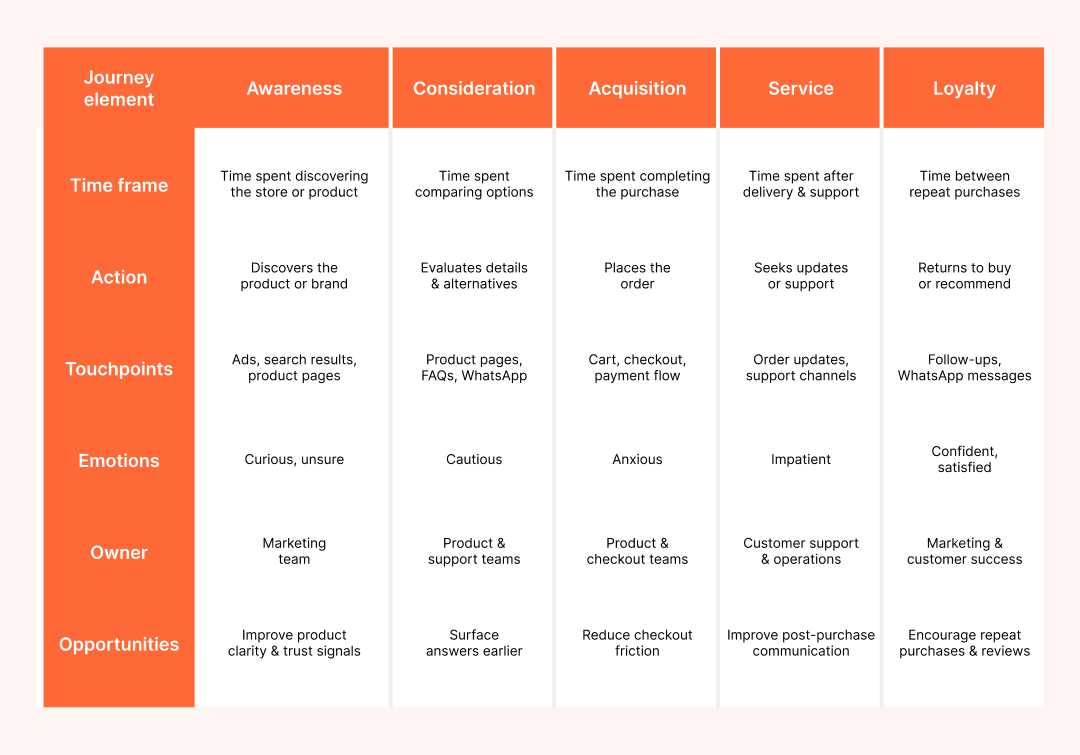
Customer journey map templates help you organise how a shopper moves through your store and what they experience at each point. Instead of guessing, you map the journey from the customer’s point of view.
For a Shopify store, the journey usually follows five stages: awareness, consideration, purchase, post-purchase, and re-purchase.
For each stage, fill in the details of how your customer moves forward:
- How long they typically spend in that stage
- What action they take, such as browsing products or completing checkout
- Where the interaction happens, like product pages, checkout, or WhatsApp
- How they feel at that moment, based on feedback or past conversations
- Who owns that part of the experience
- Where there is an opportunity to reduce friction or improve clarity
When these elements are laid out together, patterns become easier to spot, especially where shoppers hesitate or drop off.
Step 5: Update regularly
The customer journey map is not static. Review and update it regularly to reflect changes in customer behaviour or new tools you introduce, like WhatsApp for order updates or customer support. Regular updates help you stay aligned with your customers’ evolving expectations.
This step-by-step process ensures you don’t just map the customer journey, but use it to actively improve your Shopify store and customer experience.
Also Read: Comprehensive Guide to WhatsApp AI Analytics Dashboard
Also read: WhatsApp Frictionless Commerce: Build a Faster Customer Experience From Click to Order
A Shopify Customer Journey Map Template
Once you understand the stages, actions, and friction points, the next step is putting everything into a format you can actually use. A customer journey map works best when it is easy to review, update, and share across teams.
For most Shopify stores, a simple table is enough. It keeps the journey clear without turning it into a complex exercise. You can build this in a spreadsheet or a document and update it as shopper behaviour changes.
Below is a basic Shopify customer journey map template you can copy and adapt.
Once the customer journey is mapped clearly, the next step is understanding how those insights translate into real customer interactions across key touchpoints.
Also Read: How to Create a WhatsApp Broadcast List That Truly Works
How Zoko supports the Shopify customer journey
Once the Shopify customer journey is mapped, the next step is acting on the points where shoppers pause or reach out. Zoko supports these moments by connecting Shopify data with WhatsApp conversations, keeping communication timely and relevant.
- Shopify and WhatsApp connection: Connects Shopify data with WhatsApp conversations so communication stays timely and relevant.
- Shared inbox for pre-purchase questions: Helps merchants manage customer queries during discovery and consideration from a shared WhatsApp inbox.
- Order confirmations and checkout updates: Supports WhatsApp order confirmations and checkout-related updates, especially useful for COD orders.
- Post-purchase order communication: Enables order status and delivery-related communication on WhatsApp using Shopify information.
- COD and logistics updates with Shiprocket: Supports COD confirmations and delivery updates for stores using Shiprocket.
Zoko fits into the Shopify customer journey by supporting the moments where customers seek clarity, reassurance, or updates. It helps merchants use WhatsApp in a structured way without adding operational complexity.
The real value comes from acting on those insights. Clear product information, smoother checkouts, and timely communication reduce friction across the journey. Tools that connect Shopify data with customer conversations, like Zoko, make it easier to support shoppers at the moments that matter most.
Sign up for Zoko to manage Shopify customer conversations on WhatsApp.
FAQs
1. What is a Shopify customer journey?
A Shopify customer journey is the path a shopper follows from discovering your store to completing a purchase and interacting after delivery. It includes browsing, checkout, support, and post-purchase communication.
2. Why is mapping the Shopify customer journey important?
Mapping the Shopify customer journey helps you identify where shoppers hesitate, drop off, or seek clarity. This makes it easier to fix gaps that slow decisions or cause abandonment.
3. How many stages are there in a Shopify customer journey?
Most Shopify customer journeys can be mapped across five stages: awareness, consideration, purchase, retention, and advocacy. Not every shopper follows them in order, but each stage reveals different needs.
4. What data do I need to map a Shopify customer journey?
You can start with data you already have, such as Shopify reports, GA4 paths, top landing and exit pages, on-site search terms, and common support questions.
5. How does WhatsApp fit into the Shopify customer journey?
WhatsApp fits into the journey at key moments where shoppers ask questions, confirm orders, or track deliveries. Tools like Zoko help connect these conversations directly with Shopify data.
Interested to know more?
.svg)
Case Studies




















Featured Posts


Continue reading

The E-Commerce Divide: How the Top 10% of Brands Use AI to Grow 5X Faster (And Why It’s Not for Everyone)
Drive Sales with WhatsApp Catalog Integration: Here's How